
springboot中pageHelper插件 list设置不进去 为null
分页pageHelper中list放不进去值 为null,可能的解决方案如下:
1.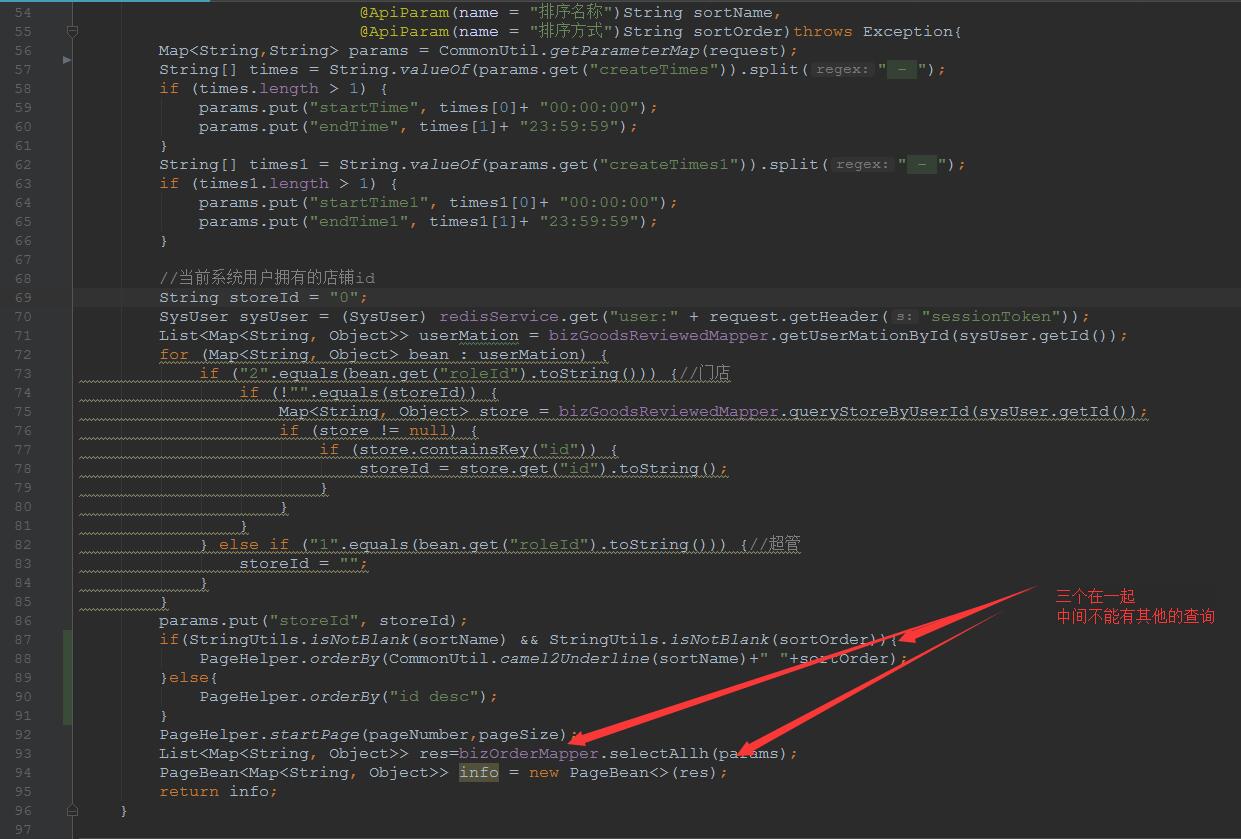
注意代码顺序,PageHelper.startPage(pageNumber,pageSize)要放在查询List的前面
代码如下:
PageHelper.startPage(pageNumber,pageSize);
List<User> list=userMapper.selectAll(map);
2.PageBean的泛型不加
比如:PageBean info=new PageBean(list);
@RequestMapping(value = "/getList7",method = RequestMethod.GET)
@ResponseBody
public PageBean getList7(@ApiParam(name ="pageNumber",value = "页码",defaultValue = "1",required = true)int pageNumber,
                       @ApiParam(name ="pageSize",value = "条数",defaultValue = "10",required = true)int pageSize,
                       @ApiParam(name ="sortName",value = "排序名称")String sortName,
                       @ApiParam(name ="sortOrder",value = "排序方式")String sortOrder,
                       HttpServletRequest request) {
    Map map=request.getParameterMap();
    if(StringUtils.isNotBlank(sortName) && StringUtils.isNotBlank(sortOrder)){
        PageHelper.orderBy(CommonUtil.camel2Underline(sortName)+" "+sortOrder);
    }else{
        PageHelper.orderBy("id desc");
    }
    PageHelper.startPage(pageNumber,pageSize);
    List<User> list=userMapper.selectAll(map);
    PageBean info=new PageBean(list);
    return info;
3.pageInfo中的值再设置一遍,往pageBean中强制设置值
PageHelper.startPage(pageNumber,pageSize);
List<User> list=userMapper.selectAll(param);
PageBean<User> info = new PageBean<>(list);
info.setTotal(new PageInfo(list).getTotal());
info.setPageNumber(pageNumber);
info.setPageSize(pageSize);
info.setRows(list);
info.setPages(new PageInfo(list).getPages());
info.setSize(new PageInfo(list).getSize());
return info;

4.注意分页中不能有多个mapper查询List 会以第一个查询分页
springboot中pageHelper插件 list设置不进去 为null的更多相关文章
- SpringBoot Mybatis PageHelper插件报错
SpringBoot2.0.0 MyBatis1.3.2 PageHelper1.1.2插件,但是在启动运行时,抛错:org.springframework.beans.factory.BeanCre ...
- springboot集成pagehelper插件
1.在pom.xml中引入依赖 <dependency> <groupId>com.github.pagehelper</groupId> <artifact ...
- IDEA 中javadoc插件不能设置的问题
解决方案 1.手动下载插件 https://github.com/ranzou06/intellij-javadocs/blob/master/intellij-javadocs.zip?raw=tr ...
- VS Code中Matlab插件安装设置
Install the extension in VS Code Open the command palette using Ctrl+Shift+P Type ext install Matlab ...
- springboot结合mybatis使用pageHelper插件进行分页查询
1.pom相关依赖引入 <dependencies> <dependency> <groupId>org.springframework.boot</grou ...
- SpringBoot集成PageHelper时出现“在系统中发现了多个分页插件,请检查系统配置!”
近日在项目中使用SpringBoot集成PageHelper后,跑单元测试时出现了"在系统中发现了多个分页插件,请检查系统配置!"这个问题. 如下图所示: org.mybatis. ...
- SpringBoot中Mybaties PageHelper插件使用
首先引入pom.xml文件配置 <!-- mybatis --> <dependency> <groupId>org.mybatis.spring.boot&l ...
- springboot中的mybatis是如果使用pagehelper的
springboot中使用其他组件都是基于自动配置的AutoConfiguration配置累的,pagehelper插件也是一样的,通过PageHelperAutoConfiguration的,这个类 ...
- Mybatis中使用PageHelper插件进行分页
分页的场景比较常见,下面主要介绍一下使用PageHelper插件进行分页操作: 一.概述: PageHelper支持对mybatis进行分页操作,项目在github地址: https://github ...
随机推荐
- hexo next主题深度优化(三),引入require.js,适配pjax。
文章目录 require.js的好处, hexo next中加入require.js 新建一个main.js作为所有js的入口 pjax的require.js实现 关于require js适配过程中报 ...
- CVE-2017-3248简单复现
我是这样操作的 目标跟windows在一个段,linux是另一个段的,我的虚拟机 windows主机上 `java -cp ysoserial.jar ysoserial.exploit.JRMPLi ...
- !!!myeclipse 上加载本地图片问题,无法加载问题
出现无法加载本地图片的问题, 原因就是把图片放到了本地项目中的image了,但是myeclipse上没有刷新 这样以后 本地的图片比在线的要快 低级错误,诶!
- springboot整合thymeleaf手动渲染
Thymeleaf手动渲染 为提高页面访问速度,可缓存html页面,客户端请求从缓存获取,获取不到再手动渲染 在spring4下 @Autowired ThymeleafViewResolver th ...
- Apache Spark 2.2.0 中文文档 - Spark SQL, DataFrames and Datasets
Spark SQL, DataFrames and Datasets Guide Overview SQL Datasets and DataFrames 开始入门 起始点: SparkSession ...
- UVALive7461 - Separating Pebbles 判断两个凸包相交
//UVALive7461 - Separating Pebbles 判断两个凸包相交 #include <bits/stdc++.h> using namespace std; #def ...
- ubuntu切换到root用户
我们都知道使用su root命令,去切换到root权限,此时会提示输入密码,可是怎么也输不对,提示"Authentication failure", 解决办法如下 su root ...
- Dom关于位置和尺寸的api
parentNode 直接父级//和offsetParent不同 inner2.parentNode <!DOCTYPE html> <html id="html&q ...
- 9.spark Core 进阶2--Cashe
RDD Persistence One of the most important capabilities in Spark is persisting (or caching) a d ...
- File转换为MultipartFile工具类
package cn.com.utils; import org.apache.commons.fileupload.FileItem; import org.apache.commons.fileu ...