
ElasticSearch6.3.2------查询
进入Kibana的控制台:http://localhost:5601/app/kibana#/dev_tools/
先放一些测试数据进去,不想一条一条,就用bulk
注意格式
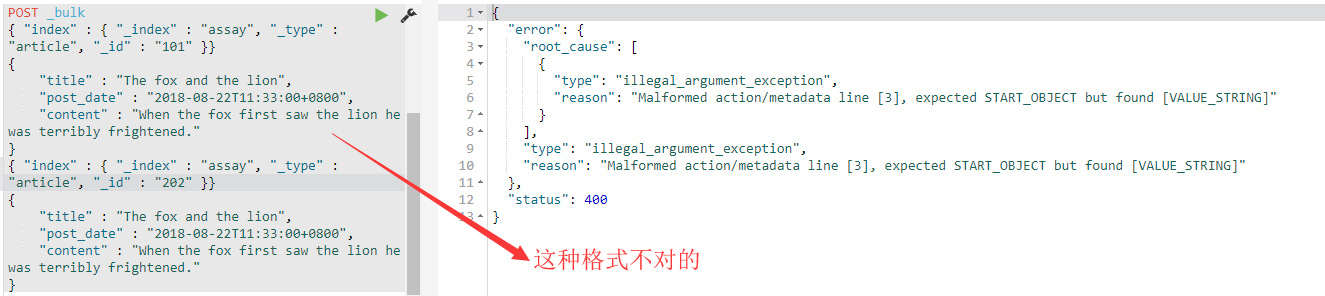
正确格式:

解释:ES期望的格式是:一行action(index, create, delete and update),一行source(也就是具体数据),这期间不能有多余的换行符,也就是说不要为了美观而把JSON格式化。
所以我插入的批量数据:执行即可
POST _bulk

{ "index" : { "_index" : "assay", "_type" : "article", "_id" : "1" }}

{"title" : "The fox and the lion 狐狸与狮子","post_date" : "2018-08-22T11:33:00+0800","content" : "When the fox first saw the lion he was terribly frightened. He ran away, and hid himself in the woods. The second time, however, he came near the lion. He stopped at a safe distance, and watched him pass by. The third time they came near one another.The fox went straight up to the lion, and stayed the whole day with him. He asked the lion how his family was, and when they would meet again."}

{ "index" : { "_index" : "assay", "_type" : "article", "_id" : "2" }}

{"title" : "A Child's Dream of a Star","post_date" : "2018-08-22T11:34:00+0800","content" : "There was once a child, and he strolled about a good deal, and thought of a number of things. He had a sister, who was a child too, and his constant companion. These two used to wonder all day long. They wondered at the beauty of the flowers; they wondered at the height and blueness of the sky; they wondered at the depth of the bright water; they wondered at the goodness and the power of God who made the lovely world."}

{ "index" : { "_index" : "assay", "_type" : "article", "_id" : "3" }}

{"title" : "The goose with the golden eggs","post_date" : "2018-08-22T11:35:00+0800","content" : "One morning a countryman went to his goose's nest, and saw a yellow and glittering1 egg there.He took the egg home. To his delight, he found that it was an egg of pure gold.Every morning the same thing occurred, and he soon became rich by selling his eggs. The countryman became more and more greedy. He wanted to get all the gold at once, so he killed the goose, when he looked inside, he found nothing in its body."}

{ "index" : { "_index" : "assay", "_type" : "article", "_id" : "4" }}

{"title" : "The Man Selling the Idol","post_date" : "2018-08-22T11:36:00+0800","content" : "A man carves an idol1 and takes it to the fair. No one buys it, so he begins to shout in order to canvass2 the customer. He says that this idol can bring in wealth and good luck. One man says to the seller, ‘Hello, My friend, if this is so, you should have the advantages that the idol can bring, why do you want to sell it? The seller says’, ‘What I want is that I can get cash in at once. The profit from the idol is so slow.’"}

{ "index" : { "_index" : "assay", "_type" : "article", "_id" : "5" }}

{"title" : "The Neighbour and the Snake","post_date" : "2018-08-23T11:33:00+0800","content" : "A snake, having made his hole close to the door of a cottage, inflicted1 a sever2 bite on the cottager's little son. So the child died.This caused much sorrow to his parents. The father decided3 to kill the snake. The next day, on its coming out of its hole for food, he took up his ax, but, making too much haste to hit the snake, missed its head, and cut off only the end of its tail.After some time the cottager, lest the snake should also bite him, tried to make peace, and placed some bread and salt beside its hole, the snake, slightly hissing4, said, ‘From now on there can be no peace between us; for whenever I see you I shall remember the loss of my tail, and whenever you see me you will be thinking of the death of your son.’"}

{ "index" : { "_index" : "assay", "_type" : "article", "_id" : "6" }}

{"title" : "The ass and a lap-dog","post_date" : "2018-08-24T11:33:00+0800","content" : "A man had an ass1 and lovely lap-dog.The ass was left in a stable, and had plenty of oats and day to eat, just as any other ass would. The lap-dog knew many tricks, and was a great favourite with his master.The master seldom went out to dine or to super without bringing him something nice to eat when he jumped about him in a pleasant manner. The ass, on the contrary, had much work to do, in grinding the corn-mill and in carrying wood from the forest or burdens from the farm,. He often co plained about his own hard fate, and contrasted it with the luxury and idleness of the lap-dog. At last one day he broke the chain and ran into his master's house, kicking up his heels without measuring and jumping as well as he could, he next tried to jump about his master as he had seen the lap-dog do, but he broke the table, and smashed all the dishes on it to pieces. He then tried to lick his master, and jumped upon his back."}
执行结果
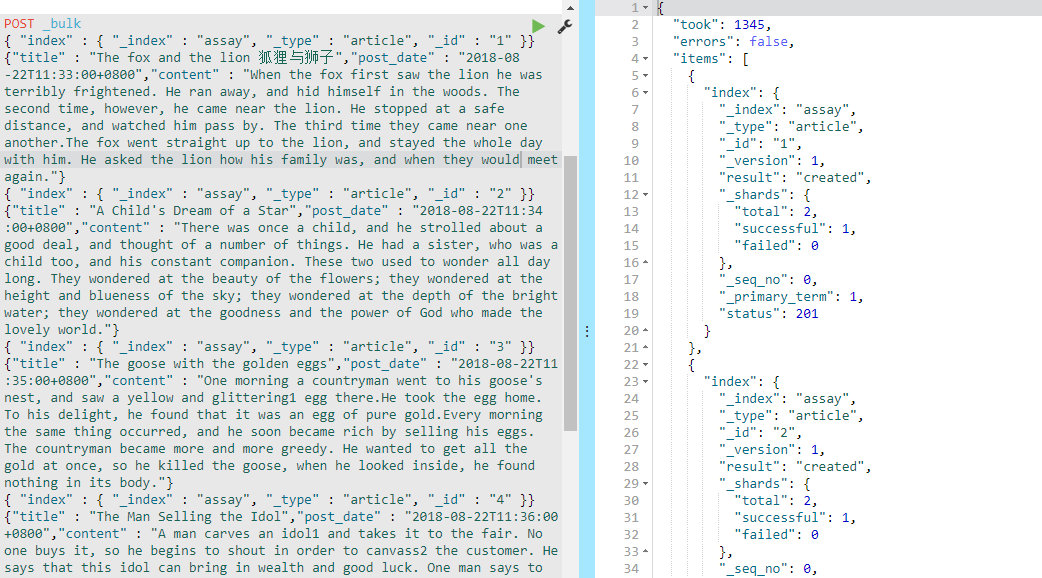
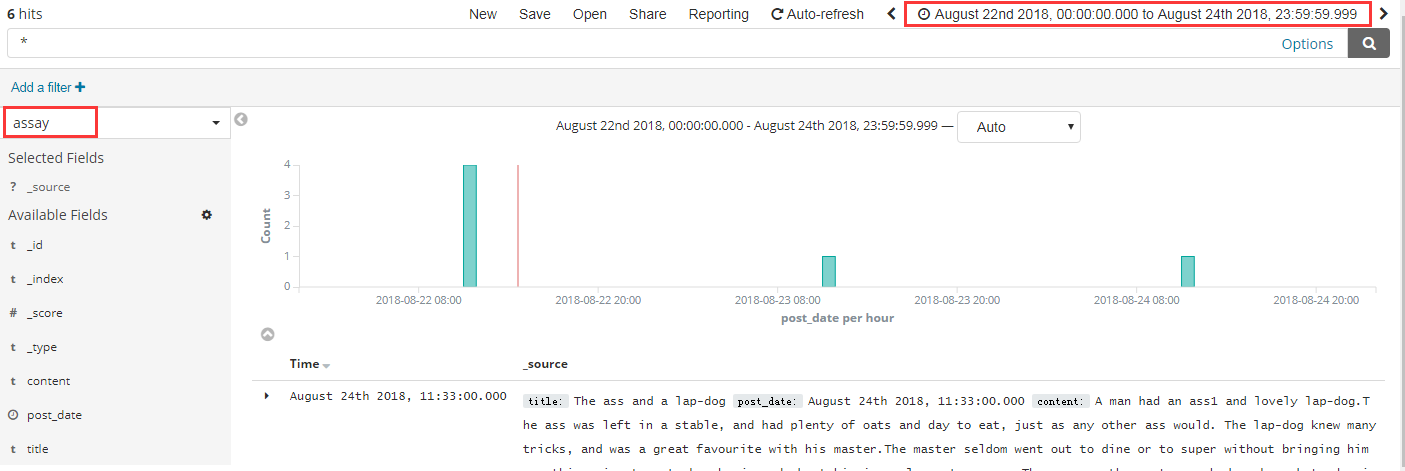
接下来先去Management创建Index Pattern,然后去Discover查看一下数据,我们就可以步入正题了
正题:ES的查询
# 搜索特定索引

GET /assay/_search?q=title:dog

# 搜索索引下面的多个类型

GET /assay/article,book/_search?q=title:dog

# 搜索多个索引

GET /assay,twitter/_search?q=message:Elasticsearch

# 搜索所有索引

GET /_all/_search?q=out

# 搜索所有索引所有类型

GET /_search?q=jumped
带有请求体的搜索
# 搜索title字段含有dog的记录

GET /assay/_search

{

    "query" : {

        "term" : { "title" : "dog" }

    }

}
分页查询
# 分页查询,from代表偏移量,size代表返回数量

GET /_search

{

    "from" : , "size" : ,

    "query" : {

        "term" : { "content" : "the" }

    }

}
注意,默认情况,from+size不能超过index.max_result_window的值(默认10000)
排序
按照post_time排序(asc升序,desc降序)
GET /assay/_search

{

    "sort" : [

        { "post_date" : {"order" : "desc"}},

        "_score"

    ],

    "query" : {

        "term" : { "content" : "the" }

    }

}
按照mode排序(min-最小值,max-最大值,sum-总和,avg-平均值,median-中位数)
POST _bulk

{ "index" : { "_index" : "goods", "_type" : "sears", "_id" : "" }}

{"name" : "crab-螃蟹","price" : [,,],"post_date" : "2018-08-23T15:12:12+0800"}

{ "index" : { "_index" : "goods", "_type" : "sears", "_id" : "" }}

{"name" : "lobster-龙虾","price" : [,,],"post_date" : "2018-08-23T15:12:12+0800"}

{ "index" : { "_index" : "goods", "_type" : "sears", "_id" : "" }}

{"name" : "abalone-鲍鱼","price" : [,,],"post_date" : "2018-08-23T15:12:12+0800"}

GET /goods/_search

{

    "sort" : [

        { "price" : {"order" : "desc", "mode" : "avg"}}

    ]

}
这里我新加了几条数据,记得去Management里面配置好索引,然后查询,这个是按照价格的平均值降序排序的
返回数据列过滤
1. 不显示原始数据
GET /goods/_search

{

    "_source": false,

    "sort" : [

        { "price" : {"order" : "desc", "mode" : "avg"}}

    ]

}
2.显示部分
GET /goods/_search

{

    "_source": ["name","price"],

    "sort" : [

        { "price" : {"order" : "desc", "mode" : "avg"}}

    ]

}
3.包含&排除(更精确的控制)
GET /goods/_search

{

    "_source": {

      "includes": ["name"],

      "excludes": "post_date"

    },

    "sort" : [

        { "price" : {"order" : "desc", "mode" : "avg"}}

    ]

}
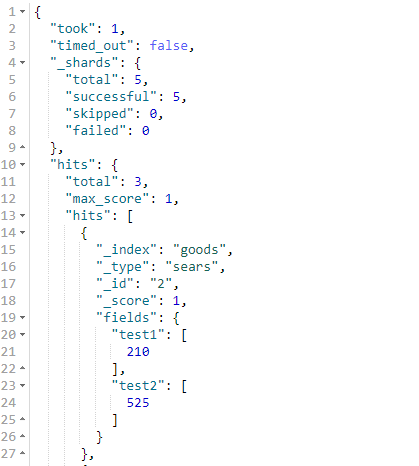
脚本
GET /goods/_search

{

    "query" : {

        "match_all": {}

    },

    "script_fields": {

      "test1": {

        "script" : {

                "lang": "painless",

                "source": "doc['price'].value * 2"

            }

      },

      "test2":{

        "script" : {

                "lang": "painless",

                "source": "doc['price'].value * params.factor",

                "params" : {

                    "factor"  : 5.0

                }

            }

      }

    }

}
结果:
..
GET /goods/_search

{

    "query" : {

        "match_all": {}

    },

    "script_fields": {

      "test1": {

        "script": "params['_source']['name']"

      }

    }

}
结果:

注意:doc[''] 和 params['_source']都能获取文档字段,不同的是doc相对来说快一些,但是会占用更多的内存,但是总体来说推荐用doc
Post Filter
在聚合计算之后,post_filter用于搜索请求末尾的搜索匹配
先初始化一些数据
PUT /clothes

{

    "mappings": {

        "fashion": {

            "properties": {

                "brand": { "type": "keyword"},

                "color": { "type": "keyword"},

                "model": { "type": "keyword"}

            }

        }

    }

}

POST _bulk

{ "index" : { "_index" : "clothes", "_type" : "fashion", "_id" : "" }}

{"brand" : "ANTA","color" : "red", "model": "S"}

{ "index" : { "_index" : "clothes", "_type" : "fashion", "_id" : "" }}

{"brand" : "ANTA","color" : "blue", "model": "M"}

{ "index" : { "_index" : "clothes", "_type" : "fashion", "_id" : "" }}

{"brand" : "ANTA","color" : "black", "model": "L"}

{ "index" : { "_index" : "clothes", "_type" : "fashion", "_id" : "" }}

{"brand" : "YISHION","color" : "red", "model": "S"}

{ "index" : { "_index" : "clothes", "_type" : "fashion", "_id" : "" }}

{"brand" : "YISHION","color" : "blue", "model": "M"}

{ "index" : { "_index" : "clothes", "_type" : "fashion", "_id" : "" }}

{"brand" : "YISHION","color" : "black", "model": "L"}
你可以查询以纯的红色衣服
GET /clothes/_search

{

  "query": {

    "bool": {

      "filter": [

        { "term": { "color": "red"   }},

        { "term": { "brand": "YISHION" }}

      ]

    }

  }

}
结果:

你可以
GET /clothes/_search

{

    "query": {

        "bool": {

            "filter": [

              { "term": { "brand": "YISHION" }}

            ]

        }

    },

    "aggs": {

        "models": {

            "terms": { "field": "model" }

        }

    }

}
结果:
{

  "took": ,

  "timed_out": false,

  "_shards": {

    "total": ,

    "successful": ,

    "skipped": ,

    "failed":

  },

  "hits": {

    "total": ,

    "max_score": ,

    "hits": [

      {

        "_index": "clothes",

        "_type": "fashion",

        "_id": "",

        "_score": ,

        "_source": {

          "brand": "YISHION",

          "color": "blue",

          "model": "M"

        }

      },

      {

        "_index": "clothes",

        "_type": "fashion",

        "_id": "",

        "_score": ,

        "_source": {

          "brand": "YISHION",

          "color": "red",

          "model": "S"

        }

      },

      {

        "_index": "clothes",

        "_type": "fashion",

        "_id": "",

        "_score": ,

        "_source": {

          "brand": "YISHION",

          "color": "black",

          "model": "L"

        }

      }

    ]

  },

  "aggregations": {

    "models": {

      "doc_count_error_upper_bound": ,

      "sum_other_doc_count": ,

      "buckets": [

        {

          "key": "L",

          "doc_count":

        },

        {

          "key": "M",

          "doc_count":

        },

        {

          "key": "S",

          "doc_count":

        }

      ]

    }

  }

}
post_filter
GET /clothes/_search

{

  "query": {

    "bool": {

      "filter": {

        "term": { "brand": "YISHION" }

      }

    }

  },

  "aggs": {

    "colors": {

      "terms": { "field": "color" }

    },

    "color_red": {

      "filter": {

        "term": { "color": "red" }

      },

      "aggs": {

        "models": {

          "terms": { "field": "model" }

        }

      }

    }

  },

  "post_filter": {

    "term": { "color": "red" }

  }

}
结果:
{

  "took": ,

  "timed_out": false,

  "_shards": {

    "total": ,

    "successful": ,

    "skipped": ,

    "failed":

  },

  "hits": {

    "total": ,

    "max_score": ,

    "hits": [

      {

        "_index": "clothes",

        "_type": "fashion",

        "_id": "",

        "_score": ,

        "_source": {

          "brand": "YISHION",

          "color": "red",

          "model": "S"

        }

      }

    ]

  },

  "aggregations": {

    "color_red": {

      "doc_count": ,

      "models": {

        "doc_count_error_upper_bound": ,

        "sum_other_doc_count": ,

        "buckets": [

          {

            "key": "S",

            "doc_count":

          }

        ]

      }

    },

    "colors": {

      "doc_count_error_upper_bound": ,

      "sum_other_doc_count": ,

      "buckets": [

        {

          "key": "black",

          "doc_count":

        },

        {

          "key": "blue",

          "doc_count":

        },

        {

          "key": "red",

          "doc_count":

        }

      ]

    }

  }

}
ElasticSearch6.3.2------查询的更多相关文章
- presto-mysql/elasticsearch6.0.0安装部署测试,异种数据源关联查询入门实践
本文简单记录一次实践使用过程,涉及presto-mysql,presto-elasticsearch,文中参数未做注释,请参考官方文档,希望能帮到大家 1 下载安装 presto-0.228 < ...
- 实现logstash6.4.3 同步mysql数据到Elasticsearch6.4.3
本文旨在实践把mysql已有的数据同步到elasticsearch中,使用的版本是6.4.3,对于其它6.x版本理应是一样的处理方式. 本文目录: 1.初始化Elasticsearch 6.4.3 1 ...
- Elasticsearch通关教程(五):如何通过SQL查询Elasticsearch
前言 这篇博文本来是想放在全系列的大概第五.六篇的时候再讲的,毕竟查询是在索引创建.索引文档数据生成和一些基本概念介绍完之后才需要的.当前面的一些知识概念全都讲解完之后再讲解查询是最好的,但是最近公司 ...
- ElasticSearch6.5.0 【Java客户端之REST Client】
说明 High Level Client 是基于 Low Level Client 的.官方文档如下: * https://www.elastic.co/guide/en/elasticsearch/ ...
- ElasticSearch评分分析 explian 解释和一些查询理解
ElasticSearch评分分析 explian 解释和一些查询理解 按照es-ik分析器安装了ik分词器.创建索引:PUT /index_ik_test.索引包含2个字段:content和nick ...
- Elasticsearch6.3.2启动过程源码阅读记录
Elasticsearch6.3.2启动过程源码阅读记录 网上有很多关于es的源码分析,觉得自己技术深度还不够,所以这些文章只是看源码过程中的一个笔记,谈不上分析. 整个启动过程以类名.方法名,按顺序 ...
- ElasticSearch6.5.0 【安装IK分词器】
不得不夸奖一下ES的周边资源,比如这个IK分词器,紧跟ES的版本,卢本伟牛逼!另外ES更新太快了吧,几乎不到半个月一个小版本就发布了!!目前已经发了6.5.2,估计我还没怎么玩就到7.0了. 下载 分 ...
- ElasticSearch6.3.2------入门
先去官网下载,方便测试用的Windows版本的 都解压了 --- 启动ElasticSearch和Kibana [E:\elasticsearch-]$ .\bin\elasticsearch.bat ...
- CentOS7.5 搭建ElasticSearch6.4.2 + Kibana6.4.2 环境
本文目录: 1.创建用户 2.授权sudo 3.下载ElasticSearch.Kibana 3.1 创建目录 3.2 下载文件 4.配置Elasticsearch 5.配置Kibana 参考资料: ...
- ElasticSearch6(三)-- Java API实现简单的增删改查
基于ElasticSearch6.2.4, Java API创建索引.查询.修改.删除,pom依赖和获取es连接 可查看此文章. package com.xsjt.learn; import java ...
随机推荐
- ArcGIS 添加 MarkerSymbol 弹出“图形符号无法序列化为 JSON”错误
今天在做一个demo,向自定义图层中添加MarkerSymbol的时候,弹出“图形符号无法序列化为 JSON”错误,之前都没有出现过这个问题,我们首先来看一看我是怎样去添加图层,然后向图层中添加Gra ...
- phonegap-plugin-contentsync
一.API 1.ContentSync.sync(options) options.src : 字符串类型 (必选项)远程托管内容的URL.更新一个生产环境下的APP,常使用HTTPS option ...
- hdu-4825(01字典树)
题意:中文题意 解题思路:01字典树板子题 代码: #include<iostream> #include<algorithm> #include<cstdio> ...
- DRF 版本 认证
DRF的版本 版本控制是做什么用的, 我们为什么要用 首先我们要知道我们的版本是干嘛用的呢大家都知道我们开发项目是有多个版本的 当我们项目越来越更新~版本就越来越多我们不可能新的版本出了~以前旧的版本 ...
- Spring 使用介绍(十三)—— Bean的生命周期
一.概述 Spring Bean的完整生命周期从创建Spring容器开始,直到最终Spring容器销毁Bean,生命周期时序图如下: 二.生命周期接口分类 Bean的生命周期经历了多个接口方法的调用, ...
- Github提交本地代码
第一步:建立git仓库 cd到你的本地项目根目录下,执行git命令 git init 第二步:将项目的所有文件添加到仓库中 git add . 如果想添加某个特定的文件,只需把.换成特定的文件名即可 ...
- U盘快速启动热键
各个品牌电脑U盘快速启动热键如下:
- [NOIP]2017列队——旋转treap/非旋转treap
Sylvia 是一个热爱学习的女孩子. 前段时间,Sylvia 参加了学校的军训.众所周知,军训的时候需要站方阵. Sylvia所在的方阵中有n × m名学生,方阵的行数为 n,列数为m. 为了便 ...
- 洛谷P1829 [国家集训队]Crash的数字表格
题目描述 今天的数学课上,Crash小朋友学习了最小公倍数(Least Common Multiple).对于两个正整数a和b,LCM(a, b)表示能同时整除a和b的最小正整数.例如,LCM(6, ...
- Hdoj 2109.Fighting for HDU 题解
Problem Description 在上一回,我们让你猜测海东集团用地的形状,你猜对了吗?不管结果如何,都没关系,下面我继续向大家讲解海东集团的发展情况: 在最初的两年里,HDU发展非常迅速,综合 ...