
MapReduce- 数据的排序处理
MapReduce- 数据的排序处理
package com.huhu.day02;

import java.io.DataInput;

import java.io.DataOutput;

import java.io.IOException;

import org.apache.hadoop.io.WritableComparable;

/**

 * 6 9

 * 3 8

 * 4 8

 * 1 0

 * 3 0

 * 8 8

 * 6 7

 * 第一列升序,第二列降序

 * @author huhu_k

 *

 */

public class Number implements WritableComparable<Number> {

	private int first;

	private int second;

	// private int third;

	public Number() {

		super();

	}

	public Number(int first, int second) {

		super();

		this.first = first;

		this.second = second;

	}

	public int getFirst() {

		return first;

	}

	public void setFirst(int first) {

		this.first = first;

	}

	public int getSecond() {

		return second;

	}

	public void setSecond(int second) {

		this.second = second;

	}

	@Override

	public int hashCode() {

		final int prime = 31;

		int result = 1;

		result = prime * result + first;

		result = prime * result + second;

		return result;

	}

	@Override

	public boolean equals(Object obj) {

		if (this == obj)

			return true;

		if (obj == null)

			return false;

		if (getClass() != obj.getClass())

			return false;

		Number other = (Number) obj;

		if (first != other.first)

			return false;

		if (second != other.second)

			return false;

		return true;

	}

	@Override

	public String toString() {

		return "Number [first=" + first + ", second=" + second + "]";

	}

	@Override

	public void readFields(DataInput in) throws IOException {

		this.first = in.readInt();

		this.second = in.readInt();

	}

	@Override

	public void write(DataOutput out) throws IOException {

		out.writeInt(this.first);

		out.writeInt(this.second);

	}

	@Override

	public int compareTo(Number o) {

		if (this.first== o.first) {

			//第二行数据降序

			return o.second - this.second;

		}

		//第一行升序

		return this.first - o.first;

	}

}
package com.huhu.day02;

import java.io.IOException;

import org.apache.hadoop.conf.Configuration;

import org.apache.hadoop.fs.Path;

import org.apache.hadoop.io.LongWritable;

import org.apache.hadoop.io.NullWritable;

import org.apache.hadoop.io.Text;

import org.apache.hadoop.mapreduce.Job;

import org.apache.hadoop.mapreduce.Mapper;

import org.apache.hadoop.mapreduce.Reducer;

import org.apache.hadoop.mapreduce.lib.input.FileInputFormat;

import org.apache.hadoop.mapreduce.lib.output.FileOutputFormat;

import org.apache.hadoop.util.GenericOptionsParser;

import org.apache.hadoop.util.Tool;

import org.apache.hadoop.util.ToolRunner;

public class NumericSorting extends ToolRunner implements Tool {

	public static class MyMapper extends Mapper<LongWritable, Text, Number, NullWritable> {

		@Override

		protected void map(LongWritable key, Text value, Context context) throws IOException, InterruptedException {

			String[] line = value.toString().split(" ");

			Number number = null;

			if (line.length == 2) {

				number = new Number(Integer.parseInt(line[0]), Integer.parseInt(line[1]));

			}

			context.write(number, NullWritable.get());

		}

	}

	public static class MyReduce extends Reducer<Number, NullWritable, Number, Text> {

		@Override

		protected void reduce(Number key, Iterable<NullWritable> values, Context context)

				throws IOException, InterruptedException {

			for (NullWritable n : values) {

				context.write(key, new Text("---"));

			}

		}

	}

	@Override

	public Configuration getConf() {

		return new Configuration();

	}

	@Override

	public void setConf(Configuration arg0) {

	}

	@Override

	public int run(String[] other) throws Exception {

		Job job = Job.getInstance(getConf(), "NumbericSorting");

		job.setJarByClass(NumericSorting.class);

		job.setMapperClass(MyMapper.class);

		job.setMapOutputKeyClass(Number.class);

		job.setMapOutputValueClass(NullWritable.class);

		job.setReducerClass(MyReduce.class);

		job.setOutputKeyClass(Number.class);

		job.setOutputValueClass(Text.class);

		FileInputFormat.addInputPath(job, new Path(other[0]));

		FileOutputFormat.setOutputPath(job, new Path(other[1]));

		return job.waitForCompletion(true) ? 0 : 1;

	}

	public static void main(String[] args) throws Exception {

		Configuration conf = new Configuration();

		String[] other = new GenericOptionsParser(conf, args).getRemainingArgs();

		if (other.length != 2) {

			System.out.println("your input args number is fail,you need input <in> and <out>");

			System.exit(0);

		}

		ToolRunner.run(conf, new NumericSorting(), other);

	}

}
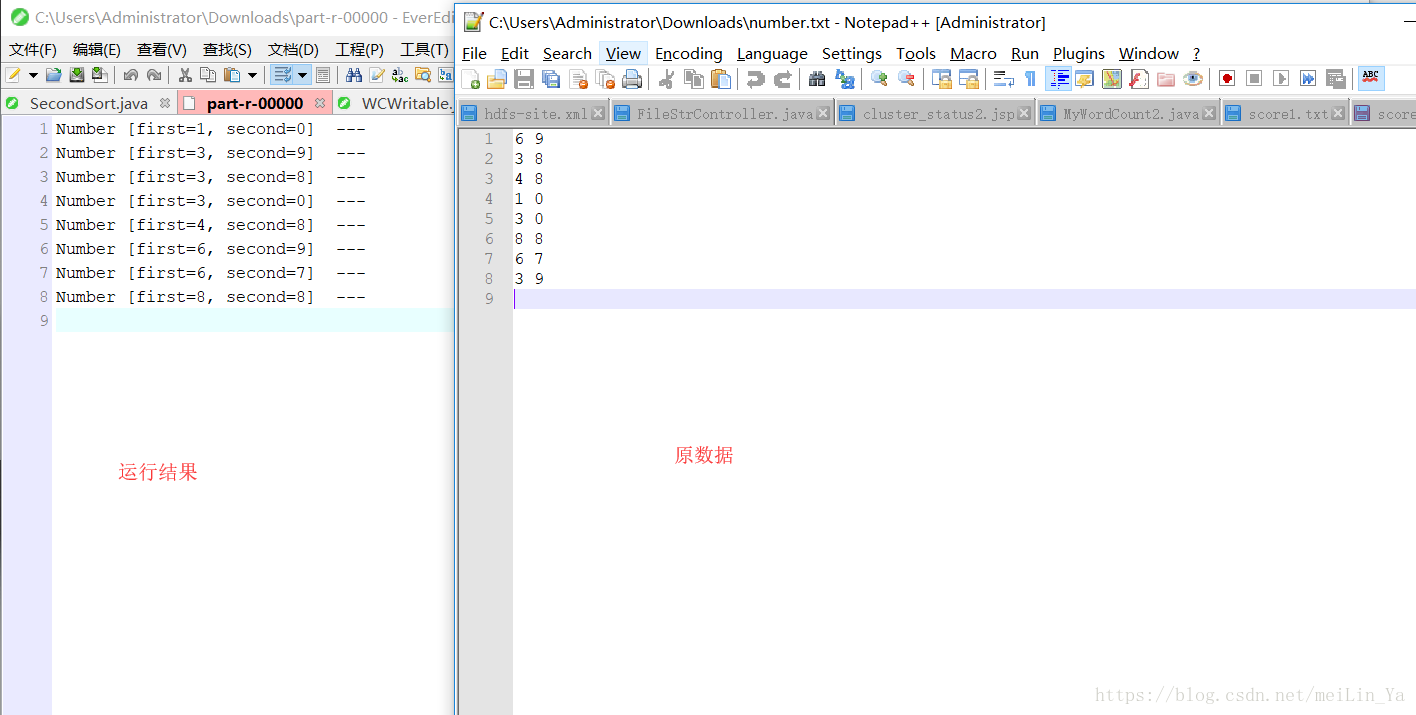
运行结果:
MapReduce- 数据的排序处理的更多相关文章
- Hadoop学习笔记—11.MapReduce中的排序和分组
一.写在之前的 1.1 回顾Map阶段四大步骤 首先,我们回顾一下在MapReduce中,排序和分组在哪里被执行: 从上图中可以清楚地看出,在Step1.4也就是第四步中,需要对不同分区中的数据进行排 ...
- MapReduce二次排序
默认情况下,Map 输出的结果会对 Key 进行默认的排序,但是有时候需要对 Key 排序的同时再对 Value 进行排序,这时候就要用到二次排序了.下面让我们来介绍一下什么是二次排序. 二次排序原理 ...
- (转)MapReduce二次排序
一.概述 MapReduce框架对处理结果的输出会根据key值进行默认的排序,这个默认排序可以满足一部分需求,但是也是十分有限的.在我们实际的需求当中,往往有要对reduce输出结果进行二次排序的需求 ...
- Hadoop MapReduce 二次排序原理及其应用
关于二次排序主要涉及到这么几个东西: 在0.20.0 以前使用的是 setPartitionerClass setOutputkeyComparatorClass setOutputValueGrou ...
- 关于MapReduce二次排序的一点解答
上一篇博客说明了怎么自定义Key,而且用了二次排序的例子来做测试,但没有详细的说明二次排序,这一篇说详细的说明二次排序,为了说明曾经一个思想的误区,特地做了一个3个字段的二次排序来说明.后面称其为“三 ...
- mapreduce 实现数子排序
设计思路: 使用mapreduce的默认排序,按照key值进行排序的,如果key为封装int的IntWritable类型,那么MapReduce按照数字大小对key排序,如果key为封装为String ...
- 详细讲解MapReduce二次排序过程
我在15年处理大数据的时候还都是使用MapReduce, 随着时间的推移, 计算工具的发展, 内存越来越便宜, 计算方式也有了极大的改变. 到现在再做大数据开发的好多同学都是直接使用spark, hi ...
- MapReduce 二次排序
默认情况下,Map 输出的结果会对 Key 进行默认的排序,但是有时候需要对 Key 排序的同时再对 Value 进行排序,这时候就要用到二次排序了.下面让我们来介绍一下什么是二次排序. 二次排序原理 ...
- Spark 颠覆 MapReduce 保持的排序记录
在过去几年,Apache Spark的採用以惊人的速度添加着,通常被作为MapReduce后继,能够支撑数千节点规模的集群部署. 在内存中数 据处理上,Apache Spark比MapReduce更加 ...
- mapreduce数据处理——统计排序
接上篇https://www.cnblogs.com/sengzhao666/p/11850849.html 2.数据处理: ·统计最受欢迎的视频/文章的Top10访问次数 (id) ·按照地市统计最 ...
随机推荐
- HDU 4400 Mines(好题!分两次计算距离)
http://acm.hdu.edu.cn/showproblem.php?pid=4400 题意: 在笛卡尔坐标中有多个炸弹,每个炸弹有一个坐标值和一个爆炸范围.现在有多次操作,每次引爆一个炸弹,问 ...
- SPOJ 839 Optimal Marks(最小割的应用)
https://vjudge.net/problem/SPOJ-OPTM 题意: 给出一个无向图G,每个点 v 以一个有界非负整数 lv 作为标号,每条边e=(u,v)的权w定义为该边的两个端点的标号 ...
- Android CPU耗电量测试
Android CPU耗电量测试 在测试Android app时,不仅仅要关注app的功能,也好关注app的性能指标,cpu.内存.流量.电量等.简单介绍下电量测试中的cpu耗电. 影响耗电的因素 C ...
- 测试驱动android
测试驱动android开发 在安卓模拟器或者真机上跑测试用例速度很慢.构建.部署.启动app,通常需要花费一分钟或者更久.这不是TDD(测试驱动开发)模式.Robolectric提供一种更好的方式. ...
- 1 --- Vue 基础指令
1.vue 指令 1.v-model 主要在表单中使用,文本框.teaxare.单选.下拉 等 2.v-text 文本渲染 类似{{}} 3.v-show 控制Dom显示隐藏 displ ...
- 运行和控制Nginx——命令行参数和信号
参考资料: Nginx中文文档: http://www.nginx.cn/nginxchscommandline Nginx的启动.停止.平滑重启.信号控制和平滑升级:http://zachary-g ...
- Codeforces Round #271 (Div. 2) F. Ant colony 线段树
F. Ant colony time limit per test 1 second memory limit per test 256 megabytes input standard input ...
- 一步到位之INNODB
原文链接:http://imysql.com/2012/09/21/mysql-faq-setup-innodb-quickly.html 快速认识InnoDB InnoDB是MySQL下使用最广泛的 ...
- PHP运算符优先级
if (!$a = $b) { // todo } if (!($a = $b)) { // todo } if ($a = !$b) { // todo } if ($a = (!$b)) { // ...
- php中if(\$a==\$b)和if(\$a=\$b)什么区别?
<?php // if($a==$b)和if($a=$b)什么区别? $a = 1; $b = 1; if ($a == $b) { // 通过 echo '通过'.PHP_EOL; } if ...