
Nodejs学习之mongodb Error: failed to connect to [localhost:27017]
在连接mongodb时出现以下错误提示信息
events.js:

        throw er; // Unhandled 'error' event

              ^

Error: failed to connect to [localhost:]

    at null.<anonymous> (E:\64bit\WebStorm\untitled\node_modules\session-mongoose\node_modules\mongoose\node_modules\mongodb\lib\mongodb\connection\server.js::)

    at EventEmitter.emit (events.js::)

    at null.<anonymous> (E:\64bit\WebStorm\untitled\node_modules\session-mongoose\node_modules\mongoose\node_modules\mongodb\lib\mongodb\connection\connection_pool.js::)

    at EventEmitter.emit (events.js::)

    at Socket.<anonymous> (E:\64bit\WebStorm\untitled\node_modules\session-mongoose\node_modules\mongoose\node_modules\mongodb\lib\mongodb\connection\connection.js::)

    at Socket.EventEmitter.emit (events.js::)

    at net.js::

    at process._tickCallback (node.js::)
出现以上错误是因为数据库mongodb没有运行
解决方案:
1、下载:上http://www.mongodb.org/downloads,下载对应的Mongodb版本。
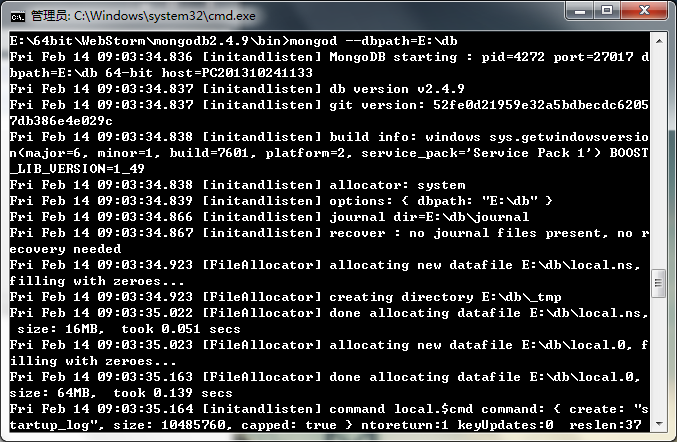
2、启动:为了更好的规划,我们启动之前可以选建立一个db文件(随便在哪建都行,我的建在e:\db),用来存放mongodb数据库。然后启动cmd,进入你下载的mongose解压的路径的bin文件,例如我的为E:\64bit\WebStorm\mongodb2.4.9\bin>,然后输入mongod --dbpath=E:\db,这时启动了,如下图所示:
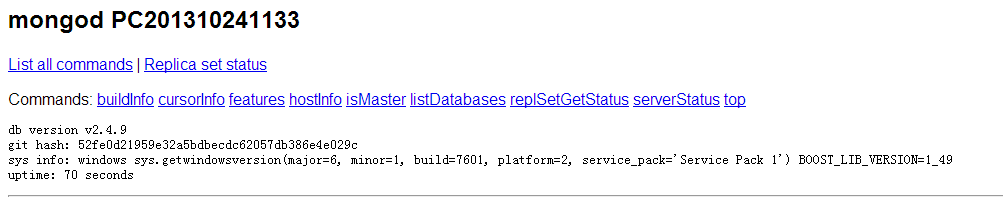
3、测试是否运行:在浏览器中输入http://localhost:28017/,注意是28017,如果得到下图所示,那么说明成功了,别关掉,然后你就可以连接mongodb了
Nodejs学习之mongodb Error: failed to connect to [localhost:27017]的更多相关文章
- phpmailer的SMTP ERROR: Failed to connect to server: 10
请问,我在win7上学习使用phpmailer时,出现这种错误怎么处理啊? SMTP ERROR: Failed to connect to server: (0) SMTP connect() fa ...
- 使用phpmailer插件发邮件失败提示:SMTP -> ERROR: Failed to connect to server: Connection timed out (110) smtp connect() failed;
一个邮件发送问题,整整弄了我一周时间,起因是这样的,之前弄的一个网站,需要在邮箱里面认证之后才可以注册成功.网站上线了差不多一年之后,客户突然跟我说,网站不能注册了,然后我就查看了一下代码. 发现报这 ...
- error: failed to connect to the hypervisor error: Failed to connect socket to '/var/run/libvirt/libvirt-sock': No such file or directory 解决办法
服务器版本:CentOS Linux release 7.4 Linux lb 3.10.0-693.el7.x86_64 #1 SMP Tue Aug 22 21:09:27 UTC 2017 x8 ...
- linux下phpmailer发送邮件出现SMTP ERROR: Failed to connect to server: (0)错误
转自:https://www.cnblogs.com/raincowl/p/8875647.html //Create a new PHPMailer instance $mail = new PHP ...
- Docker - Failed to connect to localhost port 4000: Connection refused
转载.翻译自 https://stackoverflow.com/questions/44014698/docker-failed-to-connect-to-localhost-port-4000- ...
- 【MongoDB】 Failed to connect to 127.0.0.1:27017, reason: Connection refused
由于项目需要,在一台虚拟机上安装了MongoDB,但是在启动的时候,出现如下错误: [root@localhost bin]# ./mongo MongoDB shell version v3.4.0 ...
- MongoDB error: couldn't connect to server 127.0.0.1:27017 src/mongo/shell/mongo.js(转)
rror: couldn't connect to server 127.0.0.1:27017 src/mongo/shell/mongo.js 一般这种情况就是:自己指定的数据库,所以不能.自动加 ...
- 腾讯云服务器SMTP ERROR: Failed to connect to server
一般邮件发送失败是 1.配置的问题. 2.扩展问题socket/ssl 百度搜出来一般都是以上的解决办法, 但是我这次遇到的不是. 本地可以放到腾讯云服务器就不行了,扩展也都开了. 后来发现是安全组端 ...
- linux 下 用phpmailer类smtp发送邮件始终不成功,提示:ERROR: Failed to co
https://zhidao.baidu.com/question/509191264.html?fr=iks&word=PHPMailerSMTP+connect()+failed& ...
随机推荐
- Android数据存储五种方式
1 使用SharedPreferences存储数据:常用于做本地缓存 2 文件存储数据:(1)data/data/<package name>/files目录内 (2)SDCard内 ...
- SpringMVC与Struts不同(五)
springmvc与struts2不同 1.springmvc的入口是一个servlet即前端控制器,而struts2入口是一个filter过滤器. 2.springmvc是基于方法开发(一个url对 ...
- 第一个FPGA工程—LED流水灯
这一章我们来实现第一个FPGA工程-LED流水灯.我们将通过流水灯例程向大家介绍一次完整的FPGA开发流程,从新建工程,代码设计,综合实现,管脚约束,下载FPGA程序.掌握本章内容,大家就算正式的开始 ...
- platform_get_resource的分析
阅读platformdriver的代码时,发现在probe函数直接调用platform_get_resource从pdev中获取io内存,但却没有判断传给probe的pdev是否属于这个驱动 ! 后来 ...
- zabbix系列(三)zabbix3.0.4微信告警配置详解
一.准备工作 申请微信公众号,并且是可以有发送消息的接口.添加有个脚本去调用微信的api. 之后可以参考下zabbix 的搭建,然后了解下脚本报警,之后再考虑报警方式的多样化. 个人微信一个 个人邮箱 ...
- PYTHON-绑定方法 反射 内置函数
'''绑定方法类中定义函数分为了两大类: 1. 绑定方法 特殊之处: 绑定给谁就应该由谁来调用,谁来调用就会将谁当做第一个参数自动传入 如何用: 绑定给对象的方法: 在类中定义函数没有被任何装饰器修饰 ...
- python 全栈开发,Day16(函数第一次考试)
考试题 Python11 期第二次考试(基础数据类型与函数部分) 考试时长:3个小时 满分:105分 一,选择题(每题2分,共24分) 1.python不支持的数据类型有 A.char B.int C ...
- 步步为营-64-进程&线程
1 进程 using System; using System.Collections.Generic; using System.Diagnostics; using System.Linq; us ...
- DDD领域模型数据访问权限之用户权限(十)
BAS_PRService岗位和角色服务: public class BAS_PRService { //岗位 private IRepository<BAS_Post> ireposit ...
- ef 数据库连接字符串加密
public testContext() : base(GetConnection(), true) { } public static DbConnection GetConnection() { ...