
iOS UI基础-13.0 数据存储
应用沙盒
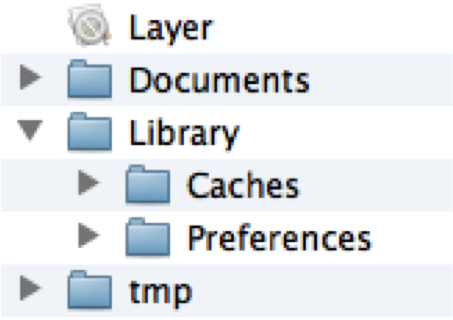
模拟器应用沙盒的根路径在
    //获取沙盒根根路径,每一个应用在手机当中都有一个文件夹,这个方法就是获取当前应用在手机里安装的文件.

    NSString *homeDir = NSHomeDirectory();

    NSLog(@"homeDir = %@",homeDir);
应用沙盒结构分析
- Documents:保存应用运行时生成的需要持久化的数据,iTunes同步设备时会备份该目录。例如,游戏应用可将游戏存档保存在该目录,数据库
- tmp:保存应用运行时所需的临时数据,使用完毕后再将相应的文件从该目录删除。应用没有运行时,系统也可能会清除该目录下的文件。iTunes同步设备时不会备份该目录
- Library/Caches:保存应用运行时生成的需要持久化的数据,比如运行日志,iTunes同步设备时不会备份该目录。一般存储体积大、不需要备份的非重要数据
- Library/Preference:保存应用的所有偏好设置,iOS的Settings(设置)应用会在该目录中查找应用的设置信息。iTunes同步设备时会备份该目录
数据存储
iOS应用数据存储的常用方式:
- XML属性列表(plist)归档
- NSUserDefaults(偏好设置)
- NSKeyedArchiver归档(NSCoding)
- SQLite3
- Core Data
XML属性列表(plist)归档
// 存储数据

- (void)savePlist

{

    // 1.获得沙盒根路径

    NSString *home = NSHomeDirectory();

    // 2.document路径

    NSString *docPath = [home stringByAppendingPathComponent:@"Documents"];

    // 3.新建数据

    NSArray *data = @[@"jack", @, @"ffdsf"];

    NSString *filepath = [docPath stringByAppendingPathComponent:@"data.plist"];

    [data writeToFile:filepath atomically:YES];

}

// 读取数据

- (void)readPlist {

    // 1.获得沙盒根路径

    NSString *home = NSHomeDirectory();

    // 2.document路径

    NSString *docPath = [home stringByAppendingPathComponent:@"Documents"];

    // 3.文件路径

    NSString *filepath = [docPath stringByAppendingPathComponent:@"data.plist"];

    // 4.读取数据

    NSArray *data = [NSArray arrayWithContentsOfFile:filepath];

    NSLog(@"%@", data);

}
Preference(偏好设置)
// 存储

- (IBAction)save {

    // 1.利用NSUserDefaults,就能直接访问软件的偏好设置(Library/Preferences)

    NSUserDefaults *defaults = [NSUserDefaults standardUserDefaults];

    // 2.存储数据

    [defaults setObject:@"mj" forKey:@"account"];

    [defaults setObject:@"" forKey:@"pwd"];

    [defaults setInteger: forKey:@"age"];

    [defaults setBool:YES forKey:@"auto_login"];

    // 3.立刻同步

    [defaults synchronize];

}

// 读取

- (IBAction)read {

    NSUserDefaults *defaults = [NSUserDefaults standardUserDefaults];

    NSString *account = [defaults objectForKey:@"account"];

    BOOL autoLogin = [defaults boolForKey:@"auto_login"];

    NSLog(@"%@ -- %d", account, autoLogin);

}
[defaults synchornize];
NSKeyedArchiver归档(NSCoding)
- uencodeWithCoder:每次归档对象时,都会调用这个方法。一般在这个方法里面指定如何归档对象中的每个实例变量,可以使用encodeObject:forKey:方法归档实例变量
- uinitWithCoder:每次从文件中恢复(解码)对象时,都会调用这个方法。一般在这个方法里面指定如何解码文件中的数据为对象的实例变量,可以使用decodeObject:forKey方法解码实例变量
MJStudent.h
#import <Foundation/Foundation.h>

@interface MJStudent : NSObject  <NSCoding>

@property (nonatomic, copy) NSString *no;

@property (nonatomic, assign) double height;

@property (nonatomic, assign) int age;

@end
MJStudent.m
#import "MJStudent.h"

@interface MJStudent()

@end

@implementation MJStudent

/**

 *  将某个对象写入文件时会调用

 *  在这个方法中说清楚哪些属性需要存储

 */

- (void)encodeWithCoder:(NSCoder *)encoder

{

    [encoder encodeObject:self.no forKey:@"no"];

    [encoder encodeInt:self.age forKey:@"age"];

    [encoder encodeDouble:self.height forKey:@"height"];

}

/**

 *  从文件中解析对象时会调用

 *  在这个方法中说清楚哪些属性需要存储

 */

- (id)initWithCoder:(NSCoder *)decoder

{

    if (self = [super init]) {

        // 读取文件的内容

        self.no = [decoder decodeObjectForKey:@"no"];

        self.age = [decoder decodeIntForKey:@"age"];

        self.height = [decoder decodeDoubleForKey:@"height"];

    }

    return self;

}

@end
控制器使用:
- (IBAction)save {

    // 1.新的模型对象

    MJStudent *stu = [[MJStudent alloc] init];

    stu.no = @"";

    stu.age = ;

    stu.height = 1.55;

    // 2.归档模型对象

    // 2.1.获得Documents的全路径

    NSString *doc = [NSSearchPathForDirectoriesInDomains(NSDocumentDirectory, NSUserDomainMask, YES) lastObject];

    // 2.2.获得文件的全路径

    NSString *path = [doc stringByAppendingPathComponent:@"stu.data"];

    // 2.3.将对象归档

    [NSKeyedArchiver archiveRootObject:stu toFile:path];

}

- (IBAction)read {

    // 1.获得Documents的全路径

    NSString *doc = [NSSearchPathForDirectoriesInDomains(NSDocumentDirectory, NSUserDomainMask, YES) lastObject];

    // 2.获得文件的全路径

    NSString *path = [doc stringByAppendingPathComponent:@"stu.data"];

    // 3.从文件中读取MJStudent对象

    MJStudent *stu = [NSKeyedUnarchiver unarchiveObjectWithFile:path];

    NSLog(@"%@ %d %f", stu.no, stu.age, stu.height);

}
NSKeyedArchiver-归档对象的注意
如果父类也遵守了NSCoding协议,请注意:
[super encodeWithCode:encode];
self = [super initWithCoder:decoder];
iOS UI基础-13.0 数据存储的更多相关文章
- iOS UI基础-4.0应用程序管理
功能与界面 功能分析: 以九宫格的形式展示应用信息 点击下载按钮后,做出相应的操作 步骤分析: 加载应用信息 根据应用的个数创建对应的view 监听下载按钮点击 整个应用界面: 程序实现 思路 UI布 ...
- Android 基础-3.0 数据存储方式
Android几种数据存储方式 文件存储 SharedPreference存储 Json解析 SQLite数据库存储 文件存储 文件存储是Android中最基本的一种存储方式,和Java中实现I/O的 ...
- iOS UI基础-9.0 UITableView基础
在iOS中,要实现表格数据展示,最常用的做法就是使用UITableView.UITableView继承自UIScrollView,因此支持垂直滚动,而且性能极佳. UITableView有两种样式: ...
- iOS UI基础-17.0 UILable之NSMutableAttributedString
在iOS开发中,常常会有一段文字显示不同的颜色和字体,或者给某几个文字加删除线或下划线的需求.之前在网上找了一些资料,有的是重绘UILabel的textLayer,有的是用html5实现的,都比较麻烦 ...
- iOS UI基础-12.0 Storyboard
storyboard创建控制器 1.先加载storyboard文件(Test是storyboard的文件名) UIStoryboard *storyboard = [UIStoryboard stor ...
- iOS UI基础-8.0 UIAlertView使用
弹出框的使用 1.实现代理UIAlertViewDelegate 2.弹出框 // 弹框初始化 UIAlertView *alert = [[UIAlertView alloc] initWithTi ...
- iOS UI基础-3.0图片浏览器及plist使用
需求: 1.显示当前图片序号/总图片数 2.显示图片 3.上一张图片.下一张图片转换 4.显示图片描述 下面用代码来实现 // // UYViewController.m // 3.0图片查看器 // ...
- iOS UI基础-19.0 UICollectionView
直接上代码,说明请看注释吧 1.继承三个代理 UICollectionViewDataSource,UICollectionViewDelegate,UICollectionViewDelegateF ...
- iOS UI基础-16.0 UIButton
回归自然,UIButton是我们使用最频烦的一个控件.下面,对该控件的一些常用方法进行一些总结. UIButton *payStateBtn = [UIButton buttonWithType:UI ...
随机推荐
- 在CentOS中安装arial字体
验证码不能正常显示是因为 linux 没有字体 1. widonws下载字体文件到Linux windows的字体比较多,其字体文件位于 C:\WINDOWS\Fonts . 从其中copy相应的字体 ...
- bootstrap-switch 使用
网址:http://www.bootcss.com/p/bootstrap-switch/ 界面设置不调用方法没成功,事件也不起作用不知道是jquery版本原因还是什么原因!,下面亲测试可以使用 $( ...
- c# 主窗体更新子窗体 进程间通信
1.窗体间数据传输 主窗体连续不断更新给子窗体 本文章来源于网络 年代久远 如有侵犯 请联系删除 1.通过 在windows form之间传值,我总结了有四个方法:全局变量.属性.窗体构造函数和de ...
- [No0000113]Keyboard shortcuts for Windows Visual Studio Code
General 常用Ctrl+Shift+P, F1 Show Command Palette 显示命令行Ctrl+P Quick Open, Go to File… 快速打开Ctrl+Shift+N ...
- RuntimeError - [Xcodeproj] Unknown object version.解决方法
wjw:layoutInScrollView username$ pod install Analyzing dependencies xcode-select: error: tool 'xcode ...
- Exception 04 : java.lang.ClassNotFoundException: Could not load requested class : org.hsqldb.jdbcDriver
异常详细信息 org.hibernate.boot.registry.classloading.spi.ClassLoadingException: Unable to load class [org ...
- English class 81:How Vulnerability can make our lives better?
1,can we come off as weak if we show imperfections? 2,The first thing I look for in you and the last ...
- elasticsearch ingest node and docker-cluster---quey using sql]
es-docker-cluster https://stefanprodan.com/2016/elasticsearch-cluster-with-docker/ https://github.co ...
- [dpdk] service core
dpdk 17.11 增加了一组新的API,serivce core 如命名,就是用一组core跑service函数. 我自己的测试程序如下: https://github.com/tony-caot ...
- 提取json响应结果值_后置处理器JSON Extractor
Json响应格式 json串中{}表示对象,[]表示数组 JSON Extractor使用json path表达式匹配,可以一次取多个变量值. $表示响应的根对象. 取子对象或对象的属性用. 取数组里 ...