
Go微服务框架go-kratos实战02:proto 代码生成和编码实现步骤
在上一篇 kratos quickstart 文章中,我们直接用 kratos new 命令生成了一个项目。
这一篇来看看 kratos API 的定义和使用。
一、kratos 中 API 简介
1.1 简介
API 全称是 Application Programming Interface,应用程序接口。
在 kratos 中,API 指的是 REST API 和 RPC API ,REST API 是用户访问应用程序时的入口,
RPC API 作为应用程序内部相互访问的接口定义。
那怎么定义 API?使用的是 protocol-buffers 这种与编程语言无关的接口自定义语言(IDL),它可以根据定义的 pb 来生成你
所需的编程语言程序。
gRPC 是 Go 语言编写的一个开源的 RPC 框架,它使用的 IDL 就是 protocol-buffers。
protocol-buffers语法学习可以参考文档:
proto3 语法, https://developers.google.com/protocol-buffers/docs/proto3
- 中译版 (时间有点早2017-03)
proto2 语法,https://developers.google.com/protocol-buffers/docs/proto
二、kratos 中 API 定义和使用
下面一步一步实现 api 文件(proto 文件)生成,然后根据 proto 文件生成对应的 pb.http, pb.grpc 代码。
然后生成 service 代码,使用 service 代码。然后编写 biz 代码等等步骤。
来理清 kratos 里代码编写的步骤。毕竟 internal 文件夹里各种 go 文件业务逻辑顺序还是要有些繁琐。
2.1 快速生成 proto 文件
在上一篇文章的项目基础上生成一个新的 API(proto 文件)。
先安装 kratos cli :
go install github.com/go-kratos/kratos/cmd/kratos/v2@latest
kratos cli 工具使用文档:https://go-kratos.dev/docs/getting-started/usage
进入项目 quickstart 目录,运行命令:
kratos proto add api/helloworld/v1/student.proto
在 api/helloworld/v1 目录先就会出现一个 student.proto 的文件,
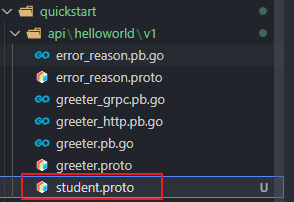
里面的代码:
syntax = "proto3";

package api.helloworld.v1;

option go_package = "quickstart/api/helloworld/v1;v1";

option java_multiple_files = true;

option java_package = "api.helloworld.v1";

service Student {

	rpc CreateStudent (CreateStudentRequest) returns (CreateStudentReply);

	rpc UpdateStudent (UpdateStudentRequest) returns (UpdateStudentReply);

	rpc DeleteStudent (DeleteStudentRequest) returns (DeleteStudentReply);

	rpc GetStudent (GetStudentRequest) returns (GetStudentReply);

	rpc ListStudent (ListStudentRequest) returns (ListStudentReply);

}

message CreateStudentRequest {}

message CreateStudentReply {}

message UpdateStudentRequest {}

message UpdateStudentReply {}

message DeleteStudentRequest {}

message DeleteStudentReply {}

message GetStudentRequest {}

message GetStudentReply {}

message ListStudentRequest {}

message ListStudentReply {}
生成了一个 student.proto 的模板,定义了一些基本操作,Create、Update、Delete、Get、List。
2.2 给 proto 添加内容
学习 greeter.proto 里的用法,给 student.proto 添加一个简单的 HTTP 转换。
添加一个 hello 的 http 转换接口
第一步:引入 import "google/api/annotations.proto";
第二步:在 service Student 里添加代码:
在服务里定义一个 Hello 的操作,然后在里面用 option (google.api.http) 语法,如下:
rpc Hello (HelloReq) returns (HelloResp) {

		option (google.api.http) = {

			get: "/hello/{name}"

		};

}
定义 HelloReq 和 HelloResp:
请求的字段和返回的字段
message HelloReq {

	string name = 1;

}

message HelloResp {

	string message = 1;

}
上面就是把 HTTP REST 转换为 gRPC :
| HTTP | gRPC |
|---|---|
| GET /hello/tom | Hello(name: "tom") |
还可以给这个接口添加额外的接口,用 additional_bindings:
rpc Hello (HelloReq) returns (HelloResp) {

		option (google.api.http) = {

		    // 定义 GET 接口,把 name 参数映射到 HelloReq

			get: "/hello/{name}",

			// 添加额外的接口

			additional_bindings {

			    // 定义了一个 POST 接口,并且把 body 映射到了 HelloReq

				post: "/hello/{id}/sayhello/{sayname}",

				body: "*",

			}

		};

}

// 这里的 HelloReq 和 HelloResp

message HelloReq {

	string name    = 1;

	string id      = 2;

	string sayname = 3;

}

message HelloResp {

	string message = 1;

	string text    = 2;

}
HTTP 转换问 gRPC:
| HTTP | gRPC |
|---|---|
| GET /hello/tom | Hello(name: "tom") |
| POST /hello/123/sayhello/tom {text: "world!"} | Hello(id: "123", sayname:"tom" text:"world!") |
2.3 生成 proto 对应代码
通过 make 命令生成:
make api
或者通过 kratos cli 生成:
kratos proto client api/helloworld/v1/student.proto
这里通过 kratos proto client api/helloworld/v1/student.proto 来生成 proto 对应的代码:
api/helloworld/v1/student.pb.go
api/helloworld/v1/student_grpc.pb.go// 注意 http 代码只会在 proto 文件中声明了 http 时才会生成
api/helloworld/v1/student_http.pb.go

2.4 生成 Service 代码
通过 proto 文件,直接生成对应的 Service 代码。使用 -t 指定生成目录:
kratos proto server api/helloworld/v1/student.proto -t internal/service
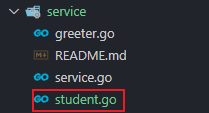
internal/service/student.go:
package service

import (

	"context"

	pb "quickstart/api/helloworld/v1"

)

type StudentService struct {

	pb.UnimplementedStudentServer

}

func NewStudentService() *StudentService {

	return &StudentService{}

}

func (s *StudentService) Createstudent(ctx context.Context, req *pb.CreateStudentRequest) (*pb.CreateStudentReply, error) {

	return &pb.CreateStudentReply{}, nil

}

func (s *StudentService) Updatestudent(ctx context.Context, req *pb.UpdateStudentRequest) (*pb.UpdateStudentReply, error) {

	return &pb.UpdateStudentReply{}, nil

}

func (s *StudentService) Deletestudent(ctx context.Context, req *pb.DeleteStudentRequest) (*pb.DeleteStudentReply, error) {

	return &pb.DeleteStudentReply{}, nil

}

func (s *StudentService) Getstudent(ctx context.Context, req *pb.GetStudentRequest) (*pb.GetStudentReply, error) {

	return &pb.GetStudentReply{}, nil

}

func (s *StudentService) Liststudent(ctx context.Context, req *pb.ListStudentRequest) (*pb.ListStudentReply, error) {

	return &pb.ListStudentReply{}, nil

}

func (s *StudentService) Hello(ctx context.Context, req *pb.HelloReq) (*pb.HelloResp, error) {

	return &pb.HelloResp{}, nil

}
看上面的代码,里面的内容是空的,需要你自己编写相应的代码逻辑。
通过上一篇文章我们知道,service 实现了 api 定义的服务,其实就是 student.proto 里定义的服务。它要把数据传输对象(比如 http request data) 传入到 internal/biz 里进行处理,它一般不会涉及业务逻辑代码。业务逻辑的组装会在 biz 里实现。
有了 service/student.go ,怎么使用?
2.5 向 wire 中注入 Service 代码
在 kratos 中,组织代码是用 wire 依赖注入的方式。
在 internal/service/service.go 文件里加上 NewStudentService:
var ProviderSet = wire.NewSet(NewGreeterService, NewStudentService)
假如我们要通过 http 来访问,那又要怎么做?对,还需要在服务端加 student 服务代码。
2.6 向server添加代码
向 internal/server/http.go,internal/server/grpc.go 添加服务代码:
在 http.go 中:
// 在函数参数中添加 student *service.StudentService

func NewHTTPServer(c *conf.Server, greeter *service.GreeterService, student *service.StudentService, logger log.Logger) *http.Server {

	... ...

	srv := http.NewServer(opts...)

	v1.RegisterGreeterHTTPServer(srv, greeter)

	v1.RegisterStudentHTTPServer(srv, student) // 在 httpserver 上注册 student

	return srv

}
在 grpc.go 中:
// 在函数参数中添加 student *service.StudentService

func NewGRPCServer(c *conf.Server, greeter *service.GreeterService, student *service.StudentService, logger log.Logger) *grpc.Server {

	... ...

	v1.RegisterGreeterServer(srv, greeter)

	v1.RegisterStudentServer(srv, student) // 在 grpcserver 上注册 student

	return srv

}
那需不需要在向 wire 注册后才能使用呢?不需要,在 internal/server/server.go 中已经有了:
var ProviderSet = wire.NewSet(NewHTTPServer, NewGRPCServer)
接下来,接受了参数,是不是要对参数进行相应处理。
顺序是:service -> biz -> data
2.7 业务逻辑 biz
先简单分析下 internal/biz/greeter.go 里的代码。
// 定义了一个 Greeter struct,主要内容就是定义 Greeter 的字段

type Greeter struct {

	Hello string

}

// 对 Greeter 定义操作接口 GreeterRepo

type GreeterRepo interface {

	Save(context.Context, *Greeter) (*Greeter, error)

	Update(context.Context, *Greeter) (*Greeter, error)

	FindByID(context.Context, int64) (*Greeter, error)

	ListByHello(context.Context, string) ([]*Greeter, error)

	ListAll(context.Context) ([]*Greeter, error)

}

// 操作加上日志

type GreeterUsecase struct {

	repo GreeterRepo

	log  *log.Helper

}

// 初始化 GreeterUsercase

func NewGreeterUsecase(repo GreeterRepo, logger log.Logger) *GreeterUsecase

// 对 Greeter 的真正操作,用到的方法都是上面 GreeterRepo 定义的

func (uc *GreeterUsecase) CreateGreeter(ctx context.Context, g *Greeter) (*Greeter, error) {

	uc.log.WithContext(ctx).Infof("CreateGreeter: %v", g.Hello)

	return uc.repo.Save(ctx, g)

}
基本步骤:1.定义 struct,里面包含字段 2.定义操作 struct 的 interface 3.给操作加上日志 4.定义真正执行操作函数
这里只定义了操作的接口 GreeterRepo interface,里面定义了常规的操作。
而操作接口里定义的操作需要到 data 里实现。
照葫芦画瓢,在 internal/biz/ 文件夹下新建文件 student.go:
1.定义 struct Student:
type Student struct {

	ID      string

	Name    string

	Sayname string

}
2.定义对 struct student 的操作接口:
type StudentRepo interface {

	Save(context.Context, *Student) (*Student, error)

	Get(context.Context, *Student) (*Student, error)

}
3.对 student 的操作加上日志:
type StudentUsercase struct {

	repo StudentRepo

	log  *log.Helper

}
4.初始化 StudentUsercase
func NewStudentUsercase(repo StudentRepo, logger log.Logger) *StudentUsercase {

	return &StudentUsercase{repo: repo, log: log.NewHelper(logger)}

}
5.编写 CreateStudent 方法,也就是一些业务逻辑编写
func (uc *StudentUsercase) CreateStudent(ctx context.Context, stu *Student) (*Student, error) {

	uc.log.WithContext(ctx).Infof("CreateStudent: %v", stu.ID)

	return uc.repo.Save(ctx, stu)

}
biz 里就是完成业务逻辑组装,数据的处理。
6.向 wire 注入 student
internal/biz/biz.go:
var ProviderSet = wire.NewSet(NewGreeterUsecase, NewStudentUsercase)
上面对 struct student 定义了操作的接口,那具体实现在哪里实现?就是在 internal/data 里实现。
2.8 持久化操作
可以仿照 2.7 小结,先看看 internal/data/greeter.go 怎么编写代码的。
greeter.go 里的具体代码就留给读者自己研究了。
下面开始编写 internal/data/student.go 代码。
1.定义持久化的 struct
type studentRepo struct {

	data *Data   // 这里 *Data 是连接数据库客户端

	log  *log.Helper

}
2.初始化 studentRepo struct
func NewStudentRepo(data *Data, logger log.Logger) biz.StudentRepo {

	return &studentRepo{

		data: data,

		log:  log.NewHelper(logger),

	}

}
3.实现接口定义的操作
在 biz/student.go 里的 StudentRepo 接口,定义了 2 个操作 Save、Get,在这里实现,
func (repo *studentRepo) Save(ctx context.Context, stu *biz.Student) (*biz.Student, error) {

	return stu, nil

}

func (repo *studentRepo) Get(ctx context.Context, stu *biz.Student) (*biz.Student, error) {

	return stu, nil

}
上面是一个实现的模板代码。
2.9 配置文件
配置文件是放在 internal/conf 文件夹中,这里放置了配置文件结构的定义文件,使用 .proto 进行配置定义,
然后通过在根目录执行 make config 命令,就可以将对应的 .pb.go 文件生成到同一目录下使用。
在初始状态下,这个 conf.proto 所定义的结构,就是 configs/config.yaml 的接口,请保持两者一致。
每次修改配置文件后,记得使用
make config命令重新生成 go 文件。
2.10 重新生成 wire_gen.go 文件
进入到 cmd/quickstart 目录,然后直接用 wire 命令重新生成 wire_gen.go 文件。
// cmd/quickstart

wire
wire 的用法可以看这篇文章:Go 依赖注入工具 wire 使用
这篇文章已经写的有点长了,接下来的一篇文章结合 gorm 进行一些简单的增加修改列表等简单的操作。
三、参考
- https://go-kratos.dev/docs/getting-started/usage kratos cli 工具使用
- https://go-kratos.dev/docs/component/api kratos api 定义
- https://cloud.google.com/endpoints/docs/grpc/transcoding http/json 转码为 gRPC
- https://go-kratos.dev/docs/guide/api-protobuf/ Protobuf 规范
- https://go-kratos.dev/docs/component/config 配置
- https://developers.google.com/protocol-buffers/docs/proto3 proto3 文档
- https://colobu.com/2017/03/16/Protobuf3-language-guide/ Protobuf3 语法指南(中译)
Go微服务框架go-kratos实战02:proto 代码生成和编码实现步骤的更多相关文章
- go微服务框架kratos学习笔记十(熔断器)
目录 go微服务框架kratos学习笔记十(熔断器) 什么是熔断 熔断器逻辑 kratos Breaker kratos 熔断逻辑 kratos熔断器使用说明 bladmaster client br ...
- kratos微服务框架学习笔记一(kratos-demo)
目录 kratos微服务框架学习笔记一(kratos-demo) kratos本体 demo kratos微服务框架学习笔记一(kratos-demo) 今年大部分时间飘过去了,没怎么更博和githu ...
- 手把手0基础项目实战(一)——教你搭建一套可自动化构建的微服务框架(SpringBoot+Dubbo+Docker+Jenkins)...
原文:手把手0基础项目实战(一)--教你搭建一套可自动化构建的微服务框架(SpringBoot+Dubbo+Docker+Jenkins)... 本文你将学到什么? 本文将以原理+实战的方式,首先对& ...
- go微服务框架kratos学习笔记五(kratos 配置中心 paladin config sdk [断剑重铸之日,骑士归来之时])
目录 go微服务框架kratos学习笔记五(kratos 配置中心 paladin config sdk [断剑重铸之日,骑士归来之时]) 静态配置 flag注入 在线热加载配置 远程配置中心 go微 ...
- # go微服务框架kratos学习笔记六(kratos 服务发现 discovery)
目录 go微服务框架kratos学习笔记六(kratos 服务发现 discovery) http api register 服务注册 fetch 获取实例 fetchs 批量获取实例 polls 批 ...
- go微服务框架kratos学习笔记七(kratos warden 负载均衡 balancer)
目录 go微服务框架kratos学习笔记七(kratos warden 负载均衡 balancer) demo demo server demo client 池 dao service p2c ro ...
- go微服务框架kratos学习笔记四(kratos warden-quickstart warden-direct方式client调用)
目录 go微服务框架kratos学习笔记四(kratos warden-quickstart warden-direct方式client调用) warden direct demo-server gr ...
- go微服务框架kratos学习笔记八 (kratos的依赖注入)
目录 go微服务框架kratos学习笔记八(kratos的依赖注入) 什么是依赖注入 google wire kratos中的wire Providers injector(注入器) Binding ...
- go微服务框架kratos学习笔记九(kratos 全链路追踪 zipkin)
目录 go微服务框架kratos学习笔记九(kratos 全链路追踪 zipkin) zipkin使用demo 数据持久化 go微服务框架kratos学习笔记九(kratos 全链路追踪 zipkin ...
随机推荐
- ES6-11学习笔记--const
新声明方式:const 1.不属于顶层对象 window 2.不允许重复声明 3.不存在变量提升 4.暂时性死区 5.块级作用域 以上特性跟let声明一样,特性可看 let 的学习笔记:链接跳转 ...
- 世界各国 MCC 和 MNC 列表
http://www.cnblogs.com/inteliot/archive/2012/08/22/2651666.html常见MCC:代码(MCC) ISO 3166-1 国家202 ...
- ubantu系统之 在桌面添加应用快捷方式
1. 首先在终端使用命令:sudo nautilus 这个命令会让你用root权限打开文件管理器,输入这个命令然后输入密码确认之后会弹出一个目录窗口;2. 然后我们就要找到目录:/usr/share/ ...
- 前端如何通过js判断浏览器的类型(忽略版本)web html css javascript
每个页面浏览器会实例出一个window对象,在window对象下有一个属性navigator,navigator本身是一个对象,navigator对象上有一个属性userAgent里面包含了当前浏览器 ...
- 帝国CMS随机调用栏目
[e:loop={'select * from [!db.pre!]enewsclass where bclassid in(1) order by rand() desc limit 10',10, ...
- java_类的访问控制符
1.分类: public protected default private是java中的访问控制修饰符. public String name; protected String name; Str ...
- Protoc安装
系统:linux 记住,千万别混乱版本,一般protoc可执行文件在/usr/local/bin/或/usr/bin/下 个人这里使用3.13版本示例,下面两部分命令可以写入shell脚本,记住执行要 ...
- InnoDB两次写
partial page write问题: 默认情况下,innodb的一个页面时16k大小,其数据校验也是针对这16k来校验的,将数据写入磁盘是以页面为单位的.文件系统是以4k为单位写入的,机械磁盘是 ...
- Elasticsearch 索引策略
Elasticsearch 7.6 索引生命周期 es的生命周期就对应了索引的策略,比如我们在使用elk的时候,由于数据量较大,时间比较久远的数据就没有那么有价值了,因此就需要定期的清除这些历史数据, ...
- 关于Swagger优化
背景 尽管.net6已经发布很久了,但是公司的项目由于种种原因依旧基于.net Framework.伴随着版本迭代,后端的api接口不断增多,每次在联调的时候,前端开发叫苦不迭:"小胖,你们 ...