
gridgroup行内编辑删除
 Ext.define('Task', {

     extend: 'Ext.data.Model',

     idProperty: 'taskId',

     fields: [

         { name: 'projectId', type: 'string' },

         { name: 'project', type: 'string' },

         { name: 'taskId', type: 'string' },

         { name: 'description', type: 'string' },

         { name: 'estimate', type: 'string' },

         { name: 'rate', type: 'string' },

         { name: 'cost', type: 'string' },

         { name: 'due', type: 'string' }

     ]

 });

 var data = [

     { projectId: 100, project: 'Ext Forms: Field Anchoring', taskId: 112, description: 'Integrate 2.0 Forms with 2.0 Layouts', estimate: 6, rate: 150, due: '06/24/2007' },

     { projectId: 100, project: 'Ext Forms: Field Anchoring', taskId: 113, description: 'Implement AnchorLayout', estimate: 4, rate: 150, due: '06/25/2007' },

     { projectId: 100, project: 'Ext Forms: Field Anchoring', taskId: 115, description: 'Testing and debugging', estimate: 8, rate: 0, due: '06/29/2007' },

     { projectId: 101, project: 'Ext Grid: Single-level Grouping', taskId: 101, description: 'Add required rendering "hooks" to GridView', estimate: 6, rate: 100, due: '07/01/2007' },

     { projectId: 101, project: 'Ext Grid: Single-level Grouping', taskId: 103, description: 'Extend Store with grouping functionality', estimate: 4, rate: 100, due: '07/04/2007' },

     { projectId: 101, project: 'Ext Grid: Single-level Grouping', taskId: 121, description: 'Default CSS Styling', estimate: 2, rate: 100, due: '07/05/2007' },

     { projectId: 102, project: 'Ext Grid: Summary Rows', taskId: 108, description: 'Remote summary integration', estimate: 4, rate: 125, due: '07/05/2007' },

     { projectId: 102, project: 'Ext Grid: Summary Rows', taskId: 110, description: 'Integrate summaries with GroupingView', estimate: 10, rate: 125, due: '07/11/2007' },

     { projectId: 102, project: 'Ext Grid: Summary Rows', taskId: 111, description: 'Testing and debugging', estimate: 8, rate: 125, due: '07/15/2007' }

 ];

 Ext.onReady(function () {

     Ext.tip.QuickTipManager.init();

     var store = Ext.create('Ext.data.Store', {

         model: 'Task',

         data: data,

         groupField: 'project'

     });

     var cellEditing123 = Ext.create('Ext.grid.plugin.CellEditing', {

         clicksToEdit: 2,//行内编辑 双击

         clicksToMoveEditor: 1,//点击编辑按钮编辑

         autoCancel: false

     });

     var showSummary = true;

     var grid = Ext.create('Ext.grid.Panel', {

         width: 900,

         height: 450,

         frame: true,

         title: 'Sponsored Projects',

         iconCls: 'icon-grid',

         renderTo: document.body,

         store: store,

         plugins: [cellEditing123],

         //dockedItems: [{

         //    dock: 'top',

         //    xtype: 'toolbar',

         //    items: [{

         //        tooltip: 'Toggle the visibility of the summary row',

         //        text: 'Toggle Summary',

         //        enableToggle: true,

         //        pressed: true,

         //        handler: function () {

         //            var view = grid.getView();

         //            showSummary = !showSummary;

         //            view.getFeature('group').toggleSummaryRow(showSummary);

         //            view.refresh();

         //        }

         //    }]

         //}],

         features: [{

             id: 'group',

             ftype: 'groupingsummary',

             groupHeaderTpl: '{name}',

             hideGroupedHeader: true,

             enableGroupingMenu: false

         }],

         columns: [ {

             header: 'Due Date',

             width: 280,

             sortable: false,

             dataIndex: 'due',

             menuDisabled: true,

             editor: {

                 allowBlank: true

             }

         }, {

             header: 'Project',

             width: 180,

             sortable: false,

             menuDisabled: true,

             dataIndex: 'project'

         },  {

             header: 'Estimate',

             width: 275,

             sortable: false,

             dataIndex: 'estimate',

             menuDisabled: true,

             editor: {

                 allowBlank: true

             }

         },

             {

                 xtype: 'actioncolumn',

                 width: 30,

                 sortable: false,

                 menuDisabled: true,

                 items: [{

                     icon: '../../../lib/Ext/img/edit.gif',

                     tooltip: '编辑',

                     scope: this,

                     handler: function (grid, rowIndex) {

                         cellEditing123.cancelEdit();

                         cellEditing123.startEdit(rowIndex, 0);

                     }

                 }]

             },

             {

                 xtype: 'actioncolumn',

                 width: 30,

                 sortable: false,

                 menuDisabled: true,

                 items: [{

                     icon: '../../../lib/Ext/img/delete.gif',

                     tooltip: '删除',

                     scope: this,

                     handler: function (grid, rowIndex) {

                         Ext.MessageBox.confirm('Confirm', '确定删除该记录?', function (btn) {

                             if (btn != 'yes') {

                                 return;

                             }

                             var SelectionModel = grid.getSelectionModel();

                             SelectionModel.select(rowIndex);

                             var store = grid.getStore();

                             store.remove(SelectionModel.getSelection());

                         })

                     }

                 }]

             }]

     });

 });
效果: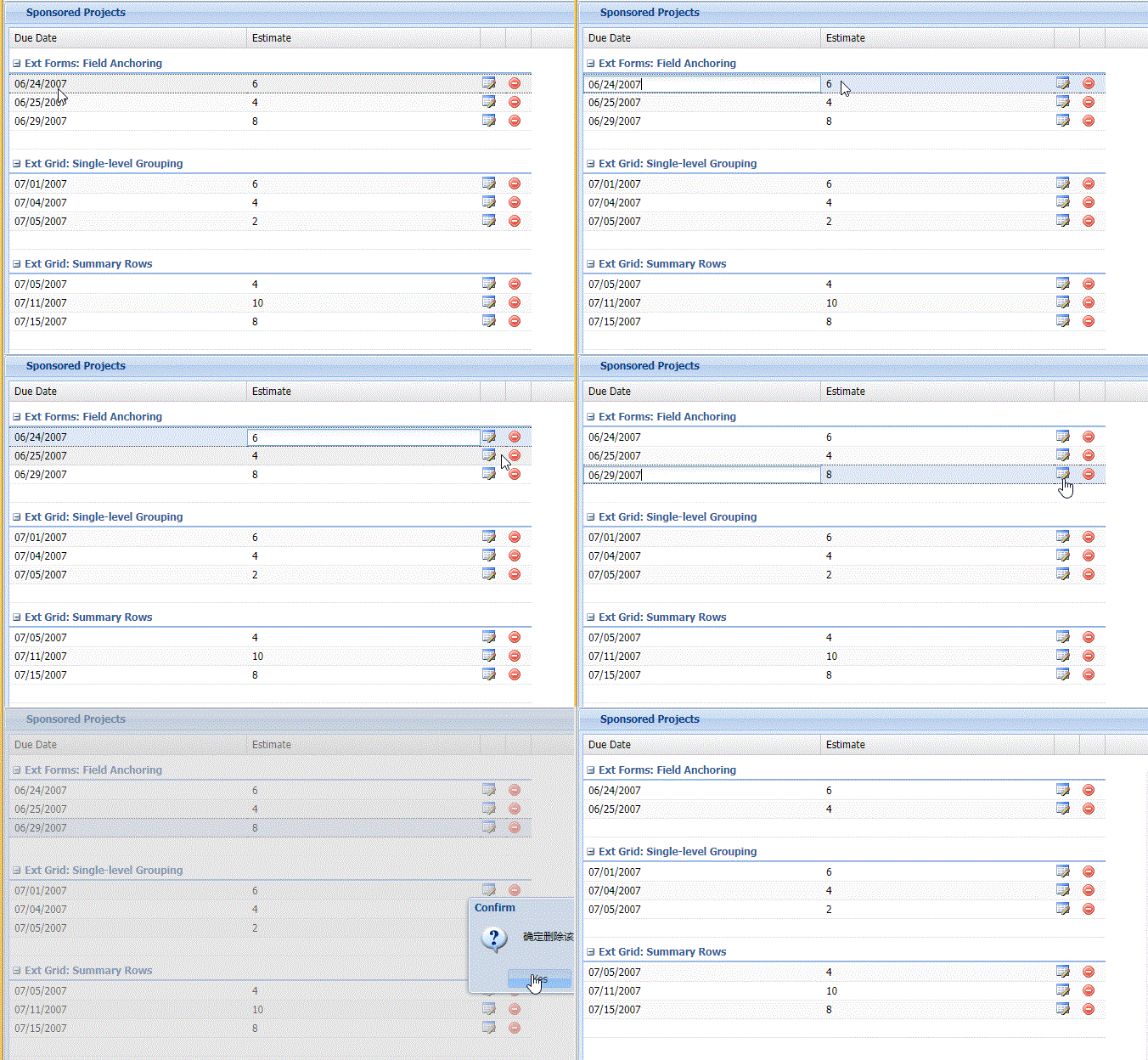
gridgroup行内编辑删除的更多相关文章
- 第一节:EasyUI样式,行内编辑,基础知识
一丶常用属性 $('#j_dg_left').datagrid({ url: '/Stu_Areas/Stu/GradeList', fit: true, // 自动适应父容器大小 singleSel ...
- bootstrap editable 行内编辑
除了那些bootstrap/bootstrap table的js , css之外,要额外添加editable的文件: <link href="../assets/css/bootstr ...
- Django项目:CRM(客户关系管理系统)--69--59PerfectCRM实现king_admin行内编辑
#base_admin.py # ————————24PerfectCRM实现King_admin自定义操作数据———————— from django.shortcuts import render ...
- ASP.NET Aries 入门开发教程6:列表数据表格的格式化处理及行内编辑
前言: 为了赶进度,周末也写文了! 前几篇讲完查询框和工具栏,这节讲表格数据相关的操作. 先看一下列表: 接下来我们有很多事情可以做. 1:格式化 - 键值的翻译 对于“启用”列,已经配置了格式化 # ...
- JS组件系列——BootstrapTable 行内编辑解决方案:x-editable
前言:之前介绍bootstrapTable组件的时候有提到它的行内编辑功能,只不过为了展示功能,将此一笔带过了,罪过罪过!最近项目里面还是打算将行内编辑用起来,于是再次研究了下x-editable组件 ...
- jQuery EasyUI 数据网格 - 启用行内编辑(转自http://www.runoob.com/jeasyui/jeasyui-datagrid-datagrid12.html)
可编辑的功能是最近添加到数据网格(datagrid)的.它可以使用户添加一个新行到数据网格(datagrid).用户也可以更新一个或多个行.本教程向您展示如何创建一个数据网格(datagrid)和内联 ...
- ASP.NET MVC5+EF6+EasyUI 后台管理系统(83)-Easyui Datagrid 行内编辑扩展
这次我们要从复杂的交互入手来说明一些用法,这才能让系统做出更加复杂的业务,上一节讲述了Datagird的批量编辑和提交本节主要演示扩展Datagrid行内编辑的属性,下面来看一个例子,我开启编辑行的时 ...
- Dynamics 365新功能:可编辑的网格(行内编辑)
关注本人微信和易信公众号: 微软动态CRM专家罗勇 ,回复238或者20161127可方便获取本文,同时可以在第一间得到我发布的最新的博文信息,follow me!我的网站是 www.luoyong. ...
- bootstrap-editable实现bootstrap-table行内编辑
bootstrap-editable行内编辑效果如下: 需要引入插件 列初始化代码,为可编辑的列添加editable属性: columns = [ { title: '文件名', field: 'Na ...
随机推荐
- Swing:LookAndFeel 教程第一篇——手把手教你写出自己的 LookAndFeel
本文是 LookAndFeel 系列教程的第一篇. 是我在对 Swing 学习摸索中的一些微薄经验. 我相信,细致看全然系列之后.你就能写出自己的 LookAndFeel. 你会发现 Swing 原来 ...
- 配置composer全量镜像与主要命令
配置中国全量镜像 查看当前composer配置的镜像地址 composer config -g repo.packagist 显示如下,显示说明没有配置镜像地址 接下来我使用下面的命令进行查看配置的镜 ...
- Agent是什么
广义的Agent包括人类.物理世界的机器人和信息世界的软件机器人. 狭义的Agent专指信息世界中的软件机器人或称软件Agent. 1) 弱定义 Agent用来最一般地说明一个软硬件系统,具有四个特性 ...
- JAVA加解密 -- Base64加解密
Base64算法实现:可以将任意的字节数组数据,通过算法,生成只有(大小写英文.数字.+./)(一共64个字符)内容表示的字符串数据. private static final String str ...
- Android自己定义(三)实现圆盘的百分比设置
近期一直在学习自己定义控件,昨天看到群里有人问怎样怎样实现圆盘样式的显示,学有所用,于是乎就有了这篇博客 先上图,一目了然 这里的显示颜色以及颜色块的大小你都能够自己设置 这里设置了三种颜色,相应三种 ...
- 说说C#的数学类,Math,浮点数(上)
说说C#的数学类,Math,浮点数 C#语言支持下图所看到的的数值类型,各自是整数,浮点数和小数 可能不是非常清楚,可是细致看看还是能看清楚的. 在一个C#程序中,整数(没有小数点的数)被觉得是一个i ...
- MYSQL版查询分页存储过程
/*--名称:MYSQL版查询分页存储过程 --输入参数:@fields -- 要查询的字段用逗号隔开--输入参数:@tables -- 要查询的表--输入参数:@where -- 查询条件--输入参 ...
- MVC项目中怎样用JS导出EasyUI DataGrid为Excel
在做一中考评项目的时候,遇到了这么一个需求.就是把评教后得到的老师的成绩导出为Excel.事实上需求非常普通.实现起来有些复杂.由于老师考评不但有固定的考核项,还有额外加分项.于是我们就抽出来了一个表 ...
- Android源代码解析之(四)-->HandlerThread
转载请标明出处:一片枫叶的专栏 上一篇文章中我们解说了AsyncTast的基本使用以及实现原理,我们知道AsyncTask内部是通过线程池和Handler实现的.通过对线程池和handler的封装实现 ...
- 也谈隐藏盘符等windows 的管理员的策略实现
网上的文章都知道在HKEY_LOCAL_MACHINE\SOFTWARE\Microsoft\Windows\CurrentVersion\Policies\Explorer 文件夹下有控制隐藏驱动器 ...