
lucene&solr学习——solr学习(二) Solr管理索引库
1.什么是solrJ
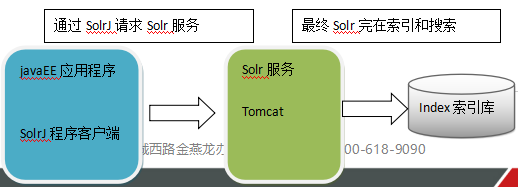
solrj是访问Solr服务的java客户端,提供索引和搜索的请求方法,SolrJ通常在嵌入在业务系统中,通过SolrJ的API接口操作Solr服务,如下图:
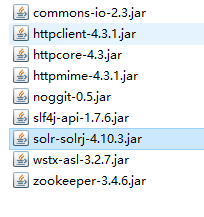
依赖jar包:
2.用solrJ对solr后台进行增删改查
2.1 添加文档
//向索引库中添加索引

    @Test

    public void addDocument() throws Exception {

        //和solr服务器创建连接

        //参数:solr服务器的地址

        SolrServer solrServer = new HttpSolrServer("http://localhost:8080/solr");

        //创建一个文档对象

        SolrInputDocument document = new SolrInputDocument();

        //向文档中添加域

        //第一个参数:域的名称,域的名称必须是在schema.xml中定义的

        //第二个参数:域的值

        document.addField("id", "c0001");

        document.addField("title_ik", "使用solrJ添加的文档");

        document.addField("content_ik", "文档的内容");

        document.addField("product_name", "商品名称");

        //把document对象添加到索引库中

        solrServer.add(document);

        //提交修改

        solrServer.commit();

    }
2.2删除文档
//删除文档,根据id删除

    @Test

    public void deleteDocumentByid() throws Exception {

        //创建连接

        SolrServer solrServer = new HttpSolrServer("http://localhost:8080/solr");

        //根据id删除文档

        solrServer.deleteById("c0001");

        //提交修改

        solrServer.commit();

    }
//根据查询条件删除文档

    @Test

    public void deleteDocumentByQuery() throws Exception {

        //创建连接

        SolrServer solrServer = new HttpSolrServer("http://localhost:8080/solr");

        //根据查询条件删除文档

        solrServer.deleteByQuery("*:*");

        //提交修改

        solrServer.commit();

    }
2.3 修改文档
在solrJ中修改没有对应的update方法,只有add方法,只需要添加一条新的文档,和被修改的文档id一致就,可以修改了。本质上就是先删除后添加。
2.4 查询文档
2.4.1 简单查询
//查询索引

    @Test

    public void queryIndex() throws Exception {

        //创建连接

        SolrServer solrServer = new HttpSolrServer("http://localhost:8080/solr");

        //创建一个query对象

        SolrQuery query = new SolrQuery();

        //设置查询条件

        query.setQuery("*:*");

        //执行查询

        QueryResponse queryResponse = solrServer.query(query);

        //取查询结果

        SolrDocumentList solrDocumentList = queryResponse.getResults();

        //共查询到商品数量

        System.out.println("共查询到商品数量:" + solrDocumentList.getNumFound());

        //遍历查询的结果

        for (SolrDocument solrDocument : solrDocumentList) {

            System.out.println(solrDocument.get("id"));

            System.out.println(solrDocument.get("product_name"));

            System.out.println(solrDocument.get("product_price"));

            System.out.println(solrDocument.get("product_catalog_name"));

            System.out.println(solrDocument.get("product_picture"));

        }

    }
2.4.2 复杂查询
//复杂查询索引

    @Test

    public void queryIndex2() throws Exception {

        //创建连接

        SolrServer solrServer = new HttpSolrServer("http://localhost:8080/solr");

        //创建一个query对象

        SolrQuery query = new SolrQuery();

        //设置查询条件

        query.setQuery("钻石");

        //过滤条件

        query.setFilterQueries("product_catalog_name:幽默杂货");

        //排序条件

        query.setSort("product_price", ORDER.asc);

        //分页处理

        query.setStart(0);

        query.setRows(10);

        //结果中域的列表

        query.setFields("id","product_name","product_price","product_catalog_name","product_picture");

        //设置默认搜索域

        query.set("df", "product_keywords");

        //高亮显示

        query.setHighlight(true);

        //高亮显示的域

        query.addHighlightField("product_name");

        //高亮显示的前缀

        query.setHighlightSimplePre("<em>");

        //高亮显示的后缀

        query.setHighlightSimplePost("</em>");

        //执行查询

        QueryResponse queryResponse = solrServer.query(query);

        //取查询结果

        SolrDocumentList solrDocumentList = queryResponse.getResults();

        //共查询到商品数量

        System.out.println("共查询到商品数量:" + solrDocumentList.getNumFound());

        //遍历查询的结果

        for (SolrDocument solrDocument : solrDocumentList) {

            System.out.println(solrDocument.get("id"));

            //取高亮显示

            String productName = "";

            Map<String, Map<String, List<String>>> highlighting = queryResponse.getHighlighting();

            List<String> list = highlighting.get(solrDocument.get("id")).get("product_name");

            //判断是否有高亮内容

            if (null != list) {

                productName = list.get(0);

            } else {

                productName = (String) solrDocument.get("product_name");

            }

            System.out.println(productName);

            System.out.println(solrDocument.get("product_price"));

            System.out.println(solrDocument.get("product_catalog_name"));

            System.out.println(solrDocument.get("product_picture"));

        }

    }
lucene&solr学习——solr学习(二) Solr管理索引库的更多相关文章
- JAVAEE——Solr:安装及配置、后台管理索引库、 使用SolrJ管理索引库、仿京东的电商搜索案例实现
1 学习回顾 1. Lucene 是Apache开源的全文检索的工具包 创建索引 查询索引 2. 遇到问题? 文件名 及文件内容 顺序扫描法 全文检索 3. 什么是全文检索? 这种先创建索引 再 ...
- solrj管理索引库
solrj管理索引库 1.1. 什么是solrJ solrj是访问Solr服务的java客户端,提供索引和搜索的请求方法,SolrJ通常在嵌入在业务系统中,通过SolrJ的API接口操作Solr服务, ...
- Solr学习笔记(3) —— SolrJ管理索引库&集群
一.什么是SolrJ solrj是访问Solr服务的java客户端,提供索引和搜索的请求方法,SolrJ通常嵌入在业务系统中,通过SolrJ的API接口操作Solr服务,如下图: 二.SolrJ的基本 ...
- Solr学习笔记(2) —— Solr管理索引库
一.维护索引 1.1 添加/更新文档 1.2 批量导入数据(使用dataimport) 第一步:把mysql的数据驱动.以及dataimport插件依赖的jar包添加到solrcore(collect ...
- Solr管理索引库——(十三)
a) 维护索引 1. 添加/更新文档 添加或更新单个文档
- solr6.1-----solrJ 程序管理索引库
solrJ 是solr 提供的一个客户端,就是一个jar 包,把jar 添加到工程中整合solr 服务. 所需jar 包 D:\solr-6.1.0\dist 下面的 solr-solrj-6.1.0 ...
- Lucene第二篇【抽取工具类、索引库优化、分词器、高亮、摘要、排序、多条件搜索】
对Lucene代码优化 我们再次看回我们上一篇快速入门写过的代码,我来截取一些有代表性的: 以下代码在把数据填充到索引库,和从索引库查询数据的时候,都出现了.是重复代码! Directory dire ...
- 第一个lucene程序,把一个信息写入到索引库中、根据关键词把对象从索引库中提取出来、lucene读写过程分析
新建一个Java Project :LuceneTest 准备lucene的jar包,要加入的jar包至少有: 1)lucene-core-3.1.0.jar (核心包) 2) lucene- ...
- Windows系统环境下Solr之Java实战(三)使用solrJ管理索引库
https://www.cnblogs.com/zhuxiaojie/p/5764680.html https://www.cnblogs.com/xieyupeng/p/9317158.html
随机推荐
- this,super,和继承
this是指当前对象的引用,super是指直接父类的引用 比如 我建造一个类 public class Person(){ private String name; private int age; ...
- Android模拟器访问本机服务器
Android模拟器访问本机服务器,用127.0.0.1访问不到,因为127.0.0.1已经被映射到模拟器了. 可以用以下两种方式访问 1. 用 10.0.2.2 2. 直接用 本机的IP地址,如:1 ...
- NSTimer_Block封装定时器的target-action成Block回调
前言 定时器NSTimer虽然简单易用,但是目标响应机制(target-action)这种方式很容易在代码中出现代码臃肿的情况,特别是在一个文件中有大量的代码,多个定时器的时候不方便调试,因此将NST ...
- URAL —— 1255 & HDU 5100——Chessboard ——————【数学规律】
用 k × 1 的矩形覆盖 n × n 的正方形棋盘 用 k × 1 的小矩形覆盖一个 n × n 的正方形棋盘,往往不能实现完全覆盖(比如,有时候 n × n 甚至根本就不是 k 的整倍数). 解题 ...
- 【Linux】Linux系统启动过程
1.Linux系统的启动过程并不是大家想象中的那么复杂,其过程可以分为5个阶段: 内核的引导. 运行 init. 系统初始化. 建立终端 . 用户登录系统. 1.Linux系统的启动过程并不是大家想象 ...
- 2、弹出窗口 Alert
1.只是弹出框 /* --- page1.html ---*/ <ion-navbar *navbar> <ion-title>Tab 1</ion-title> ...
- React.js学习小结
最近一段时间都在学习React.js,感觉还不错,现在把自己的一些学习笔记记录一下,留着以后学习查看. 0.React全家桶(技术栈) 1.React主体 2.WebPack:grunt.gulp自动 ...
- MarkDown 语言简单使用
# Markdown file ![alt img is error](http://cdn2.jianshu.io/assets/web/logo-58fd04f6f0de908401aa561cd ...
- scss-@extend
@extend指令用于共享规则和选择器之间的关系.它可以扩展所有其他类的样式在一个类中,也可应用于自己特定的样式. 查看如下scss@extend示例: .style{ font-size: 30px ...
- scss-字符串连接符
+ 运算可用于连接字符串: // SCSS p { cursor: e + -resize; } // 编译后的 CSS 样式 p { cursor: e-resize; } 请注意,如果带引号的字符 ...