
solr6.1-----solrJ 程序管理索引库
solrJ 是solr 提供的一个客户端,就是一个jar 包,把jar 添加到工程中整合solr 服务。
所需jar 包
D:\solr-6.1.0\dist 下面的 solr-solrj-6.1.0.jar,以及其依赖 D:\solr-6.1.0\dist\solrj-lib 文件夹下面的所有jar
创建工程添加jar 包
添加 solr 库索引
	@Test

	public void create() throws Exception{

		System.out.println("======================create===============");

		@SuppressWarnings({ "resource", "deprecation" })

		SolrClient solrClient = new HttpSolrClient("http://127.0.0.1:9090/solr/collection1");

		List<SolrInputDocument> docList = new ArrayList<SolrInputDocument>();

		String[] titles = {

				"chihirotj",

                "chihirotj",

                "CAS latency",

                "CAS latency",

                "CAS latency",

                "CAS latency chihirotj"};

		String[] contents = {

				"chihirotj this a vear popular book",

                "chihirotj i love you dlp",

                "CAS latency a a a a a a a",

                "CAS latency you ara bearuiflu",

                "CAS latency i love this computer",

                "CAS latency hao are you"};

		int i = 100;

        for(int j = 0; j <= 5; j ++){

            SolrInputDocument doc = new SolrInputDocument();

            doc.addField("id",i++);

            //需要在core1/conf/managed-schema中有对应的field

            //在solr 6.1 版本中已经不需要了,会自己动态的创建域,类型为strings

            doc.addField("title", titles[j]);

            doc.addField("content", contents[j]);

            docList.add(doc);

        }

        UpdateResponse rsp = solrClient.add(docList);

        System.out.println("Add doc size" + docList.size() + " result:" + rsp.getStatus() + " Qtime:" + rsp.getQTime());

        UpdateResponse rspcommit = solrClient.commit();

        System.out.println("commit doc to index" + " result:" + rsp.getStatus() + " Qtime:" + rspcommit.getQTime());

	}
之后在 管理员页面查询数据:点击query 能够查询出,刚刚添加的数据,则添加数据成功。
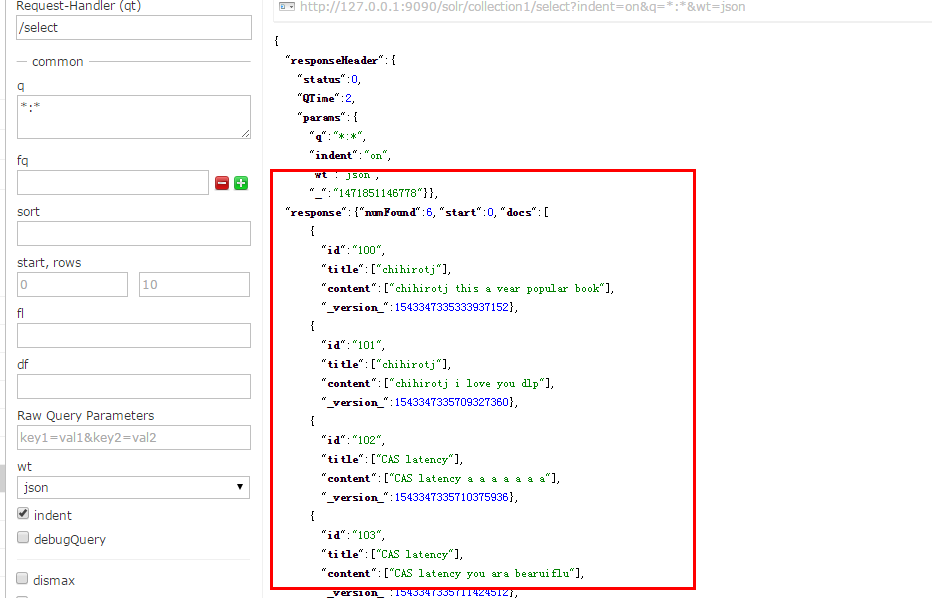
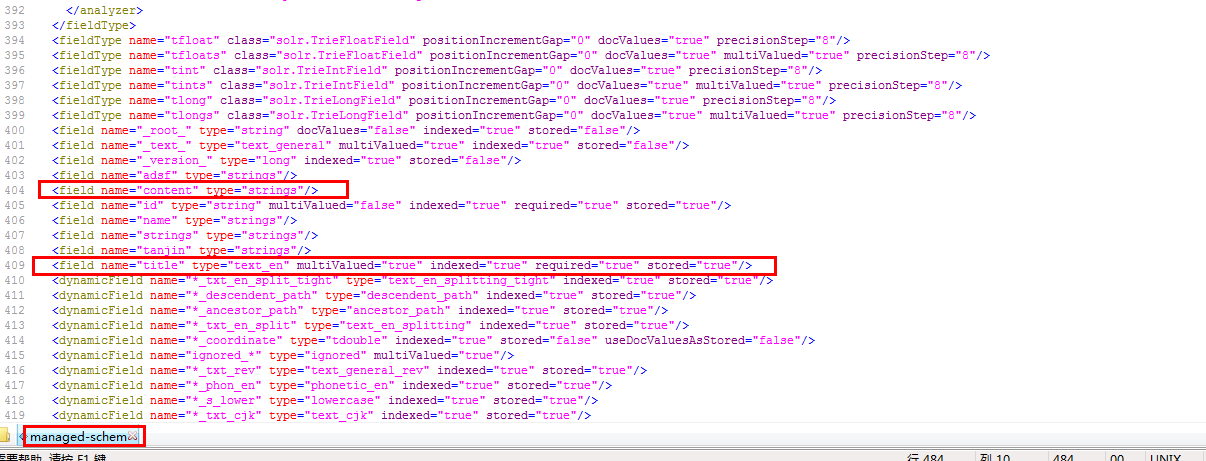
默认添加的域为 strings 类型。我们需要修改类型,使用能够解析字符串的分词器(title 域lz已经做了修改)
查询 solr 索引库
	@Test

    public void query(){

		System.out.println("======================query===================");

    	SolrClient solrClient = new HttpSolrClient("http://127.0.0.1:9090/solr/collection1");

        SolrQuery query = new SolrQuery();

        //查询条件

        query.setQuery("chihirotj");

        //高亮字段

        query.setParam("hl.fl", "title");

        //开启高亮

        query.setHighlight(true);

        //返回的字符个数

        query.setHighlightFragsize(200);

        //是否需要完全匹配

        //query.setHighlightRequireFieldMatch(true);

        //前缀

        query.setHighlightSimplePre("<em>");

        //后缀

        query.setHighlightSimplePost("</em>");

        QueryResponse response = null;

        try {

            response = solrClient.query(query);

            System.out.println(response.toString());

            System.out.println();

            SolrDocumentList docs = response.getResults();

            Map<String, Map<String, List<String>>>  maps = response.getHighlighting();

            System.out.println("文档个数:" + docs.getNumFound());

            System.out.println("查询时间:" + response.getQTime());

            for (SolrDocument doc : docs) {

            	//配置分词后

                System.out.println("id: " + doc.getFieldValue("id") + " title: " + doc.getFieldValue("title"));

            }

            for (Map<String, List<String>> map : maps.values()) {

            	List<String> title = map.get("title");

            	//高量的值

				System.out.println(title.iterator().next());

			}

        } catch (Exception e) {

            e.printStackTrace();

        }

    }
运行结果:

删除 索引库
   @Test

    public void deleteById() {

        System.out.println("======================deleteById ===================");

        SolrClient solrClient = new HttpSolrClient("http://127.0.0.1:9090/solr/collection1");

        try {

    		String[] ids = {"1", "2", "4"};

    		for (String id : ids) {

    			UpdateResponse rsp = solrClient.deleteById(id);

    			System.out.println("delete id:" + id + " result:" + rsp.getStatus() + " Qtime:" + rsp.getQTime());

			}

    		solrClient.commit();

        } catch (SolrServerException | IOException e) {

            e.printStackTrace();

        }

    }
参考:
http://www.cnblogs.com/feiye512/p/5630684.html
http://lucene.apache.org/solr/6_1_0/solr-solrj/org/apache/solr/client/solrj/SolrClient.html
solr6.1-----solrJ 程序管理索引库的更多相关文章
- JAVAEE——Solr:安装及配置、后台管理索引库、 使用SolrJ管理索引库、仿京东的电商搜索案例实现
1 学习回顾 1. Lucene 是Apache开源的全文检索的工具包 创建索引 查询索引 2. 遇到问题? 文件名 及文件内容 顺序扫描法 全文检索 3. 什么是全文检索? 这种先创建索引 再 ...
- solrj管理索引库
solrj管理索引库 1.1. 什么是solrJ solrj是访问Solr服务的java客户端,提供索引和搜索的请求方法,SolrJ通常在嵌入在业务系统中,通过SolrJ的API接口操作Solr服务, ...
- (转)淘淘商城系列——使用solrj来测试索引库
http://blog.csdn.net/yerenyuan_pku/article/details/72892280 我们使用solrj来操作索引库,一般习惯先建一个单元测试类测试下增删改查方法是否 ...
- Solr学习笔记(3) —— SolrJ管理索引库&集群
一.什么是SolrJ solrj是访问Solr服务的java客户端,提供索引和搜索的请求方法,SolrJ通常嵌入在业务系统中,通过SolrJ的API接口操作Solr服务,如下图: 二.SolrJ的基本 ...
- 使用solrj操作solr索引库
(solrj)初次使用solr的开发人员总是很郁闷,不知道如何去操作solr索引库,以为只能用<五分钟solr4.5教程(搭建.运行)>中讲到的用xml文件的形式提交数据到索引库,其实没有 ...
- 使用solrj操作solr索引库,solr是lucene服务器
客户端开发 Solrj 客户端开发 Solrj Solr是搭建好的lucene服务器 当然不可能完全满足一般的业务需求 可能 要针对各种的架构和业务调整 这里就需要用到Solrj了 Solrj是Sol ...
- lucene&solr学习——solr学习(二) Solr管理索引库
1.什么是solrJ solrj是访问Solr服务的java客户端,提供索引和搜索的请求方法,SolrJ通常在嵌入在业务系统中,通过SolrJ的API接口操作Solr服务,如下图: 依赖jar包: 2 ...
- Solr管理索引库——(十三)
a) 维护索引 1. 添加/更新文档 添加或更新单个文档
- Windows系统环境下Solr之Java实战(三)使用solrJ管理索引库
https://www.cnblogs.com/zhuxiaojie/p/5764680.html https://www.cnblogs.com/xieyupeng/p/9317158.html
随机推荐
- oracle mini project
oracle pl/sql mini project 1.解一元二次方程 (x2+4x+3=0) set serveroutput on declare a number ; b number; c ...
- PHP扩展——C扩展实现滚动记录日志
前言 万事开头难,没错就是这样!! 在没有真正开发PHP扩展之前,一直觉得PHP扩展开发对我来说是一个很遥远的事情,虽然自己有些C\C++基础,但是看PHP源码的时候还是很吃力,现在看来主要还是没有下 ...
- 基本概率分布Basic Concept of Probability Distributions 5: Hypergemometric Distribution
PDF version PMF Suppose that a sample of size $n$ is to be chosen randomly (without replacement) fro ...
- Beta版本——第三次冲刺博客
我说的都队 031402304 陈燊 031402342 许玲玲 031402337 胡心颖 03140241 王婷婷 031402203 陈齐民 031402209 黄伟炜 031402233 郑扬 ...
- Processing Images
https://developer.apple.com/library/content/documentation/GraphicsImaging/Conceptual/CoreImaging/ci_ ...
- SQL Server 2012 启动
1. 启动 SQL Server Management studio 2. 选择登录模式 Server name: "." 代表本地的数据库 Authertication: ...
- windows系统下安装MySQL
可以运行在本地windows版本的MySQL数据库程 序自从3.21版以后已经可以从MySQL AB公司获得,而且 MYSQL每日的下载百分比非常大.这部分描述在windows上安装MySQL的过程. ...
- easyUI-combotree的本地数据导入
一.页面内容: <div style="margin:10px 0"> <a href="javascript:void(0)" class= ...
- oc必须知道的知识点
id数据类型 1.通用的指针类型 2.没有*号 3.使用id类型时,不能给对象的属性或成员变量进行赋值 4.可以对其发送任何(存在的)消息 import与@class的区别 1.import会包含 ...
- Runner站立会议07
开会时间:21.10~21.30 地点:基教负一 今天做了什么:看网上下载的日历代码 明天准备做什么:继续看代码 遇到的困难:下载的代码有很多看不懂的地方,很多包.函数等都不知道 会议图: 燃尽图: