
【Netty】Netty之Bootstrapping
一、前言
前面已经学习了Netty的EventLoop以及线程模型,接着学习Netty的Bootstrapping。
二、Bootstrapping
在学习了Netty中的很多组件后,如何将这些组件有效的组合至应用程序中,这需要使用应用引导程序,引导应用程序是将其配置为运行的过程,Netty以一种绝对应用程序的方式处理引导。
2.1 Bootstrap类
Bootstrap类的继承结构图如下图所示。
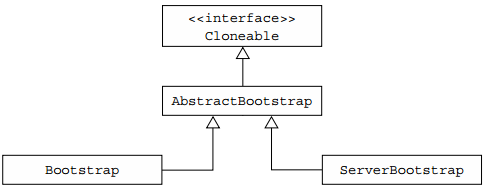
一个服务器使用一个父通道来接受来自客户端的连接并创建子通道来与它们进行通信,而一个客户端很可能只需要一个非父通道来进行所有的网络交互,而前面讨论的组件会参与引导过程,有些在客户端和服务端都会被使用。两个应用程序类型共同的引导步骤由AbstractBootstrap处理,而特定于客户端或服务器的引导步骤分别由Bootstrap或ServerBootstrap处理。
为何Bootstrap为Cloneable?因为有时需要创建具有类似或相同设置的多个通道,为了支持此模式,不需要为每个通道创建和配置新的引导实例,因此将AbstractBootstrap标记为Cloneable,在已配置的引导程序上调用clone()方法将返回可立即使用的另一个引导实例,这只会创建引导程序的EventLoopGroup的浅层副本,所以其被所有克隆的通道共享。
2.2 引导客户端和无连接协议
Bootstrap在客户端或无连接协议的应用程序中使用。
1. 引导客户端
Bootstrap类负责为客户端和使用无连接协议的应用程序创建通道,如下图所示。
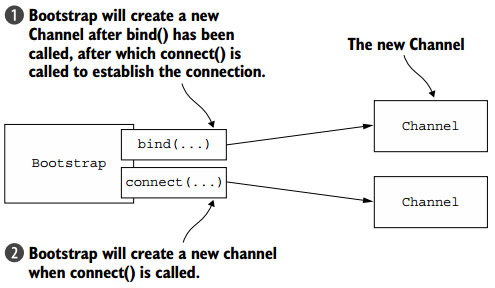
以下代码引导使用NIO TCP传输的客户端。
EventLoopGroup group = new NioEventLoopGroup();

Bootstrap bootstrap = new Bootstrap();

bootstrap.group(group)

    .channel(NioSocketChannel.class)

    .handler(new SimpleChannelInboundHandler<ByteBuf>() {

        @Override

        protected void channeRead0(

            ChannelHandlerContext channelHandlerContext,

            ByteBuf byteBuf) throws Exception {

                System.out.println("Received data");

            }

        } );

ChannelFuture future = bootstrap.connect(

    new InetSocketAddress("www.manning.com", 80));

future.addListener(new ChannelFutureListener() {

    @Override

    public void operationComplete(ChannelFuture channelFuture)

        throws Exception {

        if (channelFuture.isSuccess()) {

            System.out.println("Connection established");

        } else {

            System.err.println("Connection attempt failed");

            channelFuture.cause().printStackTrace();

        }

    }

} );
2. Channel和EventLoopGroup兼容性
io.netty.channel包中的类结构如下。
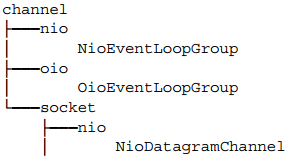
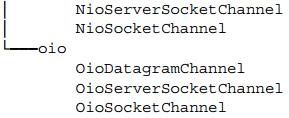
可以看到对于NIO和OIO传输,都有相关的EventLoopGroup和Channel实现,不能混合具有不同前缀的组件,例如NioEventLoopGroup和OioSocketChannel。如下代码展示不兼容的使用用法。
EventLoopGroup group = new NioEventLoopGroup();

Bootstrap bootstrap = new Bootstrap();

bootstrap.group(group)

    .channel(OioSocketChannel.class)

    .handler(new SimpleChannelInboundHandler<ByteBuf>() {

        @Override

        protected void channelRead0(

            ChannelHandlerContext channelHandlerContext,

            ByteBuf byteBuf) throws Exception {

                System.out.println("Received data");

            }

    } );

ChannelFuture future = bootstrap.connect(

    new InetSocketAddress("www.manning.com", 80));

future.syncUninterruptibly();
其中NIOEventLooop和OioSocketChannel不兼容,将会抛出IllegalStateException异常。
在调用bind或者connect方法之前,需要调用group、channel或channelFactory、handler方法,否则会抛出IllegalStateException异常。
2.3 引导服务器
ServerChannel的实现负责创建接受连接的子通道,ServerBootstrap通过bind()方法创建一个ServerChannel,ServerChannel可管理多个子通道,具体如下图所示。
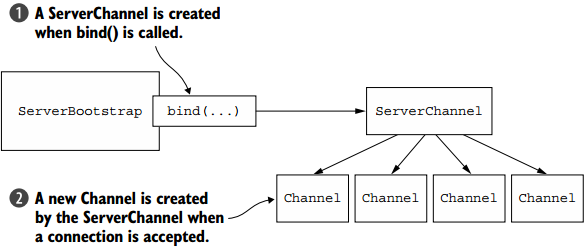
下面代码展示了如何引导服务器。
NioEventLoopGroup group = new NioEventLoopGroup();

ServerBootstrap bootstrap = new ServerBootstrap();

bootstrap.group(group)

    .channel(NioServerSocketChannel.class)

    .childHandler(new SimpleChannelInboundHandler<ByteBuf>() {

        @Override

        protected void channelRead0(ChannelHandlerContext ctx,

            ByteBuf byteBuf) throws Exception {

                System.out.println("Received data");

            }

    } );

ChannelFuture future = bootstrap.bind(new InetSocketAddress(8080));

future.addListener(new ChannelFutureListener() {

    @Override

    public void operationComplete(ChannelFuture channelFuture)

        throws Exception {

        if (channelFuture.isSuccess()) {

            System.out.println("Server bound");

        } else {

            System.err.println("Bound attempt failed");

            channelFuture.cause().printStackTrace();

        }

    }

} );
2.4 由通道引导客户端
假设服务器正在处理客户端请求,并要求服务器作为第三个系统的客户端,如代理服务器。此时需要从ServerChannel引导客户端通道。一个较好的方法是通过Bootstrap类的group方法传递Channel对应的EventLoop,因为所有分配给EventLoop的通道都使用相同的线程,这避免了额外的线程创建和相关的上下文切换。具体如下图所示。

通过group方法共享EventLoop的代码如下。
ServerBootstrap bootstrap = new ServerBootstrap();

bootstrap.group(new NioEventLoopGroup(), new NioEventLoopGroup())

    .channel(NioServerSocketChannel.class)

    .childHandler(

        new SimpleChannelInboundHandler<ByteBuf>() {

            ChannelFuture connectFuture;

            @Override

            public void channelActive(ChannelHandlerContext ctx)

                throws Exception {

                Bootstrap bootstrap = new Bootstrap();

                bootstrap.channel(NioSocketChannel.class).handler(

                    new SimpleChannelInboundHandler<ByteBuf>() {

                    @Override

                    protected void channelRead0(

                        ChannelHandlerContext ctx, ByteBuf in)

                        throws Exception {

                        System.out.println("Received data");

                    }

                } );

            bootstrap.group(ctx.channel().eventLoop());

            connectFuture = bootstrap.connect(

                new InetSocketAddress("www.manning.com", 80));

        }

        @Override

        protected void channelRead0(

            ChannelHandlerContext channelHandlerContext,

                ByteBuf byteBuf) throws Exception {

            if (connectFuture.isDone()) {

                // do something with the data

            }

        }

    } );

ChannelFuture future = bootstrap.bind(new InetSocketAddress(8080));

future.addListener(new ChannelFutureListener() {

    @Override

        public void operationComplete(ChannelFuture channelFuture)

        throws Exception {

        if (channelFuture.isSuccess()) {

            System.out.println("Server bound");

        } else {

            System.err.println("Bind attempt failed");

            channelFuture.cause().printStackTrace();

        }

    }

} );
2.5 在引导过程中添加多个ChannelHandler
在上面示例中,在引导过程中通过调用handler或者childHandler方法添加单个ChannelHandler,并且我们知道在ChannelPipeline中可以有多个ChannelHandler链,但是在引导过程中只添加了一个ChannelHandler。Netty提供了ChannelInboundHandlerAdapter,其提供了initChannel方法,该方法可以将多个ChannelHandler添加至ChannelPipeline中,你只需要将ChannelInitializer的实现提供给引导程序,而一旦Channel注册了EventLoop,那么initChannel方法将被调用,当方法返回后,ChannelInitializer将自身从ChannelPipeline中移除,如下代码展示了具体的操作。
ServerBootstrap bootstrap = new ServerBootstrap();

bootstrap.group(new NioEventLoopGroup(), new NioEventLoopGroup())

    .channel(NioServerSocketChannel.class)

    .childHandler(new ChannelInitializerImpl());

ChannelFuture future = bootstrap.bind(new InetSocketAddress(8080));

future.sync();

final class ChannelInitializerImpl extends ChannelInitializer<Channel> {

    @Override

    protected void initChannel(Channel ch) throws Exception {

        ChannelPipeline pipeline = ch.pipeline();

        pipeline.addLast(new HttpClientCodec());

        pipeline.addLast(new HttpObjectAggregator(Integer.MAX_VALUE));

    }

}
2.6 使用Netty的ChannelOptions和attributes
当创建通道时手动配置非常麻烦,可以使用option方法将ChannelOptions提供给引导程序,你提供的值将自动应用于在引导中创建的所有通道。ChannelOptions包括连接详细信息,如保持活动、超时属性和缓冲区设置等。Netty还可使用AttributeKey抽象类来配置属性值,如下代码展示了具体使用。
final AttributeKey<Integer> id = new AttributeKey<Integer>("ID");

Bootstrap bootstrap = new Bootstrap();

bootstrap.group(new NioEventLoopGroup())

.channel(NioSocketChannel.class)

.handler(

    new SimpleChannelInboundHandler<ByteBuf>() {

        @Override

        public void channelRegistered(ChannelHandlerContext ctx)

            throws Exception {

            Integer idValue = ctx.channel().attr(id).get();

            // do something with the idValue

        @Override

        protected void channelRead0(

            ChannelHandlerContext channelHandlerContext,

            ByteBuf byteBuf) throws Exception {

            System.out.println("Received data");

        }

    }

);

bootstrap.option(ChannelOption.SO_KEEPALIVE,true)

    .option(ChannelOption.CONNECT_TIMEOUT_MILLIS, 5000);

bootstrap.attr(id, 123456);

ChannelFuture future = bootstrap.connect(

new InetSocketAddress("www.manning.com", 80));

future.syncUninterruptibly();
2.7 引导DatagramChannels
前面的示例使用的SocketChannel,是基于TCP协议,但是Bootstrap也可以用于无连接的协议,如UDP协议,唯一的区别在于不调用connect方法,只使用bind方法,具体如下代码所示。
Bootstrap bootstrap = new Bootstrap();

bootstrap.group(new OioEventLoopGroup()).channel(

    OioDatagramChannel.class).handler(

    new SimpleChannelInboundHandler<DatagramPacket>(){

        @Override

        public void channelRead0(ChannelHandlerContext ctx,

            DatagramPacket msg) throws Exception {

            // Do something with the packet

        }

    }

);

ChannelFuture future = bootstrap.bind(new InetSocketAddress(0));

future.addListener(new ChannelFutureListener() {

    @Override

    public void operationComplete(ChannelFuture channelFuture)

        throws Exception {

        if (channelFuture.isSuccess()) {

            System.out.println("Channel bound");

        } else {

            System.err.println("Bind attempt failed");

            channelFuture.cause().printStackTrace();

        }

    }

})
2.8 关闭
引导使得应用运行,但是之后需要优雅的关闭引导。需要关闭EventLoopGroup,可调用EventLoopGroup.shutdownGracefully() 方法,其是异步的,会返回ChannelFuture,在观泉关闭后会收到通知,下面是使用示例。
EventLoopGroup group = new NioEventLoopGroup();

Bootstrap bootstrap = new Bootstrap();

bootstrap.group(group)

    .channel(NioSocketChannel.class);

...

Future<?> future = group.shutdownGracefully();

// block until the group has shutdown

future.syncUninterruptibly();
也可以在调用shutdownGracefully方法之前显示调用close方法,要让EventLoopGroup自己主动关闭。
三、总结
本篇博文讲解了Bootstrap,包括客户端和服务端的引导,以及如何启动标准的客户端和服务端程序。也谢谢各位园友的观看~
【Netty】Netty之Bootstrapping的更多相关文章
- [Netty] - Netty IN ACTION(导言)
最近没什么事儿做,刚好看到有需要网络编程的知识,java中有NIO和IO两种不同的方式,但是NIO的编写比较麻烦,刚好找到一个成熟的网络框架Netty.接下来的一个月就准备将Netty IN ACTI ...
- [Netty] - Netty入门(最简单的Netty客户端/服务器程序)
Java中的NIO是一种解决阻塞式IO问题的基本技术,但是NIO的编写对java程序员是有比较高的要求的.那么Netty就是一种简化操作的一个成熟的网络IO编程框架.这里简单介绍一个程序,代码是< ...
- NetCore Netty 框架 BT.Netty.RPC 系列随讲 二 WHO AM I 之 NETTY/NETTY 与 网络通讯 IO 模型之关系?
一:NETTY 是什么? Netty 是什么? 这个问题其实百度上一搜一堆. 这是官方话的描述:Netty 是一个基于NIO的客户.服务器端编程框架,使用Netty 可以确保你快速和简单的开发出一个 ...
- NIO学习笔记,从Linux IO演化模型到Netty—— Netty零拷贝
Netty的中零拷贝与上述零拷贝是不一样的,它并不是系统层面上的零拷贝,只是相对于ByteBuf而言的,更多的是偏向于数据操作优化这样的概念. Netty中的零拷贝: 1.CompositeByteB ...
- 从netty-example分析Netty组件续
上文我们从netty-example的Discard服务器端示例分析了netty的组件,今天我们从另一个简单的示例Echo客户端分析一下上个示例中没有出现的netty组件. 1. 服务端的连接处理,读 ...
- 源码分析netty服务器创建过程vs java nio服务器创建
1.Java NIO服务端创建 首先,我们通过一个时序图来看下如何创建一个NIO服务端并启动监听,接收多个客户端的连接,进行消息的异步读写. 示例代码(参考文献[2]): import java.io ...
- 从netty-example分析Netty组件
分析netty从源码开始 准备工作: 1.下载源代码:https://github.com/netty/netty.git 我下载的版本为4.1 2. eclipse导入maven工程. netty提 ...
- Netty源码分析之客户端启动过程
一.先来看一下客户端示例代码. public class NettyClientTest { public void connect(int port, String host) throws Exc ...
- Netty源码分析之服务端启动过程
一.首先来看一段服务端的示例代码: public class NettyTestServer { public void bind(int port) throws Exception{ EventL ...
- netty研究【1】:编译源代码
netty作为异步通信底层框架,其优异的性能让我产生了研究他的源码的决定. 代码研究之前,第一步就是要准备环境,至少可以编译通过,下面,就拿github上的4.1分支进行.我的IDE是Intellij ...
随机推荐
- windows server 定期备份数据库脚本
将以下文件保存为.bat脚本,在计划任务中添加定时任务运行此脚本即可.脚本中的备份目录,数据库目录和压缩文件目录请自行修改. @echo off rem 当前路径切换到备份数据库目录 cd D:\wa ...
- 统计web应用程序的访问人数
新建一个空网站,添加Global.asax全局处理. 文件目录如图: 在global类中添加代码: using System; using System.Collections.Generic; us ...
- 2017.3.12 H5学习的第一周
本周我开始了H5的学习,在这一周里我们从html的基本标签开始一直讲到了才算css的用法,接下来我将记录下来本周我学到的H5的内容. 首先是声明文档,声明文档类型是HTML5文件,它在HTML文档必不 ...
- 深入浅出分析MySQL索引设计背后的数据结构
在我们公司的DB规范中,明确规定: 1.建表语句必须明确指定主键 2.无特殊情况,主键必须单调递增 对于这项规定,很多研发小伙伴不理解.本文就来深入简出地分析MySQL索引设计背后的数据结构和算法,从 ...
- ios 获取当前ViewController
- (UIViewController*)getpresentVC:(UIWindow *)window{ if ([window.rootViewController class]==[UITabB ...
- 关于Git增、删、改源地址问题
在上篇博客中我们了解了Git的基本使用,如果你已经建立了一个远程代码库,并且遇到了远程代码库源地址修改的问题,那么这篇博客可能会帮到你. 1.如何查看当前远程Git库源地址呢? $git remote ...
- 第三章 PL/SQL编程
3.1 PL/SQL基础知识 3.1.1 什么是PL/SQL? PL/SQL是结合Oracle过程语言和结构化查询语言的一种扩展语言 3.1.1.1 PL/SQL体系 ...
- jquery控制图片切换
这种js现在用的很多.同时网上的js代码页很多.我直接从网上当了一个来用:代码如下: html <div class="bannerbox"> ...
- Unity属性的封装、继承、方法隐藏
(一)Unity属性封装.继承.方法隐藏的学习和总结 一.属性的封装 1.属性封装的定义:通过对属性的读和写来保护类中的域. 2.格式例子: private string departname; // ...
- js倒计时,秒倒计时,天倒计时
按天倒计时 HTML代码1: <Script Language="JavaScript"> <!-- Begin var timedate= new Date(& ...