
ios -使用NSLayoutConstraint实现多个view等宽等高等间距
@interface ViewController ()

{

    UIView *firstView;

    UIView *secondView;

    UIView *thirdView;

}

@end

@implementation ViewController

- (void)viewDidLoad

{

    [super viewDidLoad];

    /**

      第一个view

     */

    firstView = [[UIView alloc]init];

    firstView.translatesAutoresizingMaskIntoConstraints = NO;

    firstView.backgroundColor = [UIColor blueColor];

    [self.view addSubview:firstView];

    /**

     第二个view

     */

    secondView = [[UIView alloc]init];

    secondView.translatesAutoresizingMaskIntoConstraints = NO;

    secondView.backgroundColor = [UIColor brownColor];

    [self.view addSubview:secondView];

    /**

     第三个view

     */

    thirdView = [[UIView alloc]init];

    thirdView.translatesAutoresizingMaskIntoConstraints = NO;

    thirdView.backgroundColor = [UIColor yellowColor];

    [self.view addSubview:thirdView];

    /**绑定三个view*/

    NSDictionary *dic_bind = NSDictionaryOfVariableBindings(firstView,secondView,thirdView);

    /**设置view之间的间距和高度*/

    NSDictionary *dic_Constraint = @{ @"padding":@(.f),

                                      @"height":@(.f)

                                     };

    /**

     *  第一个view添加约束

     */

    /**垂直方向居中对齐*/

    NSLayoutConstraint *first_CenterY = [NSLayoutConstraint constraintWithItem:firstView attribute:NSLayoutAttributeCenterY relatedBy:NSLayoutRelationEqual toItem:self.view attribute:NSLayoutAttributeCenterY multiplier: constant:];

    /**垂直方向添加高度约束*/

    NSArray *first_V = [NSLayoutConstraint constraintsWithVisualFormat:@"V:[firstView(height)]" options: metrics:dic_Constraint views:dic_bind];

    [self.view addConstraints:@[first_CenterY]];

    [self.view addConstraints:first_V];

    /**

     *  第二个view添加约束

     */

    /**垂直方向居中对齐*/

     NSLayoutConstraint *second_CenterY = [NSLayoutConstraint constraintWithItem:secondView attribute:NSLayoutAttributeCenterY relatedBy:NSLayoutRelationEqual toItem:self.view attribute:NSLayoutAttributeCenterY multiplier: constant:];

     /**垂直方向添加高度约束*/

    NSArray *second_V = [NSLayoutConstraint constraintsWithVisualFormat:@"V:[secondView(height)]" options: metrics:dic_Constraint views:dic_bind];

    [self.view addConstraint:second_CenterY];

    [self.view addConstraints:second_V];

    /**

     *  第三个view添加约束

     */

    /**垂直方向居中对齐*/

    NSLayoutConstraint *third_CenterY = [NSLayoutConstraint constraintWithItem:thirdView attribute:NSLayoutAttributeCenterY relatedBy:NSLayoutRelationEqual toItem:self.view attribute:NSLayoutAttributeCenterY multiplier: constant:];

     /**垂直方向添加高度约束*/

    NSArray *third_V = [NSLayoutConstraint constraintsWithVisualFormat:@"V:[thirdView(height)]" options: metrics:dic_Constraint views:dic_bind];

    [self.view addConstraints:@[third_CenterY]];

    [self.view addConstraints:third_V];

    /**给三个view添加水平约束等宽等间距*/

    NSArray * allConstraint_H = [NSLayoutConstraint constraintsWithVisualFormat:@"H:|-padding-[firstView]-10-[secondView(firstView)]-padding-[thirdView(secondView)]-padding-|" options: metrics:dic_Constraint views:dic_bind];

    [self.view addConstraints:allConstraint_H];

}
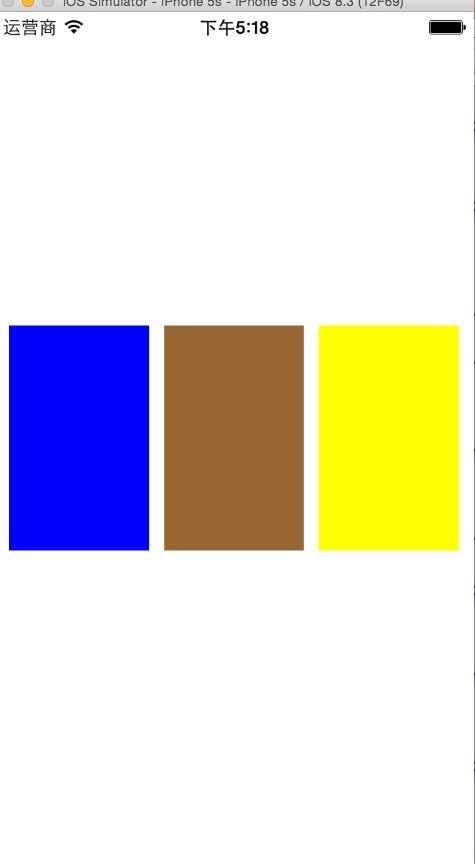
ios -使用NSLayoutConstraint实现多个view等宽等高等间距的更多相关文章
- iOS开发UI篇—控制器的View的创建
iOS开发UI篇—控制器的View的创建 一.6种创建控制器View的方式 #import "NJAppDelegate.h" #import "NJViewContro ...
- iOS开发UI篇—使用picker View控件完成一个简单的选餐应用
iOS开发UI篇—使用picker View控件完成一个简单的选餐应用 一.实现效果 说明:点击随机按钮,能够自动选取,下方数据自动刷新. 二.实现思路 1.picker view的有默认高度为162 ...
- 【IOS笔记】Creating Custom Content View Controllers
Creating Custom Content View Controllers 自定义内容视图控制器 Custom content view controllers are the heart of ...
- iOS 11 scroll滚动偏移,tableview偏移44,获取view的宽和高
1. tableview 的头部 有44的偏移量 1>.设置 tableview的 属性 tableView.scrollIndicatorInsets = UIEdgeInsets.zero ...
- 在渲染前获取 View 的宽高
在渲染前获取 View 的宽高 这是一个比较有意义的问题,或者说有难度的问题,问题的背景为:有时候我们需要在view渲染前去获取其宽高,典型的情形是,我们想在onCreate.onStart.onRe ...
- 【转】Android 获得view的宽和高
转自:http://blog.csdn.net/yangdeli888/article/details/25405263 Android 获得view的宽和高 分类: android 技术点项目20 ...
- Android查缺补漏(View篇)--在 Activity 的 onCreate() 方法中为什么获取 View 的宽和高为0?
在 Activity 的 onCreate() 方法中为什么获取 View 的宽和高为0 ? @Override protected void onCreate(Bundle savedInstanc ...
- 用addOnGlobalLayoutListener获取View的宽高
首先,我们在onCreate方法里调用getHeight()和 getWidth()是不能正确获取View的宽高的,因为onCreate方法执行完了,我们定义的控件才会被onMeasure()度量,所 ...
- Android中如何在代码中设置View的宽和高?
Android中如何在代码中设置View的宽和高?https://zhidao.baidu.com/question/536302117.htmlhttps://blog.csdn.net/u0141 ...
随机推荐
- ModelBinder 请求容错性
代码 //using System.Web.Mvc; public class TrimToDBCModelBinder : DefaultModelBinder { public override ...
- Codeforces Round #468 Div. 2题解
A. Friends Meeting time limit per test 1 second memory limit per test 256 megabytes input standard i ...
- vim使用配置-python
安装vundle git clone https://github.com/gmarik/Vundle.vim.git ~/.vim/bundle/Vundle.vim 添加配置文件 vim ~/.v ...
- uva 10048 Audiophobia UVA - 10048
题目简介 一个无向正权图,求任意两个节点之间的路径里最短的路径长度. 直接Floyd解决,就是注意要把Floyd的DP式子改一下成 G[i][j]=min(G[i][j],max(G[i][k],G[ ...
- linux下的vi的使用方法
vi的使用: 一般指令模式: vi打开一个文件就直接进入一般指令模式,可以进行删除.复制.粘贴.但是不可以对文件的内容进行修改. 常用命令: ctrl + f 向下移动一页 ctrl + b 向上移动 ...
- Switch组件
Switch组件,业务需求中经常遇到.我司的旧项目中,由于没有使用较为成熟点的组件库.自己实现了一个switch组件,但是实现的略微有些丑陋. 实现基本需求 https://jsfiddle.net/ ...
- 洛谷 3391 【模板】文艺平衡树 Treap区间翻转
[题解] 用Treap维护这个序列. 加入的时候直接插入到末尾,这样Treap就变成一棵以插入时间先后为排序关键字的二叉搜索树. 对于翻转操作,我们分裂出需要翻转的区间,给这个区间的root打一个翻转 ...
- BZOJ 1230 Usaco2008 Nov 开关灯
[题意概述] 给出一个01序列,初始时序列全为0,每次有修改操作或询问操作,修改操作要求把L~R区间中的0变成1,1变成0,查询操作要求输出L~R区间的1的个数 [题解] 线段树. 每次区间修改把区间 ...
- 数字统计(2010年NOIP全国联赛普及组)
题目描述 请统计某个给定范围[L, R]的所有整数中,数字 2 出现的次数. 比如给定范围[2, 22],数字 2 在数 2 中出现了 1 次,在数 12 中出现 1 次,在数 20 中出 现 1 次 ...
- hdu_2925_Musical Chairs_201311121643
Musical Chairs Time Limit: 2000/1000 MS (Java/Others) Memory Limit: 32768/32768 K (Java/Others) T ...