
uniapp中实现简易计算器
uniapp中实现简易计算器
主要问题:在计算器的实现过程中会遇到小数点计算精度;
此计算器是依赖了uni-popup的弹出层插件,可在uniapp官方组件中查找扩展插件popup弹窗层下载,也可直接点击该(https://ext.dcloud.net.cn/plugin?id=329)链接直接下载
计算器效果图
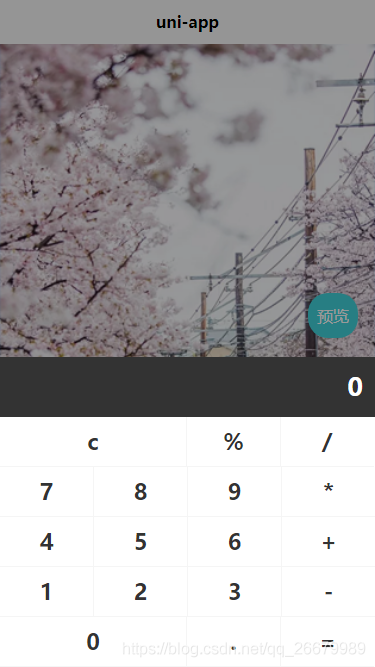
话不多说上代码:
HTML源码
<template>

    <view class="uni-popup-calculator">

        <view class="uni-popup-calculator-title">

            <text>{{number}}</text>

        </view>

        <view class="uni-popup-content">

            <view class="uni-popup-cell" :class="[item.flag?'active':'',item.width == 2?'cur':'',item.border?'border':'']"

             @click.stop="calculationTwo(item)" v-for="(item,idx) in calculator" :key="idx">

                {{item.name}}

            </view>

        </view>

    </view>

</template>
Js源码
<script>
export default {
name: 'UniPopupCalculator',
inject: ['popup'],
data() {
return {
number: '0',//计算器显示区域值
calculator: [{ //计算器各按键
name: 'c',
flag: false,
type: 'clear',
width: 2,
border: true
}, {
name: '%',
flag: false,
type: 'operator',
width: 1,
border: false
}, {
name: '/',
flag: false,
type: 'operator',
width: 1,
border: false
}, {
name: '7',
flag: false,
type: 'number',
width: 1,
border: true
}, {
name: '8',
flag: false,
type: 'number',
width: 1,
border: false
}, {
name: '9',
flag: false,
type: 'number',
width: 1,
border: false
}, {
name: '*',
flag: false,
type: 'operator',
width: 1,
border: false
}, {
name: '4',
flag: false,
type: 'number',
width: 1,
border: true
}, {
name: '5',
flag: false,
type: 'number',
width: 1,
border: false
}, {
name: '6',
flag: false,
type: 'number',
width: 1,
border: false
}, {
name: '+',
flag: false,
type: 'operator',
width: 1,
border: false
}, {
name: '1',
flag: false,
type: 'number',
width: 1,
border: true
}, {
name: '2',
flag: false,
type: 'number',
width: 1,
border: false
}, {
name: '3',
flag: false,
type: 'number',
width: 1,
border: false
}, {
name: '-',
flag: false,
type: 'operator',
width: 1,
border: false
}, {
name: '0',
flag: false,
type: 'number',
width: 2,
border: true
}, {
name: '.',
flag: false,
type: 'string',
width: 1,
border: false
}, {
name: '=',
flag: false,
type: 'equal',
width: 1,
border: false
}],
numberOne: '',//变量一
numberTwo: '',//变量二
symbol: '',//运算符
complete: false,//判断是否完成一次计算
current: -1
}
},
created() {},
methods: {
//计算器方法二:
calculationTwo: function(item) {
let that = this;
//按键点击效果
item.flag = true;
setTimeout(() => {
item.flag = false;
}, 200);
//判断输入的第一位是否是小数点
switch (item.type) {
case 'string': //小数点
if (that.complete) {
that.number = '0';
that.complete = false;
}
if (that.symbol) {
if ((that.number).indexOf('.') == -1) {
that.numberTwo = that.numberTwo + '.';
that.number = that.numberTwo;
}
} else {
if ((that.number).indexOf('.') == -1) {
that.number = that.number + '.';
}
}
break;
case 'number': //数字
if (that.complete) {
that.number = '0';
that.complete = false;
}
if (that.symbol) {
that.numberTwo += item.name;
that.number = that.numberTwo;
} else {
if (that.number == '0') {
that.number = item.name;
} else {
that.number += item.name;
}
}
break;
case 'operator': //运算符
that.symbol = item.name;
if (item.name != '%') {
that.numberOne = that.number;
that.numberTwo = '';
} else {
that.number = parseFloat(that.number) / 100;
}
break;
case 'equal': //等号
if (that.symbol == '-') {
that.number = that.subtraction(that.numberOne, that.numberTwo);
} else if (that.symbol == '+') {
that.number = that.addition(that.numberOne, that.numberTwo);
} else if (that.symbol == '*') {
that.number = that.multiplication(that.numberOne, that.numberTwo);
} else if (that.symbol == '/') {
that.number = that.division(that.numberOne, that.numberTwo);
} else if (that.symbol == '%') {
that.number = parseFloat(that.number) / 1;
}
that.complete = true;
that.numberOne = '';
that.numberTwo = '';
that.symbol = '';
break;
case 'clear': //清除符
that.clear();
break;
}
},
/**
* 清除
* */
clear: function() {
let that = this;
that.number = '0';
that.numberOne = '';
that.numberTwo = '';
that.symbol = '';
that.compile = false;
},
/**
* 除法
* */
division: function(arg1, arg2) {
var t1 = 0,
t2 = 0,
r1, r2;
try {
t1 = arg1.toString().split(".")[1].length
} catch (e) {}
try {
t2 = arg2.toString().split(".")[1].length
} catch (e) {}
Math.r1 = Number(arg1.toString().replace(".", ""))
Math.r2 = Number(arg2.toString().replace(".", ""))
return (Math.r1 / Math.r2) * Math.pow(10, t2 - t1);
},
/**
* 乘法
* */
multiplication: function(arg1, arg2) {
var m = 0,
s1 = arg1.toString(),
s2 = arg2.toString();
try {
m += s1.split(".")[1].length
} catch (e) {}
try {
m += s2.split(".")[1].length
} catch (e) {}
return Number(s1.replace(".", "")) * Number(s2.replace(".", "")) / Math.pow(10, m)
},
/**
* 加法
* */
addition: function(arg1, arg2) {
var r1, r2, m;
try {
r1 = arg1.toString().split(".")[1].length;
} catch (e) {
r1 = 0;
}
try {
r2 = arg2.toString().split(".")[1].length;
} catch (e) {
r2 = 0;
}
m = Math.pow(10, Math.max(r1, r2));
return (arg1 * m + arg2 * m) / m;
},
/**
* 减法
* */
subtraction: function(arg1, arg2) {
var r1, r2, m, n;
try {
r1 = arg1.toString().split(".")[1].length;
} catch (e) {
r1 = 0;
}
try {
r2 = arg2.toString().split(".")[1].length;
} catch (e) {
r2 = 0;
}
m = Math.pow(10, Math.max(r1, r2));
//last modify by deeka
//动态控制精度长度
n = (r1 >= r2) ? r1 : r2;
return ((arg1 * m - arg2 * m) / m).toFixed(n);
}
}
}
</script>
Css源码
<style lang="less">

    .uni-popup-calculator {

        background-color: #333333;

    }

    .uni-popup-calculator-title {

        width: 702rpx;

        height: 120rpx;

        line-height: 120rpx;

        padding: 0 24rpx;

        text-align: right;

        background-color: #333333;

        font-size: 50rpx;

        font-weight: 600;

        color: #FFFFFF;

    }

    .uni-popup-content {

        width: 750rpx;

        background-color: #FFFFFF;

        display: flex;

        flex-direction: row;

        justify-content: flex-start;

        align-items: flex-start;

        flex-wrap: wrap;

        .uni-popup-cell {

            width: 186rpx;

            height: 98rpx;

            line-height: 98rpx;

            text-align: center;

            font-size: 44rpx;

            font-weight: 600;

            color: #333333;

            border-bottom: 1px solid #f5f5f5;

            border-left: 1px solid #f5f5f5;

        }

        .uni-popup-cell.cur {

            width: 372rpx;

        }

        .uni-popup-cell.border {

            border-left: none;

        }

        .uni-popup-cell.active {

            background-color: #f5f5f5;

        }

    }

</style>
实现计算器的基本功能,希望能帮到你谢谢!记着点赞哦!
uniapp中实现简易计算器的更多相关文章
- C#Windows Form简易计算器实现(中)
昨天花了一天的时间弄计算器.也算是做出来了,还是简易的(怀疑猿生!!).在此先感谢昨天被我骚扰的朋友. 先贴一张界面看看 其实健壮性还是挺差的,用户体验也是极差的.比如说用户输入了不合理运算式子,我就 ...
- 剖析简易计算器带你入门微信小程序开发
写在前面,但是重点在后面 这是教程,也不是教程. 可以先看Demo的操作动图,看看是个什么玩意儿,GitHub地址(https://github.com/dunizb/wxapp-sCalc) 自从微 ...
- Python之实现一个简易计算器
自己动手写计算器 一.功能分析 用户输入一个类似这样 3*( 4+ 50 )-(( 100 + 40 )*5/2- 3*2* 2/4+9)*((( 3 + 4)-4)-4) 这样的表达式,假设表达式里 ...
- C#Windows Form简易计算器实现(上)
第一次写博客,来分享一个简易计算器的代码.作为一名准程序员,就是要多写代码才能孰能生巧.重视基础知识才能飞的更快更高以及更稳. 代码可能会写的很糟糕,不完美不安全之处希望发现的越多越好 c#编写计算器 ...
- JavaScript简易计算器
JavaScript一种直译式脚本语言,是一种动态类型.弱类型.基于原型的语言,内置支持类型.它的解释器被称为JavaScript引擎,为浏览器的一部分,广泛用于客户端的脚本语言,最早是在HTML(标 ...
- mini dc与简易计算器 20165235
mini dc 任务内容 本次mini dc任务就是通过补充代码来实现整型数据的后缀表达式计算 相关知识 通过利用堆栈这一先进后出的数据结构来实现后缀表达式的计算.通过Stack<Integer ...
- 《Java 程序设计》课堂实践项目-简易计算器
<Java 程序设计>课堂实践项目简易计算器 课后学习总结 目录 改变 简易计算器实验要求 课堂实践成果 课后思考 改变 修改了博客整体布局,过去就贴个代码贴个图很草率,这次布局和内容都有 ...
- 微信小程序-简易计算器
代码地址如下:http://www.demodashi.com/demo/14210.html 一.前期准备工作 软件环境:微信开发者工具 官方下载地址:https://mp.weixin.qq.co ...
- 课堂限时训练-简易计算器·mini dc
课堂限时训练-简易计算器·mini dc 实验题目 采用后缀表达式法,设计一个建议计算器,实现+.-.*./四种运算. 代码实现 码云链接 关键代码部分及结果如下: 实验分析 首先,分析一下后缀表达式 ...
- 用js制作简易计算器及猜随机数字游戏
<!doctype html><html><head> <meta charset="utf-8"> <title>JS ...
随机推荐
- .NET开源的两款第三方登录整合库
前言 我相信做开发的同学应该都对接过各种各样的第三方平台的登录授权,来获取用户信息(如:微信登录.支付宝登录.QQ登录.GitHub登录等等).今天大姚分享两款.NET开源的第三方登录整合库. MrH ...
- snipaste 替换 微信截图快捷键 F3贴图功能实在是太帅了 - 软件推荐
snipaste 替换 微信截图快捷键 这个软件很久之前就知道,一直也没觉得可以替换微信的截图功能,毕竟能懒就懒. 今天同事又推荐 用了下,觉得确实ok. https://zh.snipaste.co ...
- vscode 自动格式化 好使的配置 setting.json 20210622
一直用idea,今天有个需求得用vscode,发现格式化不好使了 用 vetur 格式化 结果带分行什么的,eslint 过去不了,更新了个好使的配置,记录一下. { "update.mod ...
- maven问题之Could not calculate build plan:
问题描述: Could not calculate build plan: Failure to transfer org.apache.maven.plugins:maven-surefire-pl ...
- 项目升级到Android31版本dlopen找不到系统so库文件
简介 最近有个海外项目需要把之前项目从30版本升级到31版本,升级后发现就发现一个问题: 因为我们的项目是系统签名的apk,所以集成到系统中后是没有任何问题的,但是当我们手动安装后就会出现使用dlop ...
- Java 8 内存管理原理解析及内存故障排查实践
作者:vivo 互联网服务器团队- Zeng Zhibin 介绍Java8虚拟机的内存区域划分.内存垃圾回收工作原理解析.虚拟机内存分配配置,介绍各垃圾收集器优缺点及场景应用.实践内存故障场景排查诊 ...
- 记录--canvas基础操作
这里给大家分享我在网上总结出来的一些知识,希望对大家有所帮助 1. 以下是一些有关使用Canvas的技巧: 绘制基本形状:Canvas可以用于绘制各种基本形状,如矩形.圆形.线条等.使用 fillRe ...
- 记录--在Vue3这样子写页面更快更高效
这里给大家分享我在网上总结出来的一些知识,希望对大家有所帮助 前言 在开发管理后台过程中,一定会遇到不少了增删改查页面,而这些页面的逻辑大多都是相同的,如获取列表数据,分页,筛选功能这些基本功能.而不 ...
- Swift Structured Concurrency
异步函数 异步函数概念 异步和并发是两个不同的概念,并发(Concurrency)是指多个任务同时执行,这里的同时不是严格意义上的同一时刻,而是在稍大时间粒度上,多个任务可以同时推进,并发的实现可以是 ...
- centos7上单机安装fastdfs6.0.9
目录 1.背景 2.fastdfs的一些知识 2.1 fastdfs的特点 2.2 架构图 2.2.1 client 介绍 2.2.2 tracker-server 介绍 2.2.3 storage- ...