
Directx11教程(55) 建立球形和锥形物体
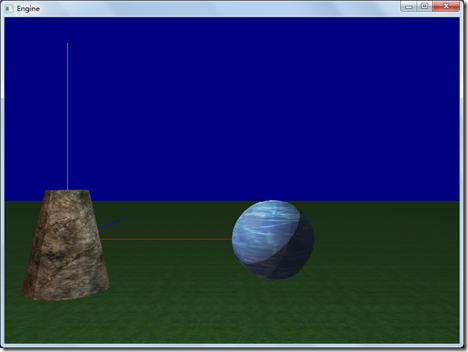
本教程中,我们新建2个model class,SphereModelClass以及CylinderModelClass,分别用来表示球形和锥形物体。
程序执行后的界面如下:
线框模式界面如下:
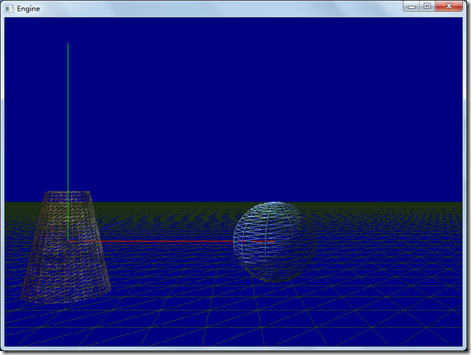
从线框模式可以看出,球形是由三个因素决定:半径、经度线、纬度线。
在SphereModelClass.cpp中,我们看到,初始化顶点缓冲和索引缓冲的函数为:InitializeBuffers(ID3D11Device* device, float radius, int numSlices, int numStacks),它多了三个参数,分别表示半径、经度切片的数量、纬度切面的数量。具体构建球形顶点的操作在函数buildStacks(vertices, indices)中,主要就是把经纬度切片的数目转化成球坐标系中的角度,求出球坐标系中顶点,再转化到笛卡尔坐标系中。
代码如下:
void SphereModelClass::buildStacks(VertexList& vertices, IndexList& indices)
{
float phiStep = PI/m_NumStacks;
int numRings = m_NumStacks-1;
// 对于每个纬度环,计算顶点.
for(int i = 1; i <= numRings; ++i)
{
float phi = i*phiStep;
// 环上的顶点
float thetaStep = 2.0f*PI/m_NumSlices;
for(int j = 0; j <= m_NumSlices; ++j)
{
float theta = j*thetaStep;
VertexType v;
// 球坐标到笛卡尔坐标的转化
v.position.x = m_Radius*sinf(phi)*cosf(theta);
v.position.y = m_Radius*cosf(phi);
v.position .z = m_Radius*sinf(phi)*sinf(theta);
D3DXVec3Normalize(&v.normal, &v.position);
//球的纹理坐标
v.texture.x = theta / (2.0f*PI);
v.texture.y = phi / PI;
v.Kd = D3DXVECTOR4(0.2, 0.2, 0.1,1.0);
v.Ks = D3DXVECTOR4(0.2, 0.2, 0.2,1.0);
vertices.push_back( v );
}
}
// 球的极点: 会出现纹理坐标扭曲
VertexType t1;
t1.position = D3DXVECTOR3(0.0f, -m_Radius, 0.0f);
t1.normal = D3DXVECTOR3(0.0f, -1.0f, 0.0f);
t1.texture = D3DXVECTOR2(0.0f, 1.0f);
t1.Kd = D3DXVECTOR4(0.2, 0.2, 0.1,1.0);
t1.Ks = D3DXVECTOR4(0.2, 0.2, 0.2,1.0);
vertices.push_back( t1 );
t1.position = D3DXVECTOR3(0.0f, m_Radius, 0.0f);
t1.normal = D3DXVECTOR3(0.0f, 1.0f, 0.0f);
t1.texture = D3DXVECTOR2(0.0f, 0.0f);
vertices.push_back(t1 );
int northPoleIndex = (int)vertices.size()-1;
int southPoleIndex = (int)vertices.size()-2;
int numRingVertices = m_NumSlices+1;
// 计算索引(不考虑极点)
for(int i = 0; i < m_NumStacks-2; ++i)
{
for(int j = 0; j < m_NumSlices; ++j)
{
indices.push_back(i*numRingVertices + j);
indices.push_back(i*numRingVertices + j+1);
indices.push_back((i+1)*numRingVertices + j);
indices.push_back((i+1)*numRingVertices + j);
indices.push_back(i*numRingVertices + j+1);
indices.push_back((i+1)*numRingVertices + j+1);
}
}
//北极点索引
for(int i = 0; i < m_NumSlices; ++i)
{
indices.push_back(northPoleIndex);
indices.push_back(i+1);
indices.push_back(i);
}
//南极点索引
int baseIndex = (numRings-1)*numRingVertices;
for(int i = 0; i < m_NumSlices; ++i)
{
indices.push_back(southPoleIndex);
indices.push_back(baseIndex+i);
indices.push_back(baseIndex+i+1);
}
}
在CylinderModelClass.cpp中,我们看到InitializeBuffers(ID3D11Device* device, float topRadius, float bottomRadius, float height, int numSlices, int numStacks),它多出了5个参数,分别表示锥体的顶部圆半径、底部圆半径,高度、经度切片的数量、纬度切片的数量。
具体计算顶点缓冲和索引缓冲由个函数组成,这三个函数的具体代码请参考源文件:
buildStacks(vertices, indices);
buildTopCap(vertices, indices);
buildBottomCap(vertices, indices);
完整的代码请参考:
工程文件myTutorialD3D11_50
代码下载:
http://files.cnblogs.com/mikewolf2002/d3d1150-58.zip
http://files.cnblogs.com/mikewolf2002/pictures.zip
Directx11教程(55) 建立球形和锥形物体的更多相关文章
- Directx11教程(56) 建立一个skydome
原文:Directx11教程(56) 建立一个skydome 本章建立一个skydome(天空穹),主要学习如何使用cube mapping. cube map就是把六张纹理当作 ...
- Directx11教程(60) tessellation学习(2)
原文:Directx11教程(60) tessellation学习(2) 本教程中,我们开始tessellation编程,共实现了2个程序,第一个tessellation程序,是对一个三 ...
- Directx11教程(5) 画一个简单的三角形(1)
原文:Directx11教程(5) 画一个简单的三角形(1) 在本篇教程中,我们将通过D3D11画一个简单的三角形.在D3D11中,GPU的渲染主要通过shader来操作(当然还有一些操作 ...
- Directx11教程(66) D3D11屏幕文本输出(1)
原文:Directx11教程(66) D3D11屏幕文本输出(1) 在D3D10中,通过ID3DX10Font接口对象,我们可以方便的在屏幕上输出文字信息,一个DrawText函数就能解决所 ...
- Directx11教程(59) tessellation学习(1)
原文:Directx11教程(59) tessellation学习(1) 在D3D11管线中,新增加了3个stage, Hull shader, Tessellator, Domain s ...
- Directx11教程(57) 环境映射
原文:Directx11教程(57) 环境映射 建好skydome后,如果我们想让其中的某个物体,比如那个球体来映射出周围环境的蓝天白云(不包括自己附近的物体),该怎么做呢?此时可以把这个 ...
- Directx11教程(54) 简单的基于GS的billboard实现
原文:Directx11教程(54) 简单的基于GS的billboard实现 本章我们用一个billboard的实现来学习D3D11中的GS. 在VS shader中,我们输入的是顶点 ...
- Directx11教程(52) 实例(instancing)的简单应用
原文:Directx11教程(52) 实例(instancing)的简单应用 有些时候,我们需要在场景中渲染大量的重复的物体,比如体育场中的观众,森林里面的树木等等,这些物体具有相似的形状,比如很多树 ...
- Directx11教程(49) stencil的应用-镜面反射
原文:Directx11教程(49) stencil的应用-镜面反射 本教程中,我们利用stencil来实现一个镜面反射效果. 1.首先我们要在D3DClass中增加几个成员变量及函数. I ...
随机推荐
- 升级gitk后,Error in startup script: unknown color name "lime"
$ gitkError in startup script: unknown color name "greeen" (processing "-fore" o ...
- Shell执行SQL,并存入变量
shell的语法还是比较严格的(比如变量赋值,两边不能用等号) #!/bin/bash ids=$(mysql -h172. -uroot -p1qaz@WSX -N -e "select ...
- 解决 Error retrieving parent for item: No resource found that matches the given name 'Theme.AppCompat.Light.DarkActionBar'
If you are looking for the solution in Android Studio : Right click on your app Open Module Settings ...
- Java中String类的常见面试题
1. 判断定义为String类型的s1和s2是否相等 String s1 = "ab"; String s2 = "abc"; String s3 = s1 + ...
- 【DM642学习笔记九】XDS560仿真器 Can't Initialize Target CPU
以前用的瑞泰的ICETEK-5100USB仿真器,现在换成XDS560试了试,速度快多了.把720*576的图片在imgae中显示也只需要四五秒钟.而5100仿真器需要三四分钟. 仿真器驱动安好后,刚 ...
- webServices学习二(小试牛刀。jdk 方式发布一个应用)
一.前提 1.用Jdk1.6.0_21以后的版本发布一个WebService服务. 2.与Web服务相关的类,都位于javax.jws.*包中. 1.主要类有: 1.@WebService - 它是 ...
- Frank Dellaert Slam Speech 20190708
Georgia Institue of Tecknology 3D Models from Community Databases Spatiotemporal Reconstruction 4D C ...
- 【python之路34】面向对象作业之学生选课系统
一.需求: 1.可以注册管理员账号,管理员账号可以创建老师和课程 2.学生可以注册和登陆,学生可以从课程列表选课,可以进行上课登记查看 二.代码 1.文件目录 bin 存放可执行文件 config 存 ...
- TZ_06_SpringMVC_拦截器的配置
1. 拦截器的概述 1>. SpringMVC框架中的拦截器用于对处理器进行预处理和后处理的技术. 2>. 可以定义拦截器链,连接器链就是将拦截器按着一定的顺序结成一条链,在访问被拦截的方 ...
- mac ssh 远程容易断线解决方案
编辑文件 /etc/ssh/ssh_config 添加下面两行 ServerAliveInterval 60 ServerAliveCountMax 3 说明一下: #server每隔60秒发送一次请 ...