
flink 安装及wordcount
1、下载
http://mirror.bit.edu.cn/apache/flink/
2、安装
确保已经安装java8以上

解压flink

tar zxvf flink-1.8.0-bin-scala_2.11.tgz

启动本地模式

$ ./bin/start-cluster.sh  # Start Flink
[hadoop@bigdata-senior01 flink-1.8.0]$ ./bin/start-cluster.sh

Starting cluster.

Starting standalonesession daemon on host bigdata-senior01.home.com.

Starting taskexecutor daemon on host bigdata-senior01.home.com.

[hadoop@bigdata-senior01 flink-1.8.0]$ jps

1995 StandaloneSessionClusterEntrypoint

2443 TaskManagerRunner

2526 Jps
3、访问flink
http://localhost:8081
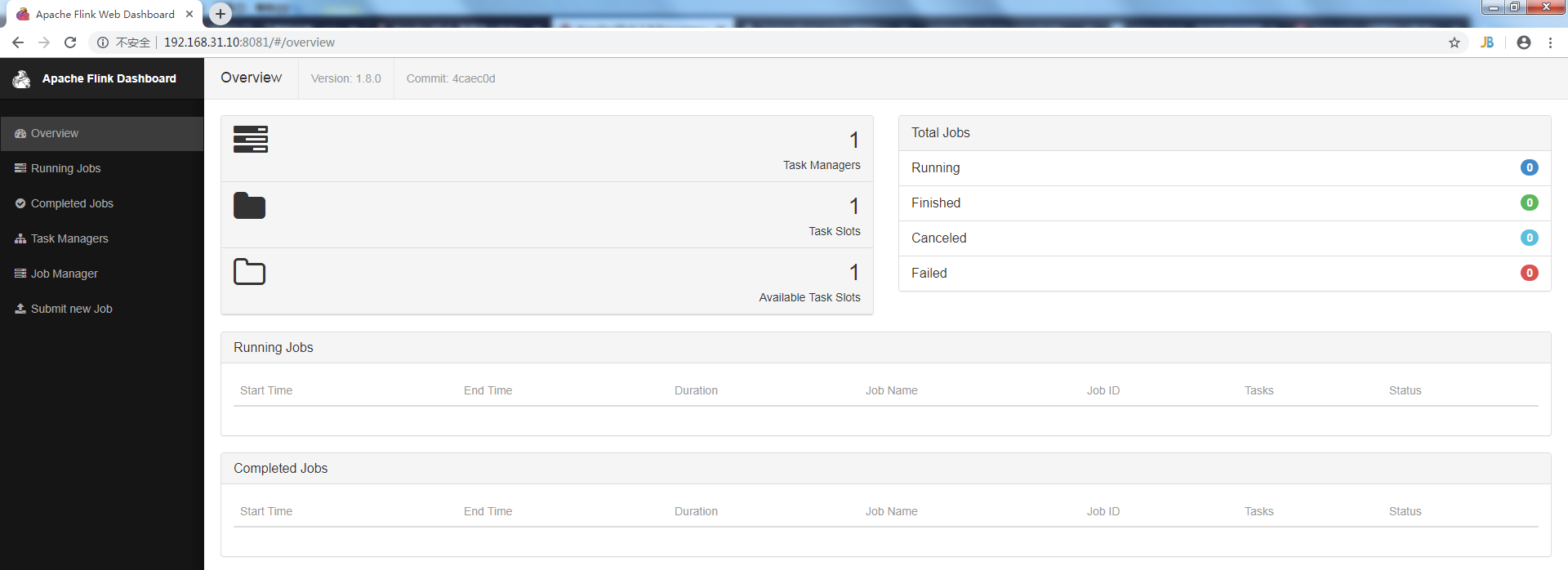
4、第一个程序wordcount,从一个socket流中读出字符串,计算10秒内的词频
4.1 引入依赖
    <dependencies>

        <dependency>

            <groupId>org.apache.flink</groupId>

            <artifactId>flink-clients_2.12</artifactId>

            <version>1.8.0</version>

        </dependency>

        <dependency>

            <groupId>org.apache.flink</groupId>

            <artifactId>flink-streaming-java_2.12</artifactId>

            <version>1.8.0</version>

            <scope>provided</scope>

        </dependency>

    </dependencies>
4.2 代码
public class SocketWindowWordCount {

    public static void main(String args[]) throws Exception {

        // the host and the port to connect to

        final String hostname;

        final int port;

        try {

            final ParameterTool params = ParameterTool.fromArgs(args);

            hostname = params.has("hostname") ? params.get("hostname") : "localhost";

            port = params.getInt("port");

        } catch (Exception e) {

            e.printStackTrace();

            System.err.println(e.getMessage());

            System.err.println("No port specified. Please run 'SocketWindowWordCount " +

                    "--hostname <hostname> --port <port>', where hostname (localhost by default) " +

                    "and port is the address of the text server");

            System.err.println("To start a simple text server, run 'netcat -l <port>' and " +

                    "type the input text into the command line");

            return;

        }

        // get the execution environment

        final StreamExecutionEnvironment env = StreamExecutionEnvironment.getExecutionEnvironment();

        // get input data by connecting to the socket

        DataStream<String> text = env.socketTextStream(hostname, port, "\n");

        // parse the data, group it, window it, and aggregate the counts

        DataStream<WordWithCount> windowCounts = text

                .flatMap(new FlatMapFunction<String, WordWithCount>() {

                    @Override

                    public void flatMap(String value, Collector<WordWithCount> out) throws Exception {

                        for (String word : value.split("\\s")) {

                            out.collect(new WordWithCount(word,1L));

                        }

                    }

                })

                .keyBy("word")

                .timeWindow(Time.seconds(10))

                .reduce(new ReduceFunction<WordWithCount>() {

                    @Override

                    public WordWithCount reduce(WordWithCount value1, WordWithCount value2) throws Exception {

                        return new WordWithCount(value1.word,value1.count+value2.count);

                    }

                });

        // print the results with a single thread, rather than in parallel

        windowCounts.print().setParallelism(1);

        env.execute("Socket Window WordCount");

    }

    /**

     * Data type for words with count.

     */

    public static class WordWithCount {

        public String word;

        public long count;

        public WordWithCount() {

        }

        public WordWithCount(String word, long count) {

            this.word = word;

            this.count = count;

        }

        @Override

        public String toString() {

            return word + " : " + count;

        }

    }

}
4.4 编译成jar包上传
先用nc启动侦听并接受连接

nc -lk 9000

启动SocketWindowWordCount

[hadoop@bigdata-senior01 bin]$ ./flink run /home/hadoop/SocketWindowWordCount.jar --port 9000

查看输出

[root@bigdata-senior01 log]# tail -f flink-hadoop-taskexecutor-0-bigdata-senior01.home.com.out
在nc端输入字符串,在日志监控端10秒为一个周期就可以看到输出合计。
flink 安装及wordcount的更多相关文章
- Flink单机版安装与wordCount
Flink为大数据处理工具,类似hadoop,spark.但它能够在大规模分布式系统中快速处理,与spark相似也是基于内存运算,并以低延迟性和高容错性主城,其核心特性是实时的处理流数据.从此大数据生 ...
- 第02讲:Flink 入门程序 WordCount 和 SQL 实现
我们右键运行时相当于在本地启动了一个单机版本.生产中都是集群环境,并且是高可用的,生产上提交任务需要用到flink run 命令,指定必要的参数. 本课时我们主要介绍 Flink 的入门程序以及 SQ ...
- Eclipse的下载、安装和WordCount的初步使用(本地模式和集群模式)
包括: Eclipse的下载 Eclipse的安装 Eclipse的使用 本地模式或集群模式 Scala IDE for Eclipse的下载.安装和WordCount的初步使用(本地模式和集群 ...
- IntelliJ IDEA的下载、安装和WordCount的初步使用(本地模式和集群模式)
包括: IntelliJ IDEA的下载 IntelliJ IDEA的安装 IntelliJ IDEA中的scala插件安装 用SBT方式来创建工程 或 选择Scala方式来创建工程 本地模式或集群 ...
- Hadoop-2.4.0安装和wordcount执行验证
Hadoop-2.4.0安装和wordcount执行验证 下面描写叙述了64位centos6.5机器下,安装32位hadoop-2.4.0,并通过执行 系统自带的WordCount样例来验证服务正确性 ...
- IntelliJ IDEA(Ultimate版本)的下载、安装和WordCount的初步使用(本地模式和集群模式)
不多说,直接上干货! IntelliJ IDEA号称当前Java开发效率最高的IDE工具.IntelliJ IDEA有两个版本:社区版(Community)和旗舰版(Ultimate).社区版时免费的 ...
- IntelliJ IDEA(Community版本)的下载、安装和WordCount的初步使用(本地模式和集群模式)
不多说,直接上干货! 对于初学者来说,建议你先玩玩这个免费的社区版,但是,一段时间,还是去玩专业版吧,这个很简单哈,学聪明点,去搞到途径激活!可以看我的博客. 包括: IntelliJ IDEA(Co ...
- 从flink-example分析flink组件(3)WordCount 流式实战及源码分析
前面介绍了批量处理的WorkCount是如何执行的 <从flink-example分析flink组件(1)WordCount batch实战及源码分析> <从flink-exampl ...
- 2、flink入门程序Wordcount和sql实现
一.DataStream Wordcount 代码地址:https://gitee.com/nltxwz_xxd/abc_bigdata 基于scala实现 maven依赖如下: <depend ...
随机推荐
- FastDfs的搭建
一.什么是FastDFS FastDFS是用c语言编写的一款开源的分布式文件系统.FastDFS为互联网量身定制,充分考虑了冗余备份.负载均衡.线性扩容等机制,并注重高可用.高性能等指标,使用Fast ...
- zzL4自动驾驶中感知系统遇到的挑战及解决方案
本次分享的大纲: Perception Introduction Sensor Setup & Sensor Fusion Perception Onboard System Percepti ...
- Spring Cloud微服务安全实战_3-8_API安全之登录
前面的文章 https://www.cnblogs.com/lihaoyang/p/11967121.html 说了用过滤器实现HttpBasic 认证 ,在请求头里携带用户名和密码,存在的问题是, ...
- Linux性能优化实战学习笔记:第二十八讲
一.案例环境描述 1.环境准备 2CPU,4GB内存 预先安装docker sysstat工具 apt install docker.io sysstat nake git 案例总共由三个容器组成: ...
- BBS_02day
目录 BBS_02day: 展示个人所有文章: 点赞,点彩功能: 评论功能: BBS_02day: 展示个人所有文章: def article_detail(request,username,arti ...
- k8s学习路线
1. 核心概念说明 http://dockone.io/article/932 https://www.centos.bz/2017/08/k8s-kubernetes-architecture-di ...
- 一张思维导图辅助你深入了解 Vue | Vue-Router | Vuex 源码架构
1.前言 本文内容讲解的内容:一张思维导图辅助你深入了解 Vue | Vue-Router | Vuex 源码架构. 项目地址:https://github.com/biaochenxuying/vu ...
- SpringBoot集成Spring Security(7)——认证流程
文章目录 一.认证流程 二.多个请求共享认证信息 三.获取用户认证信息 在前面的六章中,介绍了 Spring Security 的基础使用,在继续深入向下的学习前,有必要理解清楚 Spring Sec ...
- candlestick用法
import matplotlib.pyplot as plt from matplotlib.dates import DateFormatter, WeekdayLocator, DayLoc ...
- Spring中抽象类中使用EmbeddedValueResolverAware和@PostConstruct获取配置文件中的参数值
我的需求: 我有一个 abstract class 中包含了很多子类中需要用到的公共方法和变量,我想在抽象类中 使用@Value获取*.properties中的值.但是@Value必须要在Spring ...