
用Keras搭建神经网络 简单模版(三)—— CNN 卷积神经网络(手写数字图片识别)
# -*- coding: utf-8 -*-

import numpy as np

np.random.seed(1337) #for reproducibility再现性

from keras.datasets import mnist

from keras.utils import np_utils

from keras.models import Sequential#按层

from keras.layers import Dense, Activation,Convolution2D, MaxPooling2D, Flatten

import matplotlib.pyplot as plt

from keras.optimizers import RMSprop

from keras.optimizers import Adam
从mnist下载手写数字图片数据集,图片为28*28,将每个像素的颜色(0到255)改为(0倒1),将标签y变为10个长度,若为1,则在1处为1,剩下的都标为0。
#dowmload the mnisst the path '~/.keras/datasets/' if it is the first time to be called

#x shape (60000 28*28),y shape(10000,)

(x_train,y_train),(x_test,y_test) = mnist.load_data()#0-9的图片数据集

#data pre-processing

x_train = x_train.reshape(-1,1,28,28)#-1代表个数不限,1为高度,黑白照片高度为1

x_test = x_test.reshape(-1,1,28,28)

y_train = np_utils.to_categorical(y_train, num_classes=10) #把标签变为10个长度,若为1,则在1处为1,剩下的都标为0

y_test = np_utils.to_categorical(y_test,num_classes=10)
接下来搭建CNN
卷积->池化->卷积->池化
使图片从(1,28,28)->(32,28,28)->(32,14,14)-> (64,14,14) -> (64,7,7)
#Another way to build CNN

model = Sequential()

#Conv layer 1 output shape (32,28,28)

model.add(Convolution2D(

        nb_filter =32,#滤波器装了32个,每个滤波器都会扫过这个图片,会得到另外一整张图片,所以之后得到的告诉是32层

        nb_row=5,

        nb_col=5,

        border_mode='same', #padding method

        input_shape=(1,      #channels  通道数

                     28,28),  #height & width 长和宽

        ))

model.add(Activation('relu'))

#Pooling layer 1 (max pooling) output shape (32,14,14)

model.add(MaxPooling2D(

        pool_size=(2,2), #2*2

        strides=(2,2),  #长和宽都跳两个再pool一次

        border_mode='same', #paddingmethod

        ))

#Conv layers 2 output shape (64,14,14)

model.add(Convolution2D(64,5,5,border_mode='same'))

model.add(Activation('relu'))

#Pooling layers 2 (max pooling) output shape (64,7,7)

model.add(MaxPooling2D(pool_size=(2,2), border_mode='same'))
构建全连接神经网络
#Fully connected layer 1 input shape (64*7*7) = (3136)

#Flatten 把三维抹成一维,全连接

model.add(Flatten())

model.add(Dense(1024))

model.add(Activation('relu'))

#Fully connected layer 2 to shape (10) for 10 classes

model.add(Dense(10)) #输出10个单位

model.add(Activation('softmax')) #softmax用来分类

#Another way to define optimizer

adam = Adam(lr=1e-4)

# We add metrics to get more results you want to see

model.compile( #编译

        optimizer = adam,

        loss = 'categorical_crossentropy',

        metrics=['accuracy'], #在更新时同时计算一下accuracy

        )
训练和测试
print("Training~~~~~~~~")

#Another way to train the model

model.fit(x_train,y_train, epochs=1, batch_size=32) #训练2大批,每批32个

print("\nTesting~~~~~~~~~~")

#Evalute the model with the  metrics we define earlier

loss,accuracy = model.evaluate(x_test,y_test)

print('\ntest loss:',loss)

print('\ntest accuracy:', accuracy)
全代码:
# -*- coding: utf-8 -*-

import numpy as np

np.random.seed(1337) #for reproducibility再现性

from keras.datasets import mnist

from keras.utils import np_utils

from keras.models import Sequential#按层

from keras.layers import Dense, Activation,Convolution2D, MaxPooling2D, Flatten

import matplotlib.pyplot as plt

from keras.optimizers import RMSprop

from keras.optimizers import Adam

#dowmload the mnisst the path '~/.keras/datasets/' if it is the first time to be called

#x shape (60000 28*28),y shape(10000,)

(x_train,y_train),(x_test,y_test) = mnist.load_data()#0-9的图片数据集

#data pre-processing

x_train = x_train.reshape(-1,1,28,28)#-1代表个数不限,1为高度,黑白照片高度为1

x_test = x_test.reshape(-1,1,28,28)

y_train = np_utils.to_categorical(y_train, num_classes=10) #把标签变为10个长度,若为1,则在1处为1,剩下的都标为0

y_test = np_utils.to_categorical(y_test,num_classes=10)

#Another way to build CNN

model = Sequential()

#Conv layer 1 output shape (32,28,28)

model.add(Convolution2D(

        nb_filter =32,#滤波器装了32个,每个滤波器都会扫过这个图片,会得到另外一整张图片,所以之后得到的告诉是32层

        nb_row=5,

        nb_col=5,

        border_mode='same', #padding method

        input_shape=(1,      #channels  通道数

                     28,28),  #height & width 长和宽

        ))

model.add(Activation('relu'))

#Pooling layer 1 (max pooling) output shape (32,14,14)

model.add(MaxPooling2D(

        pool_size=(2,2), #2*2

        strides=(2,2),  #长和宽都跳两个再pool一次

        border_mode='same', #paddingmethod

        ))

#Conv layers 2 output shape (64,14,14)

model.add(Convolution2D(64,5,5,border_mode='same'))

model.add(Activation('relu'))

#Pooling layers 2 (max pooling) output shape (64,7,7)

model.add(MaxPooling2D(pool_size=(2,2), border_mode='same'))

#Fully connected layer 1 input shape (64*7*7) = (3136)

#Flatten 把三维抹成一维,全连接

model.add(Flatten())

model.add(Dense(1024))

model.add(Activation('relu'))

#Fully connected layer 2 to shape (10) for 10 classes

model.add(Dense(10)) #输出10个单位

model.add(Activation('softmax')) #softmax用来分类

#Another way to define optimizer

adam = Adam(lr=1e-4)

# We add metrics to get more results you want to see

model.compile( #编译

        optimizer = adam,

        loss = 'categorical_crossentropy',

        metrics=['accuracy'], #在更新时同时计算一下accuracy

        )

print("Training~~~~~~~~")

#Another way to train the model

model.fit(x_train,y_train, epochs=1, batch_size=32) #训练2大批,每批32个

print("\nTesting~~~~~~~~~~")

#Evalute the model with the  metrics we define earlier

loss,accuracy = model.evaluate(x_test,y_test)

print('\ntest loss:',loss)

print('\ntest accuracy:', accuracy)
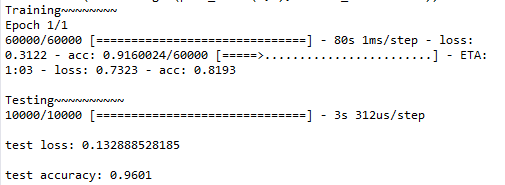
输出:
用Keras搭建神经网络 简单模版(三)—— CNN 卷积神经网络(手写数字图片识别)的更多相关文章
- 吴裕雄 python神经网络 手写数字图片识别(5)
import kerasimport matplotlib.pyplot as pltfrom keras.models import Sequentialfrom keras.layers impo ...
- 用Keras搭建神经网络 简单模版(四)—— RNN Classifier 循环神经网络(手写数字图片识别)
# -*- coding: utf-8 -*- import numpy as np np.random.seed(1337) from keras.datasets import mnist fro ...
- 吴裕雄 python 神经网络——TensorFlow 卷积神经网络手写数字图片识别
import os import tensorflow as tf from tensorflow.examples.tutorials.mnist import input_data INPUT_N ...
- 用python实现数字图片识别神经网络--启动网络的自我训练流程,展示网络数字图片识别效果
上一节,我们完成了网络训练代码的实现,还有一些问题需要做进一步的确认.网络的最终目标是,输入一张手写数字图片后,网络输出该图片对应的数字.由于网络需要从0到9一共十个数字中挑选出一个,于是我们的网络最 ...
- keras和tensorflow搭建DNN、CNN、RNN手写数字识别
MNIST手写数字集 MNIST是一个由美国由美国邮政系统开发的手写数字识别数据集.手写内容是0~9,一共有60000个图片样本,我们可以到MNIST官网免费下载,总共4个.gz后缀的压缩文件,该文件 ...
- [Python]基于CNN的MNIST手写数字识别
目录 一.背景介绍 1.1 卷积神经网络 1.2 深度学习框架 1.3 MNIST 数据集 二.方法和原理 2.1 部署网络模型 (1)权重初始化 (2)卷积和池化 (3)搭建卷积层1 (4)搭建卷积 ...
- 第三节,CNN案例-mnist手写数字识别
卷积:神经网络不再是对每个像素做处理,而是对一小块区域的处理,这种做法加强了图像信息的连续性,使得神经网络看到的是一个图像,而非一个点,同时也加深了神经网络对图像的理解,卷积神经网络有一个批量过滤器, ...
- NN:神经网络算法进阶优化法,进一步提高手写数字识别的准确率—Jason niu
上一篇文章,比较了三种算法实现对手写数字识别,其中,SVM和神经网络算法表现非常好准确率都在90%以上,本文章进一步探讨对神经网络算法优化,进一步提高准确率,通过测试发现,准确率提高了很多. 首先,改 ...
- tensorflow学习之(十)使用卷积神经网络(CNN)分类手写数字0-9
#卷积神经网络cnn import tensorflow as tf from tensorflow.examples.tutorials.mnist import input_data #数据包,如 ...
随机推荐
- celery(一)分布式任务调度模块简介及运行环境
Celery是Python开发的分布式任务调度模块. Celery本身不含消息服务,它使用第三方消息服务来传递任务. django下有个分支Django-Celery,可以结合django来实现任务的 ...
- 《Python》 代码块、小数据池和编码转换
一.代码块 Python程序是由代码块构造的.块是一个python程序的文本,他是作为一个单元执行的. 什么是代码块:一个py文件,一个函数,一个文件,一个类都是一个代码块. 作为交互方式输入的每一行 ...
- re 正则
如果直接给出字符,就是精确匹配.对于特殊字符- ,在正则表达式中要用转义字符\转义. \d 一个数字, \w 任意单个字符,空白符除外(例 字母.数字或下划线 . 英 ...
- Exception in thread "main" org.apache.poi.poifs.filesystem.OfficeXmlFileException
最近在使用poi操作excel时发现一个问题,详细如下: Exception in thread "AWT-EventQueue-0" java.lang.NoSuchMethod ...
- css3 制作平滑过度动画
-webkit-transition(属性渐变) -webkit-transition:CSS属性(none|all|属性) 持续时间 时间函数 延迟时间 CSS属性(transition-pr ...
- 【opencv基础】detectmultiscale函数详解
前言 简单的人脸检测程序可以直接基于opencv的函数库进行实现,本文介绍一下detectMultiScale函数. 函数简介 opencv2人脸检测使用的是detectMultiScale函数,可以 ...
- MyEclipse多次重装、删除注册表、重装系统激活都不成功,终极解决方法 - imsoft.cnblogs
问题:注册成功的MyEclipse被修改了一个配置文件之后,激活失败,然后在网上找激活码,激活不成功,但激活文件一直保存在电脑中,每次打开MyEclipse的激活界面总看得到之前的激活码.后面尝试 ...
- Word2007:如何在竖版(纵向)页面中间插入横版(横向)页面
通常情况下,我们在word排版过程中使用一种页面版式(横版/竖版)即可.但在某些特殊情况下,我们可能会需要在竖版页面中间插入一页或多页横版页面,抑或在横版页面中间插入竖版页面.那么,如何针对这 ...
- LOJ2538. 「PKUWC2018」Slay the Spire【组合数学】
LINK 思路 首先因为式子后面把方案数乘上了 所以其实只用输出所有方案的攻击力总和 然后很显然可以用强化牌就尽量用 因为每次强化至少把下面的牌翻一倍,肯定是更优的 然后就只有两种情况 强化牌数量少于 ...
- HDU 2089:不要62
Problem Description 杭州人称那些傻乎乎粘嗒嗒的人为62(音:laoer). 杭州交通管理局经常会扩充一些的士车牌照,新近出来一个好消息,以后上牌照,不再含有不吉利的数字了,这样一来 ...