
吴裕雄 python神经网络 手写数字图片识别(5)
import keras
import matplotlib.pyplot as plt
from keras.models import Sequential
from keras.layers import Dense,Activation,Flatten,Dropout,Convolution2D,MaxPooling2D
from keras.utils import np_utils
from keras.optimizers import RMSprop
from skimage import io
nb_classes=10
batch_size=128
####因为是卷积神经网络,输入数据的格式是图像格式,所以要进行reshape
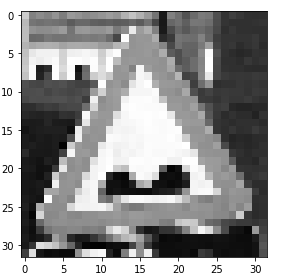
train_X = io.imread("E:\\WaySign\\0_0_colorrgb0.ppm")
train_x=np.reshape(train_X,(train_X.shape[0],32,32,1))
# test_x=np.reshape(test_X,(test_X.shape[0],28,28,1))
# train_y=np_utils.to_categorical(train_Y,nb_classes)
# test_y=np_utils.to_categorical(test_Y,nb_classes)
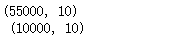
print(train_y.shape,'\n',test_y.shape)
print(train_x.shape,'\n',test_x.shape)
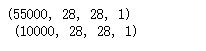
train_x[:,:,:,0].shape

###reshape后的数据显示
import matplotlib.pyplot as plt
%matplotlib inline
f,a=plt.subplots(1,10,figsize=(10,5))
for i in range(10):
a[i].imshow(train_x[i,:,:,0],cmap='gray')
print(train_Y[i])

####establish a convolution nerual network
model=Sequential()
####Convolution layer 1
model.add(Convolution2D(filters=32,kernel_size=(3,3),input_shape=(28,28,1),strides=(1,1),\
padding='same',activation='relu'))
#####pooling layer with dropout
model.add(MaxPooling2D(pool_size=(2,2), strides=(2,2), padding='valid'))
model.add(Dropout(0.2))
####Convolution layer 2
model.add(Convolution2D(filters=64,kernel_size=(3,3),strides=(1,1),padding='same',\
activation='relu'))
model.add(MaxPooling2D(pool_size=(2,2), strides=(2,2), padding='valid'))
model.add(Dropout(0.2))
####Convolution layer 3
model.add(Convolution2D(filters=128,kernel_size=(3,3),strides=(1,1),padding='same',\
activation='relu'))
model.add(MaxPooling2D(pool_size=(2,2), strides=(2,2), padding='valid'))
model.add(Flatten())###理解扁平化
model.add(Dropout(0.2))
#model.add(Flatten())?
####fully connected layer 1 (fc layer)
model.add(Dense(output_dim=625,activation='relu'))
model.add(Dropout(0.5))
####fully connected layer 2 (fc layer)
model.add(Dense(output_dim=10,activation='softmax'))
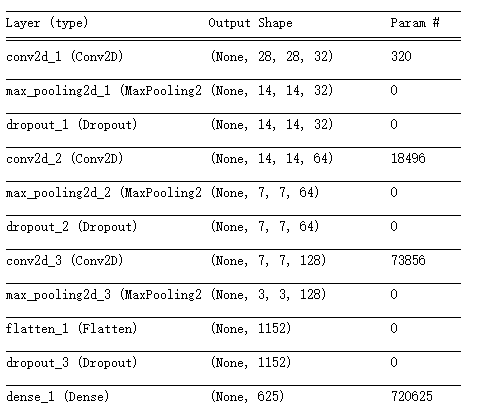
model.summary()
model.compile(optimizer=RMSprop(lr=0.001,rho=0.9),loss="categorical_crossentropy",\
metrics=['accuracy'])
import time
start_time=time.time()
model.fit(train_x,train_y,epochs=30,batch_size=128,verbose=1)
end_time=time.time()
print("running time:%.2f"%(end_time-start_time))
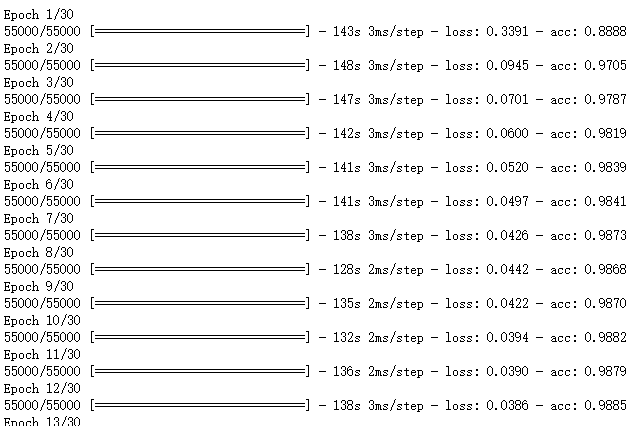
evaluation=model.evaluate(test_x,test_y,batch_size=128,verbose=1)
print("model loss:%.4f"%(evaluation[0]),"model accuracy:%.4f"%(evaluation[1]))

# https://github.com/fchollet/keras/issues/431
def get_activations(model, model_inputs, print_shape_only=True, layer_name=None):
import keras.backend as K
print('----- activations -----')
activations = []
inp = model.input
model_multi_inputs_cond = True
if not isinstance(inp, list):
# only one input! let's wrap it in a list.
inp = [inp]
model_multi_inputs_cond = False
outputs = [layer.output for layer in model.layers if
layer.name == layer_name or layer_name is None] # all layer outputs
funcs = [K.function(inp + [K.learning_phase()], [out]) for out in outputs] # evaluation functions
if model_multi_inputs_cond:
list_inputs = []
list_inputs.extend(model_inputs)
list_inputs.append(1.)
else:
list_inputs = [model_inputs, 1.]
# Learning phase. 1 = Test mode (no dropout or batch normalization)
# layer_outputs = [func([model_inputs, 1.])[0] for func in funcs]
layer_outputs = [func(list_inputs)[0] for func in funcs]
for layer_activations in layer_outputs:
activations.append(layer_activations)
if print_shape_only:
print(layer_activations.shape)
else:
print(layer_activations)
return activations
# https://github.com/philipperemy/keras-visualize-activations/blob/master/read_activations.py
def display_activations(activation_maps):
import numpy as np
import matplotlib.pyplot as plt
"""
(1, 28, 28, 32)
(1, 14, 14, 32)
(1, 14, 14, 32)
(1, 14, 14, 64)
(1, 7, 7, 64)
(1, 7, 7, 64)
(1, 7, 7, 128)
(1, 3, 3, 128)
(1, 1152)
(1, 1152)
(1, 625)
(1, 625)
(1, 10)
"""
batch_size = activation_maps[0].shape[0]
assert batch_size == 1, 'One image at a time to visualize.'
for i, activation_map in enumerate(activation_maps):
print('Displaying activation map {}'.format(i))
shape = activation_map.shape
if len(shape) == 4:
activations = np.hstack(np.transpose(activation_map[0], (2, 0, 1)))
elif len(shape) == 2:
# try to make it square as much as possible. we can skip some activations.
activations = activation_map[0]
num_activations = len(activations)
if num_activations > 1024: # too hard to display it on the screen.
square_param = int(np.floor(np.sqrt(num_activations)))
activations = activations[0: square_param * square_param]
activations = np.reshape(activations, (square_param, square_param))
else:
activations = np.expand_dims(activations, axis=0)
else:
raise Exception('len(shape) = 3 has not been implemented.')
#plt.imshow(activations, interpolation='None', cmap='binary')
fig, ax = plt.subplots(figsize=(18, 12))
ax.imshow(activations, interpolation='None', cmap='binary')
plt.show()
###One image at a time to visualize.
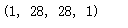
activations = get_activations(model, (test_x[0,:,:,:])[np.newaxis,:])

(test_x[0,:,:,:])[np.newaxis,:].shape
display_activations(activations)

plt.imshow(test_x[0,:,:,0],cmap='gray')
pred_value=model.predict_classes((test_x[0,:,:,:])[np.newaxis,:],batch_size=1)
print(pred_value)

吴裕雄 python神经网络 手写数字图片识别(5)的更多相关文章
- 吴裕雄 python 神经网络——TensorFlow 卷积神经网络手写数字图片识别
import os import tensorflow as tf from tensorflow.examples.tutorials.mnist import input_data INPUT_N ...
- 用Keras搭建神经网络 简单模版(三)—— CNN 卷积神经网络(手写数字图片识别)
# -*- coding: utf-8 -*- import numpy as np np.random.seed(1337) #for reproducibility再现性 from keras.d ...
- 深度学习(一):Python神经网络——手写数字识别
声明:本文章为阅读书籍<Python神经网络编程>而来,代码与书中略有差异,书籍封面: 源码 若要本地运行,请更改源码中图片与数据集的位置,环境为 Python3.6x. 1 import ...
- 用Keras搭建神经网络 简单模版(四)—— RNN Classifier 循环神经网络(手写数字图片识别)
# -*- coding: utf-8 -*- import numpy as np np.random.seed(1337) from keras.datasets import mnist fro ...
- caffe+opencv3.3dnn模块 完成手写数字图片识别
最近由于项目需要用到caffe,学习了下caffe的用法,在使用过程中也是遇到了些问题,通过上网搜索和问老师的方法解决了,在此记录下过程,方便以后查看,也希望能为和我一样的新手们提供帮助. 顺带附上老 ...
- 基于Numpy的神经网络+手写数字识别
基于Numpy的神经网络+手写数字识别 本文代码来自Tariq Rashid所著<Python神经网络编程> 代码分为三个部分,框架如下所示: # neural network class ...
- TensorFlow 卷积神经网络手写数字识别数据集介绍
欢迎大家关注我们的网站和系列教程:http://www.tensorflownews.com/,学习更多的机器学习.深度学习的知识! 手写数字识别 接下来将会以 MNIST 数据集为例,使用卷积层和池 ...
- 一文全解:利用谷歌深度学习框架Tensorflow识别手写数字图片(初学者篇)
笔记整理者:王小草 笔记整理时间2017年2月24日 原文地址 http://blog.csdn.net/sinat_33761963/article/details/56837466?fps=1&a ...
- Tensorflow学习教程------模型参数和网络结构保存且载入,输入一张手写数字图片判断是几
首先是模型参数和网络结构的保存 #coding:utf-8 import tensorflow as tf from tensorflow.examples.tutorials.mnist impor ...
随机推荐
- 各平台免费翻译API
google http://translate.google.cn/translate_a/single?client=gtx&dt=t&dj=1&ie=UTF-8&s ...
- day9笔记整理,记忆
函数的使用:一 定义函数的三种形式 1.1 无参函数 1.2 有参函数 1.3 空函数二 调用函数的三种形式 2.1 语句形式 def foo(): print('from foo') ...
- 事件驱动架构 (Event-Driven Architecture,EDA) 简介
EDA 是一种侧重于以生成/消费为基础的异步通信的架构模式.这主要对照于传统的基于线程的同步系统. EDA 是一种以事件 (event)为核心,提供事件产生,路由,消费已经结果回调等机制的架构模式. ...
- 【Linux】【secureCRT】下载,安装,激活攻略
以前公司使用的是SSH访问Linux服务器,今天争取了能看到数据,问了同事使用的是secureCRT,然后自己就装了一个. 下载地址:https://www.vandyke.com/download/ ...
- android 开发 实现一个activity变成dialog对话框
效果图: 首先说说为什么需要大费周章的去用activity实现一个dialog,明明android系统已经提供了一个更方便的dialog了.原因如下: 1.activity模式的dialog可以实现更 ...
- python-html-百度云音视频点播服务
加密的视频: 一:python后端需要生成token token计算规则 名词解释: userId: 百度云用户唯一标识,可在百度云管理控制台账号基本信息中得到,32位字符串. userKey:用户密 ...
- [Lua]string与中文
参考链接: https://baike.baidu.com/item/%E5%AD%97%E7%AC%A6%E7%BC%96%E7%A0%81/8446880?fr=aladdin#7 http:// ...
- [Unity工具]批量修改字体
效果图: using System.IO; using System.Text; using UnityEditor; using UnityEngine; using UnityEngine.UI; ...
- html A标签 绑定点击事件。跳转页面。处理
在平时的页面中,肯定有需要点击A标签 进行处理. 这时候习惯性的绑定一个点击事件进行数据处理. 在A标签中 herf="#" 然后绑定一个点击事件. 或者在A标签里面的元素里面有一 ...
- String和get
在ch4的作业中暴露出了我不懂的一些问题,主要是和String有关的定义和头文件以及和get有关的函数. String 在C++中如果想定义字符串型,即String a:则需要用到头文件<str ...