
Selenium Webdriver——操作隐藏的元素
有时候我们会碰到一些元素不可见,这个时候selenium就无法对这些元素进行操作了。例如,下面的情况:
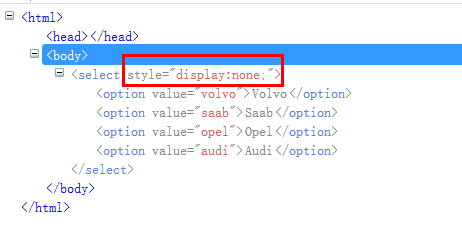
页面主要通过“display:none”来控制整个下拉框不可见。这个时候如果直接操作这个下拉框,就会提示:
from selenium import webdriver

from selenium.webdriver.support.select import Select

import os,time

driver = webdriver.Chrome()

file_path = 'file:///' + os.path.abspath('test.html')

driver.get(file_path)

sel = driver.find_element_by_tag_name('select')

Select(sel).select_by_value('opel')

time.sleep(2)

driver.quit()
exceptions.ElementNotVisibleException: Message: element not visible: Element is not currently visible and may not be manipulated
我们需要通过javaScript修改display的值。
js = 'document.querySelectorAll("select")[0].style.display="block";'

driver.execute_script(js)

sel = driver.find_element_by_tag_name('select')

Select(sel).select_by_value('opel')
document.querySelectorAll("select")[0].style.display="block";
document.querySelectorAll("select") 选择所有的select。
[0] 指定这一组标签里的第几个。
style.display="block"; 修改样式的display="block" ,表示可见。
执行完这句js代码后,就可以正常操作下拉框了。
Java代码
import java.io.File;

import org.openqa.selenium.WebDriver;

import org.openqa.selenium.By.ById;

import org.openqa.selenium.chrome.ChromeDriver;

import org.openqa.selenium.support.ui.Select;

import org.openqa.selenium.JavascriptExecutor;

public class SelectTest {

    public static void main(String[] args){

        WebDriver driver = new  ChromeDriver();

        File file = new File("C:/Users/fnngj/Desktop/test.html");

        String filePath = file.getAbsolutePath();

        driver.get(filePath);

         String js = "document.querySelectorAll('select')[0].style.display='block';";

        ((JavascriptExecutor)driver).executeScript(js);

        Select sel = new Select(driver.findElement(ById.xpath("//select")));

        sel.selectByValue("opel");

    }

}
Selenium Webdriver——操作隐藏的元素的更多相关文章
- Selenium Webdriver——操作隐藏的元素(二)display属性
有时候我们会碰到一些元素不可见,这个时候selenium就无法对这些元素进行操作了.例如,下面的情况: 页面主要通过“display:none”来控制整个下拉框不可见.这个时候如果直接操作这个下拉框, ...
- Selenium Webdriver——操作隐藏的元素(三)switchTo().frame()
在web 应用中经常会遇到frame 嵌套页面的应用,页WebDriver 每次只能在一个页面上识别元素,对于frame 嵌套内的页面上的元素,直接定位是定位是定位不到的.这个时候就需要通过switc ...
- Selenium Webdriver——操作隐藏的元素display属性
有时候我们会碰到一些元素不可见,这个时候selenium就无法对这些元素进行操作了.例如,下面的情况: 页面主要通过“display:none”来控制整个下拉框不可见.这个时候如果直接操作这个下拉框, ...
- Selenium Webdriver——操作隐藏的元素(四)
页面上弹出的对话框是自动化测试经常会遇到的一个问题:很多情况下对话框是一个iframe,如上一节中介绍的例子,处理起来稍微有点麻烦:但现在很多前端框架的对话框是div 形式的,这就让我们的处理变得十分 ...
- selenium在操作隐藏元素时会报错,怎么判断元素是隐藏的?
首先页面元素隐藏有五种方法: 1. opacity: 0; opacity 属性的意思是设置一个元素的透明度.它不是为改变元素的边界框(bounding box)而设计的.这意味着将 opacity ...
- js操作:selenium无法操作隐藏元素问题
对于前端隐藏元素,一直是selenium自动化定位元素的隐形杀手,脚本跑到隐藏元素时位置时报各种各样的错误, 隐藏的下拉菜单又没有办法避免,此帖只为交流隐藏元素自动化定位处理方法(3种操作) ...
- Python+selenium(操作隐藏元素)
测试过程中,偶尔会碰到一些页面的隐藏元素,如下,是小编举的一个简单的例子: test.html <html> <head></head> <body> ...
- selenium操作隐藏的元素
有时候我们会碰到一些元素不可见,这个时候selenium就无法对这些元素进行操作了.例如,下面的情况: Python 页面主要通过“display:none”来控制整个下拉框不可见.这个时候如果直接操 ...
- selenium操作隐藏的元素 (下拉框类型)
有时候我们会碰到一些元素不可见,这个时候selenium就无法对这些元素进行操作了.例如,下面的情况: Python 页面主要通过“display:none”来控制整个下拉框不可见.这个时候如果直接操 ...
随机推荐
- Uboot启动命令使用
1.查看根文件系统中的内容 打断Uboot的启动,默认从SD卡启动,查看根文件系统中/boot下的内容(根文件系统在mmcblk0p1上):=> mmc rescan=> ext4ls m ...
- SQL Support and Workarounds
此文章来自官方文档,说明了,对于不支持pg 标准的sql 查询的变通方法,实际使用的时候有很大的指导意义 As Citus provides distributed functionality by ...
- oracle12c之 控制pdb中sga 与 pga 内存使用
Memory Management using Resource Manager Oracle数据库资源管理器(资源管理器)现在可以在多租户容器数据库(CDB)中管理可插入数据库(PDBs)之间的内存 ...
- thinkphp 3.2.3在nginx+php下的url重写配置经验
环境:centos7.2+lnmp1.3(nginx+php7.0+mysql5.5) 进入服务器配置路径:cd /usr/local/nginx/conf/nginx.conf 修改nginx.co ...
- PHP常用函数总结(二):
//=================图像处理=================================== //=================会话机制================== ...
- FPGA将加速今日新型态数据中心的主流应用
在这个强调智能与联网的时代,可编程逻辑栅阵列 (FPGA)已经成为一个重要且不可或缺的元件.以全球500亿个联网设备,一年所产生的数据量将不计其数.从数据中心.5G通讯.虚拟网络功能,到嵌入式系统,F ...
- BASIC-9_蓝桥杯_特殊回文数
示例代码: #include <stdio.h> int main(void){ int n = 0 ; scanf("%d",&n); int i = 0 ; ...
- spring boot学习(1) hello world
第一节:SpringBoot 简介 主要是简化开发: 1. 创建独立的Spring应用程序 2. 嵌入的Tomcat,无需部署WAR文件 3. 简化Maven配置 4. 自动配置Spring 5. 提 ...
- java中使HttpDelete可以发送body信息
java中使HttpDelete可以发送body信息RESTful api中用到了DELETE方法,android开发的同事遇到了问题,使用HttpDelete执行DELETE操作的时候,不能携带bo ...
- 转载CopyOnWriteArrayList
转载原文 http://www.cnblogs.com/dolphin0520/p/3938914.html Copy-On-Write简称COW,是一种用于程序设计中的优化策略.其基本思路是,从一开 ...