
Selenium Webdriver——操作隐藏的元素display属性
有时候我们会碰到一些元素不可见,这个时候selenium就无法对这些元素进行操作了。例如,下面的情况:
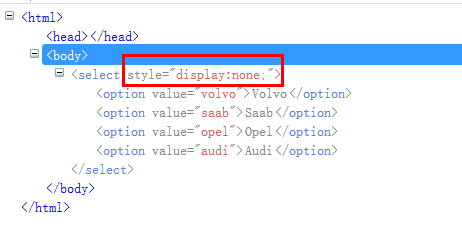
页面主要通过“display:none”来控制整个下拉框不可见。这个时候如果直接操作这个下拉框,就会提示:

from selenium import webdriver

from selenium.webdriver.support.select import Select

import os,time

driver = webdriver.Chrome()

file_path = 'file:///' + os.path.abspath('test.html')

driver.get(file_path)

sel = driver.find_element_by_tag_name('select')

Select(sel).select_by_value('opel')

time.sleep(2)

driver.quit()
exceptions.ElementNotVisibleException: Message: element not visible: Element is not currently visible and may not be manipulated
我们需要通过javaScript修改display的值。
js = 'document.querySelectorAll("select")[0].style.display="block";'

driver.execute_script(js)

sel = driver.find_element_by_tag_name('select')

Select(sel).select_by_value('opel')
document.querySelectorAll("select")[0].style.display="block";
document.querySelectorAll("select") 选择所有的select。
[0] 指定这一组标签里的第几个。
style.display="block"; 修改样式的display="block" ,表示可见。
执行完这句js代码后,就可以正常操作下拉框了。
Java代码
import java.io.File;

import org.openqa.selenium.WebDriver;

import org.openqa.selenium.By.ById;

import org.openqa.selenium.chrome.ChromeDriver;

import org.openqa.selenium.support.ui.Select;

import org.openqa.selenium.JavascriptExecutor;

public class SelectTest {

    public static void main(String[] args){

        WebDriver driver = new  ChromeDriver();

        File file = new File("C:/Users/fnngj/Desktop/test.html");

        String filePath = file.getAbsolutePath();

        driver.get(filePath);

         String js = "document.querySelectorAll('select')[0].style.display='block';";

        ((JavascriptExecutor)driver).executeScript(js);

        Select sel = new Select(driver.findElement(ById.xpath("//select")));

        sel.selectByValue("opel");

    }

}
Selenium Webdriver——操作隐藏的元素display属性的更多相关文章
- Selenium Webdriver——操作隐藏的元素(二)display属性
有时候我们会碰到一些元素不可见,这个时候selenium就无法对这些元素进行操作了.例如,下面的情况: 页面主要通过“display:none”来控制整个下拉框不可见.这个时候如果直接操作这个下拉框, ...
- Selenium Webdriver——操作隐藏的元素(三)switchTo().frame()
在web 应用中经常会遇到frame 嵌套页面的应用,页WebDriver 每次只能在一个页面上识别元素,对于frame 嵌套内的页面上的元素,直接定位是定位是定位不到的.这个时候就需要通过switc ...
- Selenium Webdriver——操作隐藏的元素
有时候我们会碰到一些元素不可见,这个时候selenium就无法对这些元素进行操作了.例如,下面的情况: 页面主要通过“display:none”来控制整个下拉框不可见.这个时候如果直接操作这个下拉框, ...
- Selenium Webdriver——操作隐藏的元素(四)
页面上弹出的对话框是自动化测试经常会遇到的一个问题:很多情况下对话框是一个iframe,如上一节中介绍的例子,处理起来稍微有点麻烦:但现在很多前端框架的对话框是div 形式的,这就让我们的处理变得十分 ...
- selenium在操作隐藏元素时会报错,怎么判断元素是隐藏的?
首先页面元素隐藏有五种方法: 1. opacity: 0; opacity 属性的意思是设置一个元素的透明度.它不是为改变元素的边界框(bounding box)而设计的.这意味着将 opacity ...
- js操作:selenium无法操作隐藏元素问题
对于前端隐藏元素,一直是selenium自动化定位元素的隐形杀手,脚本跑到隐藏元素时位置时报各种各样的错误, 隐藏的下拉菜单又没有办法避免,此帖只为交流隐藏元素自动化定位处理方法(3种操作) ...
- Python+selenium(操作隐藏元素)
测试过程中,偶尔会碰到一些页面的隐藏元素,如下,是小编举的一个简单的例子: test.html <html> <head></head> <body> ...
- selenium操作隐藏的元素
有时候我们会碰到一些元素不可见,这个时候selenium就无法对这些元素进行操作了.例如,下面的情况: Python 页面主要通过“display:none”来控制整个下拉框不可见.这个时候如果直接操 ...
- selenium操作隐藏的元素 (下拉框类型)
有时候我们会碰到一些元素不可见,这个时候selenium就无法对这些元素进行操作了.例如,下面的情况: Python 页面主要通过“display:none”来控制整个下拉框不可见.这个时候如果直接操 ...
随机推荐
- #定位系统性能瓶颈# sysdig
安装方法: curl -s https://s3.amazonaws.com/download.draios.com/stable/install-sysdig | sudo bash [root@l ...
- 创造HTTPS的是个神
HTTP 是一个明文传输的协议,很多网络监听工具都可以轻易窃取网络中传输的用户信息,如密码,信用卡, 直到后来发明HTTPS, 世界一下子安静了 Why HTTPS? HTTPS可以保证用户提交的信息 ...
- arm linux串口蓝牙工具移植及使用【转】
本文转载自:http://blog.csdn.net/hclydao/article/details/51451725 p6212中串口蓝牙在linux下的使用记录 一.linux蓝牙工具移植 主要使 ...
- 学界| UC Berkeley提出新型分布式框架Ray:实时动态学习的开端—— AI 应用的系统需求:支持(a)异质、并行计算,(b)动态任务图,(c)高吞吐量和低延迟的调度,以及(d)透明的容错性。
学界| UC Berkeley提出新型分布式框架Ray:实时动态学习的开端 from:https://baijia.baidu.com/s?id=1587367874517247282&wfr ...
- 为什么倒排索引不采用zlib这样的字典压缩算法——因为没法直接使用啊
看了下压缩算法的发展历史,根据倒排索引的数据结构特点,个人认为zstd不适合做倒排索引压缩,举例说明下: 假设有一份文档倒排列表为:[300, 302, 303, 332],对于这组倒排数据,是没法* ...
- hdu 1429(BFS+状态压缩)
胜利大逃亡(续) Time Limit: 4000/2000 MS (Java/Others) Memory Limit: 65536/32768 K (Java/Others)Total Su ...
- [NOI 2003] 逃学的小孩
[题目链接] https://www.lydsy.com/JudgeOnline/problem.php?id=1509 [算法] 树的直径 [代码] #include<bits/stdc++. ...
- 【HDU 3085】 Nightmare Ⅱ
[题目链接] http://acm.hdu.edu.cn/showproblem.php?pid=3085 [算法] 双向BFS [代码] #include<bits/stdc++.h> ...
- Java8新特性之Optional
空指针异常一直是困扰Java程序员的问题,也是我们必须要考虑的.当业务代码中充满了if else判断null 的时候程序变得不再优雅,在Java8中提供了Optional类为我们解决NullPoint ...
- awk 去重的同时并保持原来的顺序
#-----------awk.awk------------ { if(data[$0]++ == 0) lines[++count] = $0} END { for (i ...