
Selenium Webdriver——操作隐藏的元素(二)display属性
有时候我们会碰到一些元素不可见,这个时候selenium就无法对这些元素进行操作了。例如,下面的情况:
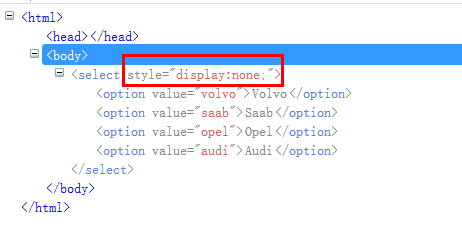
页面主要通过“display:none”来控制整个下拉框不可见。这个时候如果直接操作这个下拉框,就会提示:

from selenium import webdriver

from selenium.webdriver.support.select import Select

import os,time

driver = webdriver.Chrome()

file_path = 'file:///' + os.path.abspath('test.html')

driver.get(file_path)

sel = driver.find_element_by_tag_name('select')

Select(sel).select_by_value('opel')

time.sleep(2)

driver.quit()
exceptions.ElementNotVisibleException: Message: element not visible: Element is not currently visible and may not be manipulated
我们需要通过javaScript修改display的值。
js = 'document.querySelectorAll("select")[0].style.display="block";'

driver.execute_script(js)

sel = driver.find_element_by_tag_name('select')

Select(sel).select_by_value('opel')
document.querySelectorAll("select")[0].style.display="block";
document.querySelectorAll("select") 选择所有的select。
[0] 指定这一组标签里的第几个。
style.display="block"; 修改样式的display="block" ,表示可见。
执行完这句js代码后,就可以正常操作下拉框了。
Java代码
import java.io.File;

import org.openqa.selenium.WebDriver;

import org.openqa.selenium.By.ById;

import org.openqa.selenium.chrome.ChromeDriver;

import org.openqa.selenium.support.ui.Select;

import org.openqa.selenium.JavascriptExecutor;

public class SelectTest {

    public static void main(String[] args){

        WebDriver driver = new  ChromeDriver();

        File file = new File("C:/Users/fnngj/Desktop/test.html");

        String filePath = file.getAbsolutePath();

        driver.get(filePath);

         String js = "document.querySelectorAll('select')[0].style.display='block';";

        ((JavascriptExecutor)driver).executeScript(js);

        Select sel = new Select(driver.findElement(ById.xpath("//select")));

        sel.selectByValue("opel");

    }

}
Selenium Webdriver——操作隐藏的元素(二)display属性的更多相关文章
- Selenium Webdriver——操作隐藏的元素display属性
有时候我们会碰到一些元素不可见,这个时候selenium就无法对这些元素进行操作了.例如,下面的情况: 页面主要通过“display:none”来控制整个下拉框不可见.这个时候如果直接操作这个下拉框, ...
- Selenium Webdriver——操作隐藏的元素
有时候我们会碰到一些元素不可见,这个时候selenium就无法对这些元素进行操作了.例如,下面的情况: 页面主要通过“display:none”来控制整个下拉框不可见.这个时候如果直接操作这个下拉框, ...
- Selenium Webdriver——操作隐藏的元素(三)switchTo().frame()
在web 应用中经常会遇到frame 嵌套页面的应用,页WebDriver 每次只能在一个页面上识别元素,对于frame 嵌套内的页面上的元素,直接定位是定位是定位不到的.这个时候就需要通过switc ...
- Selenium Webdriver——操作隐藏的元素(四)
页面上弹出的对话框是自动化测试经常会遇到的一个问题:很多情况下对话框是一个iframe,如上一节中介绍的例子,处理起来稍微有点麻烦:但现在很多前端框架的对话框是div 形式的,这就让我们的处理变得十分 ...
- selenium在操作隐藏元素时会报错,怎么判断元素是隐藏的?
首先页面元素隐藏有五种方法: 1. opacity: 0; opacity 属性的意思是设置一个元素的透明度.它不是为改变元素的边界框(bounding box)而设计的.这意味着将 opacity ...
- 块级元素行内元素以及display属性
1.什么叫做标签语义化? ->合理的标签做合适的事情 ->HTML中常用的标签都有哪些? (块状标签和行内标签) ->块状标签和行内标签的区别? (常用的有8条区别) 1)内联元素: ...
- 块级元素、行内元素、display属性
块级元素 特点: 总是以一个块的形式表现出来,占领一整行.若干同级块元素会从上之下依次排列(使用float属性除外). 可以设置高度.宽度.各个方向的margin以及各个方向的padding. 当宽度 ...
- js操作:selenium无法操作隐藏元素问题
对于前端隐藏元素,一直是selenium自动化定位元素的隐形杀手,脚本跑到隐藏元素时位置时报各种各样的错误, 隐藏的下拉菜单又没有办法避免,此帖只为交流隐藏元素自动化定位处理方法(3种操作) ...
- Python+selenium(操作隐藏元素)
测试过程中,偶尔会碰到一些页面的隐藏元素,如下,是小编举的一个简单的例子: test.html <html> <head></head> <body> ...
随机推荐
- jQuery事件处理(五)
对原生js不熟悉看jQuery会困难很多.后续需要更多的关注下原生js jQuery封装之后的事件触发,其中一个分支(处理普通事件)是通过:elem.addEventListener( type, e ...
- jQuery的回调管理机制
// 对option的一个缓存,避免每次都需要createOptions,option是创建Callback对象时的传入的参数// 每个option被存入optionsCache中类似于{memory ...
- Free Download Manager (FDM) 中文版 - 替代迅雷最佳免费开源下载工具软件
https://www.freedownloadmanager.org/ Free Download Manager (FDM) 是一款经典免费纯粹的下载软件,它开源无广告,界面简洁清爽,支持 BT. ...
- 【黑金原创教程】【FPGA那些事儿-驱动篇I 】实验九:PS/2模块③ — 键盘与多组合键
实验九:PS/2模块③ — 键盘与多组合键 笔者曾经说过,通码除了单字节以外,也有双字节通码,而且双字节通码都是 8’hE0开头,别名又是 E0按键.常见的的E0按键有,<↑>,<↓ ...
- C语言qsort用法
一.对int类型数组排序 int num[100]; Sample: int cmp ( const void *a , const void *b ) { return *(int *)a - *( ...
- visual studio 2013设置背景图片
今天听了公司的一个经验分享会,发现VS竟然可以设置背景图片!还是个萌妹子!!被萌了一脸鼻血!!! 设置方法很简单:安装扩展ClaudiaIDE 1.在这里下载扩展,https://visualstud ...
- STM32下多串口用法
一个项目用到32下的多个串口,一般STM32C8T6型号拥有3个USART,串口的配置都很简单,但是要使用的话就得解决他们之间的矛盾, printf函数到底输出在哪一个串口中? 先看这函数: //重定 ...
- C++基础知识之动态库静态库
一. 静态库与动态库 库(library),一般是一种可执行的二进制格式,被操作系统载入内存执行. 我们通常把一些公用函数制作成函数库,供其它程序使用.函数库分为静态库和动态库 静态库和动态库区别: ...
- NLP常用语料集合
常用语料资源 下面提供一些网上能下载到的中文的好语料,供研究人员学习使用.(1).中科院自动化所的中英文新闻语料库 http://www.datatang.com/data/13484中文新闻分类语料 ...
- JavaScript学习12.1
JavaScript弹窗可以创建3种消息框:警告框.确认框.提示框,可以不带window对象直接使用相应的方法警告框:保护用户可以得到某些信息,当出现警告框后需要用户点击确认按钮之后才能操作windo ...