
ios开发之--UITableView中的visibleCells的用法
先上图:
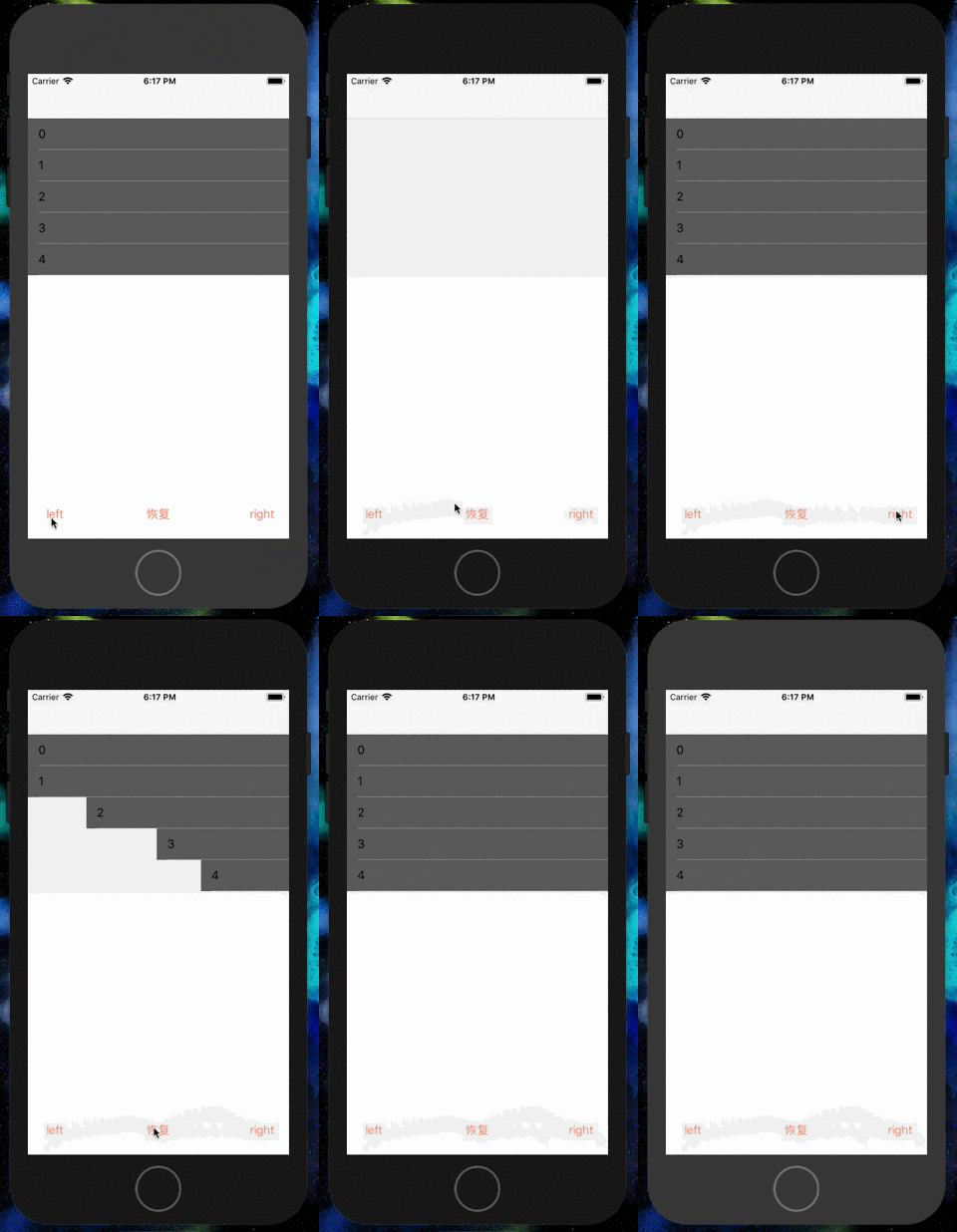
具体代码如下:
#import "ViewController.h"

@interface ViewController ()<UITableViewDelegate,UITableViewDataSource>

@property(nonatomic,strong)UITableView *myTableV;

@property(nonatomic,strong)NSArray *contentAry;

@end

@implementation ViewController

- (void)viewDidLoad {

    [super viewDidLoad];

    // Do any additional setup after loading the view, typically from a nib.

    self.contentAry = [NSArray array];

    [self creatUI];

}

- (IBAction)leftAction:(id)sender {

    self.contentAry = self.myTableV.visibleCells;

    NSLog(@"----%@",self.contentAry);

    UIButton *button = (UIButton*)sender;

    button.selected = !button.selected;

    CGAffineTransform transform;

    double duration = 0.1;

    if (button.tag == ) {

        transform = CGAffineTransformMakeTranslation(-[UIScreen mainScreen].bounds.size.width, );

    }else if (button.tag == )

    {

        for (UITableViewCell *cell in self.contentAry) {

            [UIView animateWithDuration:duration delay: options: animations:^{

                cell.transform = CGAffineTransformIdentity;

            } completion:^(BOOL finished) {

            }];

            duration += 0.1;

        }

        return;

    }else

    {

        transform = CGAffineTransformMakeTranslation([UIScreen mainScreen].bounds.size.width, );

    }

    for (UITableViewCell *cell in self.contentAry) {

        [UIView animateWithDuration:duration delay: options: animations:^{

            cell.transform = transform;

        } completion:^(BOOL finished) {

        }];

        duration += 0.1;

    }

}

-(void)creatUI

{

    self.myTableV = [[UITableView alloc]initWithFrame:CGRectMake(, , self.view.bounds.size.width, self.view.bounds.size.height - ) style:UITableViewStylePlain];

    self.myTableV.delegate = self;

    self.myTableV.dataSource = self;

    self.myTableV.tableFooterView = [[UIView alloc]init];

    [self.view addSubview:self.myTableV];

}

-(NSInteger)tableView:(UITableView *)tableView numberOfRowsInSection:(NSInteger)section

{

    return ;

}

-(UITableViewCell *)tableView:(UITableView *)tableView cellForRowAtIndexPath:(NSIndexPath *)indexPath

{

    static NSString *celliden = @"CELLS";

    UITableViewCell *cell = [tableView dequeueReusableCellWithIdentifier:celliden];

    if (!cell) {

        cell = [[UITableViewCell alloc]initWithStyle:UITableViewCellStyleDefault reuseIdentifier:celliden];

    }

    cell.textLabel.text = [NSString stringWithFormat:@"%ld",(long)indexPath.row];

    cell.backgroundColor = [[UIColor blackColor]colorWithAlphaComponent:0.6];

    return cell;

}
仅做记录!
ios开发之--UITableView中的visibleCells的用法的更多相关文章
- UITableView中的visibleCells的用法(visibleCells帮上大忙了)
这两天遇到一个问题,UITableView中需要加入动画,而且每一行的速度不一样. 刚开始做时把所有的cell都遍历一遍加上动画,后来发现,如果数据很多时,就会出现各种各样的问题,而且没有显示在界 ...
- 李洪强iOS开发之 - enum与typedef enum的用法
李洪强iOS开发之 - enum与typedef enum的用法 01 - 定义枚举类型 上面我们就在ViewController.h定义了一个枚举类型,枚举类型的值默认是连续的自然数,例如例子中的T ...
- iOS开发系列--UITableView全面解析
--UIKit之UITableView 概述 在iOS开发中UITableView可以说是使用最广泛的控件,我们平时使用的软件中到处都可以看到它的影子,类似于微信.QQ.新浪微博等软件基本上随处都是U ...
- iOS开发基础-UITableView控件简单介绍
UITableView 继承自 UIScrollView ,用于实现表格数据展示,支持垂直滚动. UITableView 需要一个数据源来显示数据,并向数据源查询一共有多少行数据以及每一行显示什么 ...
- iOS开发:UITableView的优化技巧-异步绘制Cell
最近在微博上看到一个很好的开源项目VVeboTableViewDemo,是关于如何优化UITableView的.加上正好最近也在优化项目中的类似朋友圈功能这块,思考了很多关于UITableView的优 ...
- iOS学习之UITableView中Cell的操作
接着iOS学习之Table View的简单使用 这篇,这里主要讲UITableView 中的Cell的操作,包括标记.移动.删除.插入. 为了简单快捷,直接从原来那篇的代码开始,代码下载地址:http ...
- iOS开发之动画中的时间(概况)
一.引言 在iOS开发中使用动画时,可以通过设置动画的duration.speed.begintime.offset属性,来设置动画的时长.速度.起始时间及起始偏移. 用一个简单的例子来说明各个参数的 ...
- iOS开发总结-UITableView 自定义cell和动态计算cell的高度
UITableView cell自定义头文件:shopCell.h#import <UIKit/UIKit.h>@interface shopCell : UITableViewCell@ ...
- iOS开发之UITableView中计时器的几种实现方式(NSTimer、DispatchSource、CADisplayLink)
最近工作比较忙,但是还是出来更新博客了.今天博客中所涉及的内容并不复杂,都是一些平时常见的一些问题,通过这篇博客算是对UITableView中使用定时器的几种方式进行总结.本篇博客会给出在TableV ...
随机推荐
- MVC教程九:异常过滤器
我们平常在程序里面为了捕获异常,会加上try-catch-finally代码,但是这样会使得程序代码看起来很庞大,在MVC中我们可以使用异常过滤器来捕获程序中的异常,如下图所示: 使用了异常过滤器以后 ...
- Spring Boot Gradle 打包可执行Jar文件!
使用Gradle构建项目,继承了Ant的灵活和Maven的生命周期管理,不再使用XML作为配置文件格式,采用了DSL格式,使得脚本更加简洁. 构建环境: jdk1.6以上,此处使用1.8 Gradle ...
- <context annotation-config />标签意义
该标签隐式的向Spring容器注册了: AutowiredAnnotationBeanPostProcessor CommondAnnotationBeanPostProcessor Persiste ...
- 半个月使用rust语言的体验
从第一次下载rust语言的编译器到今天刚好第14天. 简单说一下对这个语言的感觉吧. 一.性能 把以前用java写的一个中文地址切分的算法,用rust重新实现了一下(https://github.co ...
- FPGA静态时序分析——IO口时序(Input Delay /output Delay)(转载)
转载地址:http://www.cnblogs.com/linjie-swust/archive/2012/03/01/FPGA.html 1.1 概述 在高速系统中FPGA时序约束不止包括内部时钟 ...
- Android pid uid
PID:为Process Identifier, PID就是各进程的身份标识,程序一运行系统就会自动分配给进程一个独一无二的PID.进程中止后PID被系统回收,可能会被继续分配给新运行的程序,但是在a ...
- python opencv 学习笔记
图片缩放 image=cv2.imread('test.jpg') res=cv2.resize(image,(32,32),interpolation=cv2.INTER_CUBIC) cv2. ...
- 【Python】【Flask】前端调用后端方法返回页面
后端代码: @app.route("/test",methods=['POST','GET']) def test(): return "我是测试的" 前端代码 ...
- QWSLock::up(): Invalid argument
运行qt时,点击QMessageBox的确定按钮是出现错误QWSLock::up(): Invalid argument, QWSLock::down(): Invalid argument,这个是q ...
- Java如何以不同国家的格式显示时间?
在Java中,如何以不同国家的格式显示时间? 以下示例使用Locale类和DateFormat类来显示不同国家格式的日期. package com.yiibai; import java.text.D ...