
Android项目实战(五):TextView自适应大小
对于设置TextView的字体默认大小对于UI界面的好看程度是很重要的,小屏幕设置的文字过大或者大屏幕设置的文字过小都造成UI的不美观
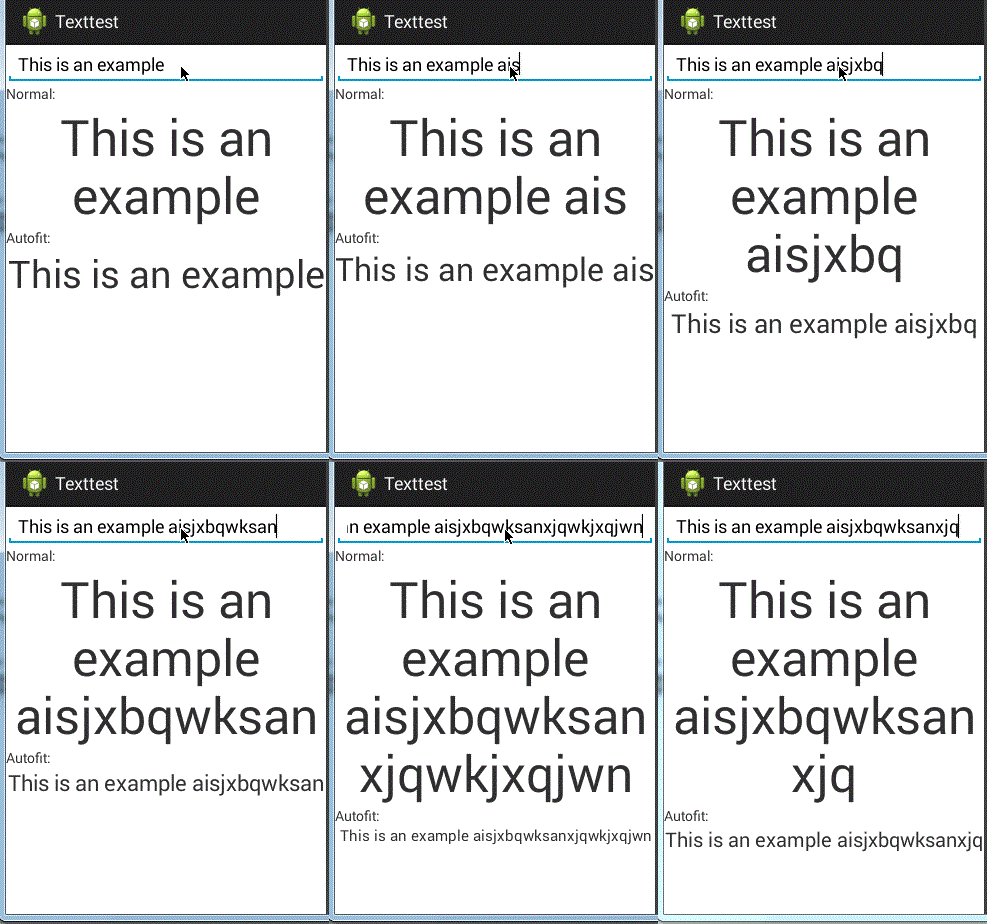
现在就让我们学习自适应大小的TextView控件,即当文字长度变化时,文字的大小会相应的变化,保证显示在一行当中
实现依靠于第三方类库
第三方类来源:
https://github.com/grantland/android-autofittextview
和正常的使用TextView一样,只需要将要自适应的TextView标签设置为<me.grantland.widget.AutofitTextView/>
注意:一定要设置为单行,否定无法显示效果
android:singleLine="true"
 <me.grantland.widget.AutofitTextView

             android:id="@+id/output_autofit"

             android:layout_width="match_parent"

             android:layout_height="wrap_content"

             android:text="@string/example"

             android:textSize="50sp"

             android:gravity="center"

             android:singleLine="true"

             autofit:minTextSize="8sp"

             />
布局文件:
 <?xml version="1.0" encoding="utf-8"?>

 <ScrollView xmlns:android="http://schemas.android.com/apk/res/android"

             xmlns:autofit="http://schemas.android.com/apk/res-auto"

     android:layout_width="match_parent"

     android:layout_height="match_parent">

     <LinearLayout

         android:layout_width="match_parent"

         android:layout_height="wrap_content"

         android:orientation="vertical"

         >

         <EditText

             android:id="@+id/input"

             android:layout_width="match_parent"

             android:layout_height="wrap_content"

             android:singleLine="true"

             android:hint="@string/input_hint"

             android:text="@string/example"/>

         <TextView

             android:layout_width="match_parent"

             android:layout_height="wrap_content"

             android:text="@string/label_normal"

             />

         <TextView

             android:id="@+id/output"

             android:layout_width="match_parent"

             android:layout_height="wrap_content"

             android:text="@string/example"

             android:textSize="50sp"

             android:gravity="center"

             />

         <TextView

             android:layout_width="match_parent"

             android:layout_height="wrap_content"

             android:text="@string/label_autofit"

             />

         <me.grantland.widget.AutofitTextView

             android:id="@+id/output_autofit"

             android:layout_width="match_parent"

             android:layout_height="wrap_content"

             android:text="@string/example"

             android:textSize="50sp"

             android:gravity="center"

             android:singleLine="true"

             autofit:minTextSize="8sp"

             />

     </LinearLayout>

 </ScrollView>
activity_main.xml
string.xml
 <?xml version="1.0" encoding="utf-8"?>

 <resources>

     <string name="app_name">Texttest</string>

     <string name="action_settings">Settings</string>

     <string name="hello_world">Hello world!</string>

     <string name="input_hint">text</string>

     <string name="label_normal">Normal:</string>

     <string name="label_autofit">Autofit:</string>

     <string name="example">This is an example</string>

 </resources>
activity
 package com.example.texttest;

 import android.app.Activity;

 import android.os.Bundle;

 import android.text.Editable;

 import android.text.TextWatcher;

 import android.view.Menu;

 import android.widget.EditText;

 import android.widget.TextView;

 public class MainActivity extends Activity {

     private TextView mOutput;

     private TextView mAutofitOutput;

     @Override

     protected void onCreate(Bundle savedInstanceState) {

         super.onCreate(savedInstanceState);

         setContentView(R.layout.activity_main);

         mOutput = (TextView)findViewById(R.id.output);

         mAutofitOutput = (TextView)findViewById(R.id.output_autofit);

         ((EditText)findViewById(R.id.input)).addTextChangedListener(new TextWatcher() {

             @Override

             public void beforeTextChanged(CharSequence charSequence, int i, int i2, int i3) {

                 // do nothing

             }

             @Override

             public void onTextChanged(CharSequence charSequence, int i, int i2, int i3) {

                 mOutput.setText(charSequence);

                 mAutofitOutput.setText(charSequence);

             }

             @Override

             public void afterTextChanged(Editable editable) {

                 // do nothing

             }

         });

     }

     @Override

     public boolean onCreateOptionsMenu(Menu menu) {

         // Inflate the menu; this adds items to the action bar if it is present.

         getMenuInflater().inflate(R.menu.main, menu);

         return true;

     }

 }
MainActivity.java
效果:
Android项目实战(五):TextView自适应大小的更多相关文章
- Android项目实战(三十二):圆角对话框Dialog
前言: 项目中多处用到对话框,用系统对话框太难看,就自己写一个自定义对话框. 对话框包括:1.圆角 2.app图标 , 提示文本,关闭对话框的"确定"按钮 难点:1.对话框边框圆角 ...
- (转载)Android项目实战(三十二):圆角对话框Dialog
Android项目实战(三十二):圆角对话框Dialog 前言: 项目中多处用到对话框,用系统对话框太难看,就自己写一个自定义对话框. 对话框包括:1.圆角 2.app图标 , 提示文本,关闭对话 ...
- (转载)Android项目实战(二十八):Zxing二维码实现及优化
Android项目实战(二十八):Zxing二维码实现及优化 前言: 多年之前接触过zxing实现二维码,没想到今日项目中再此使用竟然使用的还是zxing,百度之,竟是如此牛的玩意. 当然,项目中 ...
- (转载)Android项目实战(二十八):使用Zxing实现二维码及优化实例
Android项目实战(二十八):使用Zxing实现二维码及优化实例 作者:听着music睡 字体:[增加 减小] 类型:转载 时间:2016-11-21我要评论 这篇文章主要介绍了Android项目 ...
- Android项目实战(一): SpannableString与SpannableStringBuilder
原文:Android项目实战(一): SpannableString与SpannableStringBuilder 前言: 曾经在一些APP中的一些类似“帮助”“关于”的界面看过一行文字显示不同的颜色 ...
- Android项目实战(二十九):酒店预定日期选择
先看需求效果图: 几个需求点: 1.显示当月以及下个月的日历 (可自行拓展更多月份) 2.首次点击选择"开始日期",再次点击选择"结束日期" (1).如果&qu ...
- (转载)Android项目实战(二十七):数据交互(信息编辑)填写总结
Android项目实战(二十七):数据交互(信息编辑)填写总结 前言: 项目中必定用到的数据填写需求.比如修改用户名的文字编辑对话框,修改生日的日期选择对话框等等.现总结一下,方便以后使用. 注: ...
- (转载)Android项目实战(十七):QQ空间实现(二)—— 分享功能 / 弹出PopupWindow
Android项目实战(十七):QQ空间实现(二)—— 分享功能 / 弹出PopupWindow 这是一张QQ空间说说详情的截图. 分析: 1.点击右上角三个点的图标,在界面底部弹出一个区域,这个 ...
- Android项目实战--手机卫士开发系列教程
<ignore_js_op> banner131010.jpg (71.4 KB, 下载次数: 0) 下载附件 保存到相册 2 分钟前 上传 Android项目实战--手机卫士01- ...
- Android项目实战(四十九):Andoird 7.0+相机适配
解决方案类似: Android项目实战(四十):Andoird 7.0+ 安装APK适配 解决方法: 一.在AndroidManifest.xml 文件中添加 四大组件之一的 <provider ...
随机推荐
- right-click an action, missing "Go to slot"
According to the tutorial,to connect the actions to slots, right-click an action and select Go to sl ...
- [fun code - 模拟]孤独的“7”
今天看到朋友圈里有人发了一张孤独的7的题目,第一反应就是模拟后计算出结果,而女朋友则更爱推理,手算.
- debian软件源source.list文件格式说明
在安装完debian操作系统之后大家做的第一件事大概就是修改source.list文件了吧,否则你是无法在线更新软件的,那么source.list文件中的各个配置项的具体含义你搞懂了么?下面就以我的s ...
- Git使用日记
git是个分布式的版本管理工具,现在我们前端这边用它做版本管理.之前也看过一些相关资料,不过没有使用它管理过项目代码.如今,用它也有段时间了所以就写些东西,仅供参考. ###快速上手 工作经常用到的几 ...
- PE渲染引擎 二
增加了DOF
- 转:Android开发环境搭建
一.软件.开发包清单 Android开发首先需要搭建完整的开发环境,由于软件均是基于Dalvik Java Virtual Machine运行的所以Google官方推荐使用主流的Java开发IDE E ...
- php -- 获取当月天数及当月第一天及最后一天、上月第一天及最后一天(备忘)
Learn From :http://www.jxbh.cn/newshow.asp?id=1635&tag=2 //1.获取上个月第一天及最后一天. date('Y-m-01', strto ...
- 如何在java中使用sikuli进行自动化测试
很早之前写过一篇介绍sikuli的文章.本文简单介绍如何在java中使用sikuli进自动化测试. 图形脚本语言sikuli sikuli IDE可以完成常见的单击.右击.移动到.拖动等鼠标操作,ja ...
- bootstrap精简教程
bootstrap 的学习非常简单,并且它所提供的样式又非常精美.只要稍微简单的学习就可以制作出漂亮的页面. bootstrap中文网:http://v3.bootcss.com/ bootstrap ...
- [ShortCut] IE10快捷键
适用范围: Windows 8 操作步骤: 1.快速输入网址: “Ctrl+L”.“F4”:在IE10下按下“Ctrl+L”快捷键,可以直接将光标转到浏览器地址栏(注:地址栏中的网址会被选中),可以直 ...