
Android项目实战(五):TextView自适应大小
对于设置TextView的字体默认大小对于UI界面的好看程度是很重要的,小屏幕设置的文字过大或者大屏幕设置的文字过小都造成UI的不美观
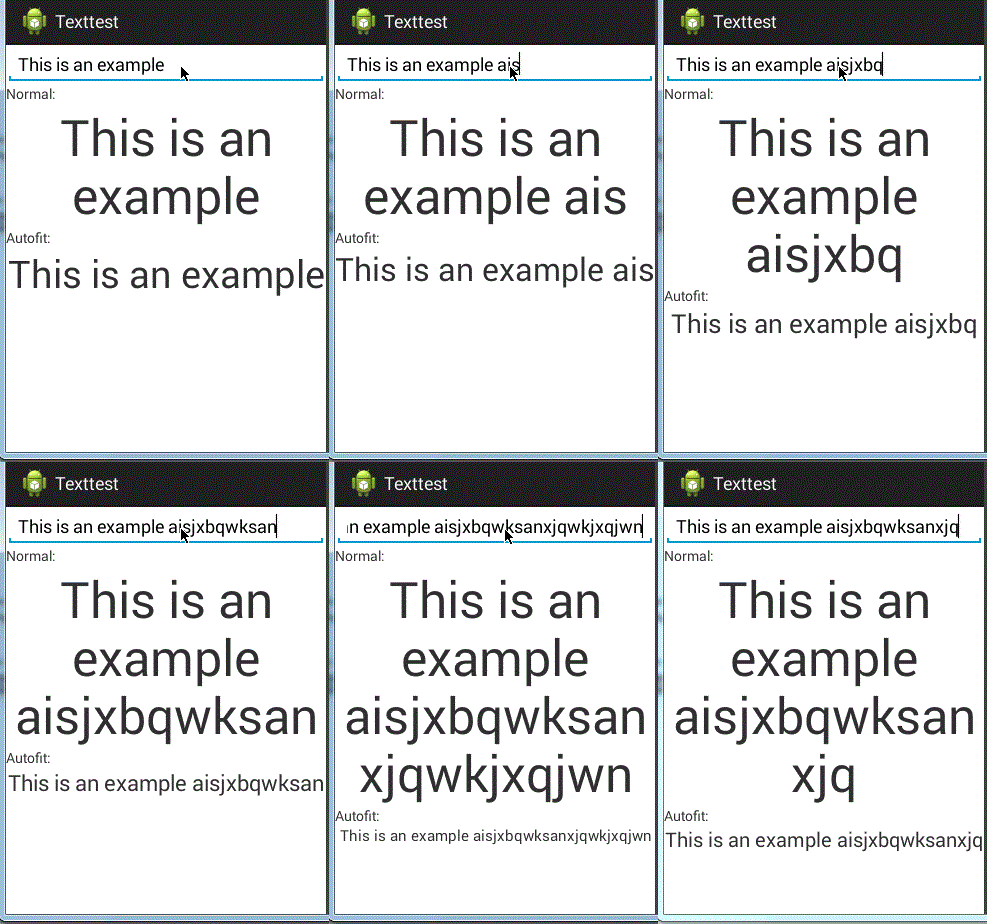
现在就让我们学习自适应大小的TextView控件,即当文字长度变化时,文字的大小会相应的变化,保证显示在一行当中
实现依靠于第三方类库
第三方类来源:
https://github.com/grantland/android-autofittextview
和正常的使用TextView一样,只需要将要自适应的TextView标签设置为<me.grantland.widget.AutofitTextView/>
注意:一定要设置为单行,否定无法显示效果
android:singleLine="true"
 <me.grantland.widget.AutofitTextView

             android:id="@+id/output_autofit"

             android:layout_width="match_parent"

             android:layout_height="wrap_content"

             android:text="@string/example"

             android:textSize="50sp"

             android:gravity="center"

             android:singleLine="true"

             autofit:minTextSize="8sp"

             />
布局文件:
 <?xml version="1.0" encoding="utf-8"?>

 <ScrollView xmlns:android="http://schemas.android.com/apk/res/android"

             xmlns:autofit="http://schemas.android.com/apk/res-auto"

     android:layout_width="match_parent"

     android:layout_height="match_parent">

     <LinearLayout

         android:layout_width="match_parent"

         android:layout_height="wrap_content"

         android:orientation="vertical"

         >

         <EditText

             android:id="@+id/input"

             android:layout_width="match_parent"

             android:layout_height="wrap_content"

             android:singleLine="true"

             android:hint="@string/input_hint"

             android:text="@string/example"/>

         <TextView

             android:layout_width="match_parent"

             android:layout_height="wrap_content"

             android:text="@string/label_normal"

             />

         <TextView

             android:id="@+id/output"

             android:layout_width="match_parent"

             android:layout_height="wrap_content"

             android:text="@string/example"

             android:textSize="50sp"

             android:gravity="center"

             />

         <TextView

             android:layout_width="match_parent"

             android:layout_height="wrap_content"

             android:text="@string/label_autofit"

             />

         <me.grantland.widget.AutofitTextView

             android:id="@+id/output_autofit"

             android:layout_width="match_parent"

             android:layout_height="wrap_content"

             android:text="@string/example"

             android:textSize="50sp"

             android:gravity="center"

             android:singleLine="true"

             autofit:minTextSize="8sp"

             />

     </LinearLayout>

 </ScrollView>
activity_main.xml
string.xml
 <?xml version="1.0" encoding="utf-8"?>

 <resources>

     <string name="app_name">Texttest</string>

     <string name="action_settings">Settings</string>

     <string name="hello_world">Hello world!</string>

     <string name="input_hint">text</string>

     <string name="label_normal">Normal:</string>

     <string name="label_autofit">Autofit:</string>

     <string name="example">This is an example</string>

 </resources>
activity
 package com.example.texttest;

 import android.app.Activity;

 import android.os.Bundle;

 import android.text.Editable;

 import android.text.TextWatcher;

 import android.view.Menu;

 import android.widget.EditText;

 import android.widget.TextView;

 public class MainActivity extends Activity {

     private TextView mOutput;

     private TextView mAutofitOutput;

     @Override

     protected void onCreate(Bundle savedInstanceState) {

         super.onCreate(savedInstanceState);

         setContentView(R.layout.activity_main);

         mOutput = (TextView)findViewById(R.id.output);

         mAutofitOutput = (TextView)findViewById(R.id.output_autofit);

         ((EditText)findViewById(R.id.input)).addTextChangedListener(new TextWatcher() {

             @Override

             public void beforeTextChanged(CharSequence charSequence, int i, int i2, int i3) {

                 // do nothing

             }

             @Override

             public void onTextChanged(CharSequence charSequence, int i, int i2, int i3) {

                 mOutput.setText(charSequence);

                 mAutofitOutput.setText(charSequence);

             }

             @Override

             public void afterTextChanged(Editable editable) {

                 // do nothing

             }

         });

     }

     @Override

     public boolean onCreateOptionsMenu(Menu menu) {

         // Inflate the menu; this adds items to the action bar if it is present.

         getMenuInflater().inflate(R.menu.main, menu);

         return true;

     }

 }
MainActivity.java
效果:
Android项目实战(五):TextView自适应大小的更多相关文章
- Android项目实战(三十二):圆角对话框Dialog
前言: 项目中多处用到对话框,用系统对话框太难看,就自己写一个自定义对话框. 对话框包括:1.圆角 2.app图标 , 提示文本,关闭对话框的"确定"按钮 难点:1.对话框边框圆角 ...
- (转载)Android项目实战(三十二):圆角对话框Dialog
Android项目实战(三十二):圆角对话框Dialog 前言: 项目中多处用到对话框,用系统对话框太难看,就自己写一个自定义对话框. 对话框包括:1.圆角 2.app图标 , 提示文本,关闭对话 ...
- (转载)Android项目实战(二十八):Zxing二维码实现及优化
Android项目实战(二十八):Zxing二维码实现及优化 前言: 多年之前接触过zxing实现二维码,没想到今日项目中再此使用竟然使用的还是zxing,百度之,竟是如此牛的玩意. 当然,项目中 ...
- (转载)Android项目实战(二十八):使用Zxing实现二维码及优化实例
Android项目实战(二十八):使用Zxing实现二维码及优化实例 作者:听着music睡 字体:[增加 减小] 类型:转载 时间:2016-11-21我要评论 这篇文章主要介绍了Android项目 ...
- Android项目实战(一): SpannableString与SpannableStringBuilder
原文:Android项目实战(一): SpannableString与SpannableStringBuilder 前言: 曾经在一些APP中的一些类似“帮助”“关于”的界面看过一行文字显示不同的颜色 ...
- Android项目实战(二十九):酒店预定日期选择
先看需求效果图: 几个需求点: 1.显示当月以及下个月的日历 (可自行拓展更多月份) 2.首次点击选择"开始日期",再次点击选择"结束日期" (1).如果&qu ...
- (转载)Android项目实战(二十七):数据交互(信息编辑)填写总结
Android项目实战(二十七):数据交互(信息编辑)填写总结 前言: 项目中必定用到的数据填写需求.比如修改用户名的文字编辑对话框,修改生日的日期选择对话框等等.现总结一下,方便以后使用. 注: ...
- (转载)Android项目实战(十七):QQ空间实现(二)—— 分享功能 / 弹出PopupWindow
Android项目实战(十七):QQ空间实现(二)—— 分享功能 / 弹出PopupWindow 这是一张QQ空间说说详情的截图. 分析: 1.点击右上角三个点的图标,在界面底部弹出一个区域,这个 ...
- Android项目实战--手机卫士开发系列教程
<ignore_js_op> banner131010.jpg (71.4 KB, 下载次数: 0) 下载附件 保存到相册 2 分钟前 上传 Android项目实战--手机卫士01- ...
- Android项目实战(四十九):Andoird 7.0+相机适配
解决方案类似: Android项目实战(四十):Andoird 7.0+ 安装APK适配 解决方法: 一.在AndroidManifest.xml 文件中添加 四大组件之一的 <provider ...
随机推荐
- devexpress表格控件gridcontrol设置隔行变色、焦点行颜色、设置(改变)显示值、固定列不移动(附源码)
介绍一些常用的gridcontrol设置. 1.设置隔行变色.首先设置显示隔行变色,步骤:OptionsView-->EnableAppearanceEvenRow-->true和Opti ...
- XPS 15 9530使用Windows10频繁发生Intel HD Graphics 4600驱动奔溃的一种解决方法
本人使用XPS 15 9530.集成显卡为Intel HD Graphics 4600.操作系统Windows 10 Pro,使用过程当中经常会发生集成显卡奔溃的问题,错误提示如下: Display ...
- HandlerMethodArgumentResolver数据绑定无效
因项目中action参数过多,并且是一些通用的查询参数,所以准备进行对参数统一封装为Map对象,然后由action中传入service中进行处理,查询spring的资料发现可以通过实现HandlerM ...
- Web离线存储的几种方式
随着HTML5的正式定稿,我们也可以大量使用HTML离线网络应用程序的特性. #1.Application Cache Application Cache 可以很简单让我们的WebApp具有离线的能力 ...
- Win10系统80端口被pid=4的System进程占用 -- 解决方法
背景: 今天在家里电脑下载phpstudy 2016后,准备启动服务器,结果提示80端口被占用 过程: 百度后有这几种解决方法: 1.IIS占用 .SQL server 2008的报表服务占用 可惜这 ...
- C中extern的用法
/*********************************************************************** INPUT3.C -- Input data pars ...
- DIV+CSS常用网页布局技巧!
以下是我整理的DIV+CSS常用网页布局技巧,仅供学习与参考! 第一种布局:左边固定宽度,右边自适应宽度 HTML Markup <div id="left">Left ...
- IOS高级编程之二:IOS的数据存储与IO
一.应用程序沙盒 IOS应用程序职能在系统为该应用所分配的文件区域下读写文件,这个文件区域就是应用程序沙盒.所有的非代码文件如:图片.声音.映象等等都存放在此. 在mac中command+shift+ ...
- jquery选择器(原创)<二>
jquery选择器,选择接着学: 前面学习了基本选择器中的CSS选择器,现在学层级选择器: 1.子元素选择器 子元素选择器,用于在给定的父元素下,查找这个父元素下面的所有的子元素,语法格式,如下: $ ...
- c#对Aspose.Word替换书签内容的简单封装
辅助类1 json和datatable互转: using System; using System.Collections.Generic; using System.Linq; using S ...