
封装,策略模式,Asp换脸
1.简单封装
1》计算类
using System;

using System.Collections.Generic;

using System.Linq;

using System.Text;

namespace 计算

{

    class operater1

    {

        private int x;

        private int y;

        private string opers;

        private int answer;

        public int X

        {

            set

            {

                x = value;

            }

        }

        public int Y

        {

            set

            {

                y = value;

            }

        }

        public string Opers

        {

            set

            {

                opers = value;

            }

        }

        public int Answer

        {

            get

            {

                return answer;

            }

        }

        public void operation()

        {

            switch (opers)

            {

                case "+":

                    answer = x + y;

                    break;

                case "-":

                    if (x > y)

                    {

                        answer = x - y;

                    }

                    else

                    {

                        throw new Exception("被减数不能小于减数!");

                    }

                    break;

                case "*":

                    answer = x * y;

                    break;

                case "/":

                    if (y == 0)

                    {

                        throw new Exception("除数不能为零!");

                    }

                    else

                    {

                        answer = x / y;

                    }

                    break;

            }

        }

    }

}
2》写入类
using System;

using System.Collections.Generic;

using System.Linq;

using System.Text;

using System.IO;

namespace 计算

{

    class writes

    {

        public void inscribe(string a, string b)

        {

            StreamWriter aaa = new StreamWriter(a, true);

            aaa.WriteLine(b);

            aaa.Close();

        }

        public void cleanup(string c, string d,string e)

        {

            StreamWriter ddd = new StreamWriter(c);

            ddd.WriteLine(" ");

            ddd.Close();

            StreamWriter aaa = new StreamWriter(d);

            aaa.WriteLine("");

            aaa.Close();

            StreamWriter fff = new StreamWriter(e);

            fff.WriteLine("");

            fff.Close();

        }

    }

}
form1代码
using System;

using System.Collections.Generic;

using System.ComponentModel;

using System.Data;

using System.Drawing;

using System.Linq;

using System.Text;

using System.Windows.Forms;

using System.IO;

namespace 计算

{

    public partial class Form1 : Form

    {

        public Form1()

        {

            InitializeComponent();

        }

        private void button1_Click(object sender, EventArgs e)//写入

        {

            writes writ = new writes();

            string fnm = @"one";

            string text1=this.textBox1.Text;

            writ.inscribe(fnm, text1);

            string fnmm = @"tow";

            string text2 = this.textBox2.Text;

            writ.inscribe(fnmm, text2);

            string fnm1 = @"fuhao";

            string text3 = this.comboBox1.Text;

            writ.inscribe(fnm1, text3);

                textBox1.Clear();

                textBox2.Clear();

        }

        private void button2_Click(object sender, EventArgs e)

        {

            Form2 fam = new Form2();

            fam.ShowDialog();

        }

        private void button3_Click(object sender, EventArgs e)//清空题库

        {

            string a = @"tow";

            string b = @"one";

            string c = @"fuhao";

            writes clean = new writes();

            clean.cleanup(a, b, c);

        }

        }

    }
form2代码
using System;

using System.Collections.Generic;

using System.ComponentModel;

using System.Data;

using System.Drawing;

using System.Linq;

using System.Text;

using System.Windows.Forms;

using System.IO;

namespace 出题

{

    public partial class Form2 : Form

    {

        public Form2()

        {

            InitializeComponent();

        }

       private int i = 1;

       public static int count;

       public static int right;

        private void timer1_Tick(object sender, EventArgs e)

        {

            try

            {

                int t = int.Parse(textBox5.Text);

                if (t <= 0)

                {

                    timer1.Enabled = false;

                    textBox5.Enabled = false;

                    MessageBox.Show("时间到了!");

                    Form3 fr3 = new Form3();

                    fr3.ShowDialog();

                }

                t = t - 1;

                textBox5.Text = t.ToString();

            }

            catch

            {

            }

        }

        private void button1_Click(object sender, EventArgs e)//开始

        {

            butt();

            try

            {

                string t = textBox5.Text;

                textBox5.Text = t;

                timer1.Enabled = true;

                timer1.Interval = 1000;

                timer1.Start();

            }

            catch

            {

            }

        }

        private void textBox4_KeyDown(object sender, KeyEventArgs e)//后台代码的应用

        {

            if (e.KeyCode == Keys.Enter)

            {

                operater1 operater = new operater1();

                operater.X = int.Parse(textBox1.Text);

                operater.Y = int.Parse(textBox3.Text);

                operater.Opers = textBox2.Text;

                operater.operation();

                if (textBox4.Text == operater.Answer.ToString())

                {

                    MessageBox.Show("回答正确!");

                    right++;

                }

                else

                {

                    MessageBox.Show("回答错误!");

                }

                count++;

                textBox4.Clear();

                butt();

            }

        }//用户的输入

        private void button2_Click(object sender, EventArgs e)//停止

        {

            textBox4.Enabled=false;

        }

        private void butt()

        {

            string[] line = File.ReadAllLines("one");

            if (i < line.Length)

            {

                textBox1.Text = line[i];

                string[] lines = File.ReadAllLines("tow");

                textBox3.Text = lines[i];

                string[] lin = File.ReadAllLines("fuhao");

                textBox2.Text = lin[i];

            }

            i++;

            if (i == line.Length + 1)

            {

                Form3 foo = new Form3();

                foo.ShowDialog();

            }

        }//读题

        private void button3_Click(object sender, EventArgs e)

        {

            this.Close();

        }//关闭窗体

    }

}
2.策略模式
using System;

using System.Collections.Generic;

using System.Linq;

using System.Text;

namespace 计算

{

    interface operater1

    {

        int calculate(int a, int b);

    }

    class Add : operater1

    {

        public int calculate(int a, int b)

        {

            return a + b;

        }

    }

    class Sub : operater1

    {

        public int calculate(int a, int b)

        {

            return a - b;

        }

    }

    class Mul : operater1

    {

        public int calculate(int a, int b)

        {

            return a * b;

        }

    }

    class Div : operater1

    {

        public int calculate(int a, int b)

        {

            if (b == 0)

            {

                throw new Exception("除数不能为零!");

            }

            else

            {

                return a / b;

            }

        }

    }

}
实现策略
using System;

using System.Collections.Generic;

using System.Linq;

using System.Text;

namespace 计算

{

    public class Clacuter

    {

        private operater1 oper1;

        public Clacuter(string aSS)

        {

            switch (aSS)

            {

                case "+":

                    oper1 = new Add();

                    break;

                case "-":

                    oper1 = new Sub();

                    break;

                case "*":

                    oper1 = new Mul();

                    break;

                case "/":

                    oper1 = new Div();

                    break;

            }

        }

        public int Calculation(int a,int b)

        {

            return oper1.calculate(a, b);

        }

    }

}
2,》写入类
using System;

using System.Collections.Generic;

using System.Linq;

using System.Text;

using System.IO;

namespace 出题

{

    class writes

    {

        public void inscribe(string a, string b)

        {

            StreamWriter aaa = new StreamWriter(a, true);

            aaa.WriteLine(b);

            aaa.Close();

        }

        public void cleanup(string c, string d,string e)

        {

            StreamWriter ddd = new StreamWriter(c);

            ddd.WriteLine(" ");

            ddd.Close();

            StreamWriter aaa = new StreamWriter(d);

            aaa.WriteLine("");

            aaa.Close();

            StreamWriter fff = new StreamWriter(e);

            fff.WriteLine("");

            fff.Close();

        }

    }

}
3》form2代码
using System;

using System.Collections.Generic;

using System.ComponentModel;

using System.Data;

using System.Drawing;

using System.Linq;

using System.Text;

using System.Windows.Forms;

using System.IO;

namespace 计算

{

    public partial class Form2 : Form

    {

        public Form2()

        {

            InitializeComponent();

        }

       private int i = 1;

       public static int count;

       public static int right;

        private void timer1_Tick(object sender, EventArgs e)

        {

            try

            {

                int t = int.Parse(textBox5.Text);

                if (t <= 0)

                {

                    timer1.Enabled = false;

                    textBox5.Enabled = false;

                    MessageBox.Show("时间到了!");

                    Form3 fr3 = new Form3();

                    fr3.ShowDialog();

                }

                t = t - 1;

                textBox5.Text = t.ToString();

            }

            catch

            {

            }

        }

        private void button1_Click(object sender, EventArgs e)//开始

        {

            butt();

            try

            {

                string t = textBox5.Text;

                textBox5.Text = t;

                timer1.Enabled = true;

                timer1.Interval = 1000;

                timer1.Start();

            }

            catch

            {

            }

        }

        private void textBox4_KeyDown(object sender, KeyEventArgs e)//策略模式代码的实现

        {

            if (e.KeyCode == Keys.Enter)

            {

                Clacuter clacuter=new Clacuter(textBox2.Text);

                int B = clacuter.Calculation(int.Parse(textBox1.Text), int.Parse(textBox3.Text));

                if (textBox4.Text ==B.ToString())

                {

                    MessageBox.Show("回答正确!");

                    right++;

                }

                else

                {

                    MessageBox.Show("回答错误!");

                }

                count++;

                textBox4.Clear();

                butt();

            }

        }//用户的输入

        private void button2_Click(object sender, EventArgs e)//停止

        {

            textBox4.Enabled=false;

        }

        private void butt()

        {

            string[] line = File.ReadAllLines("one");

            if (i < line.Length)

            {

                textBox1.Text = line[i];

                string[] lines = File.ReadAllLines("tow");

                textBox3.Text = lines[i];

                string[] lin = File.ReadAllLines("fuhao");

                textBox2.Text = lin[i];

            }

            i++;

            if (i == line.Length + 1)

            {

                Form3 foo = new Form3();

                foo.ShowDialog();

            }

        }//读题

        private void button3_Click(object sender, EventArgs e)

        {

            this.Close();

        }//关闭窗体

    }

}
3.Asp换脸
1》后台代码
using System;

using System.Collections.Generic;

using System.Linq;

using System.Web;

/// <summary>

///operater1 的摘要说明

/// </summary>

interface operater1

{

    int calculate(int a, int b);

}

class Add : operater1

{

    public int calculate(int a, int b)

    {

        return a + b;

    }

}

class Sub : operater1

{

    public int calculate(int a, int b)

    {

        return a - b;

    }

}

class Mul : operater1

{

    public int calculate(int a, int b)

    {

        return a * b;

    }

}

class Div : operater1

{

    public int calculate(int a, int b)

    {

        if (b == 0)

        {

            throw new Exception("除数不能为零!");

        }

        else

        {

            return a / b;

        }

    }

}

 public class Clacuter

    {

        private operater1 oper1;

        public Clacuter(string aSS)

        {

            switch (aSS)

            {

                case "+":

                    oper1 = new Add();

                    break;

                case "-":

                    oper1 = new Sub();

                    break;

                case "*":

                    oper1 = new Mul();

                    break;

                case "/":

                    oper1 = new Div();

                    break;

            }

        }

        public int Calculation(int a,int b)

        {

            return oper1.calculate(a, b);

        }

    }
web代码
using System;

using System.Collections.Generic;

using System.Linq;

using System.Web;

using System.Web.UI;

using System.Web.UI.WebControls;

public partial class Default2 : System.Web.UI.Page

{

    protected void Page_Load(object sender, EventArgs e)

    {

        if (!IsPostBack)

        {

            chuti();

        }

    }

    protected void Button1_Click(object sender, EventArgs e)

    {

        int a = int.Parse(TextBox1.Text);

        int b = int.Parse(TextBox2.Text);

        Clacuter claacuter = new Clacuter(TextBox3.Text);

        string answer = claacuter.Calculation(a, b).ToString();

        if (TextBox4.Text == answer)

        {

            Response.Write("回答正确!");

        }

        else

        {

            Response.Write("回答错误!");

            Response.Write(answer);

        }

    }

    protected void Button2_Click(object sender, EventArgs e)

    {

        chuti();

    }

    private void chuti()

    {

        Random random = new Random();

        TextBox1.Text = random.Next(1, 100).ToString();

        TextBox2.Text = random.Next(1, 100).ToString();

        string[] arry = new string[] { "+", "-", "*", "/" };

        TextBox3.Text = arry[random.Next(0, 4)];

    }

}
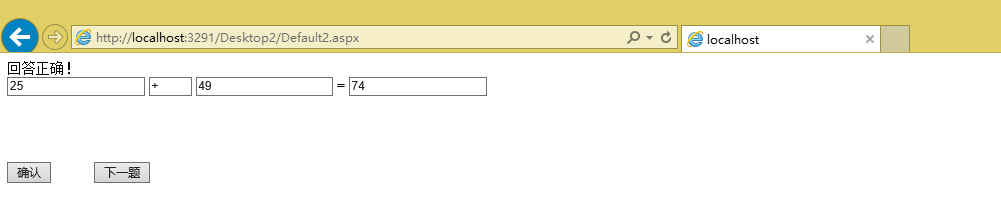
运行图片
封装,策略模式,Asp换脸的更多相关文章
- 封装,策略,Asp换脸
封装.策略 using System; using System.Collections.Generic; using System.Linq; using System.Text; namespac ...
- 计算器软件的代码实现 (策略模式+asp.net)
一 策略模式代码的编写 using System; using System.Collections.Generic; using System.Linq; using System.Web; /// ...
- 计算器软件实现系列(五)策略模式+asp.net
一 策略模式代码的编写 using System; using System.Collections.Generic; using System.Linq; using System.Web; /// ...
- Wpf+数据库代码封装+策略模式封装
运行界面: 数据库保存的题: 数据库封装代码: using System; using System.Collections.Generic; using System.Linq; using Sys ...
- ASP.NET四则运算--策略模式
在ASP.NET中实现四则运算,同样使用了类的封装,以及策略模式.只不过是把封装的类.前台代码以及后台的代码分离开来,但同样是要达到功能的实现. Calculator.cs using System; ...
- ASP.NET MVC 学习笔记-2.Razor语法 ASP.NET MVC 学习笔记-1.ASP.NET MVC 基础 反射的具体应用 策略模式的具体应用 责任链模式的具体应用 ServiceStack.Redis订阅发布服务的调用 C#读取XML文件的基类实现
ASP.NET MVC 学习笔记-2.Razor语法 1. 表达式 表达式必须跟在“@”符号之后, 2. 代码块 代码块必须位于“@{}”中,并且每行代码必须以“: ...
- ASP.net之策略模式
设计思路: 用ASP.net设计,调用策略模式.在第一个数和第二个数的文本框中输入数值,单击录题按钮,数值保存在n1,n2文档中,把要做的题都保存完后,单击开始按钮,开始做题,做完单击判断按钮,进行判 ...
- 【Android】策略模式封装百度地图路线规划模块
百度地图的Demo里有个路线规划的功能,但是,这个功能和Activity耦合性太高,所以需要单独抽离出路径规划功能,进行"解耦". 注:由于项目原因,本文只针对驾车路线规划进行封装 ...
- Android 设计模式实战之关于封装计费代码库的策略模式详谈
写在之前 这周生活上出现了很多的不如意,从周一开始就觉得哪里出现了问题,然后就是各种烦躁的情绪,后来事情还真是如预感的那样发生了,很是心痛,但也无可奈何,希望大家都好好珍惜自己身边的人:友人,亲人,家 ...
随机推荐
- 解读ClassLoader
ClassLoader一个经常出现又让很多人望而却步的词,本文将试图以最浅显易懂的方式来讲解 ClassLoader,希望能对不了解该机制的朋友起到一点点作用. 要深入了解ClassLoader ...
- C++内存问题大集合(指针问题,以及字符串拷贝问题,确实挺危险的)
作者:rendao.org,版权声明,转载必须征得同意. 内存越界,变量被篡改 memset时长度参数超出了数组长度,但memset当时并不会报错,而是操作了不应该操作的内存,导致变量被无端篡改 还可 ...
- 阅读javaScript 的原型笔记
下面我们先看一个例子已经一张图. function Foo() { } Object.prototype.name = 'My Object'; Foo.prototype.name = 'Bar'; ...
- Objdump-查看汇编指令
作用 Objdump可以用来看汇编指令 查看汇编指令 测试文件 编译指令 gcc -g -o objtest 1.8.c objdump -S objtest |more /main 查看结果
- LightOj 1024 - Eid (求n个数的最小公约数+高精度)
题目链接:http://lightoj.com/volume_showproblem.php?problem=1024 题意:给你n(2<=n<=1000)个数, 然后求n个数的最小公倍数 ...
- C# HttpWebRequest 绝技
http://www.sufeinet.com/thread-6-1-1.html 万能框架.分布式......
- Selenium2学习-002-Selenium2 Web 元素定位及 XPath 编写演示示例
此文主要对 Selenium2 的 Web 元素定位及 XPath 编写示例,敬请各位亲们参阅,共同探讨.若有不足之处,敬请各位大神指正,不胜感激! 通过 Firefox(火狐)浏览器的插件 Fire ...
- linux boot logo rotate
开机logo旋转方法. 参考链接 https://www.kernel.org/doc/Documentation/fb/fbcon.txt https://community.nxp.com/thr ...
- imx6 关闭 otg host
参考文档: http://www.cnblogs.com/zengjfgit/p/4711336.html make menuconfig 去掉Support for DR host port on ...
- cssHack
cssHack 不同的浏览器,比如Internet Explorer 6,Internet Explorer 7,Mozilla Firefox等,对CSS的解析认识不一样,因此会导致生成的页面效果不 ...