
RabbitMQ-learning
第一种模式=直连
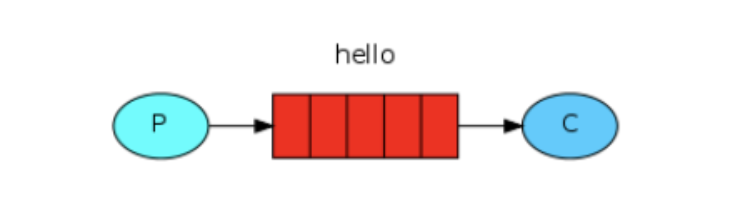
P:生产者,也就是要发送消息的程序
C:消费者:消息的接受者,会一直等待消息到来。
queue:消息队列,图中红色部分。类似一个邮箱,可以缓存消息;生产者向其中投递消息,消费者从其中取出消息。
producer:
package com.quan.rabbitmq.producer;

import com.rabbitmq.client.Channel;

import com.rabbitmq.client.Connection;

import com.rabbitmq.client.ConnectionFactory;

import java.io.IOException;

import java.util.concurrent.TimeoutException;

/**

 * 直连模型:

 * 生产者发送消息

 * 消费者,等待消息到来消费

 * 消息队列:可以缓存消息,生产者向其中投递消息,消费者从其中取出消息。

 *

 */

public class RMQProducer {

    public static void main(String[] args) throws IOException, TimeoutException {

        ConnectionFactory connectionFactory = new ConnectionFactory();

        connectionFactory.setHost("localhost");

        connectionFactory.setPort(5672);

        connectionFactory.setUsername("quan");

        connectionFactory.setPassword("admin");

        connectionFactory.setVirtualHost("quan");

        Connection connection = connectionFactory.newConnection();

        Channel channel = connection.createChannel();

        channel.queueDeclare("hello",true,false,false,null);

        channel.basicPublish("","hello",null,"hello rabbit".getBytes());

        channel.close();

        connection.close();

    }

}
consumer:
package com.quan.rabbitmq.consumer;

import com.rabbitmq.client.*;

import java.io.IOException;

import java.util.concurrent.TimeoutException;

public class RMQConsumer {

    public static void main(String[] args) throws IOException, TimeoutException {

        ConnectionFactory connectionFactory = new ConnectionFactory();

        connectionFactory.setHost("localhost");

        connectionFactory.setPort(5672);

        connectionFactory.setUsername("quan");

        connectionFactory.setPassword("admin");

        connectionFactory.setVirtualHost("quan");

        //创建连接

        Connection connection = connectionFactory.newConnection();

        //通过连接创建通道

        Channel channel = connection.createChannel();

        /**

         * 参数1:声明通道对应的队列

         * 参数2:指定是否持久化

         * 参数3:指定是否独占对象

         * 参数4:指定是否自动删除队列

         * 参数5:对队列的额外设置

         */

        channel.queueDeclare("hello",true,false,false,null);

        channel.basicConsume("hello",true,new DefaultConsumer(channel){

           @Override

           public void handleDelivery(String consumerTag, Envelope envelope, AMQP.BasicProperties properties, byte[] body) throws IOException {

               System.out.println(new String(body));

           }

       });

    }

}
第二种模式=任务模型(work quene)

当消息处理比较耗时的时候,可能生产消息的速度会远远大于消息的消费速度。长此以往,消息就会堆积越来越多,无法及时处理。
此时就可以使用work 模型:让多个消费者绑定到一个队列,共同消费队列中的消息。队列中的消息一旦消费,就会消失,因此任务是不会被重复执行的。
P:生产者:任务的发布者
C1:消费者-1,领取任务并且完成任务,假设完成速度较慢
C2:消费者-2:领取任务并完成任务,假设完成速度快
P:
/**

 * 直连模型:

 * 生产者发送消息

 * 消费者,等待消息到来消费

 * 消息队列:可以缓存消息,生产者向其中投递消息,消费者从其中取出消息。

 *

 */

public class RMQProducer2 {

    public static void main(String[] args) throws IOException, TimeoutException {

        ConnectionFactory connectionFactory = new ConnectionFactory();

        connectionFactory.setHost("localhost");

        connectionFactory.setPort(5672);

        connectionFactory.setUsername("quan");

        connectionFactory.setPassword("admin");

        connectionFactory.setVirtualHost("quan");

        Connection connection = connectionFactory.newConnection();

        Channel channel = connection.createChannel();

        channel.queueDeclare("hello",true,false,false,null);

        for(int i =0 ;i<20;i++){

            channel.basicPublish("","hello",null,(i+"=====>hello rabbit").getBytes());

        }

        channel.close();

        connection.close();

    }

}
C1
public class RMQConsumer21 {

    public static void main(String[] args) throws IOException, TimeoutException {

        ConnectionFactory connectionFactory = new ConnectionFactory();

        connectionFactory.setHost("localhost");

        connectionFactory.setPort(5672);

        connectionFactory.setUsername("quan");

        connectionFactory.setPassword("admin");

        connectionFactory.setVirtualHost("quan");

        //创建连接

        Connection connection = connectionFactory.newConnection();

        //通过连接创建通道

        Channel channel = connection.createChannel();

        /**

         * 参数1:声明通道对应的队列

         * 参数2:指定是否持久化

         * 参数3:指定是否独占对象

         * 参数4:指定是否自动删除队列

         * 参数5:对队列的额外设置

         */

        channel.queueDeclare("hello",true,false,false,null);

        channel.basicConsume("hello",true,new DefaultConsumer(channel){

           @Override

           public void handleDelivery(String consumerTag, Envelope envelope, AMQP.BasicProperties properties, byte[] body) throws IOException {

               System.out.println("我是consumer1"+new String(body));

           }

       });

    }

}
C2
public class RMQConsumer22 {

    public static void main(String[] args) throws IOException, TimeoutException {

        ConnectionFactory connectionFactory = new ConnectionFactory();

        connectionFactory.setHost("localhost");

        connectionFactory.setPort(5672);

        connectionFactory.setUsername("quan");

        connectionFactory.setPassword("admin");

        connectionFactory.setVirtualHost("quan");

        //创建连接

        Connection connection = connectionFactory.newConnection();

        //通过连接创建通道

        Channel channel = connection.createChannel();

        /**

         * 参数1:声明通道对应的队列

         * 参数2:指定是否持久化

         * 参数3:指定是否独占对象

         * 参数4:指定是否自动删除队列

         * 参数5:对队列的额外设置

         */

        channel.queueDeclare("hello",true,false,false,null);

        channel.basicConsume("hello",true,new DefaultConsumer(channel){

           @Override

           public void handleDelivery(String consumerTag, Envelope envelope, AMQP.BasicProperties properties, byte[] body) throws IOException {

                   try {

                       Thread.sleep(1000);

                   } catch (InterruptedException e) {

                       e.printStackTrace();

                   }

               System.out.println("我是consumer2"+new String(body));

           }

       });

    }

}
re
当两个消费者都在监听通道中的消息的时候:
我们一旦发消息:
我是consumer2    0=====>hello rabbit

我是consumer2    2=====>hello rabbit

我是consumer2    4=====>hello rabbit

我是consumer2    6=====>hello rabbit

我是consumer2    8=====>hello rabbit

我是consumer2    10=====>hello rabbit

我是consumer2    12=====>hello rabbit

我是consumer2    14=====>hello rabbit

我是consumer2    16=====>hello rabbit

我是consumer2    18=====>hello rabbit

@@@@@@@@@@@@@@

我是consumer1    1=====>hello rabbit

我是consumer1    3=====>hello rabbit

我是consumer1    5=====>hello rabbit

我是consumer1    7=====>hello rabbit

我是consumer1    9=====>hello rabbit

我是consumer1    11=====>hello rabbit

我是consumer1    13=====>hello rabbit

我是consumer1    15=====>hello rabbit

我是consumer1    17=====>hello rabbit

我是consumer1    19=====>hello rabbit
默认情况下,RabbitMQ将按顺序将每个消息发送给下一个使用者。平均而言,每个消费者都会收到相同数量的消息。这种分发消息的方式称为循环。
消息确认机制:
public class RMQConsumer21 {

    public static void main(String[] args) throws IOException, TimeoutException {

        ConnectionFactory connectionFactory = new ConnectionFactory();

        connectionFactory.setHost("localhost");

        connectionFactory.setPort(5672);

        connectionFactory.setUsername("quan");

        connectionFactory.setPassword("admin");

        connectionFactory.setVirtualHost("quan");

        //创建连接

        Connection connection = connectionFactory.newConnection();

        //通过连接创建通道

        final Channel channel = connection.createChannel();

        channel.queueDeclare("hello",true,false,false,null);

        channel.basicQos(1);//一次只接受一条为确认的消息

        //第二个参数:关闭自动确认消息

        channel.basicConsume("hello",false,new DefaultConsumer(channel){

           @Override

           public void handleDelivery(String consumerTag, Envelope envelope, AMQP.BasicProperties properties, byte[] body) throws IOException {

               System.out.println("我是consumer1    "+new String(body));

               channel.basicAck(envelope.getDeliveryTag(),false);//手动确认消息

           }

       });

    }

}
re:
我是consumer1    0=====>hello rabbit

@@@@@@@@@@@

我是consumer2    1=====>hello rabbit

我是consumer2    2=====>hello rabbit

我是consumer2    3=====>hello rabbit

我是consumer2    4=====>hello rabbit

我是consumer2    5=====>hello rabbit

我是consumer2    6=====>hello rabbit

我是consumer2    7=====>hello rabbit

我是consumer2    8=====>hello rabbit

我是consumer2    9=====>hello rabbit

我是consumer2    10=====>hello rabbit

我是consumer2    11=====>hello rabbit

我是consumer2    12=====>hello rabbit

我是consumer2    13=====>hello rabbit

我是consumer2    14=====>hello rabbit

我是consumer2    15=====>hello rabbit

我是consumer2    16=====>hello rabbit

我是consumer2    17=====>hello rabbit

我是consumer2    18=====>hello rabbit

我是consumer2    19=====>hello rabbit
第三种模式-广播
fanout 扇出===广播
消息发送流程:
-  可以有多个消费者

-  每个消费者有自己的queue(队列)

-  每个队列都要绑定到Exchange(交换机)

-  生产者发送的消息,只能发送到交换机,交换机来决定要发给哪个队列,生产者无法决定。

-  交换机把消息发送给绑定过的所有队列

-  队列的消费者都能拿到消息。实现一条消息被多个消费者消费

p;更新部分:
        Connection connection = connectionFactory.newConnection();

        Channel channel = connection.createChannel();

       channel.exchangeDeclare("logs","fanout");

        for(int i =0 ;i<20;i++){

            //第一个参数:交换机名字

            //第二个参数:队列名字

            //第三个参数:

            //第四个参数:消息,是byte类型

            channel.basicPublish("logs","",null,(i+"=====>hello rabbit").getBytes());

        }
c1 c2 c3:这三个都是差不多的配置:
     //绑定交换机

       channel.exchangeDeclare("logs","fanout");

       //创建临时队列

       String queue = channel.queueDeclare().getQueue();

       //将临时队列绑定交换机exchange

       channel.queueBind(queue,"logs","");

       //处理消息

        channel.basicConsume(queue,true,new DefaultConsumer(channel){

           @Override

           public void handleDelivery(String consumerTag, Envelope envelope, AMQP.BasicProperties properties, byte[] body) throws IOException {

               System.out.println("我是consumer1    "+new String(body));

           }

       });
re:
所有的消息,每个消费者都可以消费得到,
第四种模式-Routing-订阅模式中的-直连(direct)
在Fanout模式中,一条消息,会被所有订阅的队列都消费。但是,在某些场景下,我们希望不同的消息被不同的队列消费。
这时就要用到Direct类型的Exchange。
流程:
- 队列与交换机的绑定,不能是任意绑定了,而是要指定一个`RoutingKey`(路由key)

- 消息的发送方在 向 Exchange发送消息时,也必须指定消息的 `RoutingKey`。

- Exchange不再把消息交给每一个绑定的队列,而是根据消息的`Routing Key`进行判断,只有队列的`Routingkey`与消息的 `Routing key`完全一致,才会接收到消息
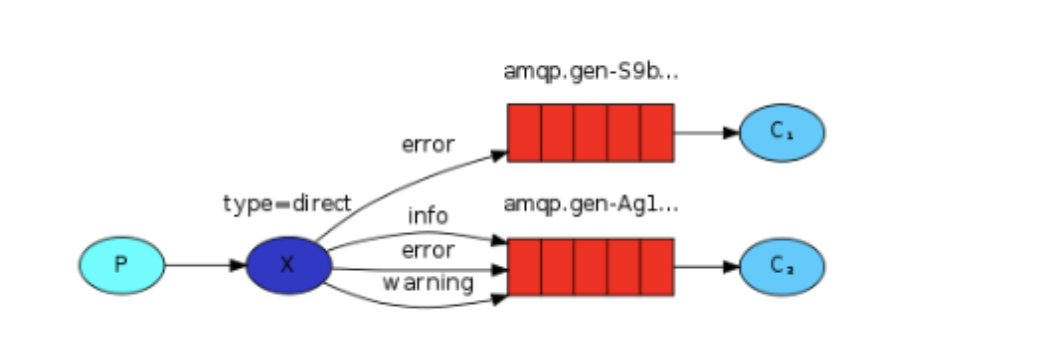
- P:生产者,向Exchange发送消息,发送消息时,会指定一个routing key。

- X:Exchange(交换机),接收生产者的消息,然后把消息递交给 与routing key完全匹配的队列

- C1:消费者,其所在队列指定了需要routing key 为 error 的消息

- C2:消费者,其所在队列指定了需要routing key 为 info、error、warning 的消息
情景:
c1 :error,info,debug
c2:error
c3:info
p:会每种key发一条消息:
p:改变rkey的值:
        //声明交换机:参数1:交换机名称

        //参数2:交换机类型:

       channel.exchangeDeclare("logs1","direct");

       String rkey = "debug";

            //第一个参数:交换机名字

            //第二个参数:队列名字/路由key

            //第三个参数:

            //第四个参数:消息,是byte类型

            channel.basicPublish("logs1",rkey,null,(rkey+"消息=====>hello rabbit").getBytes());

        channel.close();

        connection.close();

    }
c1:
  //绑定交换机/参数2 交换机类型

       channel.exchangeDeclare("logs1","direct");

       //创建临时队列

       String queue = channel.queueDeclare().getQueue();

       //将临时队列绑定交换机exchange

        //第一个参数:队列,第2个参数:交换机名字,第3个参数:路由key

       channel.queueBind(queue,"logs1","error");

       channel.queueBind(queue,"logs1","info");

       channel.queueBind(queue,"logs1","debug");

       //处理消息

        channel.basicConsume(queue,true,new DefaultConsumer(channel){

           @Override

           public void handleDelivery(String consumerTag, Envelope envelope, AMQP.BasicProperties properties, byte[] body) throws IOException {

               System.out.println("我是consumer1    "+new String(body));

           }

       });

    }
c2:
   //绑定交换机

        channel.exchangeDeclare("logs1","direct");

        //创建临时队列

        String queue = channel.queueDeclare().getQueue();

        //将临时队列绑定交换机exchange

        //第一个参数:队列,第2个参数:交换机名字,第3个参数:路由key

        channel.queueBind(queue,"logs1","error");

        //处理消息
C3:
  //创建连接

        Connection connection = connectionFactory.newConnection();

        //通过连接创建通道

        Channel channel = connection.createChannel();

        //绑定交换机

        channel.exchangeDeclare("logs1","direct");

        //创建临时队列

        String queue = channel.queueDeclare().getQueue();

        //将临时队列绑定交换机exchange

        //第一个参数:队列,第2个参数:交换机名字,第3个参数:路由key

        channel.queueBind(queue,"logs1","info");

        //处理消息
p每个rkey发送一次消息后的结果:
我是consumer1    error消息=====>hello rabbit

我是consumer1    info消息=====>hello rabbit

我是consumer1    debug消息=====>hello rabbit

我是consumer2    error消息=====>hello rabbit

我是consumer3    info消息=====>hello rabbit
可以知道,这种类型的交换机是可以按需发送的。
Routing的订阅模式--topic:
Topic类型的Exchange与Direct相比,都是可以根据RoutingKey把消息路由到不同的队列。只不过Topic类型Exchange可以让队列
在绑定Routing key 的时候使用通配符!
这种模型Routingkey 一般都是由一个或多个单词组成,多个单词之间以”.”分割,例如: item.insert


p:
 //声明交换机:参数1:交换机名称

        //参数2:交换机类型:

       channel.exchangeDeclare("topic1","topic");

       String rkey = "user.debug.all";

            //第一个参数:交换机名字

            //第二个参数:队列名字/路由key

            //第三个参数:

            //第四个参数:消息,是byte类型

            channel.basicPublish("topic1",rkey,null,(rkey+"消息=====>hello rabbit").getBytes());
c2:
        //绑定交换机

        channel.exchangeDeclare("topic1","topic");

        //创建临时队列

        String queue = channel.queueDeclare().getQueue();

        //将临时队列绑定交换机exchange

        //第一个参数:队列,第2个参数:交换机名字,第3个参数:路由key

        channel.queueBind(queue,"topic1","user.#");
user.#可以匹配多个后面的单词:
c1:
     //绑定交换机/参数2 交换机类型

       channel.exchangeDeclare("topic1","topic");

       //创建临时队列

       String queue = channel.queueDeclare().getQueue();

       //将临时队列绑定交换机exchange

        //第一个参数:队列,第2个参数:交换机名字,第3个参数:路由key

       channel.queueBind(queue,"topic1","user.*");
user.*只能接一个单词:
p发送了一次key为user.debug 和一次user.debug.all:
我是consumer1    user.debug消息=====>hello rabbit

我是consumer2    user.debug消息=====>hello rabbit

我是consumer2    user.debug.all消息=====>hello rabbit
RabbitMQ-learning的更多相关文章
- Scheduled Jobs with Custom Clock Processes in Java with Quartz and RabbitMQ
原文地址: https://devcenter.heroku.com/articles/scheduled-jobs-custom-clock-processes-java-quartz-rabbit ...
- NServiceBus+RabbitMQ开发分布式应用
前言 NServiceBus提供了8种传输管道组件,分别是Learning.MSMQ.Azure Service Bus.Azure Service Bus (Legacy).Azure S ...
- 消息队列——RabbitMQ学习笔记
消息队列--RabbitMQ学习笔记 1. 写在前面 昨天简单学习了一个消息队列项目--RabbitMQ,今天趁热打铁,将学到的东西记录下来. 学习的资料主要是官网给出的6个基本的消息发送/接收模型, ...
- RabbitMq应用二
在应用一中,基本的消息队列使用已经完成了,在实际项目中,一定会出现各种各样的需求和问题,rabbitmq内置的很多强大机制和功能会帮助我们解决很多的问题,下面就一个一个的一起学习一下. 消息响应机制 ...
- 【Machine Learning】KNN算法虹膜图片识别
K-近邻算法虹膜图片识别实战 作者:白宁超 2017年1月3日18:26:33 摘要:随着机器学习和深度学习的热潮,各种图书层出不穷.然而多数是基础理论知识介绍,缺乏实现的深入理解.本系列文章是作者结 ...
- 如何优雅的使用RabbitMQ
RabbitMQ无疑是目前最流行的消息队列之一,对各种语言环境的支持也很丰富,作为一个.NET developer有必要学习和了解这一工具.消息队列的使用场景大概有3种: 1.系统集成,分布式系统的设 ...
- RabbitMq应用一的补充(RabbitMQ的应用场景)
直接进入正题. 一.异步处理 场景:发送手机验证码,邮件 传统古老处理方式如下图 这个流程,全部在主线程完成,注册->入库->发送邮件->发送短信,由于都在主线程,所以要等待每一步完 ...
- RabbitMq应用一
RabbitMq应用一 RabbitMQ的具体概念,百度百科一下,我这里说一下我的理解,如果有少或者不对的地方,欢迎纠正和补充. 一个项目架构,小的时候,一般都是传统的单一网站系统,或者项目,三层架构 ...
- 【Machine Learning】Python开发工具:Anaconda+Sublime
Python开发工具:Anaconda+Sublime 作者:白宁超 2016年12月23日21:24:51 摘要:随着机器学习和深度学习的热潮,各种图书层出不穷.然而多数是基础理论知识介绍,缺乏实现 ...
- 【Machine Learning】机器学习及其基础概念简介
机器学习及其基础概念简介 作者:白宁超 2016年12月23日21:24:51 摘要:随着机器学习和深度学习的热潮,各种图书层出不穷.然而多数是基础理论知识介绍,缺乏实现的深入理解.本系列文章是作者结 ...
随机推荐
- 【转】可见性、原子性和有序性问题:并发编程Bug的源头
如果你细心观察的话,你会发现,不管是哪一门编程语言,并发类的知识都是在高级篇里.换句话说,这块知识点其实对于程序员来说,是比较进阶的知识.我自己这么多年学习过来,也确实觉得并发是比较难的,因为它会涉及 ...
- Java泛型的那些事
1.泛型概述 1.1.为什么使用泛型 没有泛型,在编写代码时只能使用具体类型或Object类型,无法做到使用者想要使用什么类型就是类型.比如:创建一个方法,形参需要指定需要使用的数据类型,在创建方法之 ...
- NSSCTF-easyupload2.0
相对于easyupload3.0,这个easyupload2.0就简单的很多,也可以使用和3.0一样的做法,但是应该还是有别的做法,就比如可以使用phtml这个后缀绕过检测 使用BP抓包修改一下 放包 ...
- 国产BI报表工具中低调的优秀“模范生”——思迈特软件Smartbi
首先简单来介绍一下这位低调且优秀的模范生--思迈特软件Smartbi.思迈特Smartbi是企业级商业智能BI和大数据分析品牌,满足用户在企业级报表.数据可视化分析.自助分析平台.数据挖掘建模.AI智 ...
- 目前数据可视化工具排名如何?好用的BI可视化软件
数据可视化用专业术语来就是通过视觉的方式向人类展示数据,这种在文本基础上的图表即简单又实用,而且相关性.趋势分析都非常明确,也非常可靠,通过图表一目了然.用通俗的话说就是画一张图表,将数据以比例的方式 ...
- Winfrom中关于toolStrip工具栏中按钮背景的设置
在ToolStrip中可以存放很多种控件,一般来说,主要使用的是Button和DropDownButton,通常情况下,Button需要设置图片和文字,网上找了很多个方法都不太靠谱,自己试验了下,下面 ...
- MySQL 8.0.25 MSI Install 安装过程
官网下载地址: https://dev.mysql.com/downloads/mysql 其中web-community需要联网安装,另外一个可以离线安装.我下载的是离线安装包. 1.双击安 ...
- 使用Python绘制彩色螺旋矩阵
from turtle import* #导入turtle库 bgcolor("black") #设置画布颜色为黑色 speed(0) #设置画笔绘制速度 colors=[&quo ...
- 【持续更新】Git使用指南
Tutorial from cs61B 1. 理解Git的不同视角 文件状态图 从状态视角理解git: 一个文件有4种状态, 状态转换如图所示 从存储视角理解git: 工作区:电脑里能看到的目录 暂存 ...
- ABP Framework 5.2 RC 发布及新增功能介绍
ABP Framework 5.2 RC 新增功能 目录 ABP Framework 5.2 RC 新增功能 单层解决方案模板 EF Core 数据库迁移 UI 和 数据库 选项 API 版本控制 源 ...