
移动端 滑动删除 swipeDelete
功能比较简单常见,最近整理一下做备份记录。先看看线上 整体实际效果 ,基于原生js,不依赖其他类库
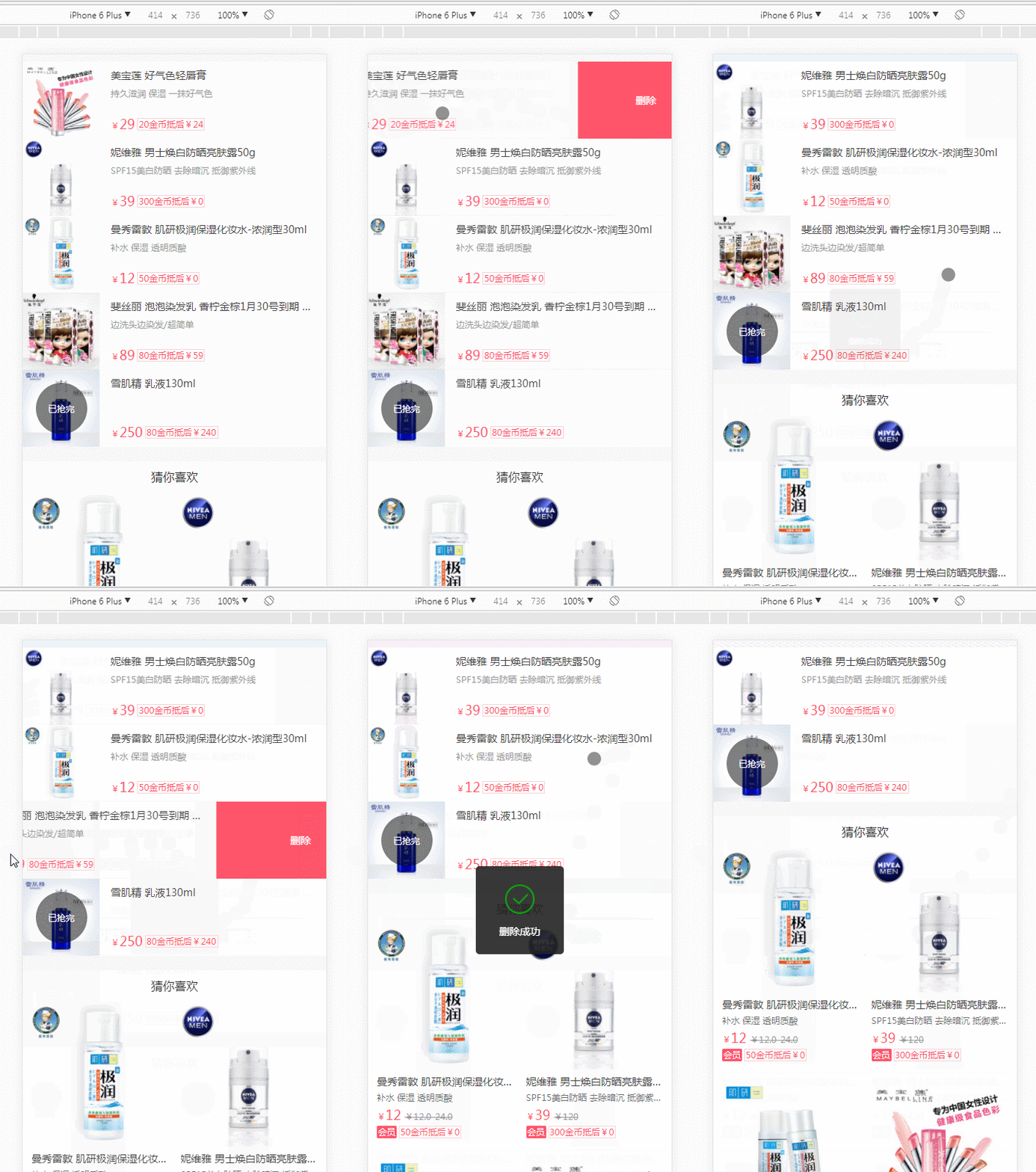
博客园地址 https://www.cnblogs.com/surfaces/p/8426056.html
github 地址:https://taylor-swift-1989.github.io/h5/swipeDelete/swipeDelete.html
下面是swipeDelete 用法 demo

默认参数
var defaults = {

		 	   distance:80,  //滑动距离

		 	   units:'px',  //默认单位

		 	   touchStart:function(){},//触摸开始回调

		 	   opened:function(){},//展开后回调

		 	   closed:function(){},//关闭后回调

		 	   duration:100,//毫秒

               deleteBtn:'.swipe-delete-btn',  //删除元素

               direction:'left',  //滑动方向

               deleteClose:true,  //点击删除是否 关闭

               deleteFn:function(){}  //删除事件   retuan false 不关闭  //   retuan true 关闭

};
dom 节点如下 支持种结构
A li 元素运动 transform: translateX(2px); 滑动元素和删除元素 父子 节点关系

<li id="li" class="swipe-delete-element list-li" >      //该节点 位移 transform: translateX

    <div class="con ">

     00 向左侧 滑动删除 一起过来

    </div>

    <div class="swipe-delete-btn btn">删除0</div>

</li>
B con 元素运动 transform: translateX(2px); 滑动元素和删除元素 兄弟节点关系

<li id="li" class=" list-li" >

    <div class="con swipe-delete-element ">   //该节点 位移 transform: translateX

     11 向左侧 滑动删除 藏在后面

    </div>

    <div class="swipe-delete-btn btn" style="right:0px;">删除1</div>

</li>
对应的js 如下,有疑问可以看下面源代码 附录
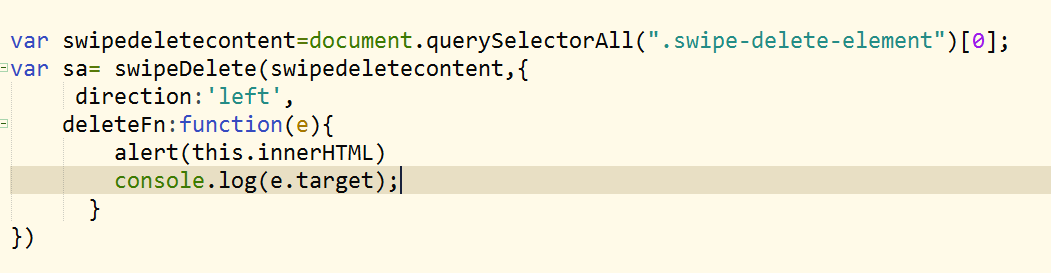

参数 deleteClose:false,用法 点击 删除按钮并收回 滑动元素, 点击事件回调函数 deleteFn里面 return true 可以收回,或者通过 sa5.swipeClose() 方法促其关闭;
var swipedeletecontent5=document.querySelectorAll(".swipe-delete-element")[5];

var sa5=new swipeDelete(swipedeletecontent5,{

	distance:160,

	deleteBtn:'.swipe-delete-btn2',

	deleteClose:false,

	//direction:'left',

	touchStart:function(e){

		console.log("sa6 touchStart"+this.innerHTML);

		//console.log(this.innerHTML==e.target.innerHTML);

	},

	opened:function(e){

		//console.log("sa6 opened");

		console.log("sa6 opened"+this.innerHTML);

	},

	closed:function(e){

		//console.log("sa6 closed");

		console.log("sa6 closed"+this.innerHTML);

	},

	deleteFn:function(e){

		var that=this;

      console.log(e.target.parentNode);

		if(that.className=="on1"){

			alert("5on11"+that.innerHTML+'不 可以关闭');

		}else if(that.className=="on2"){

		alert("5on22"+that.innerHTML+'可以关闭');

		return true; //关闭

		}

	  }

})

sa5.swipeOpen();

//console.log(sa5)

document.getElementById("j_opend").addEventListener("click",function(){

	 var swipe5=document.querySelector(".swipe5").querySelector(".swipe-delete-element");

	 var flagOpen=swipe5.getAttribute("data-lock");

	 if(flagOpen=='false'){

	 	sa5.swipeOpen();

		this.innerHTML="swipe5 关闭"

	 }

	 if(swipe5.getAttribute("data-lock")=='true'){

	 	sa5.swipeClose();

		this.innerHTML="swipe5打开 "

	 }

})
swipeDelete静态方法 API , 关闭与打开
var sa5=new swipeDelete(swipedeletecontent5,{}); sa5.swipeOpen(); sa5.swipeClose();
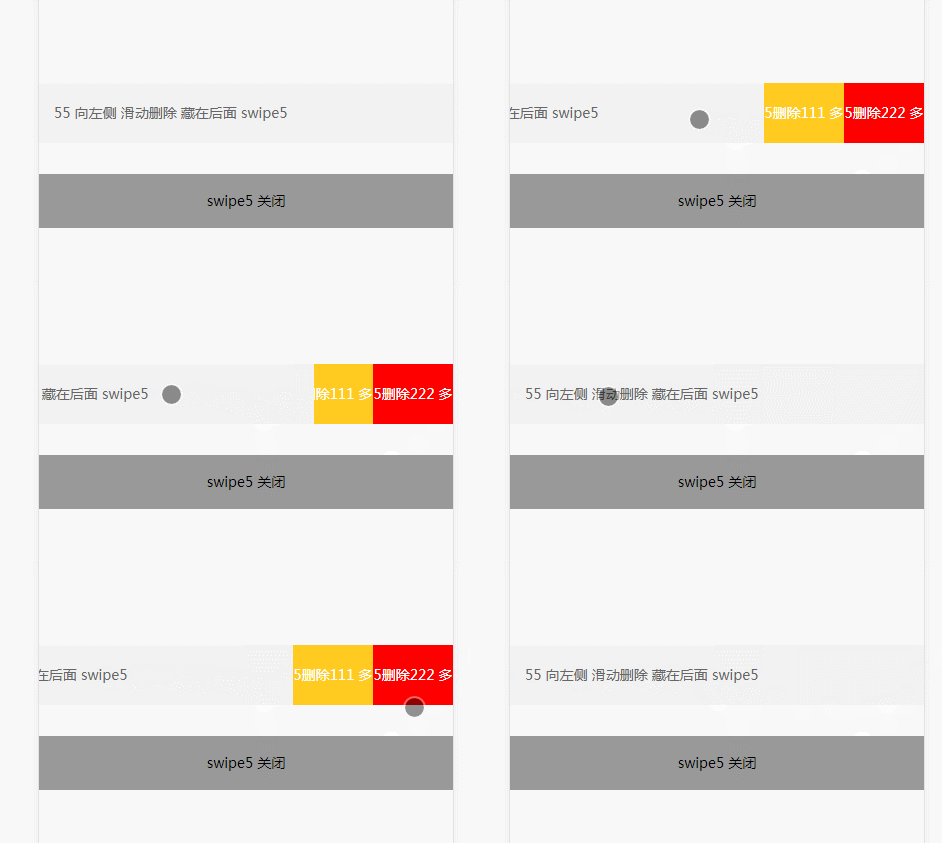
创建的swipeDelete 对象 ,可省略new 关键字,swipeDelete 类 内部 如下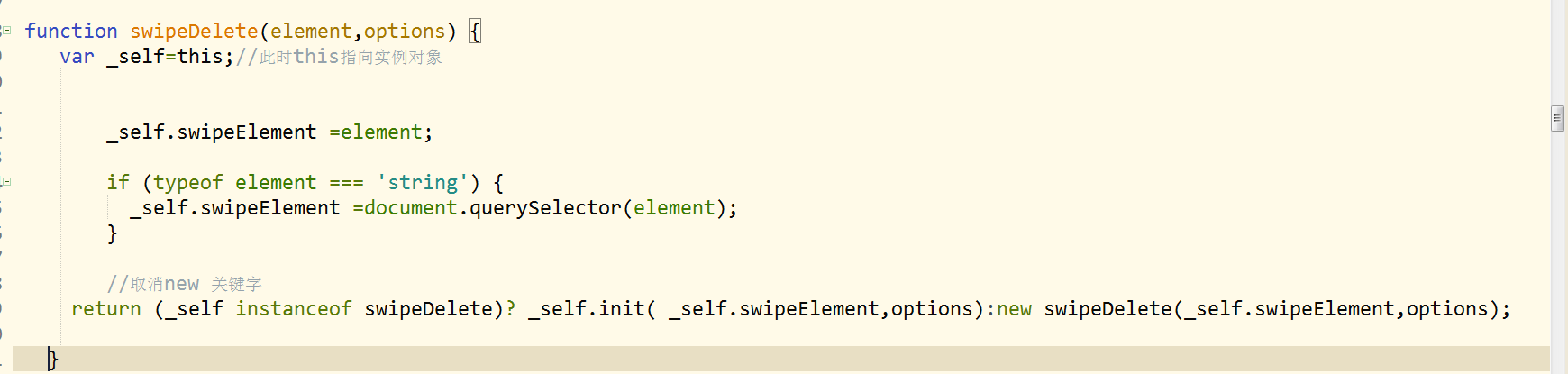
附上完整代码
<!doctype html>
<html>
<head>
<meta charset="utf-8">
<title>滑动删除</title>
<meta http-equiv="X-UA-Compatible" content="edge,chrome=1" />
<meta http-equiv="Cache-Control" content="no-siteapp" /> <!-- 避免转码 -->
<meta name="keywords" content=""/>
<meta name="description" content=""/>
<meta name="viewport" content="initial-scale=1.0,user-scalable=no,maximum-scale=1,width=device-width" />
<meta name="renderer" content="webkit|ie-comp|ie-stand">
<meta name="apple-itunes-app" content="app-id=932758491"> <meta http-equiv="pragma" content="no-cache">
<meta http-equiv="cache-control" content="no-cache">
<meta http-equiv="expires" content="0"> <meta name="format-detection" content="telephone=no">
<meta name="format-detection" content="address=no">
<meta name="format-detection" content="email=no" >
<meta name="apple-mobile-web-app-title" content="">
<meta name="apple-mobile-web-app-capable" content="yes" />
<meta name="apple-mobile-web-app-status-bar-style" content="black-translucent" />
<meta name="screen-orientation" content="portrait"> <!-- uc强制竖屏 设置横屏应用得在config里面设置,网页是无法做到的 -->
<meta name="x5-orientation" content="portrait"> <!-- QQ强制竖屏 -->
<meta name="msapplication-tap-highlight" content="no"> <!-- windows phone 点击无高光 -->
<meta name="HandheldFriendly" content="true"> <!-- 针对手持设备优化,主要是针对一些老的不识别viewport的浏览器,比如黑莓 --> <style>
/* CSS Document */
@charset "utf-8";
html,body,div,dl,dt,dd,ul,ol,li,h1,h2,h3,h4,h5,h6,pre,form,fieldset,input,textarea,p,blockquote,span,img,button ,em,i,b{margin:0;padding:0;}
html{-webkit-text-size-adjust:100%;-webkit-tap-highlight-color:transparent;min-width:320px;font-size:62.5%;}
body{font-family:"微软雅黑",'Helvetica Neue',Helvetica,tahoma,arial,sans-serif;text-rendering:optimizeLegibility;-webkit-font-smoothing:antialiased;line-height:1;font-size:14px;-webkit-touch-callout:none;-webkit-user-select:none;}
article,aside,dialog,figure,footer,header,hgroup,menu,nav,section{display:block}
dl,li,menu,ol,ul{list-style:none}
address,em,i,th{font-weight:400;font-style:normal}
a{color:#999;display:block;}
a:link,a:visited{color:#999;text-decoration:none;cursor:pointer}
a:hover{cursor:pointer}
a:active,a:focus{outline:0;}
img{width:100%;border:0;vertical-align:middle;-webkit-user-select:none;}
input,select{outline:0}
h1,h2,h3,h4,h5,h6{font-size:100%;font-variant:normal;font-weight:normal;}
button,input[type=button],input[type=tel],input[type=reset],input[type=submit]{line-height:normal!important;-webkit-appearance:none}
::-webkit-input-placeholder{color:#777;}
::input-placeholder{color:#777;}
input:focus::-webkit-input-placeholder{-webkit-transition:.1s;opacity:0;}
input:focus::input-placeholder{transition:.1s;opacity:0;}
header {
background: #f7483b;
border-bottom: 1px solid #ccc
} header h2 {
text-align: center;
line-height: 54px;
font-size: 16px;
color: #fff
} .list-ul { touch-action: none;
overflow: hidden
} .list-li {
line-height: 60px; height: 60px;
border-bottom: 1px solid #fcfcfc;
position: relative; color: #666;
background: #999;
-webkit-transition-duration:-webkit-transform .1s;
transition-duration:transform .1s; -webkit-transition-timing-function:ease-out ;transition-timing-function:ease-out ;
}
.con{ padding: 0 15px; position: relative; z-index: 7; background: #f2f2f2;}
.btn {
position: absolute;
top: 0;
right: -80px;
text-align: center;
background: #ffcb20;
color: #fff;
width: 80px; z-index: 2;
} .btn div {
float: left; display: inline-block; height: 60px;;
background: #ffcb20;
color: #fff;
width: 80px; z-index: 2;
}
.btn div:nth-of-type(2) {
background: red; }
</style> </head> <body>
<header>
<h2>suface 滑动删除 列表</h2>
</header>
<div style="height: 50px;; text-align: center; line-height: 50px;">suface 滑动删除 例子</div> <section class="list">
<ul class="list-ul">
<li id="li" class="swipe-delete-element list-li" > <!-- //该节点 位移 transform: translateX-->
<div class="con ">
00 向左侧 滑动删除 一起过来
</div>
<div class="swipe-delete-btn btn">删除0</div>
</li> <li id="li" class=" list-li" >
<div class="con swipe-delete-element "> <!-- //该节点 位移 transform: translateX-->
11 向左侧 滑动删除 藏在后面
</div>
<div class="swipe-delete-btn btn" style="right:0px;">删除1</div>
</li> <li id="li" class=" list-li swipe-delete-element" >
<div class="con ">
22 向 you 侧 滑动删除
</div>
<div class="swipe-delete-btn btn" style="right:auto; left: -80px;">删除2</div>
</li> <li id="li" class=" list-li " >
<div class="con swipe-delete-element">
33 向you 侧 滑动删除 藏在后面
</div>
<div class="swipe-delete-btn btn" style="right:auto; left: 0px;">删除3</div>
</li> <li id="li" class=" list-li swipe-delete-element" >
<div class="con ">
44 向左侧 滑动删除 多个 点击
</div>
<div class="swipe-delete-btn btn " style="right: -160px;width:160px">
<div style="width: 80px;" class="on1">4删除111 多个</div>
<div style="width: 80px;" class="on2">4删除222 多个</div>
</div>
</li> <li id="li" class=" list-li swipe5" >
<div class="con swipe-delete-element " >
55 向左侧 滑动删除 藏在后面 swipe5
</div>
<div class="swipe-delete-btn2 btn" style="right: 0px;width:160px">
<div style="width: 80px;" class="on1">5删除111 多个</div>
<div style="width: 80px;" class="on2">5删除222 多个</div>
</div>
</li> <li id="li" class=" list-li " >
<div class="con swipe-delete-element66">
666 swipe-delete-element66 参数传入
</div>
<div class="swipe-delete-btn2 btn" style="right: 0px;width:160px">
<div style="width: 80px;" class="on1">6删除111 多个</div>
<div style="width: 80px;" class="on2">6删除222 多个</div>
</div>
</li>
</ul>
</section> <div style="height: 400px;;"> <div id="j_opend" style="padding: 20px; text-align: center; background:#999; margin: 20px auto;">点击swipe5 关闭 </div> </div> <script> ;(function(window, document, undefined) { function swipeDelete(element,options) {
var _self=this;//此时this指向实例对象 _self.swipeElement =element; if (typeof element === 'string') {
_self.swipeElement =document.querySelector(element);
} //取消new 关键字
return (_self instanceof swipeDelete)? _self.init( _self.swipeElement,options):new swipeDelete(_self.swipeElement,options); }
swipeDelete.prototype = {
constructor: swipeDelete,
extend: function() {
for(var i=1; i<arguments.length; i++)
for(var key in arguments[i])
if(arguments[i].hasOwnProperty(key))
arguments[0][key] = arguments[i][key];
return arguments[0];
}, allowMultiple: true,
endEvent : function() {
var el = document.createElement("div");
var transEndEventNames = {
WebkitTransition: "webkitTransitionEnd",
transition: "transitionend"
};
for (var name in transEndEventNames) {
if (el.style[name] !== undefined) {
return transEndEventNames[name]
}
}
el = null;
return false
}(),
init: function(element,options) {
var _self = this;
var options=options||{};
var defaults = {
distance:80, //滑动距离
units:'px', //默认单位
touchStart:function(){},//触摸开始毁掉
opened:function(){},//展开后回调
closed:function(){},//关闭后回调
duration:100,//毫秒
deleteBtn:'.swipe-delete-btn', //删除元素
direction:'left', //滑动方向
deleteClose:true, //点击删除是否 关闭
deleteFn:function(){} //删除事件 retuan false 不关闭 // retuan true 关闭
}; _self.options=_self.extend({},defaults,options);
_self.swipeEvent(element,_self.options); }, swipeEvent:function(element,options){ var _self=this;
var ele=element; var isMoved = false;
var isTouched = true;
var isScrolling = undefined;//目标对象位置
var touchesDiff = 0;////移动距离
var startX=0;
var startPos={
x : 0,
y : 0,
startTime:+new Date
};
var scale=false;
var isGo=false;
var deleteBtn=ele.querySelectorAll(options.deleteBtn)[0]; //删除元素 可能是子元素 也可能同一级别 兄弟节点
var deleteFn=options.deleteFn; //删除元素回调时间
var distance=options.distance;//最大滑动距离
var direction=options.direction;
var deleteClose =options.deleteClose;
var units=options.units;
ele.setAttribute("data-lock","false");
if(!deleteBtn){
deleteBtn=ele.parentNode.nodeType==1&&ele.parentNode.querySelectorAll(options.deleteBtn)[0];
scale=true;
}; _self.direction = direction; deleteBtn.addEventListener('click', function(event) {
var that=this;
var event=event;
var target=event.target; if(options.deleteClose==true){
_self.swipeClose(ele,options);
} if(options.deleteFn&&options.deleteFn.apply(target,arguments)==true){
_self.swipeClose(ele,options);
}
event.stopPropagation();
}); ele.addEventListener('click', function(event) {
_self.swipeClose(ele,options); }); ele.addEventListener('touchstart', function(event) { var touchs = event.touches[0]; //手指头的一个 if (!_self.allowMultiple) { //不允许同时 展示多个删除 // _self.swipeClose(ele,options)
//return false;
}; //不能滑动 有没有 缩进去的 isMoved = false;
isTouched = true;
isScrolling = undefined;
startPos={
x: touchs.pageX||touchs.clientX,
y: touchs.pageY||touchs.clientY,
startTime:+new Date
}; ele.style.webkitTransitionDuration = ele.style.transitionDuration="0s"; startX=(ele.style.WebkitTransform.replace(/translateX\(/g, "").replace(/(px|rem|%)\)/g, "")) * 1||(ele.style.transform.replace(/translateX\(/g, "").replace(/(px|rem|%)\)/g, "")) * 1||0; if(ele.getAttribute("data-lock")=="false"){
options.touchStart&&options.touchStart.apply(ele,arguments);
} document.addEventListener('touchmove', function(event) {
var event=event||window.event;
if (!isTouched){
return;
} if ( event.touches.length > 1 || event.scale && event.scale !== 1){
return;
} var touchs = event.changedTouches[0];
var movPos={
x : touchs.pageX||touchs.clientX,
y : touchs.pageY||touchs.clientY
}; if (typeof isScrolling === 'undefined') {
isScrolling = !!( isScrolling || Math.abs(movPos.x-startPos.x) < Math.abs(movPos.y-startPos.y) );
} if (isScrolling) {
isTouched = false;
return;
} //event.preventDefault();
//if (!event.defaultPrevented) {
event.preventDefault();
// } _self.touchesDiff=movPos.x-startPos.x+ startX; //滑动的距离
isMoved = true; if(direction=='left'){ //向左滑 if(_self.touchesDiff>=0){
var l =isGo? Math.abs(_self.touchesDiff)*0.1:0;
ele.style.WebkitTransform=ele.style.transform = "translateX(" + l +units+") translateZ(0)"; }else{ var l = Math.abs(_self.touchesDiff);
isGo=true;
ele.style.WebkitTransform=ele.style.transform = "translateX(" + -l +units+") translateZ(0)";
if (l > distance) {
if(scale){
l = (distance+(l-distance)*0.39);;
}else{
l=distance;
}
ele.style.WebkitTransform=ele.style.transform = "translateX(" + -l +units+") translateZ(0)";
} } } if(direction=='right'){ //向右侧 if(_self.touchesDiff>=0){ var l = Math.abs(_self.touchesDiff);
isGo=true;
ele.style.WebkitTransform=ele.style.transform = "translateX(" + l +units+") translateZ(0)";
if (l > distance) {
if(scale){
l = (distance+(l-distance)*0.39);; }else{
l=distance;
} ele.style.WebkitTransform=ele.style.transform = "translateX(" + l +units+" ) translateZ(0)";
}
}else{
var l =isGo? Math.abs(_self.touchesDiff)*0.1:0;
ele.style.WebkitTransform=ele.style.transform = "translateX(-" + l +units+") translateZ(0)";
} } }); document.addEventListener('touchend', function(event) {
if (!isTouched|| !isMoved) {
isMoved = false;
isTouched = false;
return;
}
isMoved = false;
isTouched = false;
isGo=false;
var touchs = event.changedTouches[0]; //手指头的一个
var endPos={
x : touchs.pageX||touchs.clientX,
y : touchs.pageY||touchs.clientY,
endTime:+new Date
};
var timeDiff=endPos.endTime-startPos.startTime;
var distance=options.distance;
var direction=options.direction;
var touchesDiff=_self.touchesDiff;
var action="close"; //是否关闭状态
if(ele.getAttribute("data-lock")=='true'){
action = 'open';
} if (timeDiff < 300 && (touchesDiff < -10 && direction === 'left' || touchesDiff > 10 && direction === 'right')
|| timeDiff > 300 && (touchesDiff < -parseInt(distance/3) &&direction === 'left' || touchesDiff > parseInt(distance/3) && direction === 'right')
)
{
if(action == 'close'){ _self.swipeOpen(ele,options) }else{
_self.swipeClose(ele,options);
isGo=false;
event.preventDefault();
}
}else{ _self.swipeClose(ele,options);
isGo=false;
event.preventDefault(); } }); });
return this; }, swipeClose:function(ele,options){
var _self=this;
var ele= ele||_self.swipeElement;
var options=options||_self.options;
var fired=false;
var endEvent=_self.endEvent;
var units=options.units;
var duration=Number(options.duration/1000)||100;
var sa=0;
var handler = function(e) {
ele.removeEventListener(endEvent, arguments.callee, false);
fired = true;
handler=null;
sa++; if(sa>1){return }
ele.setAttribute("data-lock","false");
options.closed&&options.closed.apply(ele,arguments);;
callback=null; }; ele.style.WebkitTransform=ele.style.transform = "translateX(-" + 0 + units+") ";
ele.style.webkitTransitionDuration = ele.style.transitionDuration=duration+"s";
ele.addEventListener(endEvent,handler.bind(this), false); setTimeout(function() {
if (fired) {
return
}
handler();
}, parseInt(duration+25)); return this;
},
swipeOpen:function(ele,options){
var _self=this;
var ele= ele||_self.swipeElement;
var options=options||_self.options;
var distance=options.distance;//最大滑动距离
var units=options.units;
var duration=Number(options.duration/1000)||100;
var sa=0;
var fired=false;
var endEvent=_self.endEvent;
var handler = function (e) {
ele.removeEventListener(endEvent, arguments.callee, false);
fired=true;
handler=null; sa++; if(sa>1){return }
ele.setAttribute("data-lock","true");
if(ele.getAttribute("data-lock")=="true"){
options.opened&&options.opened.apply(ele,arguments);
}
}; if(options.direction=="left"){
distance=distance*-1;
} ele.clientLeft;
ele.style.WebkitTransform=ele.style.transform = "translateX(" + distance + units+") ";
ele.style.webkitTransitionDuration = ele.style.transitionDuration=duration+"s";
ele.addEventListener(endEvent,handler.bind(this), false); setTimeout(function() {
if (fired) {
return
}
handler();
}, parseInt(duration+25)); return this;
}
}; if (typeof exports == 'object') {
module.exports = swipeDelete;
}
else if (typeof define == 'function' && define.amd) {
define(function() {
return swipeDelete;
});
}
else {
window.swipeDelete = swipeDelete;
} })(window,document); var swipedeletecontent=document.querySelectorAll(".swipe-delete-element")[0];
var sa= swipeDelete(swipedeletecontent,{
direction:'left',
deleteFn:function(e){
alert(this.innerHTML)
console.log(e.target);
}
}) var swipedeletecontent1=document.querySelectorAll(".swipe-delete-element")[1];
var sa1= swipeDelete(swipedeletecontent1,{ deleteFn:function(e){
alert(this.innerHTML);
console.log(e.target); }
}) var swipedeletecontent2=document.querySelectorAll(".swipe-delete-element")[2];
var sa2= swipeDelete(swipedeletecontent2,{
direction:'right',
deleteFn:function(e){
alert(this.innerHTML);
console.log(e.target); }
})
//console.log(sa2.swipeOpen()) var swipedeletecontent3=document.querySelectorAll(".swipe-delete-element")[3];
var sa3= swipeDelete(swipedeletecontent3,{
direction:'right',
deleteFn:function(e){
alert(this.innerHTML);
console.log(e.target); }
})
//console.log(sa3); var swipedeletecontent4=document.querySelectorAll(".swipe-delete-element")[4];
var sa4= swipeDelete(swipedeletecontent4,{
distance:160,
direction:'left',
deleteFn:function(e){
//console.log(e.target); var that=this; if(that.className=="on1"){
alert("on1"+that.innerHTML)
}else if(that.className=="on2"){
alert("on2"+that.innerHTML)
}
}
})
//console.log(sa4.swipeOpen()) var swipedeletecontent5=document.querySelectorAll(".swipe-delete-element")[5];
var sa5=new swipeDelete(swipedeletecontent5,{
distance:160,
deleteBtn:'.swipe-delete-btn2',
deleteClose:false,
//direction:'left',
touchStart:function(e){
console.log("sa6 touchStart"+this.innerHTML);
//console.log(this.innerHTML==e.target.innerHTML);
},
opened:function(e){
//console.log("sa6 opened");
console.log("sa6 opened"+this.innerHTML);
},
closed:function(e){
//console.log("sa6 closed");
console.log("sa6 closed"+this.innerHTML);
},
deleteFn:function(e){
var that=this;
console.log(e.target.parentNode);
if(that.className=="on1"){
alert("5on11"+that.innerHTML+'不 可以关闭'); }else if(that.className=="on2"){
alert("5on22"+that.innerHTML+'可以关闭');
return true; //关闭
}
}
})
sa5.swipeOpen();
//console.log(sa5) document.getElementById("j_opend").addEventListener("click",function(){
var swipe5=document.querySelector(".swipe5").querySelector(".swipe-delete-element");
var flagOpen=swipe5.getAttribute("data-lock"); if(flagOpen=='false'){
sa5.swipeOpen();
this.innerHTML="swipe5 关闭"
} if(swipe5.getAttribute("data-lock")=='true'){
sa5.swipeClose(); this.innerHTML="swipe5打开 "
} }) var sa66=new swipeDelete(".swipe-delete-element66",{
distance:160,
deleteBtn:'.swipe-delete-btn2',
deleteClose:true,
//direction:'left',
touchStart:function(e){
console.log("sa6 touchStart"+this.innerHTML);
//console.log(this.innerHTML==e.target.innerHTML);
},
opened:function(e){
//console.log("sa6 opened");
console.log("sa6 opened"+this.innerHTML);
},
closed:function(e){
//console.log("sa6 closed");
console.log("sa6 closed"+this.innerHTML);
},
deleteFn:function(e){
var that=this;
console.log(e.target.parentNode);
if(that.className=="on1"){
alert("6on11"+that.innerHTML); }else if(that.className=="on2"){
alert("6on22"+that.innerHTML) }
//console.log(this.innerHTML); }
})
console.log(sa66);
</script> </body>
</html>
移动端 滑动删除 swipeDelete的更多相关文章
- js swipeDelete 滑动删除
先上图看看整体实际效果 看看用法 与参数 默认参数 var defaults = { distance:80, //滑动距离 units:'px', //默认单位 touchStart:functio ...
- iOS边练边学--简单的数据操作(增、删、改),左滑动删除和弹窗
一.数据刷新的原则: 通过修改模型数据,来修改tableView的展示 先修改数据模型 在调用数据刷新方法 不要直接修改cell上面子控件的属性 二.增删改用到的方法: <1>重新绑定屏幕 ...
- Android开发学习之路-RecyclerView滑动删除和拖动排序
Android开发学习之路-RecyclerView使用初探 Android开发学习之路-RecyclerView的Item自定义动画及DefaultItemAnimator源码分析 Android开 ...
- 写一个js向左滑动删除 交互特效的插件——Html5 touchmove
需求描述 需要实现类似QQ中对联系人的操作:向左滑动,滑出删除按钮.滑动超过一半时松开则自动滑到底,不到一半时松开则返回原处. 纯js实现 使用了h5的touchmove等事件,以及用js动态改变cs ...
- iOS UITableViewCell滑动删除
一般我们使用列表的形式展现数据就会用到UITableView.在熟练掌握了用UITableView展示数据以后,开发过程中可能会遇到需要删除数据的需求,我们想实现在一行数据上划动一下,然后出现一个删除 ...
- Android 用HorizontalScrollView实现ListView的Item滑动删除 ,滑动错乱 冲突
用HorizontalScrollView实现类似微信的滑动删除 测试于:Android2.2+ 对于Android来说按键操作已经在减少,越来越多的手势操作层出不穷,今天介绍一款LIstView的I ...
- android QQ消息左滑动删除实例(优化版SwipeListViewEX)
仿 QQ消息左滑动删除item消息实例 源代码参考:http://blog.csdn.net/gaolei1201/article/details/42677951 自己作了一些调整,全部代码下载地址 ...
- ListView + PopupWindow实现滑动删除
原文:ListView滑动删除 ,仿腾讯QQ(鸿洋_) 文章实现的功能是:在ListView的Item上从右向左滑时,出现删除按钮,点击删除按钮把Item删除. 看过文章后,感觉没有必要把dispat ...
- ios8 tableView设置滑动删除时 显示多个按钮
** * tableView:editActionsForRowAtIndexPath: //设置滑动删除时显示多个按钮 * UITableViewRowAction ...
随机推荐
- deeplearning.ai 卷积神经网络 Week 3 目标检测 听课笔记
本周的主题是对象检测(object detection):不但需要检测出物体(image classification),还要能定位出在图片的具体位置(classification with loca ...
- Developing Skills
题目传送门:点击打开链接 #include <iostream> #include <cstdio> #include <cstdlib> #include < ...
- Video Target Tracking Based on Online Learning—TLD多目标跟踪算法
TLD算法回顾 TLD(Tracking-Learning-Detection)是英国萨里大学的一个捷克籍博士生Zdenek Kalal在其攻读博士学位期间提出的一种新的单目标长时间(long ter ...
- c++(排序二叉树删除)
相比较节点的添加,平衡二叉树的删除要复杂一些.因为在删除的过程中,你要考虑到不同的情况,针对每一种不同的情况,你要有针对性的反应和调整.所以在代码编写的过程中,我们可以一边写代码,一边写测试用例.编写 ...
- c++(快速排序)
快速排序是编程中经常使用到的一种排序方法.可是很多朋友对快速排序有畏难情绪,认为快速排序使用到了递归,是一种非常复杂的程序,其实未必如此.只要我们使用好了方法,就可以自己实现快速排序. 首先,我们复习 ...
- PHP安全之webshell和后门检测
基于PHP的应用面临着各种各样的攻击: XSS:对PHP的Web应用而言,跨站脚本是一个易受攻击的点.攻击者可以利用它盗取用户信息.你可以配置Apache,或是写更安全的PHP代码(验证所有用户输入) ...
- ECharts插件的使用
ECharts插件:官网下载echarts.js开发者可以选择源码.下载地址:http://echarts.baidu.com/download.html 下载之后,echarts.js放在js文件夹 ...
- Screen命令安装使用教程
在安装lnmp之前,我们一般先运行一下Screen程序,因为screen好像一个容器一样,把lnmp的安装过程保护了起来.以CentOS中安装lnmp为例,程序下载.编译都需要比较长的时间,如果中途遇 ...
- ceil与intval区别
float ceil(float value)ceil返回不小于value的最小整数,返回值仍是float型 int intval ( mixed value [, int base]) int ...
- CSS3之border-radius圆角
CSS3之border-radius圆角 DIV盒子圆角 图片圆角,CSS3样式实现盒子对象圆角.图片圆角效果.div css3 border-radius圆角样式教程篇. 一.css3单词与语法结构 ...