
自定义非等高 Cell
1、自定义非等高 Cell介绍
1.1 代码自定义(frame)
- 新建一个继承自 UITableViewCell 的类。
- 重写 initWithStyle:reuseIdentifier: 方法。
- 添加所有需要显示的子控件(不需要设置子控件的数据和 frame, 子控件要添加到 contentView 中)。
- 进行子控件一次性的属性设置(有些属性只需要设置一次, 比如字体\固定的图片)。
- 提供 2 个模型。
- 数据模型: 存放文字数据\图片数据。
- frame 模型: 存放数据模型\所有子控件的 frame\cell 的高度。
- cell 拥有一个 frame 模型(不要直接拥有数据模型)。
- 重写 cell frame 模型属性的 setter 方法: 在这个方法中设置子控件的显示数据和 frame。
- frame 模型数据的初始化已经采取懒加载的方式(每一个 cell 对应的 frame 模型数据只加载一次)。
1.2 代码自定义(Autolayout)
- 新建一个继承自 UITableViewCell 的类。
- 重写 initWithStyle:reuseIdentifier: 方法。
- 添加所有需要显示的子控件(不需要设置子控件的数据和 frame, 子控件要添加到 contentView 中)。
- 进行子控件一次性的属性设置(有些属性只需要设置一次, 比如字体\固定的图片)。
- 设置 cell 上子控件的约束。
- 在模型中增加一个 cellHeight 属性,用来存放对应 cell 的高度。
- 在 cell 的模型属性 set 方法中调用 [self layoutIfNeed] 方法强制布局,然后计算出模型的 cellheight 属性值。
- 在控制器中实现 tableView:estimatedHeightForRowAtIndexPath: 方法,返回一个估计高度,比如 200。
- 在控制器中实现 tableView:heightForRowAtIndexPath: 方法,返回 cell 的真实高度(模型中的 cellHeight 属性)。
2、代码
2.1 XMGStatus.h
@interface XMGStatus : NSObject

@property (strong, nonatomic) NSString *name;

@property (strong, nonatomic) NSString *text;

@property (strong, nonatomic) NSString *icon;

@property (strong, nonatomic) NSString *picture;

@property (assign, nonatomic, getter=isVip) BOOL vip;

/** cell 的高度 */

@property (assign, nonatomic) CGFloat cellHeight;

+ (instancetype)statusWithDict:(NSDictionary *)dict;

@end
2.2 XMGStatus.m
@implementation XMGStatus

+ (instancetype)statusWithDict:(NSDictionary *)dict {

	XMGStatus *status = [[self alloc] init];

	[status setValuesForKeysWithDictionary:dict];

	return status;

}

@end
2.3 XMGStatusCell.h
@class XMGStatus;

@interface XMGStatusCell : UITableViewCell

+ (instancetype)cellWithTableView:(UITableView *)tableView;

/** 模型数据 */

@property (nonatomic, strong) XMGStatus *status;

@end
2.4 XMGStatusCell.m
#define MAS_SHORTHAND

#define MAS_SHORTHAND_GLOBALS

#import "Masonry.h"

@interface XMGStatusCell()

@property (weak, nonatomic) UIImageView *iconView;

@property (weak, nonatomic) UILabel *nameLabel;

@property (weak, nonatomic) UIImageView *vipView;

@property (weak, nonatomic) UILabel *contentLabel;

@property (weak, nonatomic) UIImageView *pictureView;

@end

@implementation XMGStatusCell

+ (instancetype)cellWithTableView:(UITableView *)tableView {

	static NSString *ID = @"status";

	XMGStatusCell *cell = [tableView dequeueReusableCellWithIdentifier:ID];

	if (cell == nil) {

		cell = [[XMGStatusCell alloc] initWithStyle:UITableViewCellStyleDefault reuseIdentifier:ID];

	}

	return cell;

}

- (instancetype)initWithStyle:(UITableViewCellStyle)style reuseIdentifier:(NSString *)reuseIdentifier {

	if (self = [super initWithStyle:style reuseIdentifier:reuseIdentifier]) {

		UIImageView *iconView = [[UIImageView alloc] init];

		[self.contentView addSubview:iconView];

		self.iconView = iconView;

		UILabel *nameLabel = [[UILabel alloc] init];

		[self.contentView addSubview:nameLabel];

		self.nameLabel = nameLabel;

		UIImageView *vipView = [[UIImageView alloc] init];

		[self.contentView addSubview:vipView];

		self.vipView = vipView;

		UILabel *contentLabel = [[UILabel alloc] init];

		contentLabel.numberOfLines = 0;

		// 设置 label 每一行文字的最大宽度

		contentLabel.preferredMaxLayoutWidth = [UIScreen mainScreen].bounds.size.width - 20;

		[self.contentView addSubview:contentLabel];

		self.contentLabel = contentLabel;

		UIImageView *pictureView = [[UIImageView alloc] init];

		[self.contentView addSubview:pictureView];

		self.pictureView = pictureView;

	}

	return self;

}

- (void)layoutSubviews {

	[super layoutSubviews];

	CGFloat margin = 10;

	[self.iconView makeConstraints:^(MASConstraintMaker *make) {

		make.size.equalTo(30);

		make.left.top.offset(margin);

	}];

	[self.nameLabel makeConstraints:^(MASConstraintMaker *make) {

		make.top.equalTo(self.iconView);

		make.left.equalTo(self.iconView.right).offset(margin);

	}];

	[self.vipView makeConstraints:^(MASConstraintMaker *make) {

		make.size.equalTo(14);

		make.left.equalTo(self.nameLabel.right).offset(margin);

		make.centerY.equalTo(self.nameLabel.centerY);

	}];

	[self.contentLabel makeConstraints:^(MASConstraintMaker *make) {

		make.top.equalTo(self.iconView.bottom).offset(margin);

		make.left.offset(margin);

		//        make.right.offset(-margin);       // 可加可不加

	}];

	[self.pictureView makeConstraints:^(MASConstraintMaker *make) {

		make.size.equalTo(100);

		make.top.equalTo(self.contentLabel.bottom).offset(margin);

		make.left.offset(margin);

	}];

}

- (void)setStatus:(XMGStatus *)status {

	_status = status;

	// 设置显示的数据

	self.iconView.image = [UIImage imageNamed:status.icon];

	self.nameLabel.text = status.name;

	if (status.isVip) {

		self.nameLabel.textColor = [UIColor orangeColor];

		self.vipView.hidden = NO;

	} else {

		self.nameLabel.textColor = [UIColor blackColor];

		self.vipView.hidden = YES;

	}

	self.contentLabel.text = status.text;

	if (status.picture) {

		self.pictureView.hidden = NO;

		self.pictureView.image = [UIImage imageNamed:status.picture];

	} else {

		self.pictureView.hidden = YES;

	}

	// 计算 cell 高度

	// 强制布局

	[self layoutIfNeeded];

	// 计算 cell 的高度

	if (self.pictureView.hidden) {  // 没有配图

		_status.cellHeight = CGRectGetMaxY(self.contentLabel.frame) + 10;

	} else {                        // 有配图

		_status.cellHeight = CGRectGetMaxY(self.pictureView.frame) + 10;

	}

}

@end
2.5 XMGStatusesViewController.m
@interface XMGStatusesViewController ()

@property (strong, nonatomic) NSArray *statuses;

@end

@implementation XMGStatusesViewController

- (NSArray *)statuses {

	if (_statuses == nil) {

		// 加载plist中的字典数组

		NSString *path = [[NSBundle mainBundle] pathForResource:@"statuses.plist" ofType:nil];

		NSArray *dictArray = [NSArray arrayWithContentsOfFile:path];

		// 字典数组 -> 模型数组

		NSMutableArray *statusArray = [NSMutableArray array];

		for (NSDictionary *dict in dictArray) {

			XMGStatus *status = [XMGStatus statusWithDict:dict];

			[statusArray addObject:status];

		}

		_statuses = statusArray;

	}

	return _statuses;

}

#pragma mark - Table view data source

- (NSInteger)tableView:(UITableView *)tableView numberOfRowsInSection:(NSInteger)section {

	return self.statuses.count;

}

- (UITableViewCell *)tableView:(UITableView *)tableView cellForRowAtIndexPath:(NSIndexPath *)indexPath {

	XMGStatusCell *cell = [XMGStatusCell cellWithTableView:tableView];

	cell.status = self.statuses[indexPath.row];

	return cell;

}

#pragma mark - 代理方法

// 返回每一行的高度

- (CGFloat)tableView:(UITableView *)tableView heightForRowAtIndexPath:(NSIndexPath *)indexPath {

	XMGStatus *staus = self.statuses[indexPath.row];

	return staus.cellHeight;

}

/**

* 返回每一行的估计高度

* 只要返回了估计高度,那么就会先调用 tableView:cellForRowAtIndexPath: 方法创建 cell,

* 再调用 tableView:heightForRowAtIndexPath: 方法获取 cell 的真实高度

*/

- (CGFloat)tableView:(UITableView *)tableView estimatedHeightForRowAtIndexPath:(NSIndexPath *)indexPath {

	return 200;

}

@end
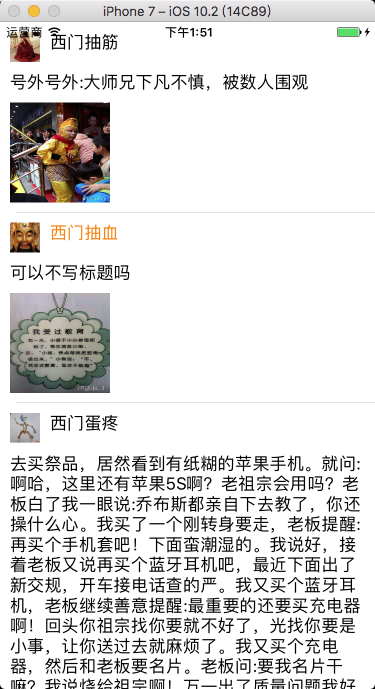
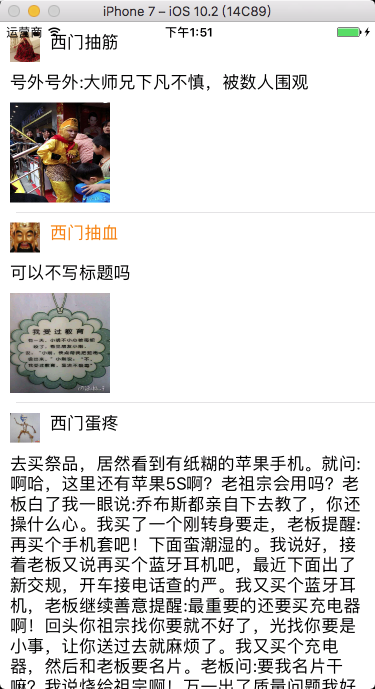
2.6 运行效果图
 ---
--- 
3、其它设置方式
3.1 计算方式
- BookModel.h
@property(nonatomic, copy)NSString *title;

@property(nonatomic, copy)NSString *detail;

@property(nonatomic, copy)NSString *icon;

@property(nonatomic, copy)NSString *price;
- BookCell.h
@property(nonatomic, retain)UILabel *titleLabel;

@property(nonatomic, retain)UILabel *detailLabel;

@property(nonatomic, retain)UIImageView *iconView;

@property(nonatomic, retain)UILabel *priceLabel;
- 设置行高
- (CGFloat)tableView:(UITableView *)tableView heightForRowAtIndexPath:(NSIndexPath *)indexPath {

	// 从数据源数组中取出数据

	BookModel *bookModel = [myDataArray objectAtIndex:indexPath.row];

	// 计算 detailLabel 占用的高度

	CGFloat detialHeight = [bookModel.detail boundingRectWithSize:CGSizeMake(self.view.bounds.size.width - 40, CGFLOAT_MAX)

	options:NSStringDrawingUsesLineFragmentOrigin

	attributes:@{NSFontAttributeName: [UIFont systemFontOfSize:14]}

	context:nil].size.height;

	// 判断是否有图片

	if (bookModel.icon.length) {

		// 60 为图片的高度

		return 30 + detialHeight + 60 + 30;

	}

	else {

		return 30 + detialHeight + 30;

	}

}
- 设置每一行显示的内容
// 设置每一行显示的内容

- (UITableViewCell *)tableView:(UITableView *)tableView cellForRowAtIndexPath:(NSIndexPath *)indexPath {

	BookCell3 *cell = [tableView dequeueReusableCellWithIdentifier:@"test" forIndexPath:indexPath];

	BookModel *bookModel = [myDataArray objectAtIndex:indexPath.row];

	// 设置 titleLabel

	cell.titleLabel.text = bookModel.title;

	// 设置 detailLabel

	// 计算 detailLabel 的高度

	CGSize detialSize = [bookModel.detail boundingRectWithSize:CGSizeMake(self.view.bounds.size.width - 40, CGFLOAT_MAX)

	options:NSStringDrawingUsesLineFragmentOrigin

	attributes:@{NSFontAttributeName: [UIFont systemFontOfSize:14]}

	context:nil].size;

	CGRect detialFrame = cell.detailLabel.frame;

	detialFrame.size.height = detialSize.height + 5;    // 加偏移量 5,适应标点无法换行

	detialFrame.size.width = detialSize.width + 5;

	cell.detailLabel.frame = detialFrame;               // 设置 detailLabel 的 frame

	cell.detailLabel.text = bookModel.detail;

	// 判断是否有图片

	if (bookModel.icon.length) {

		// 设置 iconView

		CGRect iconFrame = cell.iconView.frame;

		iconFrame.origin.y = detialFrame.origin.y + detialFrame.size.height;

		cell.iconView.frame = iconFrame;

		cell.iconView.image = [UIImage imageNamed: bookModel.icon];

		// 设置 priceLabel

		CGRect priceFrame = cell.priceLabel.frame;

		priceFrame.origin.y = iconFrame.origin.y + iconFrame.size.height;

		cell.priceLabel.frame = priceFrame;

		cell.priceLabel.text = bookModel.price;

	}

	else {

		// 设置 priceLabel

		CGRect priceFrame = cell.priceLabel.frame;

		priceFrame.origin.y = detialFrame.origin.y + detialFrame.size.height;

		cell.priceLabel.frame = priceFrame;

		cell.priceLabel.text = bookModel.price;

	}

	return cell;

}
3.2 系统自动布局方式
- 自适应 cell 中较高的一个视图的高度。
- ImageView 与 Label 同行显示,且都设置了上下边缘约束,ImageView 的图片填充模式为 Aspect Fit,否则图片将会被拉长。
- 协议方法 方式设置
// 动态设置行高
- (CGFloat)tableView:(UITableView *)tableView estimatedHeightForRowAtIndexPath:(NSIndexPath *)indexPath { /*
行高自适应 Label 高度
*/ secondTableViewCell *cell = [tableView dequeueReusableCellWithIdentifier:@"secondTableViewCell" forIndexPath:indexPath]; cell.secondLabel.text = [_labelArray objectAtIndex:indexPath.row]; return [cell.contentView systemLayoutSizeFittingSize:(UILayoutFittingCompressedSize)].height + 1;
} // 属性变量 方式设置
self.tableView.estimatedRowHeight = 80;
self.tableView.rowHeight = UITableViewAutomaticDimension;
```
自定义非等高 Cell的更多相关文章
- iOS边练边学--自定义非等高的cell
一.使用xib或者storyboard自定义非等高的cell实现方式差不多,这里简单介绍一下通过xib文件实现的方法 <1.1>创建一个继承自UITableViewCell的子类,比如Ch ...
- 非等高cell实战(01)-- 实现微博页面
非等高cell实战(01)-- 实现微博页面 学习过UITableView.AutoLayout以及MVC的相关知识,接下来通过一个微博页面实战来整合一下. 首先看一下效果图: 需求分析 此页面为非等 ...
- 非等高cell实战--实现微博页面
代码地址如下:http://www.demodashi.com/demo/11639.html 前言 学习过UITableView.AutoLayout以及MVC的相关知识,接下来通过一个微博页面实战 ...
- 自定义不等高cell—storyBoard或xib自定义不等高cell
1.iOS8之后利用storyBoard或者xib自定义不等高cell: 对比自定义等高cell,需要几个额外的步骤(iOS8开始才支持) 添加子控件和contentView(cell的content ...
- iOS开发——UI进阶篇(三)自定义不等高cell,如何拿到cell的行高,自动计算cell高度,(有配图,无配图)微博案例
一.纯代码自定义不等高cell 废话不多说,直接来看下面这个例子先来看下微博的最终效果 首先创建一个继承UITableViewController的控制器@interface ViewControll ...
- iOS开发——UI进阶篇(二)自定义等高cell,xib自定义等高的cell,Autolayout布局子控件,团购案例
一.纯代码自定义等高cell 首先创建一个继承UITableViewCell的类@interface XMGTgCell : UITableViewCell在该类中依次做一下操作1.添加子控件 - ( ...
- 不等高cell的tableView界面搭建
一.搭建界面 1.界面分析 分析界面的层次结构,分析界面应该用什么控件来搭建 2.界面层次结构 分析之后,我们可以把这个界面分为四个模块(topView middleView commentView ...
- 【Android 应用开发】 自定义组件 宽高适配方法, 手势监听器操作组件, 回调接口维护策略, 绘制方法分析 -- 基于 WheelView 组件分析自定义组件
博客地址 : http://blog.csdn.net/shulianghan/article/details/41520569 代码下载 : -- GitHub : https://github.c ...
- ios中自定义tableView,CollectionView的cell什么时候用nib加载,什么时候用标识重用
做了一段时间的iOS,在菜鸟的路上还有很长的路要走,把遇到的问题记下来,好记性不如烂笔头. 在项目开发中大家经常会用到tableView和collectionView两个控件,然而在cell的自定义上 ...
随机推荐
- 运行jar应用程序引用其他jar包的三种常用方法(jar命令)
参考:http://blog.csdn.net/wangmuming/article/details/44343017 方法一.使用Extension Classloader来加载 你可以把需要加载的 ...
- Ettercap进行arp毒化
攻击者IP:192.168.220.152 受害者IP:192.168.220.151 网关:192.168.220.2 修改DNS文件 ┌─[root@sch01ar]─[~] └──╼ #vim ...
- hibernate 单元测试
单元测试 测试 dao service action package com.kaishengit.test; import org.hibernate.Session; import com.ka ...
- python连接sql server数据库
记录一下pyodbc连接数据库的使用方法和注意事项,基于python2.7: 前提: pip install pyodbc .下载pyodbc包. pyodbc.connect('DRIVER ...
- VS调试程序时,程序出现异常,但VS不报错的解决方案
在调试>异常> 里面把勾全勾上就行了!
- C#正则表达式匹配双引号
html: <img class="bubble large" src="/images/hero-logos/cog.svg" width=" ...
- nginx 启动、重启、关闭命令
一.启动 cd /usr/local/nginx/sbin ./nginx 二.重启 更改配置重启nginx kill -HUP 主进程号或进程号文件路径 或者cd /usr/local/ngi ...
- sql基本查询语句练习
student(S#,Sname,Sage,Ssex) 学生表 S#:学号: Sname:学生姓名:Sage:学生年龄:Ssex:学生性别 Course(C#,Cname,T#) 课程表 ...
- Codeforces 1077(F1+F2) DP 单调队列
题意:给你一个n个元素的数组,从中选取x个元素,并且要保证任意的m个位置中必须至少有一个元素被选中,问选中元素的和最大可以是多少? F1 n,m,x到200 F2 n,m,x到5000. 思路1:设d ...
- 面试题:3年工作经验 已看1 有用 memcache和redis有什么区别
此内容偏中高级,适合有三年经验者. 1. java中wait和sleep有什么区别?多线程条件下如何保证数据安全? 答:最大区别是等待时wait会释放锁(乐观锁),而sleep会一直持有锁 ...