
python开发_tkinter_获取单选菜单值
在之前的blog中有提到python的tkinter中的菜单操作
python开发_tkinter_窗口控件_自己制作的Python IDEL_博主推荐
python开发_tkinter_窗口控件_自己制作的Python IDEL_博主推荐(二)
python开发_tkinter_菜单选项中英文切换_菜单选项不可用操作_博主推荐
下面是tkinter的获取单选菜单值的操作
运行效果:
当点击'print party and flavor'按钮的时候,获取单选菜单的值
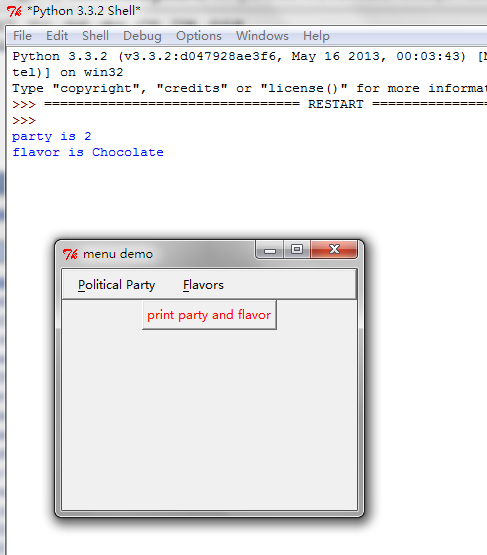
==========================================================
代码部分:
==========================================================
 from tkinter import *

 #       The way to think about this is that each radio button menu

 #       controls a different variable -- clicking on one of the

 #       mutually exclusive choices in a radiobutton assigns some value

 #       to an application variable you provide. When you define a

 #       radiobutton menu choice, you have the option of specifying the

 #       name of a varaible and value to assign to that variable when

 #       that choice is selected. This clever mechanism relieves you,

 #       the programmer, from having to write a dumb callback that

 #       probably wouldn't have done anything more than an assignment

 #       anyway. The Tkinter options for this follow their Tk

 #       counterparts:

 #       {"variable" : my_flavor_variable, "value" : "strawberry"}

 #       where my_flavor_variable is an instance of one of the

 #       subclasses of Variable, provided in Tkinter.py (there is

 #       StringVar(), IntVar(), DoubleVar() and BooleanVar() to choose

 #       from)

 __author__ = {'name' : 'Hongten',

               'mail' : 'hongtenzone@foxmail.com',

               'blog' : 'http://www.cnblogs.com/',

               'QQ': '',

               'created' : '2013-09-11'}

 def makePoliticalParties(var):

     # make menu button

     Radiobutton_button = Menubutton(mBar, text='Political Party',

                                     underline=0)

     Radiobutton_button.pack(side=LEFT, padx='2m')

     # the primary pulldown

     Radiobutton_button.menu = Menu(Radiobutton_button)

     Radiobutton_button.menu.add_radiobutton(label='Republican',

                                             variable=var, value=1)

     Radiobutton_button.menu.add('radiobutton', {'label': 'Democrat',

                                                 'variable' : var,

                                                 'value' : 2})

     Radiobutton_button.menu.add('radiobutton', {'label': 'Libertarian',

                                                 'variable' : var,

                                                 'value' : 3})

     var.set(2)

     # set up a pointer from the file menubutton back to the file menu

     Radiobutton_button['menu'] = Radiobutton_button.menu

     return Radiobutton_button

 def makeFlavors(var):

     # make menu button

     Radiobutton_button = Menubutton(mBar, text='Flavors',

                                     underline=0)

     Radiobutton_button.pack(side=LEFT, padx='2m')

     # the primary pulldown

     Radiobutton_button.menu = Menu(Radiobutton_button)

     Radiobutton_button.menu.add_radiobutton(label='Strawberry',

                                             variable=var, value='Strawberry')

     Radiobutton_button.menu.add_radiobutton(label='Chocolate',

                                             variable=var, value='Chocolate')

     Radiobutton_button.menu.add_radiobutton(label='Rocky Road',

                                             variable=var, value='Rocky Road')

     # choose a default

     var.set("Chocolate")

     # set up a pointer from the file menubutton back to the file menu

     Radiobutton_button['menu'] = Radiobutton_button.menu

     return Radiobutton_button

 def printStuff():

     print("party is", party.get())

     print("flavor is", flavor.get())

     print()

 #################################################

 #### Main starts here ...

 root = Tk()

 # make a menu bar

 mBar = Frame(root, relief=RAISED, borderwidth=2)

 mBar.pack(fill=X)

 # make two application variables,

 # one to control each radio button set

 party = IntVar()

 flavor = StringVar()

 Radiobutton_button = makePoliticalParties(party)

 Radiobutton_button2 = makeFlavors(flavor)

 # finally, install the buttons in the menu bar.

 # This allows for scanning from one menubutton to the next.

 mBar.tk_menuBar(Radiobutton_button, Radiobutton_button2)

 b = Button(root, text="print party and flavor", foreground="red",

            command=printStuff)

 b.pack(side=TOP)

 root.title('menu demo')

 root.iconname('menu demo')

 root.mainloop()
参考资料:
http://www.oschina.net/code/explore/Python-3.1.3/Demo/tkinter/matt/two-radio-groups.py
python开发_tkinter_获取单选菜单值的更多相关文章
- python开发_tkinter_获取文本框内容_给文本框添加键盘输入事件
在之前的blog中有提到python的tkinter中的菜单操作 python开发_tkinter_窗口控件_自己制作的Python IDEL_博主推荐 python开发_tkinter_窗口控件_自 ...
- python开发_tkinter_单选菜单_不可用菜单操作
在之前的blog中有提到python的tkinter中的菜单操作 python开发_tkinter_窗口控件_自己制作的Python IDEL_博主推荐 python开发_tkinter_窗口控件_自 ...
- python开发_tkinter_窗口控件_自己制作的Python IDEL_博主推荐(二)
在上一篇blog:python开发_tkinter_窗口控件_自己制作的Python IDEL_博主推荐 中介绍了python中的tkinter的一些东西,你可能对tkinter有一定的了解了.这篇b ...
- python开发_tkinter_小球完全弹性碰撞游戏
python开发_tkinter_小球完全弹性碰撞游戏 完成这个小球的完全弹性碰撞游戏灵感来自于: 下面是我花了一周下班时间所编写的一个小球完全弹性碰撞游戏: 游戏初始化状态: 最下面的游标和修改 ...
- python开发_tkinter_多级子菜单
在之前的blog中有提到python的tkinter中的菜单操作 python开发_tkinter_窗口控件_自己制作的Python IDEL_博主推荐 python开发_tkinter_窗口控件_自 ...
- python开发_tkinter_复选菜单
在之前的blog中有提到python的tkinter中的菜单操作 python开发_tkinter_窗口控件_自己制作的Python IDEL_博主推荐 python开发_tkinter_窗口控件_自 ...
- python开发_tkinter_菜单选项中英文切换_菜单选项不可用操作_博主推荐
我使用的python版本为:3.3.2 如果你对python中tkinter模块的菜单操作不是很了解,你可以看看: python开发_tkinter_窗口控件_自己制作的Python IDEL_博主推 ...
- python开发_tkinter_窗口控件_自己制作的Python IDEL_博主推荐
在了解python中的tkinter模块的时候,你需要了解一些tkinter的相关知识 下面是python的API文档中的一个简单例子: import tkinter as tk class Appl ...
- python开发_tkinter_小球完全弹性碰撞游戏_源码下载
完成这个小球的完全弹性碰撞游戏灵感来自于: 下面是我花了一周下班时间所编写的一个小球完全弹性碰撞游戏: 游戏初始化状态: 最下面的游标和修改小球的移动速度 ====================== ...
随机推荐
- Integer to Roman & Roman to Integer
Integer to Roman Given an integer, convert it to a roman numeral. The number is guaranteed to be wit ...
- ORACLE表空间查询和管理【转】
红色是自由指定的~~--查询表空间SELECT D.TABLESPACE_NAME, SPACE "SUM_SPACE(M)", SPACE - NVL(F ...
- Android浮动窗口的实现
1.浮动窗口的实现原理 看到上图的那个小Android图标了吧,它不会被其他组建遮挡,也可以响应用户的点击和拖动事件,它的显示和消失由WindowManager直接管理,它就是Android浮动窗口. ...
- JavaBean的实用工具Lombok(省去get、set等方法)
转:https://blog.csdn.net/ghsau/article/details/52334762 背景 我们在开发过程中,通常都会定义大量的JavaBean,然后通过IDE去生成其属性 ...
- rsync + inotify 实时同步
1. 前言 2 台 nginx 需要做集群, 静态文件和php文件都在nginx服务器本地. 有三种方案: (1)NFS (2)Rsync + inotify (3)共享存储服务器 第一种:当 nfs ...
- 从源码分析StringUtils包
今天用到StringUtils.join方法,闲来无聊,看了下源码 当然不可能自己分析,你傻啊,在这里推荐一个别人分析的; http://blog.csdn.net/baidu_31071595/ar ...
- linux 安装 Elasticsearch6.4.0详细步骤以及问题解决方案
1.jdk 安装 参考资料:https://www.cnblogs.com/shihaiming/p/5809553.html 2.elasticsearch 安装 下载:https://artifa ...
- delphi TComponent类(1)
来自:http://blog.csdn.net/lailai186/article/details/7442383 ------------------------------------------ ...
- 静态链接库(lib)、动态链接库(dll)与动态链接库的导入库(lib)
静态链接库与动态链接库相对应.动态链接库的导入库不同于以上两种库. 1.静态链接库(lib) 程序编译一般需经编辑.编译.连接.加载和运行几个步骤.在我们的应用中,有一些公共代码是需要反复使用 ...
- 左列動態添加菜單Repeater
前台代碼: <%@ Page Language="C#" AutoEventWireup="true" CodeFile="left.aspx. ...