
python开发_tkinter_复选菜单
在之前的blog中有提到python的tkinter中的菜单操作
python开发_tkinter_窗口控件_自己制作的Python IDEL_博主推荐
python开发_tkinter_窗口控件_自己制作的Python IDEL_博主推荐(二)
python开发_tkinter_菜单选项中英文切换_菜单选项不可用操作_博主推荐
下面是tkinter中复选菜单的操作
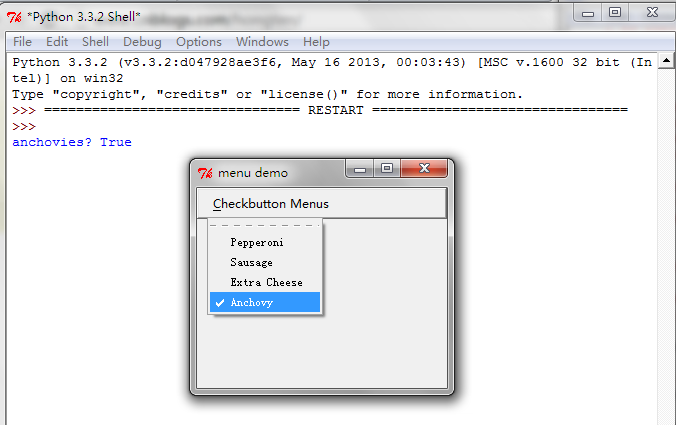
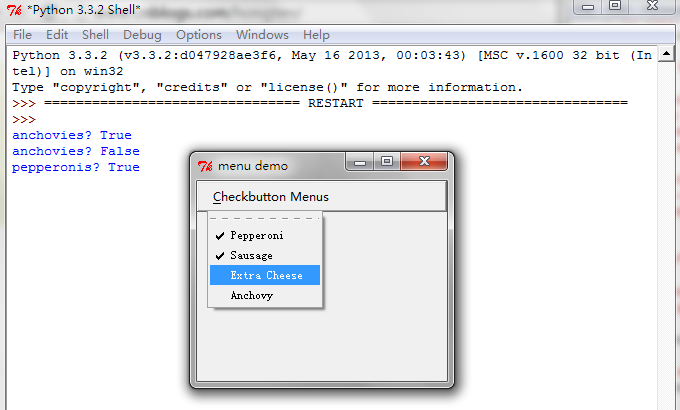
运行效果:
1.初始化的时候,最后一个子菜单被选中。
2.选择子菜单项,所触发的事件...
==============================================================
代码部分:
==============================================================
 from tkinter import *

 __author__ = {'name' : 'Hongten',

               'mail' : 'hongtenzone@foxmail.com',

               'blog' : 'http://www.cnblogs.com/',

               'QQ': '',

               'created' : '2013-09-10'}

 #状态标志

 pepperonis = False

 anchovies = 0

 def print_pepperonis():

     global pepperonis

     pepperonis = not pepperonis

     print('pepperonis?', pepperonis)

 def print_anchovies():

     '''从这里我们可以判断出'Anchovy'子菜单是否处于选择状态'''

     global anchovies

     anchovies = not anchovies

     print("anchovies?", anchovies)

 def makeCheckbuttonMenu():

     # make menu button

     Checkbutton_button = Menubutton(mBar, text='Checkbutton Menus',

                                     underline=0)

     Checkbutton_button.pack(side=LEFT, padx='2m')

     # the primary pulldown

     Checkbutton_button.menu = Menu(Checkbutton_button)

     # and all the check buttons. Note that the "variable" "onvalue" and "offvalue" options

     # are not supported correctly at present. You have to do all your application

     # work through the calback.

     Checkbutton_button.menu.add_checkbutton(label='Pepperoni', command=print_pepperonis)

     Checkbutton_button.menu.add_checkbutton(label='Sausage')

     Checkbutton_button.menu.add_checkbutton(label='Extra Cheese')

     # so here's a callback

     Checkbutton_button.menu.add_checkbutton(label='Anchovy',

                                             command=print_anchovies)

     #初始化时,被选中状态

     #

     # and start with anchovies selected to be on. Do this by

     # calling invoke on this menu option. To refer to the "anchovy" menu

     # entry we need to know it's index. To do this, we use the index method

     # which takes arguments of several forms:

     #

     # argument        what it does

     # -----------------------------------

     # a number        -- this is useless.

     # "last"          -- last option in the menu

     # "none"          -- used with the activate command. see the man page on menus

     # "active"        -- the currently active menu option. A menu option is made active

     #                         with the 'activate' method

     # "@number"       -- where 'number' is an integer and is treated like a y coordinate in pixels

     # string pattern  -- this is the option used below, and attempts to match "labels" using the

     #                    rules of Tcl_StringMatch

     Checkbutton_button.menu.invoke(Checkbutton_button.menu.index('Anchovy'))

     # set up a pointer from the file menubutton back to the file menu

     Checkbutton_button['menu'] = Checkbutton_button.menu

     return Checkbutton_button

 #################################################

 #### Main starts here ...

 root = Tk()

 root.geometry('250x200')

 root.title('menu demo')

 root.iconname('menu demo')

 # make a menu bar

 mBar = Frame(root, relief=RAISED, borderwidth=2)

 mBar.pack(fill=X)

 Checkbutton_button = makeCheckbuttonMenu()

 mBar.tk_menuBar(Checkbutton_button)

 root.mainloop()
python开发_tkinter_复选菜单的更多相关文章
- python开发_tkinter_多级子菜单
在之前的blog中有提到python的tkinter中的菜单操作 python开发_tkinter_窗口控件_自己制作的Python IDEL_博主推荐 python开发_tkinter_窗口控件_自 ...
- python开发_tkinter_单选菜单_不可用菜单操作
在之前的blog中有提到python的tkinter中的菜单操作 python开发_tkinter_窗口控件_自己制作的Python IDEL_博主推荐 python开发_tkinter_窗口控件_自 ...
- python开发_tkinter_获取文本框内容_给文本框添加键盘输入事件
在之前的blog中有提到python的tkinter中的菜单操作 python开发_tkinter_窗口控件_自己制作的Python IDEL_博主推荐 python开发_tkinter_窗口控件_自 ...
- python开发_tkinter_获取单选菜单值
在之前的blog中有提到python的tkinter中的菜单操作 python开发_tkinter_窗口控件_自己制作的Python IDEL_博主推荐 python开发_tkinter_窗口控件_自 ...
- python开发_tkinter_菜单选项中英文切换_菜单选项不可用操作_博主推荐
我使用的python版本为:3.3.2 如果你对python中tkinter模块的菜单操作不是很了解,你可以看看: python开发_tkinter_窗口控件_自己制作的Python IDEL_博主推 ...
- python开发_tkinter_窗口控件_自己制作的Python IDEL_博主推荐(二)
在上一篇blog:python开发_tkinter_窗口控件_自己制作的Python IDEL_博主推荐 中介绍了python中的tkinter的一些东西,你可能对tkinter有一定的了解了.这篇b ...
- python开发_tkinter_小球完全弹性碰撞游戏
python开发_tkinter_小球完全弹性碰撞游戏 完成这个小球的完全弹性碰撞游戏灵感来自于: 下面是我花了一周下班时间所编写的一个小球完全弹性碰撞游戏: 游戏初始化状态: 最下面的游标和修改 ...
- 安卓开发_复选按钮控件(CheckBox)的简单使用
复选按钮 即可以选择若干个选项,与单选按钮不同的是,复选按钮的图标是方块,单选按钮是圆圈 复选按钮用CheckBox表示,CheckBox是Button的子类,支持使用Button的所有属性 一.由于 ...
- FineReport——JS二次开发(复选框全选)
在进行查询结果选择的时候,我们经常会用到复选框控件,对于如何实现复选框全选,基本思路: 在复选框中的初始化事件中把控件加入到一个全局数组里,然后在全选复选框里对数组里的控件进行遍历赋值. 首先,定义两 ...
随机推荐
- xss的一个tip
其实可能不能算tip吧. 分享一下吧. unicode有四种编码方式 源文本:The &#x [Hex]:The &# [Decimal]:The \U [Hex]:\U0054\U0 ...
- KVM,QEMU,libvirt入门学习笔记【转】
转自:http://blog.csdn.net/julykobe/article/details/27571387 注:本文内容均来自网络,我只是在此做了一些摘抄和整理的工作,来源均有注明. 0.虚拟 ...
- 一个脚本和一个容易疏忽的问题strcmp、strncmp、memcmp的用法【原创】
一个容易疏忽的问题: strcmp.strncmp.memcmp, 对于memcmp进行字符串比较时可能会出现内存重叠的情况 status = strncmp(xdev->product, &q ...
- 含有ref out 参数 的方法反射 Emit 与 普通
反射中很多朋友应该屡屡被带有ref out参数的方法折腾 当使用正常反射一个方法时候: 代码如下调用一个后期绑定方法MakeByRefType 就行了 MemberInfo test = typeof ...
- [转载]Windows服务编写原理及探讨(3)
(三)对服务的深入讨论之下 现在我们还剩下一个函数可以在细节上讨论,那就是服务的CtrlHandler函数. 当调用RegisterServiceCtrlHandler函数时,SCM得到并保存这个回调 ...
- Linux 网络编程实例
/*socket->bind->listen->accept->recv/recvfrom->send/sendto->close 客户端:socket->c ...
- Ibatis.Net 各种配置说明学习(二)
1.各个配置文件的配置说明 providers.config:指定数据库提供者,.Net版本等信息. xxxxx.xml:映射规则. SqlMap.config:大部分配置一般都在这里,如数据库连接等 ...
- IOS使用SourceTree
一.安装sourceTree 1.下载 访问SourceTree 软件官方下载地址 : https://www.sourcetreeapp.com 下载macos版本 2.安装 安装和windows安 ...
- AdvStringGrid 单元格字体颜色、背景颜色
procedure TForm5.Button1Click(Sender: TObject); var I: Integer; begin AdvStringGrid1.RowCount := ;// ...
- Codeforces 946D Timetable(预处理+分组背包)
题目链接:http://codeforces.com/problemset/problem/946/D 题目大意:有n个字符串,代表n天的课表,1表示这个时间要上课,0表示不要上课,一天在学校时间为第 ...