
python -猜字小游戏
代码运行效果如下:
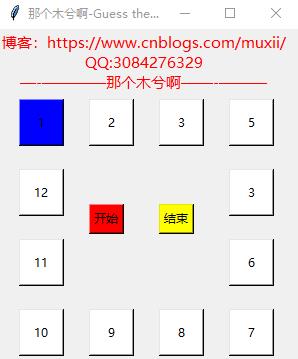
注意:
1.必须要在python3环境想使用
2.QQ:3084276329(一起交流学习)
3.还请大家评论
Guess the word game代码如下:
 #! /usr/bin/env python

 # -*- coding: utf- -*-

 # Guess the word game

 # 博客:https://www.cnblogs.com/muxii

 # 那个木兮啊

 import tkinter

 import threading

 import time

 from tkinter import *

 from tkinter import  messagebox

 from tkinter import  messagebox

 root = tkinter.Tk()

 root.title('那个木兮啊-Guess the word')

 root.minsize(,)

 label =(root)

 label = Label(root,text = '博客:https://www.cnblogs.com/muxii/\nQQ:3084276329\n—-————那个木兮啊——-———',font = ('微软雅黑',),fg = 'red')

 label.grid(row = ,column =)

 btn1 = tkinter.Button(root,text ='',width = ,height =,bg='blue')

 btn1.place(x=,y=)

 btn2 = tkinter.Button(root,text = '',width = ,height =,bg ='white')

 btn2.place(x=,y=)

 btn3 = tkinter.Button(root,text = '',width = ,height =,bg ='white')

 btn3.place(x=,y=)

 btn4 = tkinter.Button(root,text = '',width = ,height =,bg ='white')

 btn4.place(x=,y=)

 btn5 = tkinter.Button(root,text = '',width = ,height =,bg ='white')

 btn5.place(x=,y=)

 btn6 = tkinter.Button(root,text = '',width = ,height =,bg ='white')

 btn6.place(x=,y=)

 btn7 = tkinter.Button(root,text = '',width = ,height =,bg ='white')

 btn7.place(x=,y= )

 btn8 = tkinter.Button(root,text = '',width = ,height =,bg ='white')

 btn8.place(x=,y=)

 btn9 = tkinter.Button(root,text = '',width = ,height =,bg ='white')

 btn9.place(x=,y= )

 btn10 = tkinter.Button(root,text = '',width = ,height =,bg ='white')

 btn10.place(x=,y=)

 btn11 = tkinter.Button(root,text = '',width = ,height =,bg ='white')

 btn11.place(x=,y=)

 btn12 = tkinter.Button(root,text = '',width = ,height =,bg ='white')

 btn12.place(x=,y=)

 herolists = [btn1,btn2,btn3,btn4,btn5,btn6,btn7,btn8,btn9,btn11]

 isloop    = False

 stopsing  = False

 #定义停止id

 stopid    = None

 #定义函数,循环选项 设置背景颜色,选中的为红色,

 def round():

     global isloop

     global stopid

     if isloop ==True:

         return

     i =

     #判断一个对象是否已经类型 type

     #考虑继承关系

     if isinstance(stopid,int):

         i = stopid

     while True:

         #

         time.sleep(0.05)#延时

         for x in herolists:

             x['bg'] = 'white'

         herolists[i]['bg'] ='blue'

         i +=

         if i >= len(herolists):

             i =

         if  stopsing == True:

             isloop =False

             stopid = i

             break

  #停止

 def stop1():

     global stopsing

     if stopsing == True:

         return

     stopsing = True

 #开始

 def newtask():

     global  isloop

     global  stopsing

     stopsing = False

 #建立线程

     t = threading.Thread(target = round )

     t.start()

     isloop = True

 btn_start = tkinter.Button(root,text = '开始',bg = 'red',command = newtask)

 btn_start.place(x=,y=)

 #

 btn_stop = tkinter.Button(root,text = '结束',bg = 'yellow',command = stop1)

 btn_stop.place(x=,y= )

 root.mainloop()
2018.8.3
python -猜字小游戏的更多相关文章
- LY.猜字小游戏
猜字小游戏
- Demo_2:Qt实现猜字小游戏
1 环境 系统:windows 10 代码编写运行环境:Qt Creator 4.4.1 (community) Github: 2 简介 参考视频:https://www.bilibili.co ...
- Python猜数小游戏
使用random变量随机生成一个1到100之间的数 采集用户所输入的数字,如果输入的不符合要求会让用户重新输入. 输入符合要求,游戏开始.如果数字大于随机数,输出数字太大:如果小于随机数,输出数字太小 ...
- 初识python: while循环 猜年龄小游戏
知识点: 1.python注释方法: 单行注释: # 多行注释: '''注释内容 ''' (单引号或双引号都可以),亦可打印多行 例: #此处是单行注释信息 print('这里是打印内容') #这里 ...
- 简单的猜数字小游戏--Python
猜数字小游戏: #coding=utf-8 import random answer =random.randint(1,100) #生成随机数 n=int (input("Please ...
- 关于切片/截取(slice)和random模块的使用(实例:猜单词小游戏)
切片和random的使用在源码中都有注释(可以直接下载):https://github.com/NoobZeng/GuessWords 1. README.MD 基于Python的猜单词游戏 猜单词小 ...
- day06-java-(方法,猜字符小游戏)
day05-java-(方法,猜字符小游戏) 1.方法: 1)用于封装一段特定的逻辑功能 2)方法应尽可能的独立,只干一件事 3)方法可以被反复的调用多次 4)避免代码重复,有利于代码的维护, ...
- Java基础知识强化之IO流笔记70:Properties练习之 如何让猜数字小游戏只能玩5次的案例
1. 使用Properties完成猜数字小游戏只能玩5次的案例: 2. 代码实现: (1)猜数字游戏GuessNumber: package cn.itcast_08; import java.uti ...
- java猜数字小游戏
/* * * 猜数字小游戏 * * 先由系统生成一个2-100之间的随机数字, * * 然后捕获用户从控制台中输入的数字是否与系统生成的随机数字相同, * * 如果相同则统计用户所猜的次数,并给出相应 ...
随机推荐
- 44、WebStrom下载和破解
WebStrom下载地址: http://www.pc6.com/mac/112553.html WebStrom 2017激活破解(http://blog.csdn.net/it_talk/arti ...
- zend studio导入外部项目乱码怎么解决
在zendstudio ide中,导入一个工程后,发现工程里面很多的文件都打上了红色的叉叉,打开这些文件一看,发现只要是有汉字存在的文件,都出现了乱码.按住alt+enter发现,该文件的编码默认为g ...
- 2018.11.02 洛谷P3952 时间复杂度(模拟)
传送门 惊叹考场dubuffdubuffdubuff. 这题还没有梭哈难啊233. 直接按照题意模拟就行了. 代码: #include<bits/stdc++.h> using names ...
- jrebel热部署
一,JRebel 插件 获取与安装 1,JRebel 官网下载地址https://zeroturnaround.com/software/jrebel/download/#!/free-trial P ...
- Router types
Inq-n. Flits are stored at the input of the router. Each input unit is connected to the switch by as ...
- java常用设计模式三:原型模式
在说原型模式之前先说一下浅拷贝和深拷贝的概念 一.浅拷贝和深拷贝 1.浅拷贝 在java中,对象创建后需要有一个引用变量来指向该对象实际的地址空间,也就是说引用变量与对象实体是两个不同的数据体.在Ob ...
- 微信小程序之弹框modal
官方文档 <modal hidden="{{hidden}}" title="这里是title" confirm-text="自定义确定按钮&q ...
- Effective C++ 随笔(3)
条款12: 以对象管理资源 两种只能指针: std:auto_ptr<> 当使用copy操作室,原先的智能指针指向为null std:tr1:share_ptr<int> sp ...
- android-基础编程-TextView
TextView是简单而又复杂的控件,简单是使用上,复杂是源代码研究.基础编程这里只讲是如何使用. TextView主要分为两种使用方法,一种是xml中不带span的textview,另外一种是Spa ...
- spring注解开发
applicationContext.xml <?xml version="1.0" encoding="UTF-8"?> <beans xm ...