
二,文件上传控件el-upload
需求: 上传文件,保存到服务器,并保存历史记录
上效果图
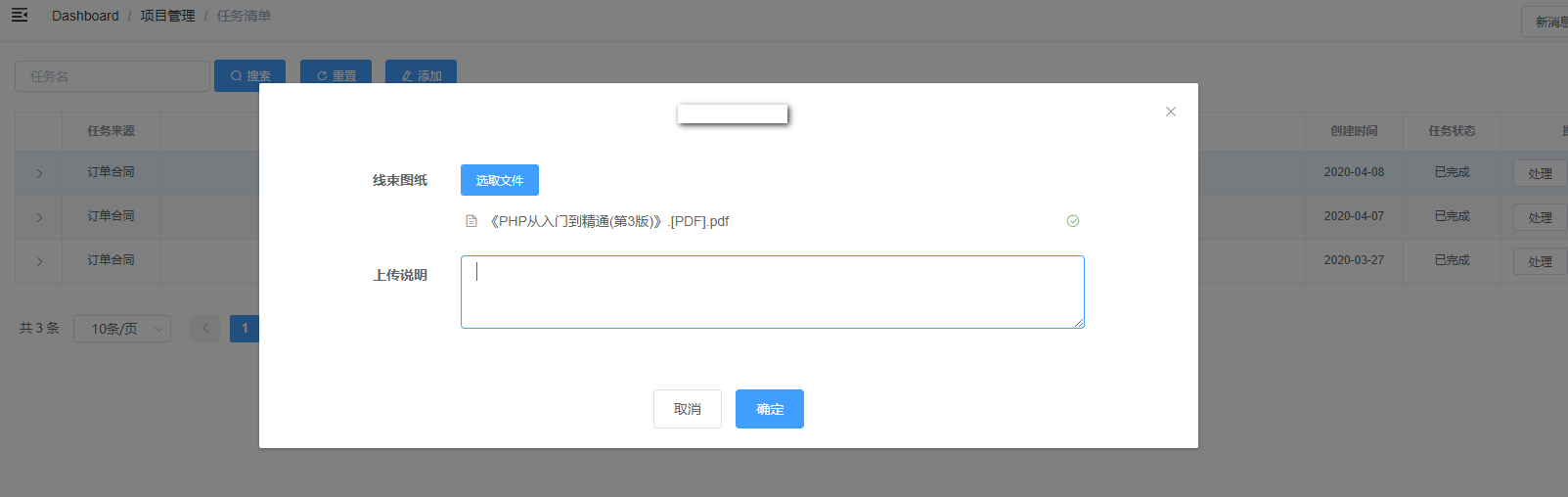
      <el-form-item label="文件">

        <el-upload

          ref="uploadHarnessDrawing"

          v-loading="loadingFile"

          action=""

          :limit=""

          :on-preview="handlePreview"

          :on-change="onHarnessDrawingFileChange"

          :on-remove="onHarnessDrawingFileRemove"

          :file-list="harnessDrawingFileList"

          :auto-upload="false"

        >

          <el-button slot="trigger" size="small" type="primary">选取文件</el-button>

        </el-upload>

      </el-form-item>
el-upload 为Element上传控件,需要注意的以下三个事件,分别为预览,Change以及删除,change和remove直接修改file-list属性
:on-preview="handlePreview"
:on-change="onHarnessDrawingFileChange"
:on-remove="onHarnessDrawingFileRemove"
:file-list="harnessDrawingFileList"
onHarnessDrawingFileChange(file, fileList) {

      this.harnessDrawingFileList = fileList

    },

    onHarnessDrawingFileRemove(file, fileList) {

      this.harnessDrawingFileList = fileList

    },

    handlePreview(file) {

      var url = file.url

      if (url === undefined) {

        return

      }

      this.viewFile(url)

    },

    viewFile(url) {

      var param = {

        token: getToken(),

        url: url

      }

      this.loadingFile = true

      fileDownload(param).then(res => {

        if (res.code === 20000) {

          downloadFile(res.data.name, res.data.dataStr)

          this.loadingFile = false

        }

      })

    }
这么做的原因是功能不使用自带的提交功能,而是使用按钮统一提交,并且在后台判断文件修改
提交事件
submitUpload() {

      this.loading = true

      this.uploadForm = new FormData()

      this.uploadForm.append('id', this.id)

      this.uploadForm.append('token', this.token)

      this.uploadForm.append('comment', this.temp.Comment === undefined ? '' : this.temp.Comment)

      var config = {

        // 这里是重点,需要和后台沟通好请求头,Content-Type不一定是这个值

        headers: { 'Content-Type': 'multipart/form-data' }

      }

      for (var i = 0; i < this.harnessDrawingFileList.length; i++) {

        this.uploadForm.append('harnessDrawingFileList', this.harnessDrawingFileList[i].raw)

        if (this.harnessDrawingFileList[i].raw === undefined) {

          // 初始文件

          this.uploadForm.append('initialHarnessDrawingFileList', this.harnessDrawingFileList[i].url)

        }

      }

      // 添加请求头

      axios.post(this.baseURL + '/ProjectManager/uploadFile', this.uploadForm, config).then(response => {

        this.loading = false

        if (response.data.code !== 20000) {

          MessageBox.alert(response.data.msg)

          return

        }

        this.innerVisible = false

        this.$notify({

          title: '成功',

          message: response.data.msg,

          type: 'success',

          duration: 2000

        })

        this.$emit('refreshTable')

      })

    }
后台代码:
/// <summary>

        /// 上传文件

        /// </summary>

        /// <param name="id">Id</param>

        /// <param name="token">登录Token</param>

        /// <returns></returns>

        [HttpPost]

        public HttpResponseMessage uploadElectricalEngineerFile()

        {

            // 返回数据

            String result = String.Empty;

            String tempUploadPath = String.Empty;

            String tempUploadDatePath = String.Empty;

            try

            {

                String msg = String.Empty;

                String token = HttpContext.Current.Request.Form["token"];

                LoginUser loginUser = GetCurrentLoginUser(token);

                tempUploadPath = HttpContext.Current.Request.MapPath(String.Format("/upload/Temp/{0}/", loginUser.Uid));

                tempUploadDatePath = tempUploadPath + DateTime.Now.ToString("yyyyMMddHHmmss") + "/";

                String taskId = HttpContext.Current.Request.Form["id"];

                String comment = HttpContext.Current.Request.Form["comment"] == null ? "" : HttpContext.Current.Request.Form["comment"];

                HttpFileCollection files = HttpContext.Current.Request.Files;

                // 文件夹信息获取,根据项目名 命名

                String path = HttpContext.Current.Request.MapPath("/upload/");

                TaskDomain task = TaskBiz.GetById(taskId);

                TechnicalSupportDomain techDomain = null;

                if (task == null)

                {

                    AppLog.Error(Constant.MSG_NO_TASK_DATA);

                    return JsonResultModel(Result_Success_Error, Constant.MSG_NO_TASK_DATA, result);

                }

                techDomain = TechnicalSupportBiz.GetById(task.MasterId);

                if (techDomain == null)

                {

                    AppLog.Error(Constant.MSG_NO_SOURCE_DATA);

                    return JsonResultModel(Result_Success_Error, Constant.MSG_NO_SOURCE_DATA, result);

                }

                ContractDomain contract = pjService.GetContractById(techDomain.ContractId); //ContractBiz.GetById(techDomain.ContractId);

                path = String.Format("/upload/{0}/{1}/{2}", contract.CustomerName, contract.ProjectName, Constant.FILE_PATH_TECHNICAL_SUPPORT);

                msg = String.Format("用户【{0}】为项目【{1}】", loginUser.User.FullName, contract.ProjectName);

                // 把所有的文件保存到临时文件夹中,在临时文件夹操作

                String initialHarnessDrawingFileFileList = HttpContext.Current.Request.Form["initialHarnessDrawingFileList"] == null ? "" : HttpContext.Current.Request.Form["initialHarnessDrawingFileList"];

                List<String> lsInitialHarnessDrawingFileFile = new List<String>(initialHarnessDrawingFileFileList.Split(",".ToCharArray(), StringSplitOptions.RemoveEmptyEntries));

                // 判断文件是否变更

                GetElectricalEngineerFileInfo(techDomain);

                List<String> harnessDrawingFiles = techDomain.HarnessDrawingFiles.Select(p => p.url).ToList();

                // 文件是否变更

                techDomain.HarnessDrawingFileChange = lsInitialHarnessDrawingFileFile.All(harnessDrawingFiles.Contains) && harnessDrawingFiles.All(lsInitialHarnessDrawingFileFile.Contains) && lsInitialHarnessDrawingFileFile.Count == harnessDrawingFiles.Count;

                // 没有改变

                if (techDomain.HarnessDrawingFileChange && files.AllKeys.Length == )

                {

                    return JsonResultModel(Result_Success_Code, Result_Success_MSG, result);

                }

                List<String> deleteFileInfo = new List<String>();

                // 找出删除的文件

                List<String> list = harnessDrawingFiles.Except(lsInitialHarnessDrawingFileFile).ToList();

                if (list != null && list.Count > )

                {

                    list.ForEach(item =>

                    {

                        deleteFileInfo.Add(String.Format("文件{0}", Path.GetFileName(item)));

                    });

                }

                // 把现有的文件保存到临时文件夹中

                if (!Directory.Exists(tempUploadDatePath + "HarnessDrawing/"))

                {

                    Directory.CreateDirectory(tempUploadDatePath + "HarnessDrawing/");

                }

                for (int iIndex = ; iIndex < lsInitialHarnessDrawingFileFile.Count; iIndex++)

                {

                    FileInfo file = new FileInfo(HttpContext.Current.Request.MapPath(lsInitialHarnessDrawingFileFile[iIndex]));

                    file.CopyTo(tempUploadDatePath + "HarnessDrawing/" + file.Name);

                }

                String fileName = String.Empty;

                for (int iIndex = ; iIndex < files.AllKeys.Length; iIndex++)

                {

                    HttpPostedFile postedFile = files[iIndex];

                    fileName = System.IO.Path.GetFileName(postedFile.FileName);

                    switch (files.AllKeys[iIndex])

                    {

                        case Constant.FILE_HARNESSDRAWING_LIST:

                            postedFile.SaveAs(tempUploadDatePath + "HarnessDrawing/" + fileName);

                            break;

                    }

                }

                // 获取最终的文件

                DirectoryInfo dir = new DirectoryInfo(tempUploadDatePath + "HarnessDrawing/");

                List<FileInfo> lastedHarnessDrawingFiles = dir.GetFiles().ToList();

                // 上传文件

                String filePath = String.Empty;

                String bakDate = DateTime.Now.ToString("yyyy-MM-dd HH:mm:ss");

                String versionName = DateTime.Now.ToFileTimeUtc().ToString();

                String versionPath = String.Empty;

                List<String> fileInfoList = new List<String>();

                // 文件

                techDomain.HarnessDrawing = String.Empty;

                filePath = path + String.Format("/{0}/", Constant.FILE_PATH_HARNESSDRAWING);

                foreach (FileInfo file in lastedHarnessDrawingFiles)

                {

                    fileName = file.Name;

                    if (!Directory.Exists(filePath))

                    {

                        Directory.CreateDirectory(filePath);

                    }

                    versionPath = filePath + versionName + "/";

                    techDomain.HarnessDrawing = versionPath;

                    fileInfoList.Add(String.Format(" 文件:{0}", fileName));

                    // 备份文件

                    versionPath = HttpContext.Current.Request.MapPath(versionPath);

                    if (!Directory.Exists(versionPath))

                    {

                        Directory.CreateDirectory(versionPath);

                    }

                    file.CopyTo(versionPath + fileName);

                }

                // 写入Log

                if (lastedHarnessDrawingFiles.Count > )

                {

                    CommonMethod.WriteVersionLog(HttpContext.Current.Request.MapPath(filePath) + Constant.VERSION_LOG_NAME, String.Format("{0}|{1}|{2}", bakDate, versionName, comment));

                }

                techDomain.TaskId = taskId;

                result = pjService.SaveElectricalEngineerTaskInfo(techDomain, loginUser);

                if (!String.IsNullOrEmpty(result))

                {

                    AppLog.Error(result);

                    return JsonResultModel(Result_Success_Error, result, null);

                }

                if (deleteFileInfo.Count > )

                {

                    msg += String.Format("删除了{0}", String.Join(",", deleteFileInfo));

                }

                if (fileInfoList.Count > )

                {

                    msg += String.Format("上传了{0}", String.Join(",", fileInfoList));

                }

                LogHelper.LogOperate(msg, Constant.OPEARTE_LOG_INFO, loginUser);

            }

            catch (Exception ex)

            {

                AppLog.Error(ex);

                return JsonResultModel(Result_Success_Error, ex.Message, result);

            }

            finally

            {

                if (!String.IsNullOrEmpty(tempUploadPath))

                {

                    // 删除临时文件夹

                    CommonMethod.DeleteDirectory(tempUploadPath, tempUploadDatePath.TrimEnd('/'));

                }

            }

            return JsonResultModel(Result_Success_Code, Result_Success_MSG, result);

        }
自此,文件上传功能完成
二,文件上传控件el-upload的更多相关文章
- jquery文件上传控件 Uploadify
(转自 http://www.cnblogs.com/mofish/archive/2012/11/30/2796698.html) 基于jquery的文件上传控件,支持ajax无刷新上传,多个文件同 ...
- 使用Uploadify(UploadiFive)多文件上传控件遇到的坑
最近项目中需要实现多文件上传功能,于是结合需求最终选择了Uploadify这一款控件来实现.相比其他控件,Uploadify具有简洁的界面,功能API基本可以解决大多数需求,又是基于jquery的,配 ...
- ***文件上传控件bootstrap-fileinput的使用和参数配置说明
特别注意: 引入所需文件后页面刷新查看样式奇怪,浏览器提示错误等,可能是因为js.css文件的引用顺序问题,zh.js需要在fileinput.js后面引入.bootstrap最好在filein ...
- jquery文件上传控件 Uploadify 可以和ajax交互
http://www.cnblogs.com/mofish/archive/2012/11/30/2796698.html 原网址 基于jquery的文件上传控件,支持ajax无刷新上传,多个文件同 ...
- jquery文件上传控件 Uploadify(转)
原文:http://www.cnblogs.com/mofish/archive/2012/11/30/2796698.html 基于jquery的文件上传控件,支持ajax无刷新上传,多个文件同时上 ...
- jquery文件上传控件 Uploadify 问题记录
Uploadify v3.2.1 首先引用下面的文件 <!--上传控件 uploadify--> <script type="text/javascript" s ...
- 因用了NeatUpload大文件上传控件而导致Nonfile portion > 4194304 bytes错误的解决方法
今天遇到一个问题,就是“NeatUpload大文件上传控件而导致Nonfile portion > 4194304 bytes错误”,百度后发现了一个解决方法,跟大家分享下: NeatUploa ...
- 对FileUpload文件上传控件的一些使用方法说明
//创建时间:2014-03-12 //创建人:幽林孤狼 //说明:FileUpload文件上传控件使用说明(只是部分)已共享学习为主 //可以上传图片,txt文档.doc,wps,还有音频文件,视屏 ...
- [Vue]写一个简单的文件上传控件
这篇将介绍如何写一个简单的基于Vue+Element的文件上传控件. 控件将具有 1. 上传队列的列表,显示文件名称,大小等信息,可以显示上传进度实时刷新 2. 取消上传 使用Element的u ...
- 在WebBrowser中通过模拟键盘鼠标操控网页中的文件上传控件(转)
引言 这两天沉迷了Google SketchUp,刚刚玩够,一时兴起,研究了一下WebBrowser. 我在<WebBrowser控件使用技巧分享>一文中曾谈到过“我现在可以通过WebBr ...
随机推荐
- Haporxy
安装Haproxy: 下载 wget https://fossies.org/linux/misc/haproxy-1.8.3.tar.gz tar -zxf haproxy-.tar.g cd ha ...
- django源码分析——静态文件staticfiles中间件
本文环境python3.5.2,django1.10.x系列 1.在上一篇文章中已经分析过handler的处理过程,其中load_middleware就是将配置的中间件进行初始化,然后调用相应的设置方 ...
- Java笔记(day18-19)
泛型: jdk1.5出现的安全机制. 好处: 1,将运行时期的问题ClassCastException转到了编译时期. 2,避免了强制转换的麻烦. <>:当操作的引用数据类型不确定的时候. ...
- Redis超详细总结
NoSQL概述 一.数据存储的演化史 1.单机MySQL的美好年代 在90年代,一个网站的访问量一般都不大,用单个数据库完全可以轻松应付.在那个时候,更多的都是静态网页,动态交互类型的网站不多. 上述 ...
- A. Guest From the Past(数学推式子)
\(n元,买塑料杯子a元,买玻璃杯子b元,但玻璃杯子用完后可以卖c元\) \(求最多买的杯子.\) \(---------------------------分割------------------- ...
- R - Weak Pair HDU - 5877 离散化+权值线段树+dfs序 区间种类数
R - Weak Pair HDU - 5877 离散化+权值线段树 这个题目的初步想法,首先用dfs序建一颗树,然后判断对于每一个节点进行遍历,判断他的子节点和他相乘是不是小于等于k, 这么暴力的算 ...
- 记一次sqoop安装后测试的问题
运行命令: sqoop import --connect "jdbc:mysql://x.x.x.x:3306/intelligent_qa_bms?useUnicode=true& ...
- 51单片机putchar函数的说明
原文排版远些乱,整理了一下. #include <reg51.h> #define XON 0x11 /*串口流控制符 启动*/ #define XOFF 0x13 /*串口流控制符 中断 ...
- 读CSV文件并写arcgis shp文件
一.在这里我用到的csv文件是包含x,y坐标及高程.降雨量数据的文件.如下图所示. 二.SF简介 简单要素模型(Simple Feature,SF),是 OGC 国际组织定义的面向对象的矢量数据模型. ...
- 5G新基建到来,图扑推出智慧路灯三维可视化方案
前言 作为智慧城市的重要组成部分,智慧灯杆管理系统采用信息化.数字化手段,把路灯及城市景观照明等各种不同对象的监控和数据采集及处理融于一体, 为城市管理者进行城市管理.进行科学决策提供了强有力的手段. ...