
Mybatis入门(六)联查之多对一
Mysql可以联查,但Mybatis也可以联查只是没有MySQL联查的舒服需要配置很多文件。
开始搭建环境:
MySQL新建两个表一个Student一个Teacher表:
Teacher表:
CREATE TABLE teacher(

 tid int primary key,

 tname varchar(30) not null

)
Student表:
CREATE TABLE student(

 sid int primary key,

 sname varchar(30) not null,

 tid int not null,

 foreign key(tid) references teacher(tid)

)
目录:
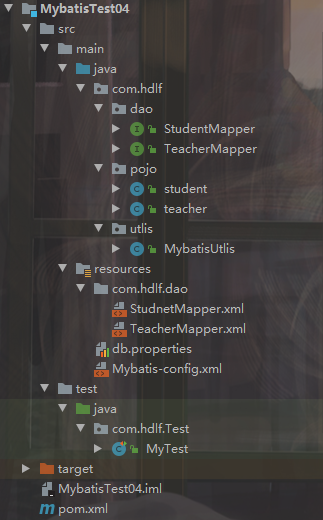
文件很多但也不复杂静下心来慢慢想就能捋清楚。
pom.xml文件配置:
<?xml version="1.0" encoding="UTF-8"?>

<project xmlns="http://maven.apache.org/POM/4.0.0"

         xmlns:xsi="http://www.w3.org/2001/XMLSchema-instance"

         xsi:schemaLocation="http://maven.apache.org/POM/4.0.0 http://maven.apache.org/xsd/maven-4.0.0.xsd">

    <modelVersion>4.0.0</modelVersion>

    <groupId>org.example</groupId>

    <artifactId>MybatisTest04</artifactId>

    <version>1.0-SNAPSHOT</version>

    <dependencies>

        <!--导入MySQL包/核心-->

        <!-- https://mvnrepository.com/artifact/mysql/mysql-connector-java -->

        <dependency>

            <groupId>mysql</groupId>

            <artifactId>mysql-connector-java</artifactId>

            <version>8.0.18</version>

        </dependency>

        <!--导入Mybatis包/核心-->

        <!-- https://mvnrepository.com/artifact/org.mybatis/mybatis -->

        <dependency>

            <groupId>org.mybatis</groupId>

            <artifactId>mybatis</artifactId>

            <version>3.5.3</version>

        </dependency>

        <!--导入junit测试包-->

        <!-- https://mvnrepository.com/artifact/junit/junit -->

        <dependency>

            <groupId>junit</groupId>

            <artifactId>junit</artifactId>

            <version>4.13</version>

            <scope>test</scope>

        </dependency>

        <!--偷懒专用包-->

        <!-- https://mvnrepository.com/artifact/org.projectlombok/lombok -->

        <dependency>

            <groupId>org.projectlombok</groupId>

            <artifactId>lombok</artifactId>

            <version>1.18.10</version>

            <scope>provided</scope>

        </dependency>

    </dependencies>

    <!--maven由于他的约定大于配置,我们之后可以能遇到我们写的配置文件,无法被处理或生效问题,解决方案-->

    <build>

        <resources>

            <resource>

                <directory>src/main/java</directory>

                <includes>

                    <include>**/*.properties</include>

                    <include>**/*.xml</include>

                </includes>

                <filtering>false</filtering>

            </resource>

            <resource>

                <directory>src/main/resources</directory>

                <includes>

                    <include>**/*.properties</include>

                    <include>**/*.xml</include>

                </includes>

                <filtering>false</filtering>

            </resource>

        </resources>

    </build>

</project>
Mybatis-config.xml配置文件:
<?xml version="1.0" encoding="UTF-8" ?>

<!DOCTYPE configuration

        PUBLIC "-//mybatis.org//DTD Config 3.0//EN"

        "http://mybatis.org/dtd/mybatis-3-config.dtd">

<configuration>

    <properties resource="db.properties"/>

    <typeAliases>

        <typeAlias type="com.hdlf.pojo.student" alias="student"></typeAlias>

        <typeAlias type="com.hdlf.pojo.teacher" alias="teacher"></typeAlias>

    </typeAliases>

    <environments default="development">

        <environment id="development">

            <transactionManager type="JDBC"/>

            <dataSource type="POOLED">

                <property name="driver" value="${driver}"/>

                <property name="url" value="${url}"/>

                <property name="username" value="${username}"/>

                <property name="password" value="${password}"/>

            </dataSource>

        </environment>

    </environments>

    <mappers>

        <mapper resource="com/hdlf/dao/StudnetMapper.xml"></mapper>

        <mapper class="com.hdlf.dao.TeacherMapper"></mapper>

    </mappers>

</configuration>
utils工具类:
package com.hdlf.utlis;

import org.apache.ibatis.io.Resources;

import org.apache.ibatis.session.SqlSession;

import org.apache.ibatis.session.SqlSessionFactory;

import org.apache.ibatis.session.SqlSessionFactoryBuilder;

import java.io.IOException;

import java.io.InputStream;

public class MybatisUtlis {

    private static SqlSessionFactory sqlSessionFactory;

    static{

        try {

            String resource = "Mybatis-config.xml";

            InputStream inputStream = Resources.getResourceAsStream(resource);

            sqlSessionFactory = new SqlSessionFactoryBuilder().build(inputStream);

        } catch (IOException e) {

            e.printStackTrace();

        }

    }

    public static SqlSession getSqlSession(){

        return sqlSessionFactory.openSession();

    }

}
StudentMapper接口:
package com.hdlf.dao;

import com.hdlf.pojo.student;

import java.util.List;

public interface StudentMapper {

    student getStudent(int tid);

    List<student> getallstudent();

}
TeacherMapper接口:
package com.hdlf.dao;

import com.hdlf.pojo.teacher;

public interface TeacherMapper {

    teacher getteacher(int tid);

}
student实体类:
package com.hdlf.pojo;

public class student {

    private int sid;

    private String sname;

    private teacher teacher;

    public student() {

    }

    public student(int sid, String sname, com.hdlf.pojo.teacher teacher) {

        this.sid = sid;

        this.sname = sname;

        this.teacher = teacher;

    }

    public int getSid() {

        return sid;

    }

    public void setSid(int sid) {

        this.sid = sid;

    }

    public String getSname() {

        return sname;

    }

    public void setSname(String sname) {

        this.sname = sname;

    }

    public com.hdlf.pojo.teacher getTeacher() {

        return teacher;

    }

    public void setTeacher(com.hdlf.pojo.teacher teacher) {

        this.teacher = teacher;

    }

    @Override

    public String toString() {

        return "student{" +

                "sid=" + sid +

                ", sname='" + sname + '\'' +

                ", teacher=" + teacher +

                '}';

    }

}
teacher实体类:
package com.hdlf.pojo;

public class teacher {

    private int tid;

    private String tname;

    public teacher() {

    }

    public teacher(int tid, String tname) {

        this.tid = tid;

        this.tname = tname;

    }

    public int getTid() {

        return tid;

    }

    public void setTid(int tid) {

        this.tid = tid;

    }

    public String getTname() {

        return tname;

    }

    public void setTname(String tname) {

        this.tname = tname;

    }

    @Override

    public String toString() {

        return "teacher{" +

                "tid=" + tid +

                ", tname='" + tname + '\'' +

                '}';

    }

}
搭建完环境就该操作了,接下来很重要:
StudnetMapper.xml配置文件:
<association>装配对象时使用,其中 property 表示类中的属性名 select 表示要执行的sql语句(写完整的sql语句) column 要传过去的字段参数 javaType指定这个实体类
<?xml version="1.0" encoding="UTF-8" ?>

<!DOCTYPE mapper

        PUBLIC "-//mybatis.org//DTD Config 3.0//EN"

        "http://mybatis.org/dtd/mybatis-3-mapper.dtd">

<mapper namespace="com.hdlf.dao.StudentMapper">

    <select id="getStudent" parameterType="int">

        select * from mybatis.student where sid = #{tid}

    </select>

    <select id="getallstudent" resultMap="getallstudentmap">

        select * from mybatis.student

    </select>

    <resultMap id="getallstudentmap" type="student">

        <result property="sid" column="sid"></result>

        <result property="sname" column="sname"></result>

        <!--<association>装配对象时使用,其中  property  表示类中的属性名

          select  表示要执行的sql语句(写完整的sql语句) column 要传过去的字段参数

           javaType指定这个实体类-->

        <association property="teacher" column="tid" javaType="teacher" select="getteacher"></association>

    </resultMap>

    <select id="getteacher" resultType="teacher">

        select * from mybatis.teacher where tid = #{tid}

    </select>

</mapper>
测试类:
MyTest:
public class MyTest {

    @Test

    public void test(){

        SqlSession sqlSession = MybatisUtlis.getSqlSession();

        StudentMapper mapper = sqlSession.getMapper(StudentMapper.class);

        List<student> s = mapper.getallstudent();

        for (student s2 : s){

            System.out.println(s2);

        }

        sqlSession.close();

    }

}
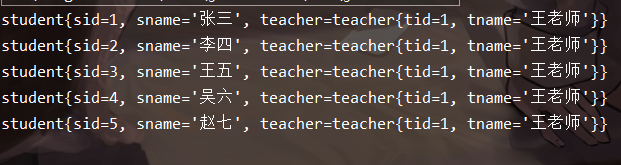
结果:
下一章说一对多的处理
Mybatis入门(六)联查之多对一的更多相关文章
- Mybatis入门(六)联查之一对多
上一章说了多对一,很多学生被一个老师教,这一章是一个老师教很多学生 目录基本没有变化只是改了配置文件: 2.配置文件: TeacherMapper接口类: package com.hdlf.dao; ...
- mybatis入门_一对多,多对多映射以及整合spring框架
一.一对多映射. 1.1 一对多映射之根据多的一方关联查询一的一方 示例:查询出具体的订单信息,同时也查询出来订单的用户信息. 引入的订单表如下所示: 框选出来的为具体的外键. 订单的Pojo类如下所 ...
- <MyBatis>入门六 动态sql
package org.maple.mapper; import org.apache.ibatis.annotations.Param; import org.maple.pojo.Employee ...
- Spring Boot入门(六):使用MyBatis访问MySql数据库(注解方式)
本系列博客记录自己学习Spring Boot的历程,如帮助到你,不胜荣幸,如有错误,欢迎指正! 本篇博客我们讲解下在Spring Boot中使用MyBatis访问MySql数据库的简单用法. 1.前期 ...
- Mybatis(一) mybatis入门
学习了hibernate这个持久层框架之后,在来学习Mybatis简直是无压力,因为Mybatis入门门栏很低,如果学习过了hibernate的话,对于Mybatis的学习很简单了,如果没学习过hib ...
- Mybatis学习(一)—————mybatis入门
学习了hibernate这个持久层框架之后,在来学习Mybatis简直是无压力,因为Mybatis入门门栏很低,如果学习过了hibernate的话,对于Mybatis的学习很简单了,如果没学习过hib ...
- mybatis入门基础(二)----原始dao的开发和mapper代理开发
承接上一篇 mybatis入门基础(一) 看过上一篇的朋友,肯定可以看出,里面的MybatisService中存在大量的重复代码,看起来不是很清楚,但第一次那样写,是为了解mybatis的执行步骤,先 ...
- MyBatis入门(五)---延时加载、缓存
一.创建数据库 1.1.建立数据库 /* SQLyog Enterprise v12.09 (64 bit) MySQL - 5.7.9-log : Database - mybatis ****** ...
- MyBatis入门(二)---一对一,一对多
一.创建数据库表 1.1.创建数据表同时插入数据 /* SQLyog Enterprise v12.09 (64 bit) MySQL - 5.6.27-log : Database - mybati ...
随机推荐
- ThinkPHP3.2.2的函数扩展
ThinkPHP的函数扩展:为了更好的在前台模板中显示变量,例如,商品分类中,分类名称之间的缩进.此时,在APP/Common/Common文件夹下(APP为新建的应用目录),新建一个php文件,如: ...
- Python:列表类型
概念 列表:有序的,可变的,元素集合 因为列表和字符串都是序列类型,所以很多操作和字符串很相似 但是注意:列表是可变类型,字符串是不可变类型 定义 基本定义 定义方法:[ 元素1, 元素2, .... ...
- ROS机器人系统学习——踩坑之路
推荐学习教程:深蓝学院 机器人操作系统ROS理论与实践学习 在学习到第2讲ROS基础的分布式通信时,一直卡在这里,主机开启小海龟后,从机虽然可以通过 rostopic list 列出当前的所有topi ...
- SprintBoot学习(二)
Spring Boot的入口类 1.名为xxxApplication的就是入口类,在main方法中使用SpringApplication.run(SpringBootTestApplication.c ...
- Java学习资源 - 测试
JUnit注解解释 1. @Test : 测试方法,测试程序会运行的方法,后边可以跟参数代表不同的测试,如(expected=XXException.class) 异常测试,(timeout=xxx) ...
- windows之杀死端口
提示: 查询端口 查询pid 杀死任务 通过 cmd 进入控制台: 查询端口: netstat -aon|findstr 1111 查询pid下的任务: tasklist|findstr 6616 杀 ...
- Suffix Tree(后缀树)
这篇简单的谈谈后缀树原理及实现. 如前缀树原理一般,后缀trie树是将字符串的每个后缀使用trie树的算法来构造.例如banana的所有后缀: 0: banana 1: anana 2: nana 3 ...
- 解决:mui 的 选项卡 + 下拉刷新 功能,在其中嵌入 iframe 后,在 iphone 的情况下,iframe 的内容不能滚动,只显示第一屏内容。
我所遇到的情况是,使用 mui 的 选项卡 + 下拉刷新 功能时,其中有2个页面是嵌入了别的网站的页面,而别个几个是通过 ajax 加载本网站的数据.然后 在其中嵌入 iframe 后,在 iphon ...
- java是什么
Java是一个纯的面向对象的程序设计语言 java是一种强类型语言,特点是: 1,跨平台 2,面向对象 3,简单易用 跨平台指的是只要有java虚拟机的平台,都可以运行java代码. Java继承了C ...
- 吴裕雄 Bootstrap 前端框架开发——Bootstrap 排版:缩写
<!DOCTYPE html> <html> <head> <title>Bootstrap 实例 - 缩写</title> <lin ...