
DispatcherServlet和ContextLoaderListener,还有spring+servlet3.0 无web.xml启动问题
上篇提到:
关于spring +springmvc中两个spring应用上下文(DispatcherServlet和ContextLoaderListener)的问题,挺让人迷糊的。
他们都是加载Bean。简单粗暴的理解就是spring的bean 用ContextLoaderListener加载,springmvc的用DispatcherServlet 加载。
《spring in action》一书中给了点解释,【我们希望DispatcherServlet 加载包含Web组件的bean,如控制器,视图解析器及处理映射,而ContextLoaderListener需要加载应用中的其他bean。这些bean通常是驱动应用后端的中间层和数据层组件】。
按道理说,反正都是bean的配置,所有的配置都 配置到一起也是可以的? 其实不然。
参看了网上几篇博客,解释的有的还算正常,有的就是可能是猜测的,当然也可能是spring版本不同导致的。
【Spring启动过程分析】(1)启动流程简介http://blog.csdn.net/moshenglv/article/details/53517343
DispatcherServlet与ContextLoaderListener的对比http://blog.csdn.net/sadfishsc/article/details/51027873
SpringMVC DispatcherServlet 初始化过程http://blog.csdn.net/sadfishsc/article/details/51027809
SpringWeb ContextLoaderListener 初始化过程http://blog.csdn.net/sadfishsc/article/details/51027840
Servlet 3 + Spring MVC零配置:去除所有xmlhttp://blog.csdn.net/xiao__gui/article/details/46803193
如果想真正深入了解,估计得看源码了。
个人觉得,还是分开好。否则可能引起不必要的错误。 那如果两个都配置了,都加载了所有的bean呢,会不会有bean重复加载的问题?
个人亲自写代码实验了一下,
1. 配置web.xml方式 启动
为方便 ,先把普通的bean配置(service层,domain层 ,dao层,数据库等)成为application.xml, springmvc相关的bean配置(controller层,视图解析器等),称为springmvc.xml,
springmvc.xml中配置是:
  <mvc:annotation-driven />

   <mvc:default-servlet-handler/>

   <mvc:resources location="/WEB-INF/pages/" mapping="/pages/**"/>

   <!-- 扫描controller(controller层注入) -->

   <context:component-scan base-package="com.zj.controller"/>

   <!-- 对模型视图添加前后缀 -->

   <bean id="viewResolver" class="org.springframework.web.servlet.view.InternalResourceViewResolver" p:prefix="/WEB-INF/pages/" p:suffix=".jsp"/>
如果正常配置,应该是:
<context-param>

        <param-name>contextConfigLocation</param-name>

        <param-value>classpath:application.xml</param-value>

    </context-param>
<listener>
        <listener-class>org.springframework.web.context.ContextLoaderListener</listener-class>
    </listener>
<!-- springMVC核心配置 -->
    <servlet>
        <servlet-name>dispatcherServlet</servlet-name>
        <servlet-class>org.springframework.web.servlet.DispatcherServlet</servlet-class>
        <init-param>
            <param-name>contextConfigLocation</param-name>
            <param-value>classpath:springmvc/springmvc.xml</param-value>
        </init-param>
        <load-on-startup>1</load-on-startup>
    </servlet>

    <!-- 拦截设置 -->
    <servlet-mapping>
        <servlet-name>dispatcherServlet</servlet-name>
        <url-pattern>/</url-pattern>
    </servlet-mapping>
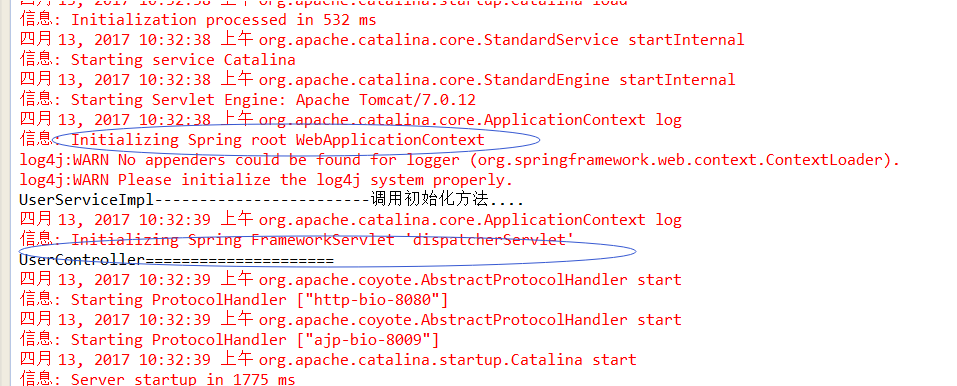
UserServiceImpl------------------------------- 和 UserController==================== 是我写在构造函数中的System.out.println 输出的。
如果配置成这样呢:把正常的springmvc.xml 和 application.xml 放一起,让ContextLoaderListener 加载。DispatcherServlet 加载一个空的springmvc配置springmvc-empty.xml,
 <context-param>

        <param-name>contextConfigLocation</param-name>

        <param-value>classpath:application.xml,classpath:springmvc/springmvc.xml</param-value>

    </context-param>

   <servlet>

        <servlet-name>dispatcherServlet</servlet-name>

        <servlet-class>org.springframework.web.servlet.DispatcherServlet</servlet-class>

        <init-param>

            <param-name>contextConfigLocation</param-name>

            <param-value>classpath:springmvc/springmvc-empty.xml</param-value>

        </init-param>

        <load-on-startup>1</load-on-startup>

    </servlet>
结果发现,还是可以正常加载controller的bean以及 视图解析等,只是controller Bean加载的顺序变提前了。。不过 应用访问 和正常情况没啥两样。
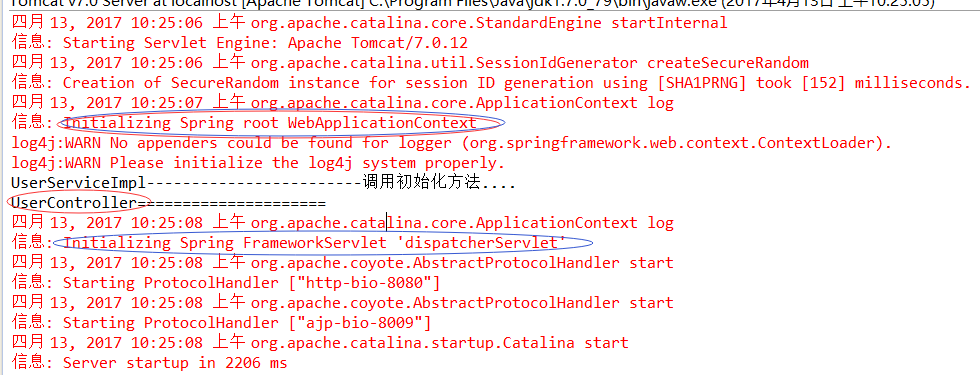
所以,不像网上有些人说的controller 、视图解析器 一定要DispatcherServlet加载。 不过拦截器等东西,我没试验。
================
如果 下面这样配置呢:
    <!-- 读取spring配置文件 -->

    <context-param>

        <param-name>contextConfigLocation</param-name>

        <param-value>classpath:application.xml,classpath:springmvc/springmvc.xml</param-value>

    </context-param>

 <servlet>

        <servlet-name>dispatcherServlet</servlet-name>

        <servlet-class>org.springframework.web.servlet.DispatcherServlet</servlet-class>

        <init-param>

            <param-name>contextConfigLocation</param-name>

            <param-value>classpath:springmvc/springmvc.xml</param-value>

        </init-param>

        <load-on-startup>1</load-on-startup>

    </servlet

可以发现 controller的bean确实加载了两遍。
不过web应用可以正常使用。
同理,如果把application.xml 也在DispatcherServlet里在配置一遍,那service等bean也是加载两遍。
===========
结论:配置web.xml 方式启动,最好还是最好把application.xml 配置 和 springmvc.xml 配置分开,分别用ContextLoadListener加载 和 DispatcherServlet加载。
2. spring +servlet3.0 无web.xml方式启动
我用的是继承WebApplicationInitializer ,通过OnStartup 启动的方式。
我用的Tomact 7.0环境,发现如果web.xml 中存在Servlet的那些配置,就不会按照WebApplicationInitializer 启动,除非web.xml 中不要Servlet的那些配置,几乎一个空的web.xml。
这个没有深究,估计和 Servlet3.0启动方式 顺序有关吧。
第一种写法:
public class MyWebAppInitializer implements WebApplicationInitializer {

    public void onStartup(ServletContext servletContext) throws ServletException {

        System.out.println("startUP=++++=+++++++++++++++++++++++++++++");

         servletContext.setInitParameter("contextConfigLocation", "classpath:application.xml,classpath:springmvc/springmvc.xml");

        // servletContext.setInitParameter("contextConfigLocation", "classpath:application.xml");

        ServletRegistration.Dynamic registration = servletContext.addServlet("dispatcher", new DispatcherServlet());

        registration.setLoadOnStartup(1);

        //registration.addMapping("/");

        registration.addMapping(new String[]{"*.html"});

        registration.setInitParameter("contextConfigLocation", "classpath:springmvc/springmvc.xml");

        servletContext.addListener(new ContextLoaderListener( ));

    }
}
运行结果:
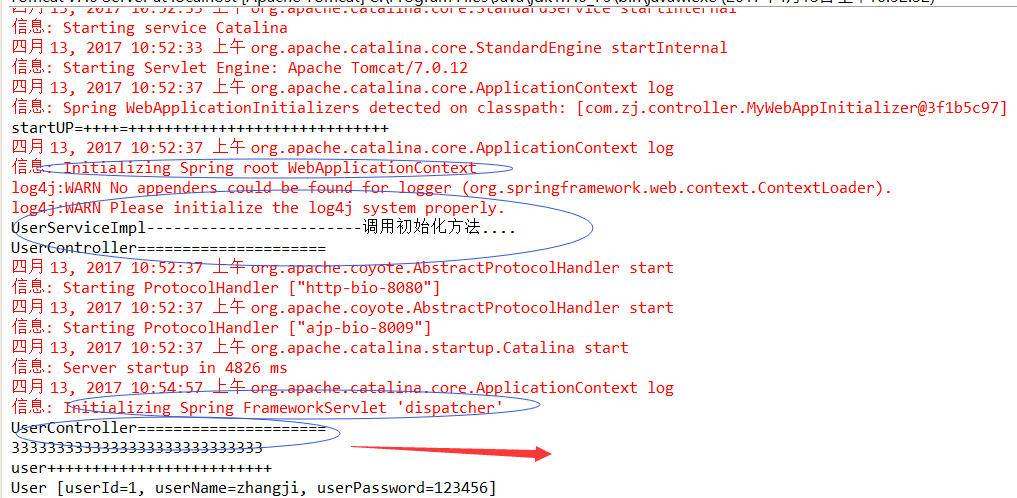
结果:可以正常访问。 不过 第一次访问的时候,会再出现 一次UserController Bean的初始化。
代码改一下, servletContext.setInitParameter("contextConfigLocation", "classpath:application.xml,classpath:springmvc/springmvc.xml");
改成 servletContext.setInitParameter("contextConfigLocation", "classpath:application.xml");

结果:可以正常访问。 UserController的bean 第一次访问的时候才 生成,有点懒加载的意思。
=========
如果 servletContext.setInitParameter("contextConfigLocation", "classpath:application.xml,classpath:springmvc/springmvc.xml");
把 //registration.setInitParameter("contextConfigLocation", "classpath:springmvc/springmvc.xml"); 注释掉。
会出现什么情况呢。

结果:可以正常启动。 但是 不能正常访问。 DispatcherServlet 会找默认的 配置。 找不到 ,就发飙了。
第二种写法:
public void onStartup(ServletContext servletContext) throws ServletException {

        System.out.println("startUP=++++=+++++++++++++++++++++++++++++");

        // servletContext.setInitParameter("contextConfigLocation", "classpath:application.xml,classpath:springmvc/springmvc.xml");

        // servletContext.addListener(new ContextLoaderListener());

        // AnnotationConfigWebApplicationContext rootContext = new AnnotationConfigWebApplicationContext();

        XmlWebApplicationContext rootContext = new XmlWebApplicationContext();

        List<String> locationList = new ArrayList<String>();

        locationList.add("classpath:application.xml");

        //locationList.add("classpath:springmvc/springmvc.xml");

        rootContext.setConfigLocations((String[])locationList.toArray(new String[locationList.size()]));

//        ContextLoader contextLoader = new ContextLoader(rootContext);

//        contextLoader.initWebApplicationContext(servletContext);

        servletContext.addListener(new ContextLoaderListener( rootContext));

        //AnnotationConfigWebApplicationContext webContext = new AnnotationConfigWebApplicationContext();

       // webContext.register(WebConfig.class);

        ServletRegistration.Dynamic registration = servletContext.addServlet("dispatcher", new DispatcherServlet());

        registration.setLoadOnStartup(1);

        //registration.addMapping("/");

        registration.addMapping(new String[]{"*.html"});

        registration.setInitParameter("contextConfigLocation", "classpath:springmvc/springmvc.xml");

        //servletContext.addListener(new ContextLoaderListener( ));

    }
结果:
信息: Spring WebApplicationInitializers detected on classpath: [com.zj.controller.MyWebAppInitializer@5794495e]

startUP=++++=+++++++++++++++++++++++++++++

log4j:WARN No appenders could be found for logger (org.springframework.web.context.support.StandardServletEnvironment).

log4j:WARN Please initialize the log4j system properly.

四月 13, 2017 1:38:20 下午 org.apache.catalina.core.ApplicationContext log

信息: Initializing Spring root WebApplicationContext

UserServiceImpl------------------------调用初始化方法....

四月 13, 2017 1:38:21 下午 org.apache.coyote.AbstractProtocolHandler start

信息: Starting ProtocolHandler ["http-bio-8080"]

四月 13, 2017 1:38:21 下午 org.apache.coyote.AbstractProtocolHandler start

信息: Starting ProtocolHandler ["ajp-bio-8009"]

四月 13, 2017 1:38:21 下午 org.apache.catalina.startup.Catalina start

信息: Server startup in 4462 ms

四月 13, 2017 1:38:31 下午 org.apache.catalina.core.ApplicationContext log

信息: Initializing Spring FrameworkServlet 'dispatcher'

UserController=====================

3333333333333333333333333333
结果发现: 可以正常访问,第一次访问加载UserController bean
如果 : ServletRegistration.Dynamic registration = servletContext.addServlet("dispatcher", new DispatcherServlet());
改成 ServletRegistration.Dynamic registration = servletContext.addServlet("dispatcher", new DispatcherServlet(rootContext));
结果:可以正常启动,但是无法正常访问。提示 The requested resource () is not available.,不知道咋回事儿。
=============
如果代码改成这样:
public void onStartup(ServletContext servletContext) throws ServletException {

        System.out.println("startUP=++++=+++++++++++++++++++++++++++++");

        // servletContext.setInitParameter("contextConfigLocation", "classpath:application.xml,classpath:springmvc/springmvc.xml");

        // servletContext.addListener(new ContextLoaderListener());

        // AnnotationConfigWebApplicationContext rootContext = new AnnotationConfigWebApplicationContext();

        XmlWebApplicationContext rootContext = new XmlWebApplicationContext();

        List<String> locationList = new ArrayList<String>();

        locationList.add("classpath:application.xml");

        locationList.add("classpath:springmvc/springmvc.xml");

        rootContext.setConfigLocations((String[])locationList.toArray(new String[locationList.size()]));

//        ContextLoader contextLoader = new ContextLoader(rootContext);

//        contextLoader.initWebApplicationContext(servletContext);

        servletContext.addListener(new ContextLoaderListener( rootContext));

        //AnnotationConfigWebApplicationContext webContext = new AnnotationConfigWebApplicationContext();

       // webContext.register(WebConfig.class);

        ServletRegistration.Dynamic registration = servletContext.addServlet("dispatcher", new DispatcherServlet(rootContext));

        registration.setLoadOnStartup(1);

        //registration.addMapping("/");

        registration.addMapping(new String[]{"*.html"});

        //registration.setInitParameter("contextConfigLocation", "classpath:springmvc/springmvc.xml");

        //servletContext.addListener(new ContextLoaderListener( ));

    }
结果:正常启动,可以正常访问。controller bean提前加载。
信息: Spring WebApplicationInitializers detected on classpath: [com.zj.controller.MyWebAppInitializer@6710bb13]

startUP=++++=+++++++++++++++++++++++++++++

log4j:WARN No appenders could be found for logger (org.springframework.web.context.support.StandardServletEnvironment).

log4j:WARN Please initialize the log4j system properly.

四月 13, 2017 1:48:46 下午 org.apache.catalina.core.ApplicationContext log

信息: Initializing Spring root WebApplicationContext

UserServiceImpl------------------------调用初始化方法....

UserController=====================

四月 13, 2017 1:48:47 下午 org.apache.coyote.AbstractProtocolHandler start

信息: Starting ProtocolHandler ["http-bio-8080"]

四月 13, 2017 1:48:47 下午 org.apache.coyote.AbstractProtocolHandler start

信息: Starting ProtocolHandler ["ajp-bio-8009"]

四月 13, 2017 1:48:47 下午 org.apache.catalina.startup.Catalina start

信息: Server startup in 4797 ms

四月 13, 2017 1:49:02 下午 org.apache.catalina.core.ApplicationContext log

信息: Initializing Spring FrameworkServlet 'dispatcher'

3333333333333333333333333333
//代码也可以改成这样,自己写 ContextLoader  加载bean
public void onStartup(ServletContext servletContext) throws ServletException {

        System.out.println("startUP=++++=+++++++++++++++++++++++++++++");

        XmlWebApplicationContext rootContext = new XmlWebApplicationContext();

        List<String> locationList = new ArrayList<String>();

        locationList.add("classpath:application.xml");

        locationList.add("classpath:springmvc/springmvc.xml");

        rootContext.setConfigLocations((String[])locationList.toArray(new String[locationList.size()]));

        ContextLoader contextLoader = new ContextLoader(rootContext);

        contextLoader.initWebApplicationContext(servletContext);

        //servletContext.addListener(new ContextLoaderListener( rootContext));

        ServletRegistration.Dynamic registration = servletContext.addServlet("dispatcher", new DispatcherServlet(rootContext));

        registration.setLoadOnStartup(1);

        //registration.addMapping("/");

        registration.addMapping(new String[]{"*.html"});

        //registration.setInitParameter("contextConfigLocation", "classpath:springmvc/springmvc.xml");

        //servletContext.addListener(new ContextLoaderListener( ));

    }
=============
或者采用注解方式。这里只给mvc配置采用了注解。
@Configuration

@EnableWebMvc

@ComponentScan(basePackages = "com.zj.controller")

public class WebConfig {

    @Bean

    public InternalResourceViewResolver internalResourceViewResolver() {

        InternalResourceViewResolver viewResolver = new InternalResourceViewResolver();

        viewResolver.setPrefix("/WEB-INF/pages/");

        viewResolver.setSuffix(".jsp");

        return viewResolver;

    }

    public void configureDefaultServletHandling(final DefaultServletHandlerConfigurer configurer) {

        configurer.enable();

      }

}
    public void onStartup(ServletContext servletContext) throws ServletException {

        System.out.println("startUP=++++=+++++++++++++++++++++++++++++");

        XmlWebApplicationContext rootContext = new XmlWebApplicationContext();

        List<String> locationList = new ArrayList<String>();

        locationList.add("classpath:application.xml");

        //locationList.add("classpath:springmvc/springmvc.xml");

        rootContext.setConfigLocations((String[])locationList.toArray(new String[locationList.size()]));

        ContextLoader contextLoader = new ContextLoader(rootContext);

        contextLoader.initWebApplicationContext(servletContext);

        AnnotationConfigWebApplicationContext webContext = new AnnotationConfigWebApplicationContext();

        webContext.register(WebConfig.class);

        ServletRegistration.Dynamic registration = servletContext.addServlet("dispatcher", new DispatcherServlet(webContext));

        registration.setLoadOnStartup(1);

        //registration.addMapping("/");

        registration.addMapping(new String[]{"*.html"});

        //registration.setInitParameter("contextConfigLocation", "classpath:springmvc/springmvc.xml");

        //servletContext.addListener(new ContextLoaderListener( ));

    }
结果: 正常启动,正常访问。controller bean 延迟加载。
信息: Spring WebApplicationInitializers detected on classpath: [com.zj.controller.MyWebAppInitializer@5a278fe0]

startUP=++++=+++++++++++++++++++++++++++++

log4j:WARN No appenders could be found for logger (org.springframework.web.context.support.StandardServletEnvironment).

log4j:WARN Please initialize the log4j system properly.

四月 13, 2017 1:58:09 下午 org.apache.catalina.core.ApplicationContext log

信息: Initializing Spring root WebApplicationContext

UserServiceImpl------------------------调用初始化方法....

四月 13, 2017 1:58:09 下午 org.apache.coyote.AbstractProtocolHandler start

信息: Starting ProtocolHandler ["http-bio-8080"]

四月 13, 2017 1:58:09 下午 org.apache.coyote.AbstractProtocolHandler start

信息: Starting ProtocolHandler ["ajp-bio-8009"]

四月 13, 2017 1:58:09 下午 org.apache.catalina.startup.Catalina start

信息: Server startup in 4644 ms

四月 13, 2017 1:58:18 下午 org.apache.catalina.core.ApplicationContext log

信息: Initializing Spring FrameworkServlet 'dispatcher'

UserController=====================

3333333333333333333333333333
综上: springmvc配置 和 普通的bean的配置 分开加载,可以延迟加载controller 的Bean。
不过我感觉很奇怪,<load-on-startup>1</load-on-startup>应该是启动时候立即加载。 0 及0 以上应该是容器启动时候加载,负数为懒加载,
在web.xml起作用,但是在代码方式registration.setLoadOnStartup(1) 为啥还是第一次访问才加载呢? 是我版本问题,还是代码问题呢?
DispatcherServlet和ContextLoaderListener,还有spring+servlet3.0 无web.xml启动问题的更多相关文章
- servlet3.0无web.xml
大家应该都已经知道spring 3.1对无web.xml式基于代码配置的servlet3.0应用.通过spring的api或是网络上高手们的博文,也一定很快就学会并且加到自己的应用中去了.PS:如果还 ...
- springmvc学习指南 之---第27篇 spring如何实现servlet3.0无web.xml 配置servlet对象的
writedby 张艳涛 基于web.xml配置,有人说麻烦,tomcat给按照servlet3.0,实现了基于注解@WebServlet,有人说springmvc的springmvc.xml配置麻烦 ...
- servlet3.0,web.xml的metadata-complete的作用
metadata-complete是servlet3.0规范中的新增的属性,该属性接受两个属性值,true或false.当该属性值为true时,该web应用将不会加载Annotation配置的web组 ...
- WebApplicationInitializer究 Spring 3.1之无web.xml式 基于代码配置的servlet3.0应用
本文转自http://hitmit1314.iteye.com/blog/1315816 大家应该都已经知道Spring 3.1对无web.xml式基于代码配置的servlet3.0应用.通过spri ...
- spring 和springmvc 在 web.xml中的配置
(1)问题:如何在Web项目中配置Spring的IoC容器? 答:如果需要在Web项目中使用Spring的IoC容器,可以在Web项目配置文件web.xml中做出如下配置: <!-- Sprin ...
- Spring源码解析-Web容器启动过程
Web容器启动过程,主要讲解Servlet和Spring容器结合的内容. 流程图如下: Web容器启动的Root Context是有ContextLoaderListener,一般使用spring,都 ...
- Spring之WebContext不使用web.xml启动 初始化重要的类源码分析(Servlet3.0以上的)
入口: org.springframework.web.SpringServletContainerInitializer implements ServletContainerInitializer ...
- Spring Boot2.0之注解方式启动Springmvc
回顾下springmvc原理图: DispatcherServlet是Spring MVC的核心,每当应用接受一个HTTP请求,由DispatcherServlet负责将请求分发给应用的其他组件. 在 ...
- Spring 及 SpringMVC的web.xml配置详解
出处http://blog.csdn.net/u010796790 1.spring 框架解决字符串编码问题:过滤器 CharacterEncodingFilter(filter-name) 2.在w ...
随机推荐
- P 1030 完美数列
转跳点:
- 用AD 输出BOM时提示failed to open excel template
解决办法: 去掉这个√!
- 了解java常用框架
今天我看了一点看起来比较片面的东西,java常用基本床架,并且在网上搜了相关的知识和概括总结,用来继续后期的学习: 1.struts2框架,这是最经典的框架(可以说没有“之一”).可以帮你快速搭建出一 ...
- 大数据高可用集群环境安装与配置(07)——安装HBase高可用集群
1. 下载安装包 登录官网获取HBase安装包下载地址 https://hbase.apache.org/downloads.html 2. 执行命令下载并安装 cd /usr/local/src/ ...
- Standard Aras Dialogs
In a another blog post, we covered how to open dialogs within Aras Innovator using custom forms and ...
- git使用散记
1.从远程clone一个项目 git clone ‘项目地址’ //clone项目地 git checkout -b dev origin/dev //远程已有dev分支,新建本地dev分支与远程相对 ...
- (BUILDER)建造者与(FACTORY)工厂模式 的比较
首先,说明下 参考博文 1. 建造者 http://www.cnblogs.com/zhili/p/BuilderPattern.html 2. 抽象工厂 http://www ...
- Elasticsearch分布式搜索
ElasticSearch之介绍 一 Elasticsearch产生背景 1.1 大规模数据如何检索 如:当系统数据量上了10亿.100亿条的时候,我们在做系统架构的时候通常会从以下角度去考虑问题:1 ...
- Tensorflow学习教程------softmax简单介绍
做机器学习的同志们应该对这个都不陌生,这里简单举个例子.一般来说,使用softmax函数来将神经元输出的数值映射到0到1之间,这样神经元输出的值就变为了一个概率值. 公式和例子如下图 公式和例子如下图
- openstack trove主要贡献公司-Tesora被Stratoscale收购
新闻链接:http://www.stratoscale.com/press/press-releases/stratoscale-acquires-database-as-a-service-prov ...