
Spark Streaming核心概念与编程
Spark Streaming核心概念与编程
1. 核心概念
StreamingContext
- Create StreamingContext
import org.apache.spark._

import org.apache.spark.streaming._

val conf = new SparkConf().setAppName(appName).setMaster(master)

//Second(1) #表示处理的批次, 当前1秒处理一次

val ssc = new StreamingContext(conf, Second(1))
- StreamingContext的构造函数
//StreamingContext构造函数-最常用的两个

/**

 * Create a StreamingContext using an existing SparkContext.

 * @param sparkContext existing SparkContext

 * @param batchDuration the time interval at which streaming data will be divided into batches

 */

def this(sparkContext: SparkContext, batchDuration: Duration) = {

  this(sparkContext, null, batchDuration)

}

/**

 * Create a StreamingContext by providing the configuration necessary for a new SparkContext.

 * @param conf a org.apache.spark.SparkConf object specifying Spark parameters

 * @param batchDuration the time interval at which streaming data will be divided into batches

 */

def this(conf: SparkConf, batchDuration: Duration) = {

  this(StreamingContext.createNewSparkContext(conf), null, batchDuration)

}
batch interval可以根据你的应用程序需求的延迟要求以及集群可用的资源状况来设置
创建StreamingContext可以做什么?
- Define the input sources by creating input DStreams(通过StreamingContext可以创建输入元数据)
- Define the streaming computations by applying transformation and output operations to DStreams(可以通过 transformation 或者 output operations 去操作DStreams)
- Start receiving data and processing it using streamingContext.start()(通过使用streamingContext.start()来接受处理数据)
- Wait for the processing to be stopped(manually or due to any error) using streamingContext.awaitTermination()(等在处理停止(自然或者发生错误)使用streamingContext.awaitTermination())
- The processing can be manually stopped using streamingContext.stop()(处理时可以使用streamingContext.stop()来停止)
创建了StreamingContext后需要注意什么?
- Once a context has been started, no new streaming computations can be set up or added to it.(启动一个context后,是不可以再添加计算逻辑)
- Once a context has been stopped, it cannot be restarted.(一但context停止,那么就不能再使用代码重新启动)
- Only one StreamingContext can be active in a JVM at the same time.(一个StreamingContext只能在一个JVM中存活)
- stop() on StreamingContext also stops the SparkContext. To stop only the StreamingContext, set the optional parameter of stop() called stopSparkContext to false.(stop()可以停止SparkContext,如果你只想停止StreamingContext,请设置参数)
- A SparkContext can be re-used to create multiple StreamingContexts, as long as the previous StreamingContext is stopped (without stopping the SparkContext) before the next StreamingContext is created.(一个SparkContext可以创建多个StreamingContext)
DStream (Discretized Streams)
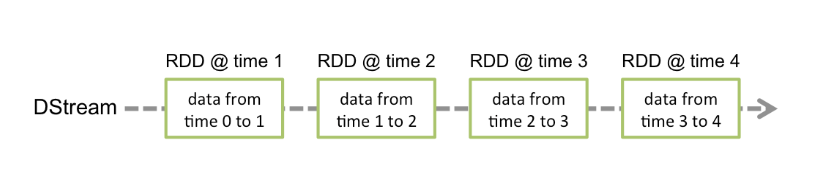
Discretized Stream or DStream is the basic abstraction provided by Spark Streaming. It represents a continuous stream of data, either the input data stream received from source, or the processed data stream generated by transforming the input stream. Internally, a DStream is represented by a continuous series of RDDs, which is Spark’s abstraction of an immutable, distributed dataset (see Spark Programming Guide for more details). Each RDD in a DStream contains data from a certain interval, as shown in the following figure.
Discretized Stream or DStream 是Spark Streaming的一个基础抽象。它代表程序化数据流(源源不断,不停止),可以从输入数据流,或者通过Data Stream转换的。换句话说,一个DStream代表的是一系列的持续不断的RDDs。RDDs是Spark的不可变的一个分布式数据集,每一个RDD是在DStream里面一个间隔包含的数据。
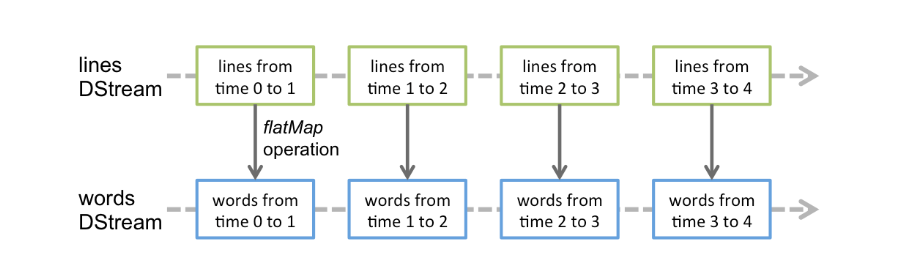
> Any operation applied on a DStream translates to operations on the underlying RDDs. For example, in the earlier example of converting a stream of lines to words, the flatMap operation is applied on each RDD in the lines DStream to generate the RDDs of the words DStream. This is shown in the following figure.

> 对DStream操作算子,比如map/flatMap,其实底层会被翻译为对DStream中的每个RDD做相同的操作。因为一个DStream是由不同批次的RDD构成的。
- Input DStream and Receives
Input DStreams are DStreams representing the stream of input data received from streaming sources. In the quick example, lines was an input DStream as it represented the stream of data received from the netcat server. Every input DStream (except file stream, discussed later in this section) is associated with a Receiver (Scala doc, Java doc) object which receives the data from a source and stores it in Spark’s memory for processing.
Input DStreams 输入数据的流是从数据源头接收过来的数据。每一个Input DStream 都要关联一个Receiver用来接收数据从数据源存到Spark的内存中。- Spark支持两种数据源
- Basic sources: file systems, and socket connections.
- Advanced sources: Kafka, Flume
- Spark支持两种数据源
2. Transformations
Similar to that of RDDs, transformations allow the data from the input DStream to be modified. DStreams support many of the transformations available on normal Spark RDD’s. Some of the common ones are as follows.
和RDD操作很相似,可以从input DStream 转换成一个新的。函数和RDD操作差不多!
| Transformation | Meaning |
|---|---|
| map(func) | Return a new DStream by passing each element of the source DStream through a function func. |
| flatMap(func) | Similar to map, but each input item can be mapped to 0 or more output items. |
| filter(func) | Return a new DStream by selecting only the records of the source DStream on which func returns true. |
| repartition(numPartitions) | Changes the level of parallelism in this DStream by creating more or fewer partitions. |
| union(otherStream) | Return a new DStream that contains the union of the elements in the source DStream and otherDStream. |
| count() | Return a new DStream of single-element RDDs by counting the number of elements in each RDD of the source DStream. |
| reduce(func) | Return a new DStream of single-element RDDs by aggregating the elements in each RDD of the source DStream using a function func (which takes two arguments and returns one). The function should be associative and commutative so that it can be computed in parallel. |
| countByValue() | When called on a DStream of elements of type K, return a new DStream of (K, Long) pairs where the value of each key is its frequency in each RDD of the source DStream. |
| reduceByKey(func, [numTasks]) | When called on a DStream of (K, V) pairs, return a new DStream of (K, V) pairs where the values for each key are aggregated using the given reduce function. Note: By default, this uses Spark's default number of parallel tasks (2 for local mode, and in cluster mode the number is determined by the config property spark.default.parallelism) to do the grouping. You can pass an optional numTasks argument to set a different number of tasks. |
| join(otherStream, [numTasks]) | When called on two DStreams of (K, V) and (K, W) pairs, return a new DStream of (K, (V, W)) pairs with all pairs of elements for each key. |
| cogroup(otherStream, [numTasks]) | When called on a DStream of (K, V) and (K, W) pairs, return a new DStream of (K, Seq[V], Seq[W]) tuples. |
| transform(func) | Return a new DStream by applying a RDD-to-RDD function to every RDD of the source DStream. This can be used to do arbitrary RDD operations on the DStream. |
| updateStateByKey(func) | Return a new "state" DStream where the state for each key is updated by applying the given function on the previous state of the key and the new values for the key. This can be used to maintain arbitrary state data for each key. |
3. Output Operations
Output operations allow DStream’s data to be pushed out to external systems like a database or a file systems. Since the output operations actually allow the transformed data to be consumed by external systems, they trigger the actual execution of all the DStream transformations (similar to actions for RDDs). Currently, the following output operations are defined:
Output operations可以把数据写到外部的数据源(database, file system)
| Output Operation | Meaning |
|---|---|
| print() | Prints the first ten elements of every batch of data in a DStream on the driver node running the streaming application. This is useful for development and debugging. Python API This is called pprint() in the Python API. |
| saveAsTextFiles(prefix, [suffix]) | Save this DStream's contents as text files. The file name at each batch interval is generated based on prefix and suffix: "prefix-TIME_IN_MS[.suffix]". |
| saveAsObjectFiles(prefix, [suffix]) | Save this DStream's contents as SequenceFiles of serialized Java objects. The file name at each batch interval is generated based on prefix and suffix: "prefix-TIME_IN_MS[.suffix]". Python API This is not available in the Python API. |
| saveAsHadoopFiles(prefix, [suffix]) | Save this DStream's contents as Hadoop files. The file name at each batch interval is generated based on prefix and suffix: "prefix-TIME_IN_MS[.suffix]". Python API This is not available in the Python API. |
| foreachRDD(func) | The most generic output operator that applies a function, func, to each RDD generated from the stream. This function should push the data in each RDD to an external system, such as saving the RDD to files, or writing it over the network to a database. Note that the function func is executed in the driver process running the streaming application, and will usually have RDD actions in it that will force the computation of the streaming RDDs. |
4. 实战案例
- 基础 Maven pom.xml 依赖配置
<project xmlns="http://maven.apache.org/POM/4.0.0" xmlns:xsi="http://www.w3.org/2001/XMLSchema-instance"

        xsi:schemaLocation="http://maven.apache.org/POM/4.0.0 http://maven.apache.org/maven-v4_0_0.xsd">

  <groupId>org.ko</groupId>

  <version>1.0.0-SNAPSHOT</version>

  <modelVersion>4.0.0</modelVersion>

  <artifactId>spark-streaming</artifactId>

  <inceptionYear>2008</inceptionYear>

  <properties>

      <scala.version>2.11.12</scala.version>

      <kafka.version>2.0.0</kafka.version>

      <spark.version>2.2.1</spark.version>

      <hadoop.version>3.1.0</hadoop.version>

      <hbase.version>2.1.0</hbase.version>

      <jackson.version>2.9.2</jackson.version>

  </properties>

  <dependencies>

      <!--Hadoop 依赖-->

      <dependency>

          <groupId>org.apache.hadoop</groupId>

          <artifactId>hadoop-client</artifactId>

          <version>${hadoop.version}</version>

      </dependency>

      <!--Spark Streaming 依赖-->

      <dependency>

          <groupId>org.apache.spark</groupId>

          <artifactId>spark-streaming_2.11</artifactId>

          <version>${spark.version}</version>

      </dependency>

      <!--HBase Client 依赖-->

      <dependency>

          <groupId>org.apache.hbase</groupId>

          <artifactId>hbase-client</artifactId>

          <version>${hbase.version}</version>

      </dependency>

      <!--Jackson json处理工具包-->

      <dependency>

          <groupId>com.fasterxml.jackson.module</groupId>

          <artifactId>jackson-module-scala_2.11</artifactId>

          <version>${jackson.version}</version>

      </dependency>

      <!--HBase Server 依赖-->

      <!--<dependency>

          <groupId>org.apache.hbase</groupId>

          <artifactId>hbase-server</artifactId>

          <version>${hbase.version}</version>

      </dependency>-->

      <!--Scala Library-->

      <dependency>

          <groupId>org.scala-lang</groupId>

          <artifactId>scala-library</artifactId>

          <version>${scala.version}</version>

      </dependency>

      <!--Kafka 依赖-->

      <dependency>

          <groupId>org.apache.kafka</groupId>

          <artifactId>kafka_2.11</artifactId>

          <version>${kafka.version}</version>

          <exclusions>

              <exclusion>

                  <groupId>org.xerial.snappy</groupId>

                  <artifactId>snappy-java</artifactId>

              </exclusion>

              <exclusion>

                  <groupId>com.fasterxml.jackson.core</groupId>

                  <artifactId>*</artifactId>

              </exclusion>

          </exclusions>

      </dependency>

      <dependency>

          <groupId>org.xerial.snappy</groupId>

          <artifactId>snappy-java</artifactId>

          <version>1.1.2.6</version>

      </dependency>

  </dependencies>

  <!--cdh hadoop repository-->

  <!--<repositories>

      <repository>

          <id>cloudera</id>

          <url>https://repository.cloudera.com/artifactory/cloudera-repos/</url>

      </repository>

  </repositories>-->

  <build>

      <sourceDirectory>src/main/scala</sourceDirectory>

      <testSourceDirectory>src/test/scala</testSourceDirectory>

      <plugins>

          <plugin>

              <groupId>org.scala-tools</groupId>

              <artifactId>maven-scala-plugin</artifactId>

              <version>2.15.1</version>

              <executions>

                  <execution>

                      <goals>

                          <goal>compile</goal>

                          <goal>testCompile</goal>

                      </goals>

                  </execution>

              </executions>

              <configuration>

                  <scalaVersion>${scala.version}</scalaVersion>

                  <args>

                      <arg>-target:jvm-1.5</arg>

                  </args>

              </configuration>

          </plugin>

          <plugin>

              <groupId>org.apache.maven.plugins</groupId>

              <artifactId>maven-eclipse-plugin</artifactId>

              <configuration>

                  <downloadSources>true</downloadSources>

                  <buildcommands>

                      <buildcommand>ch.epfl.lamp.sdt.core.scalabuilder</buildcommand>

                  </buildcommands>

                  <additionalProjectnatures>

                      <projectnature>ch.epfl.lamp.sdt.core.scalanature</projectnature>

                  </additionalProjectnatures>

                  <classpathContainers>

                      <classpathContainer>org.eclipse.jdt.launching.JRE_CONTAINER</classpathContainer>

                      <classpathContainer>ch.epfl.lamp.sdt.launching.SCALA_CONTAINER</classpathContainer>

                  </classpathContainers>

              </configuration>

          </plugin>

          <plugin>

              <groupId>org.apache.maven.plugins</groupId>

              <artifactId>maven-compiler-plugin</artifactId>

              <configuration>

                  <source>8</source>

                  <target>8</target>

              </configuration>

          </plugin>

      </plugins>

  </build>

  <reporting>

      <plugins>

          <plugin>

              <groupId>org.scala-tools</groupId>

              <artifactId>maven-scala-plugin</artifactId>

              <configuration>

                  <scalaVersion>${scala.version}</scalaVersion>

              </configuration>

          </plugin>

      </plugins>

  </reporting>

</project>
Spark Streaming处理socket数据
- 1.代码实现
/**

  * Spark Streaming 处理socket数据

  *

  * 测试: nc -lk 6789

  */

object NetworkWordCount {

  def main(args: Array[String]): Unit = {

    //1. 创建spark conf配置

    val sparkConf = new SparkConf()

      .setMaster("local[2]")

      .setAppName("NetworkWordCount")

    //2. 创建StreamingContext需要两个参数: SparkConf 和 batch interval

    val ssc = new StreamingContext(sparkConf, Seconds(5))

    val lines = ssc.socketTextStream("192.168.37.128", 6789)

    val result = lines.flatMap(_.split(" ")).map((_, 1)).reduceByKey(_+_)

    result.print()

    ssc.start()

    ssc.awaitTermination()

  }

}
- 2.为什么local[?], 一定要设置为2
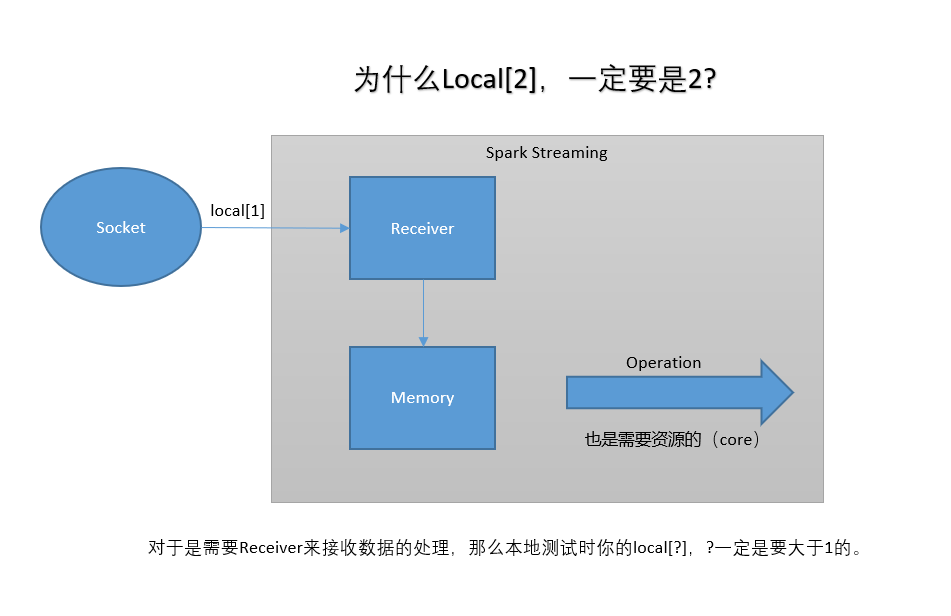
Receiver 和 Spark Core 处理都需要系统资源,所有2个是最低的数量。
Spark Streaming 处理 HDFS 文件数据
- 代码实现
/**

  * <p>

  *   使用Spark Streaming 处理文件系统(local/HDFS)的数据

  * </p>

  */

object FileWordCount {

  def main(args: Array[String]): Unit = {

    val sparkConf = new SparkConf()

      .setMaster("local")

      .setAppName("FileWordCount")

    val ssc = new StreamingContext(sparkConf, Seconds(5))

    val lines = ssc.textFileStream("D:\\tmp")

    val result = lines.flatMap(_.split(" ")).map((_, 1)).reduceByKey(_+_)

    result.print()

    ssc.start()

    ssc.awaitTermination()

  }

}
Spark Streaming会持续监控数据文件夹变化,现在不支持递归嵌套文件夹。
- 注意事项
- The files must have the same data format.(文件格式必须一样)
- The files must be create in the dataDirectory by atomically moving or renaming them into the data directory.(这个文件必须创建在数据文件夹,并且是原子性的移动或者改变名字到监控文件夹)
- Once moved, the files must not be changed. So if the files are being continuously appended, the new data will not be read.(一但移动就不可以再改变,是持久的被添加进去,新写入数据不会被处理。)
Spark Streaming核心概念与编程的更多相关文章
- Spark系列-核心概念
Spark系列-初体验(数据准备篇) Spark系列-核心概念 一. Spark核心概念 Master,也就是架构图中的Cluster Manager.Spark的Master和Workder节点分别 ...
- Spark 以及 spark streaming 核心原理及实践
收录待用,修改转载已取得腾讯云授权 作者 | 蒋专 蒋专,现CDG事业群社交与效果广告部微信广告中心业务逻辑组员工,负责广告系统后台开发,2012年上海同济大学软件学院本科毕业,曾在百度凤巢工作三年, ...
- Spark Streaming基础概念
为了更好地理解Spark Streaming 子框架的处理机制,必须得要自己弄清楚这些最基本概念. 1.离散流(Discretized Stream,DStream):这是Spark Streamin ...
- spark streaming基本概念一
在学习spark streaming时,建议先学习和掌握RDD.spark streaming无非是针对流式数据处理这个场景,在RDD基础上做了一层封装,简化流式数据处理过程. spark strea ...
- 【慕课网实战】Spark Streaming实时流处理项目实战笔记十之铭文升级版
铭文一级: 第八章:Spark Streaming进阶与案例实战 updateStateByKey算子需求:统计到目前为止累积出现的单词的个数(需要保持住以前的状态) java.lang.Illega ...
- 【慕课网实战】Spark Streaming实时流处理项目实战笔记九之铭文升级版
铭文一级: 核心概念:StreamingContext def this(sparkContext: SparkContext, batchDuration: Duration) = { this(s ...
- Spark Streaming笔记
Spark Streaming学习笔记 liunx系统的习惯创建hadoop用户在hadoop根目录(/home/hadoop)上创建如下目录app 存放所有软件的安装目录 app/tmp 存放临时文 ...
- Spark Streaming编程指南
Overview A Quick Example Basic Concepts Linking Initializing StreamingContext Discretized Streams (D ...
- 2、 Spark Streaming方式从socket中获取数据进行简单单词统计
Spark 1.5.2 Spark Streaming 学习笔记和编程练习 Overview 概述 Spark Streaming is an extension of the core Spark ...
随机推荐
- fiddler抓取APP请求
必备环境: 1.电脑上已经安装fiddler 2.手机和电脑在同一局域网 设置:Fiddler>Tools>Fiddler Options>Connections 勾选Allow r ...
- Sharepoint配置Projectserver
1 需要创建一个project server application 程序. 2 创建一个内容数据库,这个比较简单,微软文档中如下表述: 3 创建一个Project Web App 需要用命 ...
- UDF/UDAF开发总结
参考文章: https://www.cnblogs.com/itxuexiwang/p/6264547.html https://www.cnblogs.com/eRrsr/p/6096989.htm ...
- The Shapes of CSS(css的形状)
All of the below use only a single HTML element. Any kind of CSS goes, as long as it's supported in ...
- python正则二
在python中,我们可以使用re模块来使用正则表达式. 正则表达式使用\对特殊字符进行转义,因为python本身也是用\作为转义,所以在使用正则的时候会出现这样的情况,'python\\.org', ...
- Glance组件解析
1 Glance基本框架图 组件 描述 A client 任何使用Glance服务的应用. REST API 通过REST方式暴露Glance的使用接口. Database Abstraction L ...
- Ubuntu下命令行安装jdk,android-studio,及genymotion虚拟机来进行android开发
安装JDK 从oracle官网下最新版的linux64位的jdk包(现在最新为jdk-8u92-linux-x64.tar.gz) 命令如下 新建文件夹-解压 sudo mkdir /usr/lib/ ...
- Kali-linux密码在线破解
为了使用户能成功登录到目标系统,所以需要获取一个正确的密码.在Kali中,在线破解密码的工具很多,其中最常用的两款分别是Hydra和Medusa.本节将介绍使用Hydra和Medusa工具实现密码在线 ...
- Python 模块化 自定义模块 (四)
自定义模块 一个.py文件就是一个模块 创建以下三个文件: 运行test.py ,查看运行结果. #test.py print("this is test module") imp ...
- Selenium自动化测试值环境搭建
Selenium自动化测试之环境搭建 一.背景介绍 自动化测试近几年在测试领域很火,出去面试要是说不会自动化测试薪资都不好意思往高了要!很多公司做敏捷测试用到自动化,其他一些公司也是跟风,即使用不上自 ...