
动画 CABasicAnimation animationWithKeyPath 一些规定的值
CABasicAnimation animationWithKeyPath Types
When using the ‘CABasicAnimation’ from the QuartzCore Framework in Objective-C, you have to specify an animationWithKeyPath. This is a long string and is not easily listed in the CABasicAnimation, CAPropertyAnimation, or the CAAnimation class. I ended up finding a handy chart within the Core Animation Programming guide in Apple’s iPhone OS Reference Library. Hope this helps save someone time, at least it will for me.
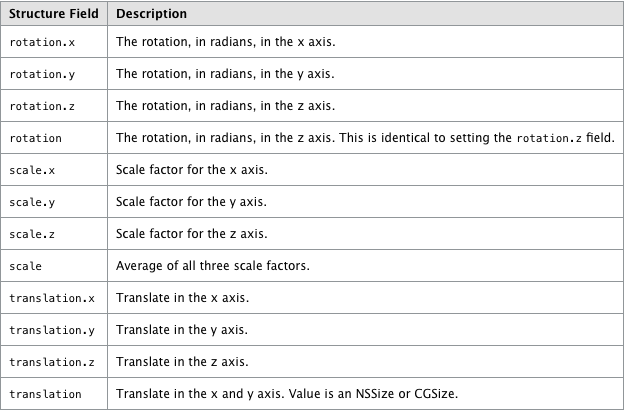

CABasicAnimation *theAnimation;
theAnimation=[CABasicAnimation animationWithKeyPath:@"transform.translation.y"];
theAnimation.delegate = self;
theAnimation.duration = 1;
theAnimation.repeatCount = 0;
theAnimation.removedOnCompletion = FALSE;
theAnimation.fillMode = kCAFillModeForwards;
theAnimation.autoreverses = NO;
theAnimation.fromValue = [NSNumber numberWithFloat:0];
theAnimation.toValue = [NSNumber numberWithFloat:-60];
[self.view.layer addAnimation:theAnimation forKey:@"animateLayer"];
我们可以通过animationWithKeyPath键值对的方式来改变动画
animationWithKeyPath的值:

transform.scale = 比例轉換
transform.scale.x = 闊的比例轉換
transform.scale.y = 高的比例轉換
transform.rotation.z = 平面圖的旋轉
opacity = 透明度

margin
zPosition

backgroundColor

cornerRadius
borderWidth

bounds
contents

contentsRect
cornerRadius
frame

hidden

mask

masksToBounds
opacity

position

shadowColor

shadowOffset

shadowOpacity
shadowRadius
[self. ui_View.layer removeAllAnimations];

    CABasicAnimation *pulse = [CABasicAnimation animationWithKeyPath:@"transform.scale"];
    pulse.timingFunction = [CAMediaTimingFunction functionWithName:kCAMediaTimingFunctionEaseOut];
    pulse.duration = 0.5 + (rand() % 10) * 0.05;
    pulse.repeatCount = 1;
    pulse.autoreverses = YES;
    pulse.fromValue = [NSNumber numberWithFloat:.8];
    pulse.toValue = [NSNumber numberWithFloat:1.2];
    [self.ui_View.layer addAnimation:pulse forKey:nil];

// bounds

CABasicAnimation *anim = [CABasicAnimation animationWithKeyPath:@"bounds"];
    anim.duration = 1.f;
    anim.fromValue = [NSValue valueWithCGRect:CGRectMake(0,0,10,10)];
    anim.toValue = [NSValue valueWithCGRect:CGRectMake(10,10,200,200)];
    anim.byValue  = [NSValue valueWithCGRect:self. ui_View.bounds];
//    anim.toValue = (id)[UIColor redColor].CGColor;
//    anim.fromValue =  (id)[UIColor blackColor].CGColor;

    anim.timingFunction = [CAMediaTimingFunction functionWithName:kCAMediaTimingFunctionEaseInEaseOut];
    anim.repeatCount = 1;
    anim.autoreverses = YES;

    [ui_View.layer addAnimation:anim forKey:nil];
//cornerRadius

    CABasicAnimation *anim2 = [CABasicAnimation animationWithKeyPath:@"cornerRadius"];
    anim2.duration = 1.f;
    anim2.fromValue = [NSNumber numberWithFloat:0.f];
    anim2.toValue = [NSNumber numberWithFloat:20.f];
    anim2.timingFunction = [CAMediaTimingFunction functionWithName:kCAMediaTimingFunctionEaseInEaseOut];
    anim2.repeatCount = CGFLOAT_MAX;
    anim2.autoreverses = YES;

    [ui_View.layer addAnimation:anim2 forKey:@"cornerRadius"];

//contents

CABasicAnimation *anim = [CABasicAnimation animationWithKeyPath:@"contents"];
    anim.duration = 1.f;
    anim.fromValue = (id)[UIImage imageNamed:@"1.jpg"].CGImage;
    anim.toValue = (id)[UIImage imageNamed:@"2.png"].CGImage;
//    anim.byValue  = (id)[UIImage imageNamed:@"3.png"].CGImage;
//    anim.toValue = (id)[UIColor redColor].CGColor;
//    anim.fromValue =  (id)[UIColor blackColor].CGColor;

    anim.timingFunction = [CAMediaTimingFunction functionWithName:kCAMediaTimingFunctionEaseInEaseOut];
    anim.repeatCount = CGFLOAT_MAX;
    anim.autoreverses = YES;

    [ui_View.layer addAnimation:anim forKey:nil];

[ui_View.layer setShadowOffset:CGSizeMake(2,2)];
    [ui_View.layer setShadowOpacity:1];
    [ui_View.layer setShadowColor:[UIColor grayColor].CGColor];
//
    CABasicAnimation *anim = [CABasicAnimation animationWithKeyPath:@"shadowColor"];
    anim.duration = 1.f;
    anim.toValue = (id)[UIColor redColor].CGColor;
    anim.fromValue =  (id)[UIColor blackColor].CGColor;

    anim.timingFunction = [CAMediaTimingFunction functionWithName:kCAMediaTimingFunctionEaseInEaseOut];
    anim.repeatCount = CGFLOAT_MAX;
    anim.autoreverses = YES;

    [ui_View.layer addAnimation:anim forKey:nil];

    CABasicAnimation *_anim = [CABasicAnimation animationWithKeyPath:@"shadowOffset"];
    _anim.duration = 1.f;
    _anim.fromValue = [NSValue valueWithCGSize:CGSizeMake(0,0)];
    _anim.toValue = [NSValue valueWithCGSize:CGSizeMake(3,3)];

    _anim.timingFunction = [CAMediaTimingFunction functionWithName:kCAMediaTimingFunctionEaseInEaseOut];
    _anim.repeatCount = CGFLOAT_MAX;
    _anim.autoreverses = YES;

    [ui_View.layer addAnimation:_anim forKey:nil];

    CABasicAnimation *_anim1 = [CABasicAnimation animationWithKeyPath:@"shadowOpacity"];
    _anim1.duration = 1.f;
    _anim1.fromValue = [NSNumber numberWithFloat:0.5];
    _anim1.toValue = [NSNumber numberWithFloat:1];

    _anim1.timingFunction = [CAMediaTimingFunction functionWithName:kCAMediaTimingFunctionEaseInEaseOut];
    _anim1.repeatCount = CGFLOAT_MAX;
    _anim1.autoreverses = YES;

    [ui_View.layer addAnimation:_anim1 forKey:nil];

    CABasicAnimation *_anim2 = [CABasicAnimation animationWithKeyPath:@"shadowRadius"];
    _anim2.duration = 1.f;
    _anim2.fromValue = [NSNumber numberWithFloat:10];
    _anim2.toValue = [NSNumber numberWithFloat:5];

    _anim2.timingFunction = [CAMediaTimingFunction functionWithName:kCAMediaTimingFunctionEaseInEaseOut];
    _anim2.repeatCount = CGFLOAT_MAX;
    _anim2.autoreverses = YES;

    [ui_View.layer addAnimation:_anim2 forKey:nil];
几个可以用来实现热门APP应用PATH中menu效果的几个方法
+(CABasicAnimation *)opacityForever_Animation:(float)time //永久闪烁的动画
{
CABasicAnimation *animation=[CABasicAnimation animationWithKeyPath:@"opacity"];
animation.fromValue=[NSNumber numberWithFloat:1.0];
animation.toValue=[NSNumber numberWithFloat:0.0];
animation.autoreverses=YES;
animation.duration=time;
animation.repeatCount=FLT_MAX;
animation.removedOnCompletion=NO;
animation.fillMode=kCAFillModeForwards;
return animation;
}
+(CABasicAnimation *)opacityTimes_Animation:(float)repeatTimes durTimes:(float)time; //有闪烁次数的动画
{
CABasicAnimation *animation=[CABasicAnimation animationWithKeyPath:@"opacity"];
animation.fromValue=[NSNumber numberWithFloat:1.0];
animation.toValue=[NSNumber numberWithFloat:0.4];
animation.repeatCount=repeatTimes;
animation.duration=time;
animation.removedOnCompletion=NO;
animation.fillMode=kCAFillModeForwards;
animation.timingFunction=[CAMediaTimingFunction functionWithName:kCAMediaTimingFunctionEaseIn];
animation.autoreverses=YES;
return animation;
}
+(CABasicAnimation *)moveX:(float)time X:(NSNumber *)x //横向移动
{
CABasicAnimation *animation=[CABasicAnimation animationWithKeyPath:@"transform.translation.x"];
animation.toValue=x;
animation.duration=time;
animation.removedOnCompletion=NO;
animation.fillMode=kCAFillModeForwards;
return animation;
}
+(CABasicAnimation *)moveY:(float)time Y:(NSNumber *)y //纵向移动
{
CABasicAnimation *animation=[CABasicAnimation animationWithKeyPath:@"transform.translation.y"];
animation.toValue=y;
animation.duration=time;
animation.removedOnCompletion=NO;
animation.fillMode=kCAFillModeForwards;
return animation;
}
+(CABasicAnimation *)scale:(NSNumber *)Multiple orgin:(NSNumber *)orginMultiple durTimes:(float)time Rep:(float)repeatTimes //缩放
{
CABasicAnimation *animation=[CABasicAnimation animationWithKeyPath:@"transform.scale"];
animation.fromValue=orginMultiple;
animation.toValue=Multiple;
animation.duration=time;
animation.autoreverses=YES;
animation.repeatCount=repeatTimes;
animation.removedOnCompletion=NO;
animation.fillMode=kCAFillModeForwards;
return animation;
}
+(CAAnimationGroup *)groupAnimation:(NSArray *)animationAry durTimes:(float)time Rep:(float)repeatTimes //组合动画
{
CAAnimationGroup *animation=[CAAnimationGroup animation];
animation.animations=animationAry;
animation.duration=time;
animation.repeatCount=repeatTimes;
animation.removedOnCompletion=NO;
animation.fillMode=kCAFillModeForwards;
return animation;
}
+(CAKeyframeAnimation *)keyframeAniamtion:(CGMutablePathRef)path durTimes:(float)time Rep:(float)repeatTimes //路径动画
{
CAKeyframeAnimation *animation=[CAKeyframeAnimation animationWithKeyPath:@"position"];
animation.path=path;
animation.removedOnCompletion=NO;
animation.fillMode=kCAFillModeForwards;
animation.timingFunction=[CAMediaTimingFunction functionWithName:kCAMediaTimingFunctionEaseIn];
animation.autoreverses=NO;
animation.duration=time;
animation.repeatCount=repeatTimes;
return animation;
}
+(CABasicAnimation *)movepoint:(CGPoint )point //点移动
{
CABasicAnimation *animation=[CABasicAnimation animationWithKeyPath:@"transform.translation"];
animation.toValue=[NSValue valueWithCGPoint:point];
animation.removedOnCompletion=NO;
animation.fillMode=kCAFillModeForwards;
return animation;
}
+(CABasicAnimation *)rotation:(float)dur degree:(float)degree direction:(int)direction repeatCount:(int)repeatCount //旋转
{
CATransform3D rotationTransform = CATransform3DMakeRotation(degree, 0, 0,direction);
CABasicAnimation* animation;
animation = [CABasicAnimation animationWithKeyPath:@"transform"];
animation.toValue= [NSValue valueWithCATransform3D:rotationTransform];
animation.duration= dur;
animation.autoreverses= NO;
animation.cumulative= YES;
animation.removedOnCompletion=NO;
animation.fillMode=kCAFillModeForwards;
animation.repeatCount= repeatCount;
animation.delegate= self;
return animation;
}
实现view放大再缩小的效果
- (void)viewDidLoad {

    [super viewDidLoad];

layer=[CALayer layer];

layer.frame=CGRectMake(50, 200, 50, 50);

layer.backgroundColor=[UIColor orangeColor].CGColor;

layer.cornerRadius=8.0f;

CABasicAnimation *animation=[CABasicAnimation animationWithKeyPath:@"transform.translation.y"];

animation.duration=4.0f;

animation.autoreverses=NO;

animation.repeatCount=1;

animation.toValue=[NSNumber numberWithInt:-10];

animation.fromValue=[NSNumber numberWithInt:200];

animation.timingFunction = [CAMediaTimingFunction functionWithName:kCAMediaTimingFunctionEaseInEaseOut];

CABasicAnimation *animationZoomIn=[CABasicAnimation animationWithKeyPath:@"transform.scale"];

animationZoomIn.duration=2.0f;

animationZoomIn.autoreverses=NO;

animationZoomIn.repeatCount=1;

animationZoomIn.toValue=[NSNumber numberWithFloat:1.56];

animationZoomIn.timingFunction=[CAMediaTimingFunction functionWithName:kCAMediaTimingFunctionEaseIn];

CABasicAnimation *animationZoomOut=[CABasicAnimation animationWithKeyPath:@"transform.scale"];

animationZoomOut.beginTime=2.0f;

animationZoomOut.duration=2.0f;

animationZoomOut.autoreverses=NO;

animationZoomOut.repeatCount=1;

animationZoomOut.toValue=[NSNumber numberWithFloat:.01];

animationZoomOut.timingFunction=[CAMediaTimingFunction functionWithName:kCAMediaTimingFunctionEaseOut];

CAAnimationGroup *group=[CAAnimationGroup animation];

group.duration=4.0f;

group.animations=[NSArray arrayWithObjects: animation, animationZoomIn, animationZoomOut,nil];

group.removedOnCompletion=NO;

group.fillMode=kCAFillModeForwards;

[layer addAnimation:group forKey:nil];

[self.view.layer addSublayer:layer];

//layer.hidden=YES;

}
动画 CABasicAnimation animationWithKeyPath 一些规定的值的更多相关文章
- CABasicAnimation animationWithKeyPath 一些规定的值
CABasicAnimation animationWithKeyPath Types When using the ‘CABasicAnimation’ from the QuartzCore Fr ...
- CABasicAnimation animationWithKeyPath Types
转自:http://www.cnblogs.com/pengyingh/articles/2379631.html CABasicAnimation animationWithKeyPath 一些规定 ...
- 核心动画基础动画(CABasicAnimation)关键帧动画
1.在iOS中核心动画分为几类: 基础动画(CABasicAnimation) 关键帧动画(CAKeyframeAnimation) 动画组(CAAnimationGroup) 转场动画(CATran ...
- 基本动画CABasicAnimation - 完成之后闪回初始状态
基本动画CABasicAnimation 结束之后,默认闪回初始状态,那怎么解决呢? position需要设备两个属性: // MARK: - 结束后不要闪回去 anim.removedOnCompl ...
- iOS:核心动画之基本动画CABasicAnimation
基本动画,是CAPropertyAnimation的子类 属性说明: fromValue:keyPath相应属性的初始值 toValue:keyPath相应属性的结束值 动画过程说明: 随着动画的进行 ...
- OC动画CABasicAnimation
//1.创建动画 CABasicAnimation *anima=[CABasicAnimation animationWithKeyPath:@"bounds"]; //1.1设 ...
- CoreAnimation 核心动画 / CABasicAnimation/ CAKeyframeAnimation
- (void)createBaseAnimation{ //基础动画 CABasicAnimation *animation = [CABasicAnimation animation]; anim ...
- 过渡与动画 - steps调速函数&CSS值与单位之ch
写在前面 上一篇中我们熟悉五种内置的缓动曲线和(三次)贝塞尔曲线,并且基于此完成了缓动效果. 但是如果我们想要实现逐帧动画,基于贝塞尔曲线的调速函数就显得有些无能为力了,因为我们并不需要帧与帧之间的过 ...
- CSS总结六:动画(一)ransition:过渡、animation:动画、贝塞尔曲线、step值的应用
transition-property transition-duration transition-timing-function transition-delay animation-name a ...
随机推荐
- iOS学习12之OC属性和点语法
1.属性(@property和@Synthesize) 1> 属性是 Objective-C 2.0 定义的语法,提供 setter 和 getter 方法的默认实现.在一定程度上简化代码,并且 ...
- soapui中文操作手册(五)----入门与安全测试
在SoapUI4.0引入的安全测试特点使它非常容易为你来验证你的目标服务的功能性安全,就可以评估您的系统常见的安全攻击的漏洞.特别是如果系统是公开可用的,即使不是这种情况,确保了完全安全的环境也是非常 ...
- lua 获取文件名和扩展名
local str = "aaa.bbb.bbb.txt" --获取文件名 function getFileName(str) local idx = str:match(&quo ...
- 2076. The Drunk Jailer
Problem A certain prison contains a long hall of n cells, each right next to each other. Each cell h ...
- UVA 10780 - Again Prime? No Time.
题目链接 思路好想,注意细节.错了很多次. #include <cstdio> #include <cstring> #include <string> #incl ...
- iOS 让启动页面延迟的方法
<1> 利用多线程的方法:[NSThread sleepForTimeInterval:300];
- C语言工具---Code::Blocks
Code::Blocks Code::Blocks 是一个开源的全功能的跨平台C/C++集成开发环境. Code::Blocks是开放源码软件.由纯粹的C++语言开发完成,它使用了著名的图形界面库wx ...
- [译]FastClick: native-like tapping for touch apps
原文地址:http://labs.ft.com/2011/08/fastclick-native-like-tapping-for-touch-apps/ 这篇文章是一篇老文了,现在才看到,真是落后啊 ...
- spring security为不同用户显示各自的登录成功页面
一个常见的需求是,普通用户登录之后显示普通用户的工作台,管理员登陆之后显示后台管理页面.这个功能可以使用taglib解决. 其实只要在登录成功后的jsp页面中使用taglib判断当前用户拥有的权限进行 ...
- 将文件系统数据库迁移到ASM中
使用裸设备配置ASM实例 http://www.cnblogs.com/myrunning/p/4270849.html 1.查看我们创建的磁盘组 [oracle@std ~]$ export ORA ...