
大数据学习——flume拦截器
flume 拦截器(interceptor)
1、flume拦截器介绍
拦截器是简单的插件式组件,设置在source和channel之间。source接收到的事件event,在写入channel之前,拦截器都可以进行转换或者删除这些事件。每个拦截器只处理同一个source接收到的事件。可以自定义拦截器。
2、flume内置的拦截器
2.1 时间戳拦截器
flume中一个最经常使用的拦截器 ,该拦截器的作用是将时间戳插入到flume的事件报头中。如果不使用任何拦截器,flume接受到的只有message。时间戳拦截器的配置:
|
参数 |
默认值 |
描述 |
|
type |
timestamp |
类型名称timestamp,也可以使用类名的全路径org.apache.flume.interceptor.TimestampInterceptor$Builder |
|
preserveExisting |
false |
如果设置为true,若事件中报头已经存在,不会替换时间戳报头的值 |
参数 默认值 描述
type timestamp 类型名称timestamp,也可以使用类名的全路径org.apache.flume.interceptor.TimestampInterceptor$Builder
preserveExisting false 如果设置为true,若事件中报头已经存在,不会替换时间戳报头的值
source连接到时间戳拦截器的配置:
a1.sources.r1.interceptors=i1
a1.sources.r1.interceptors.i1.type=timestamp a1.sources.r1.interceptors.i1.preserveExisting=false
|
a1.sources.r1.interceptors=i1 a1.sources.r1.interceptors.i1.type=timestamp a1.sources.r1.interceptors.i1.preserveExisting=false |
2.2 主机拦截器
主机拦截器插入服务器的ip地址或者主机名,agent将这些内容插入到事件的报头中。事件报头中的key使用hostHeader配置,默认是host。主机拦截器的配置:
参数 默认值 描述
type host 类型名称host,也可以使用类名的全路径org.apache.flume.interceptor.HostInterceptor$Builder
hostHeader host 事件头的key
useIP true 如果设置为false,host键插入主机名
preserveExisting false 如果设置为true,若事件中报头已经存在,不会替换时间戳报头的值
|
参数 |
默认值 |
描述 |
|
type |
host |
类型名称host,也可以使用类名的全路径org.apache.flume.interceptor.HostInterceptor$Builder |
|
hostHeader |
host |
事件头的key |
|
useIP |
true |
如果设置为false,host键插入主机名 |
|
preserveExisting |
false |
如果设置为true,若事件中报头已经存在,不会替换时间戳报头的值 |
source连接到主机拦截器的配置:
a1.sources.r1.interceptors=i2
a1.sources.r1.interceptors.i2.type=host
a1.sources.r1.interceptors.i2.useIP=false
a1.sources.r1.interceptors.i2.preserveExisting=false
|
a1.sources.r1.interceptors=i2 a1.sources.r1.interceptors.i2.type=host a1.sources.r1.interceptors.i2.useIP=false a1.sources.r1.interceptors.i2.preserveExisting=false |
2.3 静态拦截器
静态拦截器的作用是将k/v插入到事件的报头中。配置如下
|
参数 |
默认值 |
描述 |
|
type |
static |
类型名称static,也可以使用类全路径名称org.apache.flume.interceptor.StaticInterceptor$Builder |
|
key |
key |
事件头的key |
|
value |
value |
key对应的value值 |
|
preserveExisting |
true |
如果设置为true,若事件中报头已经存在该key,不会替换value的值 |
参数 默认值 描述
type static 类型名称static,也可以使用类全路径名称org.apache.flume.interceptor.StaticInterceptor$Builder
key key 事件头的key
value value key对应的value值
preserveExisting true 如果设置为true,若事件中报头已经存在该key,不会替换value的值
source连接到静态拦截器的配置:
a1.sources.r1.interceptors= i3
a1.sources.r1.interceptors.static.type=static a1.sources.r1.interceptors.static.key=logs a1.sources.r1.interceptors.static.value=logFlume a1.sources.r1.interceptors.static.preserveExisting=false
a1.sources.r1.interceptors= i3
a1.sources.r1.interceptors.static.type=static a1.sources.r1.interceptors.static.key=logs a1.sources.r1.interceptors.static.value=logFlume a1.sources.r1.interceptors.static.preserveExisting=false
2.4 正则过滤拦截器
在日志采集的时候,可能有一些数据是我们不需要的,这样添加过滤拦截器,可以过滤掉不需要的日志,也可以根据需要收集满足正则条件的日志。配置如下
|
参数 |
默认值 |
描述 |
|
type |
REGEX_FILTER |
类型名称REGEX_FILTER,也可以使用类全路径名称org.apache.flume.interceptor.RegexFilteringInterceptor$Builder |
|
regex |
.* |
匹配除“\n”之外的任何个字符 |
|
excludeEvents |
false |
默认收集匹配到的事件。如果为true,则会删除匹配到的event,收集未匹配到的 |
参数 默认值 描述
type REGEX_FILTER 类型名称REGEX_FILTER,也可以使用类全路径名称org.apache.flume.interceptor.RegexFilteringInterceptor$Builder
regex .* 匹配除“\n”之外的任何个字符
excludeEvents false 默认收集匹配到的事件。如果为true,则会删除匹配到的event,收集未匹配到的
source连接到正则过滤拦截器的配置:
|
a1.sources.r1.interceptors=i4 a1.sources.r1.interceptors.i4.type=REGEX_FILTER a1.sources.r1.interceptors.i4.regex=(rm)|(kill) a1.sources.r1.interceptors.i4.excludeEvents=false |
这样配置的拦截器就只会接收日志消息中带有rm 或者kill的日志。
测试案例:
test_regex.conf
|
# 定义这个agent中各组件的名字 a1.sources = r1 a1.sinks = k1 a1.channels = c1 # 描述和配置source组件:r1 a1.sources.r1.type = netcat a1.sources.r1.bind = itcast01 a1.sources.r1.port = 44444 a1.sources.r1. a1.sources.r1.interceptors=i4 a1.sources.r1.interceptors.i4.type=REGEX_FILTER #保留内容中出现hadoop或者是spark的字符串的记录 a1.sources.r1.interceptors.i4.regex=(hadoop)|(spark) a1.sources.r1.interceptors.i4.excludeEvents=false # 描述和配置sink组件:k1 a1.sinks.k1.type = logger # 描述和配置channel组件,此处使用是内存缓存的方式 a1.channels.c1.type = memory a1.channels.c1.capacity = 1000 a1.channels.c1.transactionCapacity = 100 # 描述和配置source channel sink之间的连接关系 a1.sources.r1.channels = c1 a1.sinks.k1.channel = c1 |
发送数据测试:
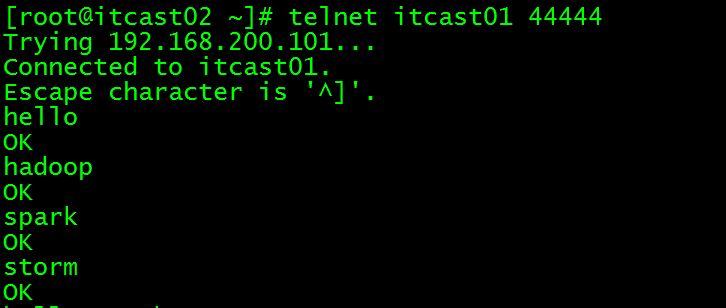
打印到控制台信息:

只接受到存在hadoop或者spark的记录,验证成功!
自定义拦截器
1. 背景介绍
Flume是Cloudera提供的一个高可用的,高可靠的,分布式的海量日志采集、聚合和传输的系统,Flume支持在日志系统中定制各类数据发送方,用于收集数据;同时,Flume提供对数据进行简单处理,并写到各种数据接受方(可定制)的能力。Flume有各种自带的拦截器,比如:TimestampInterceptor、HostInterceptor、RegexExtractorInterceptor等,通过使用不同的拦截器,实现不同的功能。但是以上的这些拦截器,不能改变原有日志数据的内容或者对日志信息添加一定的处理逻辑,当一条日志信息有几十个甚至上百个字段的时候,在传统的Flume处理下,收集到的日志还是会有对应这么多的字段,也不能对你想要的字段进行对应的处理。
2. 自定义拦截器
根据实际业务的需求,为了更好的满足数据在应用层的处理,通过自定义Flume拦截器,过滤掉不需要的字段,并对指定字段加密处理,将源数据进行预处理。减少了数据的传输量,降低了存储的开销。
3. 实现
本技术方案核心包括二部分:
① 编写java代码,自定义拦截器;
内容包括:
1. 定义一个类CustomParameterInterceptor实现Interceptor接口。
2. 在CustomParameterInterceptor类中定义变量,这些变量是需要到 Flume的配置文件中进行配置使用的。每一行字段间的分隔符(fields_separator)、通过分隔符分隔后,所需要列字段的下标(indexs)、多个下标使用的分隔符(indexs_separator)、多个下标使用的分隔符(indexs_separator)。
3. 添加CustomParameterInterceptor的有参构造方法。并对相应的变量进行处理。将配置文件中传过来的unicode编码进行转换为字符串。
4. 写具体的要处理的逻辑intercept()方法,一个是单个处理的,一个是批量处理。
5. 接口中定义了一个内部接口Builder,在configure方法中,进行一些参数配置。并给出,在flume的conf中没配置一些参数时,给出其默认值。通过其builder方法,返回一个CustomParameterInterceptor对象。
6. 定义一个静态类,类中封装MD5加密方法
7. 通过以上步骤,自定义拦截器的代码开发已完成,然后打包成jar, 放到Flume的根目录下的lib中

② 修改Flume的配置信息
新增配置文件spool-interceptor-hdfs.conf,内容为:
a1.channels = c1
a1.sources = r1
a1.sinks = s1
#channel
a1.channels.c1.type = memory
a1.channels.c1.capacity=100000
a1.channels.c1.transactionCapacity=50000
#source
a1.sources.r1.channels = c1
a1.sources.r1.type = spooldir
a1.sources.r1.spoolDir = /root/data/
a1.sources.r1.batchSize= 50
a1.sources.r1.inputCharset = UTF-8
a1.sources.r1.interceptors =i1 i2
a1.sources.r1.interceptors.i1.type =cn.itcast.interceptor.CustomParameterInterceptor$Builder
a1.sources.r1.interceptors.i1.fields_separator=\\u0009
a1.sources.r1.interceptors.i1.indexs =0,1,3,5,6
a1.sources.r1.interceptors.i1.indexs_separator =\\u002c
a1.sources.r1.interceptors.i1.encrypted_field_index =0
a1.sources.r1.interceptors.i2.type = timestamp
#sink
a1.sinks.s1.channel = c1
a1.sinks.s1.type = hdfs
a1.sinks.s1.hdfs.path =hdfs://192.168.200.101:9000/flume/%Y%m%d
a1.sinks.s1.hdfs.filePrefix = event
a1.sinks.s1.hdfs.fileSuffix = .log
a1.sinks.s1.hdfs.rollSize = 10485760
a1.sinks.s1.hdfs.rollInterval =20
a1.sinks.s1.hdfs.rollCount = 0
a1.sinks.s1.hdfs.batchSize = 1500
a1.sinks.s1.hdfs.round = true
a1.sinks.s1.hdfs.roundUnit = minute
a1.sinks.s1.hdfs.threadsPoolSize = 25
a1.sinks.s1.hdfs.useLocalTimeStamp = true
a1.sinks.s1.hdfs.minBlockReplicas = 1
a1.sinks.s1.hdfs.fileType =DataStream
a1.sinks.s1.hdfs.writeFormat = Text
a1.sinks.s1.hdfs.callTimeout = 60000
a1.sinks.s1.hdfs.idleTimeout =60
启动:
bin/flume-ng agent -c conf -f conf/spool-interceptor-hdfs.conf -name a1 -Dflume.root.logger=DEBUG,console
5. 项目实现截图:

图一 原始文件内容

图二 HDFS上产生收集到的处理数据
大数据学习——flume拦截器的更多相关文章
- 大数据学习——flume日志分类采集汇总
1. 案例场景 A.B两台日志服务机器实时生产日志主要类型为access.log.nginx.log.web.log 现在要求: 把A.B 机器中的access.log.nginx.log.web.l ...
- 大数据学习——flume安装部署
1.Flume的安装非常简单,只需要解压即可,当然,前提是已有hadoop环境 上传安装包到数据源所在节点上 然后解压 tar -zxvf apache-flume-1.6.0-bin.tar.gz ...
- 大数据学习之Linux进阶02
大数据学习之Linux进阶 1-> 配置IP 1)修改配置文件 vi /sysconfig/network-scripts/ifcfg-eno16777736 2)注释掉dhcp #BOOTPR ...
- 大数据学习之Hadoop快速入门
1.Hadoop生态概况 Hadoop是一个由Apache基金会所开发的分布式系统集成架构,用户可以在不了解分布式底层细节情况下,开发分布式程序,充分利用集群的威力来进行高速运算与存储,具有可靠.高效 ...
- 大数据学习路线,来qun里分享干货,
一.Linux lucene: 全文检索引擎的架构 solr: 基于lucene的全文搜索服务器,实现了可配置.可扩展并对查询性能进行了优化,并且提供了一个完善的功能管理界面. 推荐一个大数据学习群 ...
- Flume 拦截器(interceptor)详解
flume 拦截器(interceptor)1.flume拦截器介绍拦截器是简单的插件式组件,设置在source和channel之间.source接收到的事件event,在写入channel之前,拦截 ...
- 大数据学习:storm流式计算
Storm是一个分布式的.高容错的实时计算系统.Storm适用的场景: 1.Storm可以用来用来处理源源不断的消息,并将处理之后的结果保存到持久化介质中. 2.由于Storm的处理组件都是分布式的, ...
- 大数据学习系列之—HBASE
hadoop生态系统 zookeeper负责协调 hbase必须依赖zookeeper flume 日志工具 sqoop 负责 hdfs dbms 数据转换 数据到关系型数据库转换 大数据学习群119 ...
- 大数据学习笔记——Linux完整部署篇(实操部分)
Linux环境搭建完整操作流程(包含mysql的安装步骤) 从现在开始,就正式进入到大数据学习的前置工作了,即Linux的学习以及安装,作为运行大数据框架的基础环境,Linux操作系统的重要性自然不言 ...
随机推荐
- 洛谷 P3375 【模板】KMP字符串匹配 || HDU 1686 Oulipo || kmp
HDU-1686 P3375 kmp介绍: http://www.matrix67.com/blog/archives/115 http://www.cnblogs.com/SYCstudio/p/7 ...
- SpringCloud开发学习总结(七)—— 声明式服务调用Feign(三)
Feign中的Ribbon配置 由于Spring Cloud Feign的客户端负载均衡是通过Spring Cloud Ribbon实现的,所以我们可以直接通过配置Ribbon客户端的方式来自定义各个 ...
- 通过表单展示不一样的页面(input对象)
表单中包含不一样的样式,不同功能的提交数据的方式.在许多页面中,浏览者不经意间已经不断在使用表单的功能,如留言,设置自己的密码或者是复选框,下拉列表等. input对象下的多种表单表现形式: 通常在页 ...
- MySQLDump在使用之前一定要想到的事情 [转载]
转载于:http://blog.itpub.net/29254281/viewspace-1392757/ MySQLDump经常用于迁移数据和备份. 下面创建实验数据,两个数据库和若干表create ...
- solr的多条件组合查询和solr的范围查询【转】
solr的多条件组合查询和solr的范围查询 版权声明:本文为博主原创文章,供大家参考,但不要抄袭哦! 存在问题:为了减轻数据库的访问压力,往往我们将必要的数据存储到solr中,并给部分字段建立索引, ...
- 高阶组件(Higher-Order Components)
有时候人们很喜欢造一些名字很吓人的名词,让人一听这个名词就觉得自己不可能学会,从而让人望而却步.但是其实这些名词背后所代表的东西其实很简单. 我不能说高阶组件就是这么一个东西.但是它是一个概念上很简单 ...
- 访问github.com太慢的解决方法
修改 c:\windows\system32\drivers\etc\host文件添加 192.30.255.112 github.com 151.101.72.249 github.global.s ...
- Java基础50题test3—水仙花数
水仙花数 题目:打印出所有的"水仙花数",所谓"水仙花数"是指一个三位数,其各位数字立方和等于该数本身.例 如:153 是一个"水仙花数", ...
- 【转】Android中实现IPC的几种方式详细分析及比较
1.使用Bundle ----> 用于android四大组件间的进程间通信android的四大组件都可使用Bundle传递数据 所以如果要实现四大组件间的进程间通信 完全可以使用Bundl ...
- ES6学习笔记(3)----字符串的扩展
参考书<ECMAScript 6入门>http://es6.ruanyifeng.com/ 字符串的扩展ES6之前只能识别\u0000 - \uFFFF 之间的字符,超过此范围,识别会出错 ...