
springboot使用rabbitmq-Topic模式,亲自实测能用!!!
0.项目目录截图
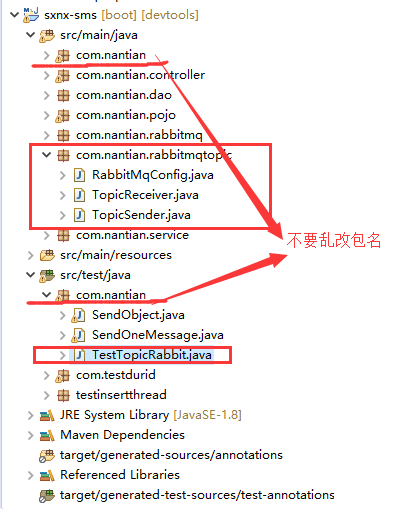
=====================================================================
springboot的版本:
<groupId>org.springframework.boot</groupId>
<artifactId>spring-boot-starter-parent</artifactId>
<version>2.2.0.RELEASE</version>
<relativePath /> <!-- lookup parent from repository -->
==========================================================================================================================================
引入jar包:
<!-- springboot整合rabbitMQ -->
<dependency>
<groupId>org.springframework.boot</groupId>
<artifactId>spring-boot-starter-amqp</artifactId>
</dependency>
========================================================================================================================
使用junit5做测试.
========================================================================================================================
1.application.yml配置文件
#SpringBoot整合RabbitMQ
rabbitmq:
host: localhost
port: 5672
username: guest
password: guest
#connection-timeout: 15000
2.RabbitMqConfig.java
package com.nantian.rabbitmqtopic;
import org.springframework.amqp.core.Binding;
import org.springframework.amqp.core.BindingBuilder;
import org.springframework.amqp.core.Queue;
import org.springframework.amqp.core.TopicExchange;
import org.springframework.beans.factory.annotation.Qualifier;
import org.springframework.context.annotation.Bean;
import org.springframework.context.annotation.Configuration;
/**
* Created by Administrator on 2018/4/10.
* 1. yaml
* 2. RabbitMqConfig
* a 创建queue
* b. 创建交换机TopicExchange
* c. 根据绑定规则将队列绑定到相应的交换机上
* 3. sender
* 4. test
* 5. receiver
*/
@Configuration
public class RabbitMqConfig {
// a 创建queue
@Bean(name = "message") // 指定该参数名是message 见下面Qualifier("message")
public Queue queueMessage(){
return new Queue("topic.message"); // topic.message 是rounting-key,匹配规则
}
@Bean(name = "messages")
public Queue queueMessages(){
return new Queue("topic.messages");
}
// b. 创建交换机TopicExchange
@Bean
public TopicExchange exchange(){
return new TopicExchange("topicExchange");
}
/*
c. 根据绑定规则将队列绑定到相应的交换机上(bindingKey)--Exchange Queues
*/
@Bean
public Binding bindingExchangeMessage(@Qualifier("message") Queue queueMessage,TopicExchange exchange){
return BindingBuilder.bind(queueMessage).to(exchange).with("topic.message");
}
@Bean
/**
* 将队列"messages" 绑定到交换机上,绑定规则是 topic.messages
*
*/
public Binding bindingExchangeMessages(@Qualifier("messages")Queue queueMessages,TopicExchange exchange){
return BindingBuilder.bind(queueMessages).to(exchange).with("topic.#");
}
}
3.发送者:TopicSender.java
package com.nantian.rabbitmqtopic;
import org.springframework.amqp.core.AmqpTemplate;
import org.springframework.beans.factory.annotation.Autowired;
import org.springframework.stereotype.Component;
/**
* Created by Administrator on 2018/4/10.
*/
@Component
public class TopicSender {
@Autowired
private AmqpTemplate amqpTemplate;
/**
* 交换机 rountingkey 发送的内容 发送消息到相应的Exchange
* 向名称为 topicExchange 的交换机 发送满足routingkey规则为 "topic.messages " 的内容为 "我是发送消息的内容" 的消息
*/
public void sendMessage(){
this.amqpTemplate.convertAndSend("topicExchange","topic.messages","我是发送消息的内容! ");
}
/**
* 消息一
*/
public void send1() {
String context = "hi, i am message 1";
System.out.println("Sender : " + context);
this.amqpTemplate.convertAndSend("topicExchange", "topic.message", context);
}
/**
* 消息2
*/
public void send2() {
String context = "hi, i am messages 2";
System.out.println("Sender : " + context);
this.amqpTemplate.convertAndSend("topicExchange", "topic.messages", context);
}
}
4.接受者:TopicReceiver.java
package com.nantian.rabbitmqtopic;
import org.springframework.amqp.rabbit.annotation.RabbitListener;
import org.springframework.stereotype.Component;
/**
* Created by Administrator on 2018/4/10.
*/
@Component
public class TopicReceiver {
@RabbitListener(queues ="topic.message" )
public void receiveMessage1(String str){
System.out.println("赵云1:我是监听topic.message的,仅满足topic.message的过来 , "+str);
}
@RabbitListener(queues ="topic.messages" )
public void receiveMessage2(String str){
System.out.println("关羽2:我是监听topic.# 的,满足 topic.# 的都过来 , "+str);
}
}
5.测试类:TestTopicRabbitMq.java
package com.nantian;
import org.junit.Test;
import org.junit.runner.RunWith;
import org.springframework.beans.factory.annotation.Autowired;
import org.springframework.boot.test.context.SpringBootTest;
import org.springframework.test.context.junit4.SpringRunner;
import com.nantian.rabbitmqtopic.TopicSender;
@RunWith(SpringRunner.class)
@SpringBootTest
public class TestTopicRabbit {
@Autowired
private TopicSender topicSender;
@Test
public void contextLoads() {
topicSender.sendMessage();
}
/**
* 测试消息一
*/
@Test
public void send1() {
topicSender.send1();
}
/**
* 测试消息二
*/
@Test
public void send2() {
topicSender.send2();
}
}
springboot使用rabbitmq-Topic模式,亲自实测能用!!!的更多相关文章
- 干货!基于SpringBoot的RabbitMQ多种模式队列实战
目录 环境准备 安装RabbitMQ 依赖 连接配置 五种队列模式实现 1 点对点的队列 2 工作队列模式Work Queue 3 路由模式Routing 4 发布/订阅模式Publish/Subsc ...
- SpringBoot之RabbitMQ的使用
一 .RabbitMQ的介绍 RabbitMQ是消息中间件的一种,消息中间件即分布式系统中完成消息的发送和接收的基础软件,消息中间件的工作过程可以用生产者消费者模型来表示.即,生产者不断的向消息队列发 ...
- springboot学习笔记-6 springboot整合RabbitMQ
一 RabbitMQ的介绍 RabbitMQ是消息中间件的一种,消息中间件即分布式系统中完成消息的发送和接收的基础软件.这些软件有很多,包括ActiveMQ(apache公司的),RocketMQ(阿 ...
- SpringBoot整合RabbitMQ实现六种工作模式
RabbitMQ主要有六种种工作模式,本文整合SpringBoot分别介绍工作模式的实现. 前提概念 生产者 消息生产者或者发送者,使用P表示: 队列 消息从生产端发送到消费端,一定要通过队列转发,使 ...
- RabbitMQ入门-Topic模式
上篇<RabbitMQ入门-Routing直连模式>我们介绍了可以定向发送消息,并可以根据自定义规则派发消息.看起来,这个Routing模式已经算灵活的了,但是,这还不够,我们还有更加多样 ...
- spring boot整合RabbitMQ(Topic模式)
1.Topic交换器介绍 Topic Exchange 转发消息主要是根据通配符. 在这种交换机下,队列和交换机的绑定会定义一种路由模式,那么,通配符就要在这种路由模式和路由键之间匹配后交换机才能转发 ...
- demo rabbitmq topic(主题模式),fanout(广播模式),轮询分发,确认接收Ack处理
//durable = true 代表持久化 交换机和队列都要为true ,持久代表服务重启,没有处理的消息依然存在 //topic 根据不同的routkey 发送和接收信息 //fanout 广播模 ...
- RabbitMQ广播:topic模式
topic模式跟direct差不多,只是把type改一下就行. direct是把固定的routing_key跟queue绑定,topic是把模糊的routing_key跟queue绑定 原理图: 发布 ...
- SpringBoot集成RabbitMQ
官方说明:http://www.rabbitmq.com/getstarted.html 什么是MQ? MQ全称为Message Queue, 消息队列(MQ)是一种应用程序对应用程序的通信方法.MQ ...
随机推荐
- js 中加减乘除 比较精确的算法,js本身有些运算会出错,这里给出较精确的算法
问题这样的: 37.5*5.5=206.08 (JS算出来是这样的一个结果,我四舍五入取两位小数) 我先怀疑是四舍五入的问题,就直接用JS算了一个结果为:206.08499999999998 怎么会 ...
- mybatis与Spring集成(Aop整合PagerAspect插件)
目的: Mybatis与spring集成 Aop整合pagehelper插件 Mybatis与spring集成 导入pom依赖 <?xml version="1.0" enc ...
- slot 组件的内部传值 v-slot 的使用
嵌套组件传值 person.vue <template> <div class="vslot-test"> <ul> <li v-for= ...
- 如何加入 Skype for Business 会议?
参加一个线上培训,收到了Skype的参会地址,是这个样子的 然后就是一脸懵逼的不知道怎么参加会议了.找了半天终于在同事的帮助下参加成功. 我的参加方法:在Window上用Skype for Busin ...
- MyBatis 常用词汇含义
JDBC:java Data Base Connection(Java与数据库连接): ORM:Object Relational Mapping(对象关系映射,简称ORM,或者O/RM,或者O/M ...
- 我们为什么要通过python来入IT这一行
我们为什么要通过python来入IT这一行 导语 这个问题,其实大部分在选择转行做IT,或者在行业内处于边缘化的非技术人员都会有这样的疑惑.毕竟,掌握一门技能,是需要花成本的.决策之前,做个前景判 ...
- 常见的CSS样式
常见的css样式 color 文字颜色 background-color 背景颜色 opacity 设置透明度 颜色: 光的三原色: 红 绿 蓝 三种颜色表示法: 名词表示法: red green b ...
- 用ajax和PHP实现简单的流程管理
首先要先有一个新建流程的页面xinjian.php <!DOCTYPE html PUBLIC "-//W3C//DTD XHTML 1.0 Transitional//EN" ...
- Python 简单web服务器的实现
import re import socket def service_cilent(new_socket): request = new_socket.recv(1024).decode(" ...
- 七年开发经验详解JVM的GC 算法
概述 GC 是 JVM 自带的功能,它能够自动回收对象,清理内存,这是 Java 语言的一大优势,但是GC绝不仅伴随着Java,相反,GC历史比Java更悠久.关于GC,我认为有四个问题需要解决: 为 ...