
0.9.0.RELEASE版本的spring cloud alibaba nacos实例
简而言之,nacos与eureka的不同之处有三:后台老板、部署方式、功能。nacos是阿里的,eureka是奈飞的;nacos有自己的安装包,需要独立部署,eureka仅作为一个服务组件,引入jar包即可;nacos=eureka+config,它既是注册中心,也是配置中心。
如何使用nacos?先下载安装包(下载地址https://github.com/alibaba/nacos/releases),打开下载页 -> 点击目前最新版本1.1.3跳到下载页 -> 点击压缩包 -> 下载到本地(E盘download目录)后解压 -> 通过命令行启动nacos:
C:\Users\wulf>e:

E:\>cd download\nacos\bin

E:\download\nacos\bin>startup.cmd -m standalone

         ,--.

       ,--.'|

   ,--,:  : |                                           Nacos 1.1.

,`--.'`|  ' :                       ,---.               Running in stand alone mode, All function modules

|   :  :  | |                      '   ,'\   .--.--.    Port:

:   |   \ | :  ,--.--.     ,---.  /   /   | /  /    '   Pid: 32916

|   : '  '; | /       \   /     \.   ; ,. :|  :  /`./   Console: http://10.10.100.110:8848/nacos/index.html

'   ' ;.    ;.--.  .-. | /    / ''   | |: :|  :  ;_

|   | | \   | \__\/: . ..    ' / '   | .; : \  \    `.      https://nacos.io

'   : |  ; .' ," .--.; |'   ; :__|   :    |  `----.   \

|   | '`--'  /  /  ,.  |'   | '.'|\   \  /  /  /`--'  /

'   : |     ;  :   .'   \   :    : `----'  '--'.     /

;   |.'     |  ,     .-./\   \  /            `--'---'

'---'        `--`---'     `----'

-- ::, INFO Bean 'org.springframework.security.config.annotation.configuration.ObjectPostProcessorConfiguration' of type [org.springframework.security.config.annotation.configuration.ObjectPostProcessorConfiguration$$EnhancerBySpringCGLIB$$209b3f7a] is not eligible for getting processed by all BeanPostProcessors (for example: not eligible for auto-proxying)

-- ::, INFO Bean 'objectPostProcessor' of type [org.springframework.security.config.annotation.configuration.AutowireBeanFactoryObjectPostProcessor] is not eligible for getting processed by all BeanPostProcessors (for example: not eligible for auto-proxying)

-- ::, INFO Bean 'org.springframework.security.access.expression.method.DefaultMethodSecurityExpressionHandler@6e9175d8' of type [org.springframework.security.access.expression.method.DefaultMethodSecurityExpressionHandler] is not eligible for getting processed by all BeanPostProcessors (for example: not eligible for auto-proxying)

-- ::, INFO Bean 'org.springframework.security.config.annotation.method.configuration.GlobalMethodSecurityConfiguration' of type [org.springframework.security.config.annotation.method.configuration.GlobalMethodSecurityConfiguration$$EnhancerBySpringCGLIB$$456fe22c] is not eligible for getting processed by all BeanPostProcessors (for example: not eligible for auto-proxying)

-- ::, INFO Bean 'methodSecurityMetadataSource' of type [org.springframework.security.access.method.DelegatingMethodSecurityMetadataSource] is not eligible for getting processed by all BeanPostProcessors (for example: not eligible for auto-proxying)

-- ::, INFO Tomcat initialized with port(s):  (http)

-- ::, INFO Root WebApplicationContext: initialization completed in  ms

-- ::, INFO Initializing ExecutorService 'applicationTaskExecutor'

-- ::, INFO Adding welcome page: class path resource [static/index.html]

-- ::, INFO Creating filter chain: Ant [pattern='/'], []

-- ::, INFO Creating filter chain: Ant [pattern='/**/*.css'], []

-- ::, INFO Creating filter chain: Ant [pattern='/**/*.js'], []

-- ::, INFO Creating filter chain: Ant [pattern='/**/*.html'], []

-- ::, INFO Creating filter chain: Ant [pattern='/**/*.map'], []

-- ::, INFO Creating filter chain: Ant [pattern='/**/*.svg'], []

-- ::, INFO Creating filter chain: Ant [pattern='/**/*.png'], []

-- ::, INFO Creating filter chain: Ant [pattern='/**/*.ico'], []

-- ::, INFO Creating filter chain: Ant [pattern='/console-fe/public/**'], []

-- ::, INFO Creating filter chain: Ant [pattern='/v1/auth/login'], []

-- ::, INFO Creating filter chain: Ant [pattern='/v1/console/health/**'], []

-- ::, INFO Creating filter chain: Ant [pattern='/v1/cs/**'], []

-- ::, INFO Creating filter chain: Ant [pattern='/v1/ns/**'], []

-- ::, INFO Creating filter chain: Ant [pattern='/v1/cmdb/**'], []

-- ::, INFO Creating filter chain: Ant [pattern='/actuator/**'], []

-- ::, INFO Creating filter chain: Ant [pattern='/v1/console/server/**'], []

-- ::, INFO Creating filter chain: any request, [org.springframework.security.web.context.request.async.WebAsyncManagerIntegrationFilter@6c8bca63, org.springframework.security.web.context.SecurityContextPersistenceFilter@6d24ffa1, org.springframework.security.web.header.HeaderWriterFilter@74cadd41, org.springframework.security.web.authentication.logout.LogoutFilter@42a9e5d1, com.alibaba.nacos.console.filter.JwtAuthenticationTokenFilter@2364305a, org.springframework.security.web.savedrequest.RequestCacheAwareFilter@773f7880, org.springframework.security.web.servletapi.SecurityContextHolderAwareRequestFilter@4c51bb7, org.springframework.security.web.authentication.AnonymousAuthenticationFilter@470a696f, org.springframework.security.web.session.SessionManagementFilter@55e8ec2f, org.springframework.security.web.access.ExceptionTranslationFilter@62fad19, org.springframework.security.web.access.intercept.FilterSecurityInterceptor@5536379e]

-- ::, INFO Exposing  endpoint(s) beneath base path '/actuator'

-- ::, INFO Initializing ExecutorService 'taskScheduler'

-- ::, INFO Tomcat started on port(s):  (http) with context path '/nacos'

-- ::, INFO Nacos Log files: E:\download\nacos/logs/

-- ::, INFO Nacos Conf files: E:\download\nacos/conf/

-- ::, INFO Nacos Data files: E:\download\nacos/data/

-- ::, INFO Nacos started successfully in stand alone mode.

-- ::, INFO Initializing Servlet 'dispatcherServlet'

-- ::, INFO Completed initialization in  ms
我们通过localhost:8848/nacos可以访问到它,默认用户名密码都是nacos:
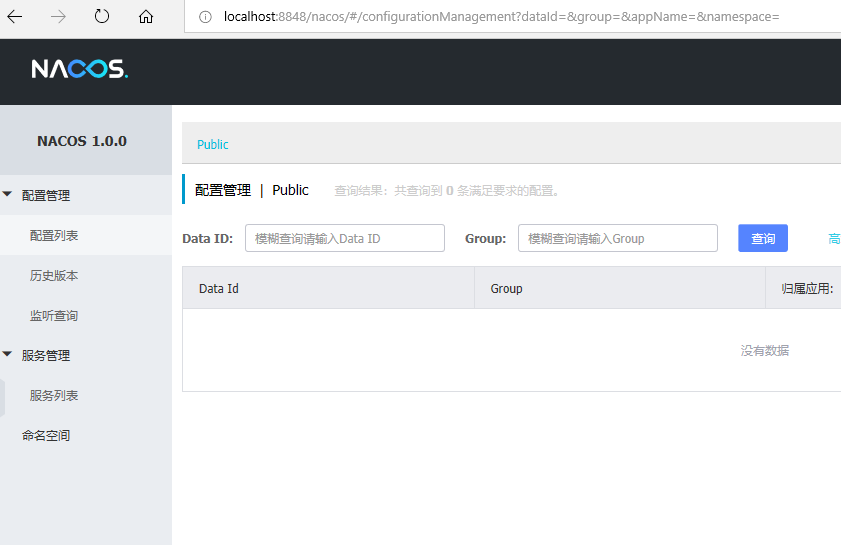
我们创建个项目来注册到这个nacos,三板斧再来:
1、pom引入spring boot、spring cloud、spring cloud alibaba和nacos依赖:
<?xml version="1.0" encoding="UTF-8"?>

<project xmlns="http://maven.apache.org/POM/4.0.0" xmlns:xsi="http://www.w3.org/2001/XMLSchema-instance"

         xsi:schemaLocation="http://maven.apache.org/POM/4.0.0 http://maven.apache.org/xsd/maven-4.0.0.xsd">

    <modelVersion>4.0.0</modelVersion>

    <groupId>com.wlf</groupId>

    <artifactId>spring-cloud-alibaba-provider</artifactId>

    <version>0.0.1-SNAPSHOT</version>

    <packaging>jar</packaging>

    <parent>

        <groupId>org.springframework.boot</groupId>

        <artifactId>spring-boot-starter-parent</artifactId>

        <version>2.1.7.RELEASE</version>

    </parent>

    <dependencyManagement>

        <dependencies>

            <dependency>

                <groupId>org.springframework.cloud</groupId>

                <artifactId>spring-cloud-dependencies</artifactId>

                <version>Greenwich.SR2</version>

                <type>pom</type>

                <scope>import</scope>

            </dependency>

            <dependency>

                <groupId>org.springframework.cloud</groupId>

                <artifactId>spring-cloud-alibaba-dependencies</artifactId>

                <version>0.9.0.RELEASE</version>

                <type>pom</type>

                <scope>import</scope>

            </dependency>

        </dependencies>

    </dependencyManagement>

    <dependencies>

        <dependency>

            <groupId>org.springframework.boot</groupId>

            <artifactId>spring-boot-starter-web</artifactId>

        </dependency>

        <dependency>

            <groupId>org.springframework.boot</groupId>

            <artifactId>spring-boot-starter-test</artifactId>

            <scope>test</scope>

        </dependency>

        <dependency>

            <groupId>org.springframework.cloud</groupId>

            <artifactId>spring-cloud-starter-alibaba-nacos-discovery</artifactId>

        </dependency>

        <dependency>

            <groupId>org.projectlombok</groupId>

            <artifactId>lombok</artifactId>

            <optional>true</optional>

        </dependency>

    </dependencies>

    <build>

        <plugins>

            <plugin>

                <groupId>org.springframework.boot</groupId>

                <artifactId>spring-boot-maven-plugin</artifactId>

            </plugin>

        </plugins>

    </build>

</project>
2、application配置nacos地址:
#端口

server.port=

#应用名

spring.application.name=lxytrans-provider

#注册中心

spring.cloud.nacos.discovery.server-addr=localhost:
3、启动类加注解@EnableDiscoveryClient:
import lombok.extern.slf4j.Slf4j;

import org.springframework.boot.SpringApplication;

import org.springframework.boot.autoconfigure.SpringBootApplication;

import org.springframework.cloud.client.discovery.EnableDiscoveryClient;

import org.springframework.context.annotation.Bean;

import org.springframework.web.bind.annotation.GetMapping;

import org.springframework.web.bind.annotation.RestController;

@EnableDiscoveryClient

@SpringBootApplication

public class TransProviderApplication {

    public static void main(String[] args) {

        SpringApplication.run(TransProviderApplication.class, args);

    }

    @Slf4j

    @RestController

    static class TestController {

        @GetMapping("/hello")

        public String hello() {

            return "hello";

        }

        @GetMapping("/hey")

        public String hey() throws InterruptedException {

            Thread.sleep(2000);

            return "hey";

        }

    }

}
跑起来后我们看下nacos控制台实例:

以上是服务提供方注册到nacos, 消费方的注册跟服务方没啥不同,这里就不再列出。nacos更多介绍参见https://nacos.io/zh-cn/docs/what-is-nacos.html。至于消费方如何通过nacos调用提供方服务,参见0.9.0.RELEASE版本的spring cloud alibaba nacos+feign实例。
0.9.0.RELEASE版本的spring cloud alibaba nacos实例的更多相关文章
- 0.9.0.RELEASE版本的spring cloud alibaba sentinel实例
sentinel即哨兵,相比hystrix断路器而言,它的功能更丰富.hystrix仅支持熔断,当服务消费方调用提供方发现异常后,进入熔断:sentinel不仅支持异常熔断,也支持响应超时熔断,另外还 ...
- 0.9.0.RELEASE版本的spring cloud alibaba nacos+feign实例
这里的feign依然是原来的feign,只不过将注册中心由eureka换成了nacos.服务提供方参见0.9.0.RELEASE版本的spring cloud alibaba nacos实例,消费方跟 ...
- 0.9.0.RELEASE版本的spring cloud alibaba nacos+gateway网关实例
gateway就是用来替换zuul的,功能都差不多,我们看下它怎么来跟nacos一起玩.老套路,三板斧: 1.pom: <?xml version="1.0" encodin ...
- 0.9.0.RELEASE版本的spring cloud alibaba sentinel+gateway网关实例
sentinel除了让服务提供方.消费方用之外,网关也能用它来限流.我们基于上次整的网关(参见0.9.0.RELEASE版本的spring cloud alibaba nacos+gateway网关实 ...
- 0.9.0.RELEASE版本的spring cloud alibaba sentinel+feign降级处理实例
既然用到了feign,那么主要是针对服务消费方的降级处理.我们基于0.9.0.RELEASE版本的spring cloud alibaba nacos+feign实例添油加醋,把sentinel功能加 ...
- 0.9.0.RELEASE版本的spring cloud alibaba sentinel限流、降级处理实例
先看服务提供方的,我们在原来的sentinel实例(参见0.9.0.RELEASE版本的spring cloud alibaba sentinel实例)上加上限流.降级处理,三板斧只需在最后那一斧co ...
- Spring Cloud Alibaba | Nacos服务中心初探
目录 Spring Cloud Alibaba | Nacos服务中心初探 1. 什么是Nacos? 1.1 Nacos 1.0 1.2 Nacos 2.0 2. Nacos 架构及概念 2.1 服务 ...
- Spring Cloud Alibaba | Nacos服务注册与发现
目录 Spring Cloud Alibaba | Nacos服务注册与发现 1. 服务提供者 1.1 pom.xml项目依赖 1.2 配置文件application.yml 1.3 启动类Produ ...
- Spring Cloud Alibaba | Nacos配置管理
目录 Spring Cloud Alibaba | Nacos配置管理 1. pom.xml 项目依赖 2. 在 bootstrap.properties 中配置 Nacos server 的地址和应 ...
随机推荐
- osi七层网络模型(一)
在网络中OSI分为七层网络模型,怎么理解七层模型呢?简单理解我们的手机都有手机壳.屏幕.摄像头.电池.芯片等很多原件,每个原件都是由不同的 厂家生产,最终组装成了一部功能完整的手机,同样,在网络中,也 ...
- linux网络编程之posix共享内存
今天继续研究posix IPC对象,这次主要是学习一下posix共享内存的使用方法,下面开始: 下面编写程序来创建一个共享内存: 编译运行: 那posix的共享内存存放在哪里呢?上节中学的posix的 ...
- msaa mrt load store action unity
unity buildin renderpipeline 和lightweight rp 对于开了msaa的rt 的load store action设置失效 buildin的时候set render ...
- 使用SpringTask 进行Java定时任务开发
(我这里的案例 是模拟 将项目包放到tomcat里面运行 ) 新建一个Java Web的Maven项目....... 此过程省略... 项目结构如图: 1.pom.xml 配置 <?xml ve ...
- 是什么是FBC CBV
- FBV url - 函数 - CBV url - view
- 如何使用python内置的request发送JSON格式的数据
使用步骤如下: 一.如果想发送json格式的数据,需要使用request模块中的Request类来创建对象,作为urlopen函数的参数 二.header中添加content-type为applica ...
- 如何下载oracle jdk|oracle jdk下载慢,要登录等等问题
wget -c --no-cookies --no-check-certificate --header "Cookie: oraclelicense=accept-securebackup ...
- 服务器nginx配置显示文件而不是下载
有时候在服务器上配置某些文件比如TXT文件,在浏览器打开的时候,会弹出下载.如何只让他在浏览器中显示,而不是下载呢.在nginx配置文件中添加一行代码 add_header Content-Type ...
- 简单了解Web Workers API
1. 为什么使用Web Workers API 通过使用该API,web应用程序可以独立于主线程,运行一个单独的线程来处理脚本. 可以在独立的线程中解决耗时较长的任务,避免主线程阻塞. 2. 应用 1 ...
- How to Set Up a NFS Server on Debian 10 Buster
How to Set Up a NFS Server on Debian 10 Buster Nick Congleton Debian 24 May 2019 Contents 1. Softw ...