
[React Native] Create a component using ScrollView
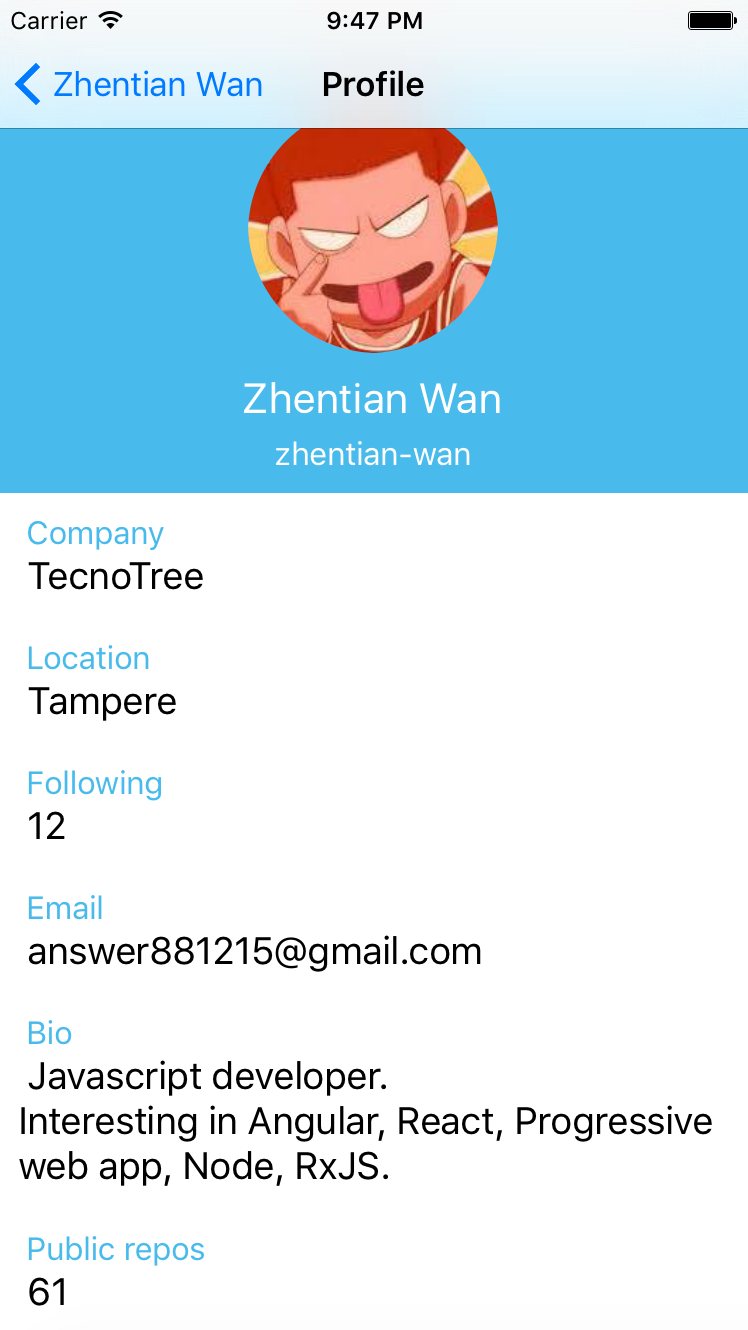
To show a list of unchanging data in React Native you can use the scroll view component. In this lesson, we'll map through the data we got back from the Github API, and fill complete ScrollView component for the user profile.
After call goToProfile function in Dashboard:
    goToProfile(){

        this.props.navigator.push({

            title: 'Profile',

            component: Profile,

            passProps: {userInfo: this.props.userInfo}

        });

    }
We create a new component 'Profile.js'
import React, {Component} from 'react';

import {View, StyleSheet, Text, ScrollView} from 'react-native';

import Badge from './Badge';

const styles = StyleSheet.create({

    container: {

        flex:

    },

    buttonText: {

        fontSize: ,

        color: 'white',

        alignSelf: 'center'

    },

    rowContainer: {

        padding:

    },

    rowTitle: {

        color: '#48BBEC',

        fontSize:

    },

    rowContent: {

        fontSize:

    }

});

class Profile extends React.Component{

    getRowTitle(userInfo, item){

        item = (item === 'public_repos') ? item.replace('_', ' ') : item;

        return item[] ? item[].toUpperCase() + item.slice() : item;

    }

    createList(userInfo, topicArr){

        return topicArr.map( (item, index) => {

            if(!userInfo[item]){

                return <View key={index}></View>

            }else{

                return (

                    <View style={styles.rowContainer}>

                        <Text style={styles.rowTitle}> {this.getRowTitle(userInfo, item)} </Text>

                        <Text style={styles.rowContent}> {userInfo[item]} </Text>

                    </View>

                );

            }

        })

    }

    render(){

        const userInfo = this.props.userInfo;

        const topicArr = ['company', 'location', 'followers', 'following', 'email', 'bio', 'public_repos'];

        return (

            <ScrollView style={styles.container} >

                <Badge userInfo={this.props.userInfo} />

                {this.createList(userInfo, topicArr)}

            </ScrollView>

        );

    }

}

module.exports = Profile;
[React Native] Create a component using ScrollView的更多相关文章
- React Native 中的component 的生命周期
React Native中的component跟Android中的activity,fragment等一样,存在生命周期,下面先给出component的生命周期图 getDefaultProps ob ...
- [RN] React Native 中使用 stickyHeaderIndices 实现 ScrollView 的吸顶效果
React Native中,ScrollView组件可以使用 stickyHeaderIndices 轻松实现 sticky 效果. 例如下面代码中: <ScrollView showsVert ...
- React Native 获取组件(Component)在屏幕上的位置
年后主客户端的需求以及老的业务迁移RN,现在疯狂的在学RN.在迁移需求的时候遇到需要获取组件在屏幕上的绝对位置.页面如下: 就需要展开的时候获取sectionHeader(默认排序)在屏幕上的具体位置 ...
- React Native Expected a component class,got [object Object]解决
报错原因: 组件大小写错误. 解决方式: 修改组件名称即可. 这篇博客介绍了大部分RN的错误原因和解决方法: http://blog.csdn.net/chichengjunma/article/de ...
- React Native 控制一个component的显示隐藏
// 首先在constructor里: this.state = { visible: false } // 然后在点击事件设置: this.setState({ visible: t ...
- [React Native] Using the Image component and reusable styles
Let's take a look at the basics of using React Native's Image component, as well as adding some reus ...
- React Native 中 component 生命周期
React Native 中 component 生命周期 转自 csdn 子墨博客 http://blog.csdn.net/ElinaVampire/article/details/518136 ...
- [转] React Native Navigator — Navigating Like A Pro in React Native
There is a lot you can do with the React Native Navigator. Here, I will try to go over a few example ...
- React Native之 ScrollView介绍和使用
前言 学习本系列内容需要具备一定 HTML 开发基础,没有基础的朋友可以先转至 HTML快速入门(一) 学习 本人接触 React Native 时间并不是特别长,所以对其中的内容和性质了解可能会有所 ...
随机推荐
- 设置一个POJO的某个属性的默认值
//月利率private BigDecimal monthRate=new BigDecimal(0);
- 结构体buf_block_t
/** Buffer block for which an uncompressed page exists */ typedef struct buf_block_struct buf_block_ ...
- 函数innobase_start_or_create_for_mysql
buffer pool初始化 /******************************************************************** Starts InnoDB a ...
- NOI2002银河英雄传说
原先就看过这道题,觉得很复杂. 不知道为什么今天一看觉得好水啊…… 难道这就是并查集的启发式合并? 数组d[i]表示i到其父节点的距离,即中间隔了多少船舰. 数组sum[i]记录以i为根的集合总共有多 ...
- 【转】开发者教程:如何将Android应用发布到Google Play(Android Market)官方市场
原文网址:http://www.chinaapp.org/game/5594.html 作为一个专业的App开发者网站,竟然没有一篇讲述如何将Android App发布到Google Play的教程, ...
- 用纯css写出三角形
1.新建一个元素,随便什么元素,不过我习惯性的会用块元素来做.如果行内元素就display:block它.<div class="triangle"></div& ...
- CSS遮罩——如何在CSS中使用遮罩
Css遮罩是2008年4月由苹果公司添加到webkit引擎中的.遮罩提供一种基于像素级别的,可以控制元素透明度的能力,类似于png24位或png32位中的alpha透明通道的效果. 图像是由rgb三个 ...
- BlockingQueue汇总
前言: 在新增的Concurrent包中,BlockingQueue很好的解决了多线程中,如何高效安全“传输”数据的问题.通过这些高效并且线程安全的队列类,为我们快速搭建高质量的多线程程序带来极大的便 ...
- bzoj 1176 Mokia(CDQ分治,BIT)
[题目链接] http://acm.hust.edu.cn/vjudge/problem/viewProblem.action?id=96974 [题意] 定义查询操作与修改操作:1 x y z 为 ...
- NOIP2014 飞扬的小鸟
3. 飞扬的小鸟 (bird.cpp/c/pas) [问题描述] Flappy Bird 是一款风靡一时的休闲手机游戏.玩家需要不断控制点击手机屏幕的频率来调节小鸟的飞行高度,让小鸟顺利通过画面右方的 ...