
Unity3D之Legacy动画系统学习笔记
Unity3D的Mecanim动画系统是非常强大的,而且作为Unity推荐的动画系统,其未来会完全代替老的一套动画系统,即Legacy动画系统。目前的情况是Mecanim与Legacy两套动画系统同时共存,但是并不是说Legacy动画系统就没有任何价值了,作为Unity4.0以前使用的动画系统,我认为还是很有必要去了解和学习的,所以就有了这篇笔记。
Legacy动画系统
http://docs.unity3d.com/Manual/Animations.html
我们可以使用Unity自带的资源来学习老版本的动画系统,新建Unity3D项目,选择菜单“Assets”->“Import Package”->“Character Controller”,导入的资源里的那个小人就是使用Legacy动画系统的模型,我们的学习可以基于他来进行。
模型文件
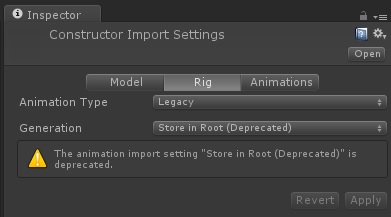
在骨骼这一项中,我们发现动画类型的设置就是Legacy,说明这个模型使用的动画类型为老版本的动画系统。
我们再看看动画页:
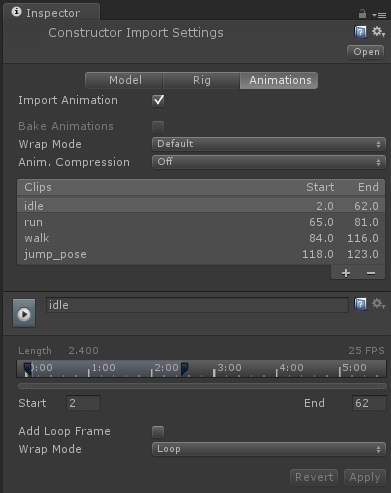
动画页中,我们可以对动画剪辑进行编辑。
控制动画
我们直接将FBX文件拖入场景,Unity会自动帮我们添加Transform和Animation两个组件(注意Mecanim动画系统使用的是Animator组件,Legacy动画系统使用的是Animation组件)。
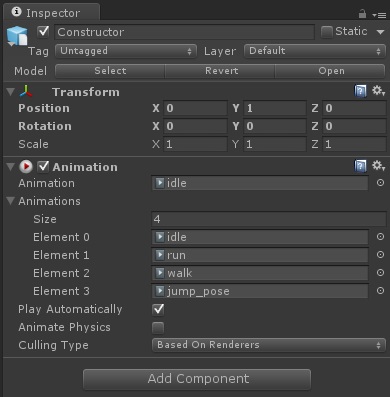
Animation组件的设置还是比较简单的:
- Animation:当前播放的动画。
- Animations:所有可以播放的动画。
- Play Automatically:是否自动播放。
- Animate Physics:动画是否和物理世界进行交互。
- Culling Type:动画在不可见时是否还继续播放,优化选项默认即可。
点击播放按钮就可以看见动画正常播放了。
脚本控制
http://docs.unity3d.com/ScriptReference/Animation.html
下面我们来看看如何使用脚本控制动画的播放,我们将下面的脚本绑定到人物身上即可。
 using UnityEngine;

 using System.Collections;

 public class AnimationScript : MonoBehaviour

 {

     private Animation _animation;

     void Start()

     {

         _animation = this.animation;

     }

     void OnGUI()

     {

         //直接播放动画

         if(GUI.Button(new Rect(, , , ), "idle"))

         {

             _animation.Play("idle");

         }

         if(GUI.Button(new Rect(, , , ), "walk"))

         {

             _animation.Play("walk");

         }

         if(GUI.Button(new Rect(, , , ), "run"))

         {

             _animation.Play("run");

         }

         if(GUI.Button(new Rect(, , , ), "jump_pose"))

         {

             _animation.Play("jump_pose");

         }

         //使用融合来播放动画

         if(GUI.Button(new Rect(, , , ), "idle"))

         {

             _animation.CrossFade("idle");

         }

         if(GUI.Button(new Rect(, , , ), "walk"))

         {

             _animation.CrossFade("walk");

         }

         if(GUI.Button(new Rect(, , , ), "run"))

         {

             _animation.CrossFade("run");

         }

         if(GUI.Button(new Rect(, , , ), "jump_pose"))

         {

             _animation.CrossFade("jump_pose");

         }

     }

 }
运行程序,会看见两排按钮,其中第一排按钮使用Play方法来切换动画,而第二排按钮则使用CrossFade来播放动画。
Play与CrossFade的区别
以从跑步切换到站立动画为例来看:
Play:直接切换动画,如果人物之前处于倾斜跑步状态,则会立即变成站立状态,表现上比较不真实,特别是当两个动画姿势差别较大时。
CrossFade:通过动画融合来切换动画,第二个参数可以指定融合的时间,如果人物之前处于倾斜跑步状态,则会在指定的融合时间内逐渐变成站立状态,表现上接近真实的人物动作切换效果。
但是当使用CrossFade播放跳跃动画时会出现问题,主要问题是跳跃动画不是循环播放且其持续时间小于动画融合的时间,我们修改为下面的脚本指定融合时间短一点就可以正常进行跳跃的融合播放了:
_animation.CrossFade("jump_pose", 0.1f);
PlayQueued
该方法可以指定当当前的动画播放完毕后接下来播放的动画,如下:
_animation.PlayQueued("run", QueueMode.CompleteOthers, PlayMode.StopSameLayer);
文件格式和资源加载
我们的模型使用通用的FBX格式,那么动画文件的储存一般有两种情况,一是所有的动画和模型都一起存放到一个文件中,还有一种情况是模型单独一个文件而动画单独一个文件。
模型动画都存放在一个文件中的情况
类似于Unity提供的Character Controller中的资源就是这样的结构,一个FBX文件保存了模型、骨骼和动画:

Resources加载
我们直接加载该资源就可以直接使用,将下面的脚本绑定到摄像机即可,脚本如下:
 using UnityEngine;

 using System.Collections;

 public class AllInOneResourcesLoad : MonoBehaviour

 {

     private Animation _animation;

     void Start()

     {

         GameObject go = Resources.Load<GameObject>("Standard Assets/Character Controllers/Sources/PrototypeCharacter/Constructor");

         GameObject man = Instantiate(go) as GameObject;

         _animation = man.animation;

     }

     void OnGUI()

     {

         //直接播放动画

         if(GUI.Button(new Rect(, , , ), "idle"))

         {

             _animation.Play("idle");

         }

         if(GUI.Button(new Rect(, , , ), "walk"))

         {

             _animation.Play("walk");

         }

         if(GUI.Button(new Rect(, , , ), "run"))

         {

             _animation.Play("run");

         }

         if(GUI.Button(new Rect(, , , ), "jump_pose"))

         {

             _animation.Play("jump_pose");

         }

         //使用融合来播放动画

         if(GUI.Button(new Rect(, , , ), "idle"))

         {

             _animation.CrossFade("idle");

         }

         if(GUI.Button(new Rect(, , , ), "walk"))

         {

             _animation.CrossFade("walk");

         }

         if(GUI.Button(new Rect(, , , ), "run"))

         {

             _animation.CrossFade("run");

         }

         if(GUI.Button(new Rect(, , , ), "jump_pose"))

         {

             _animation.CrossFade("jump_pose", 0.1f);

         }

     }

 }
AssetBundle加载
打包
使用下面的脚本打包:
 using UnityEditor;

 using UnityEngine;

 public class CreateAllInOneAB

 {

     [MenuItem("Tool/CreateAllInOneAB")]

     private static void Create()

     {

         BuildPipeline.BuildAssetBundle(null, new[]

             {

                 AssetDatabase.LoadAssetAtPath("Assets/Resources/Standard Assets/Character Controllers/Sources/PrototypeCharacter/Constructor.FBX", typeof(GameObject))

             },

             Application.streamingAssetsPath + "/AllInOne.assetbundle",

             BuildAssetBundleOptions.CollectDependencies | BuildAssetBundleOptions.CompleteAssets | BuildAssetBundleOptions.UncompressedAssetBundle,

             BuildTarget.StandaloneWindows64);

     }

 }
加载
将下面的脚本绑定到摄像机即可:
 using UnityEngine;

 using System.Collections;

 public class AllInOneAssetBundleLoad : MonoBehaviour

 {

     private Animation _animation;

     void Start()

     {

         AssetBundle assetBundle = AssetBundle.CreateFromFile(Application.streamingAssetsPath + "/AllInOne.assetbundle");

         GameObject go = assetBundle.Load("Constructor", typeof(GameObject)) as GameObject;

         GameObject man = Instantiate(go) as GameObject;

         _animation = man.animation;

     }

     void OnGUI()

     {

         //直接播放动画

         if(GUI.Button(new Rect(, , , ), "idle"))

         {

             _animation.Play("idle");

         }

         if(GUI.Button(new Rect(, , , ), "walk"))

         {

             _animation.Play("walk");

         }

         if(GUI.Button(new Rect(, , , ), "run"))

         {

             _animation.Play("run");

         }

         if(GUI.Button(new Rect(, , , ), "jump_pose"))

         {

             _animation.Play("jump_pose");

         }

         //使用融合来播放动画

         if(GUI.Button(new Rect(, , , ), "idle"))

         {

             _animation.CrossFade("idle");

         }

         if(GUI.Button(new Rect(, , , ), "walk"))

         {

             _animation.CrossFade("walk");

         }

         if(GUI.Button(new Rect(, , , ), "run"))

         {

             _animation.CrossFade("run");

         }

         if(GUI.Button(new Rect(, , , ), "jump_pose"))

         {

             _animation.CrossFade("jump_pose", 0.1f);

         }

     }

 }
模型动画分开存放的情况
还有一种情况是模型和动画是分为多个FBX文件存放的,比如下面是模型文件:

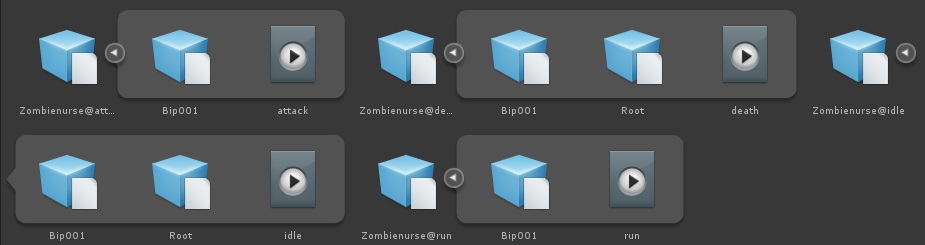
虽然有一个Take 001的动画,但是实际上我们并不使用该动画,而是使用下面仅保存了动画的FBX文件:
Resources加载
首先我们要清楚的是,无论是保存了模型还是保存了动画的FBX文件在Unity看来都是同样的一种类型,即添加了Animation组件的GameObject,下面我们看看如何在Resources中加载并显示这个角色,代码如下,挂载到主摄像机即可:
 using UnityEngine;

 using System.Collections;

 public class ResourcesLoad : MonoBehaviour

 {

     private Animation _animation;

     void Start()

     {

         GameObject go = Resources.Load<GameObject>("ZombieNurse/Zombienurse_Rig");

         GameObject man = Instantiate(go) as GameObject;

         _animation = man.animation;

         //添加动画剪辑

         _animation.AddClip(LoadAnimationClip("ZombieNurse/Animation/Zombienurse@attack"), "attack");

         _animation.AddClip(LoadAnimationClip("ZombieNurse/Animation/Zombienurse@death"), "death");

         _animation.AddClip(LoadAnimationClip("ZombieNurse/Animation/Zombienurse@idle"), "idle");

         _animation.AddClip(LoadAnimationClip("ZombieNurse/Animation/Zombienurse@run"), "run");

         _animation.Play("idle");

     }

     private AnimationClip LoadAnimationClip(string path)

     {

         GameObject go = Resources.Load<GameObject>(path);

         return go.animation.clip;

     }

     void OnGUI()

     {

         if(GUI.Button(new Rect(, , , ), "idle"))

         {

             _animation.CrossFade("idle");

         }

         if(GUI.Button(new Rect(, , , ), "run"))

         {

             _animation.CrossFade("run");

         }

         if(GUI.Button(new Rect(, , , ), "attack"))

         {

             _animation.CrossFade("attack");

         }

         if(GUI.Button(new Rect(, , , ), "death"))

         {

             _animation.CrossFade("death");

         }

     }

 }
AssetBundle加载
打包
使用下面的脚本打包:
 using UnityEngine;

 using UnityEditor;

 public class CreateAB : MonoBehaviour

 {

     [MenuItem("Tool/CreateAB")]

     private static void Create()

     {

         BuildPipeline.BuildAssetBundle(null, new[]

             {

                 AssetDatabase.LoadAssetAtPath("Assets/Resources/ZombieNurse/Zombienurse_Rig.FBX", typeof(GameObject)),

                 AssetDatabase.LoadAssetAtPath("Assets/Resources/ZombieNurse/Animation/Zombienurse@attack.FBX", typeof(GameObject)),

                 AssetDatabase.LoadAssetAtPath("Assets/Resources/ZombieNurse/Animation/Zombienurse@death.FBX", typeof(GameObject)),

                 AssetDatabase.LoadAssetAtPath("Assets/Resources/ZombieNurse/Animation/Zombienurse@idle.FBX", typeof(GameObject)),

                 AssetDatabase.LoadAssetAtPath("Assets/Resources/ZombieNurse/Animation/Zombienurse@run.FBX", typeof(GameObject))

             },

             Application.streamingAssetsPath + "/AB.assetbundle",

             BuildAssetBundleOptions.CollectDependencies | BuildAssetBundleOptions.CompleteAssets | BuildAssetBundleOptions.UncompressedAssetBundle,

             BuildTarget.StandaloneWindows64);

     }

 }
加载
将下面的脚本绑定到摄像机即可:
 using UnityEngine;

 using System.Collections;

 public class AssetBundleLoad : MonoBehaviour

 {

     private Animation _animation;

     void Start()

     {

         AssetBundle assetBundle = AssetBundle.CreateFromFile(Application.streamingAssetsPath + "/AB.assetbundle");

         GameObject go = assetBundle.Load("Zombienurse_Rig", typeof(GameObject)) as GameObject;

         GameObject man = Instantiate(go) as GameObject;

         _animation = man.animation;

         //添加动画剪辑

         _animation.AddClip(LoadAnimationClip(assetBundle, "Zombienurse@attack"), "attack");

         _animation.AddClip(LoadAnimationClip(assetBundle, "Zombienurse@death"), "death");

         _animation.AddClip(LoadAnimationClip(assetBundle, "Zombienurse@idle"), "idle");

         _animation.AddClip(LoadAnimationClip(assetBundle, "Zombienurse@run"), "run");

         _animation.Play("idle");

     }

     private AnimationClip LoadAnimationClip(AssetBundle assetBundle, string path)

     {

         GameObject go = assetBundle.Load(path, typeof(GameObject)) as GameObject;

         return go.animation.clip;

     }

     void OnGUI()

     {

         if(GUI.Button(new Rect(, , , ), "idle"))

         {

             _animation.CrossFade("idle");

         }

         if(GUI.Button(new Rect(, , , ), "run"))

         {

             _animation.CrossFade("run");

         }

         if(GUI.Button(new Rect(, , , ), "attack"))

         {

             _animation.CrossFade("attack");

         }

         if(GUI.Button(new Rect(, , , ), "death"))

         {

             _animation.CrossFade("death");

         }

     }

 }
Unity3D之Legacy动画系统学习笔记的更多相关文章
- Unity3D之Mecanim动画系统学习笔记(二):模型导入
我们要在Unity3D中使用上模型和动画,需要经过下面几个阶段的制作,下面以一个人形的模型开发为准来介绍. 模型制作 模型建模(Modelling) 我们的美术在建模时一般会制作一个称为T-Pose( ...
- Unity3D之Mecanim动画系统学习笔记(一):认识Mecanim动画系统
Mecanim简介 Mecanim动画系统是Unity3D4.0开始引入的一套全新的动画系统,主要提供了下面4个方面的功能: 针对人形角色提供一套特殊的工作流. 动画重定向的能力,可以非常方便的把动画 ...
- Unity3D之Mecanim动画系统学习笔记(九):Blend Tree(混合树)
认识Blend Tree 我们在Animator Controller中除了可以创建一个State外还可以创建一个Blend Tree,如下: 那么我们看下新创建的Blend Tree和State有什 ...
- Unity3D之Mecanim动画系统学习笔记(七):IK(反向动力学)动画
什么是IK? IK(Inverse Kinematics)即反向动力学,即可以使用场景中的各种物体来控制和影响角色身体部位的运动,一般来说骨骼动画都是传统的从父节点到子节点的带动方式(即正向动力学), ...
- Unity3D之Mecanim动画系统学习笔记(十一):高级功能应用
动作游戏 还记得读书的时候熬夜打<波斯王子>的时光,我们的王子通过跳跃穿过墙壁的小洞.在高层建筑上进行攀爬和跳跃,还有在操作失误掉下高楼和触发必死机关后使用时之沙的时光倒流功能回归死亡之前 ...
- Unity3D之Mecanim动画系统学习笔记(十):Mecanim动画的资源加载相关
资源加载是必备的知识点,这里就说说Mecanim动画的资源如何打包及加载. 注意,Unity4.x和Unity5.x的AssetBundle打包策略不一样,本笔记是基于Unity4.x的AssetBu ...
- Unity3D之Mecanim动画系统学习笔记(五):Animator Controller
简介 Animator Controller在Unity中是作为一种单独的配置文件存在的文件类型,其后缀为controller,Animator Controller包含了以下几种功能: 可以对多个动 ...
- Unity3D之Mecanim动画系统学习笔记(四):Animation State
动画的设置 我们先看看Animation Clip的一些设置: Loop time:动画是否循环播放. 下面出现了3个大致一样的选项: Root Transform Rotation:表示为播放动画的 ...
- Unity3D之Mecanim动画系统学习笔记(三):Animation View
动画组件之间的关系 我们先看一张图: 这里我们可以看到,我们在GameObject之上绑定的Animator组件是控制模型进行动画播放的. 而其属性Controller则对应一个Animator Co ...
随机推荐
- .frm文件
http://www.cnblogs.com/jiangxu67/p/4755097.html MySQL]frm文件解析 MySQL 协议字节序 关于传输整数小大端的实现 http://hamilt ...
- public,protected,friendly,private的访问权限
请说出作用域public,private,protected,以及不写时的区别 这四个作用域的可见范围如下表所示. 说明:如果在修饰的元素上面没有写任何访问修饰符,则表示friendly. 作用域 ...
- bzoj2797
对和排序,显然最小是a1+a2,次小a1+a3 然后穷举哪里是a2+a3 这样a1,a2,a3就求出来了 注意a2+a3只可能是前n+1项中的一个,所以穷举这步是O(n)的 接下来我们把已经确定的数的 ...
- bzoj1185
一遇到数学题和计算几何题我就要调半天…… 玛雅,我真是太弱了…… 基本思路很简单,先上凸包,然后矩形与凸包一边重合,然后旋转卡壳即可 然而我没怎么写过计算几何题,一开始写的各种囧,后来看了hzwer的 ...
- cocos2d-x 2.1.2 bug发现
1.在做屏蔽触摸时发现 extensions中的CCScrollView类 void CCScrollView::registerWithTouchDispatcher() { CCDirector: ...
- Android ashmem hacking
/********************************************************************** * Android ashmem hacking * 声 ...
- ASP.NET MVC模型部分验证
在很多情况下,我们为了代码的复用可能会存在ViewModel共用的情形.比方说,web应用中常常会遇到的一个需求就是用户找回密码的功能.用户首先要验证通过验证邮箱(通常是用户名)来获取验证码,然后再进 ...
- <五>面向对象分析之UML核心元素之边界
一:基本概念
- TabWidget/TabHost的两种使用方法
1.概念 盛放Tab的容器就是TabHost.TabHost的实现有两种方式: 第一种继承TabActivity,从TabActivity中用getTabHost()方法获取TabHost.各个Tab ...
- UI篇--布局问题
1.android:layout_marginRight 不起作用解决方法 今天想在RelativeLayout的左右分别放上一个按钮, 左边按钮用marginLeft="10dp" ...