
家庭版记账本app进度之编辑框组件
<EditText>中设置提示信息是用到的语句是android:hint来进行提示语句的书写。
android:inputType可以将此编辑框设置为输入密码的编辑框(现实的是小黑点)
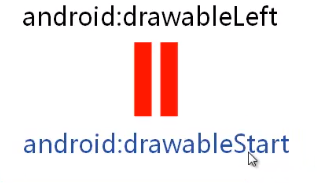
android:drawableLeft属性来确定相应编辑框开始时候对应的头像。
除了在文字的左侧设置图片的,也可以在其他的地方进行图片的设置。
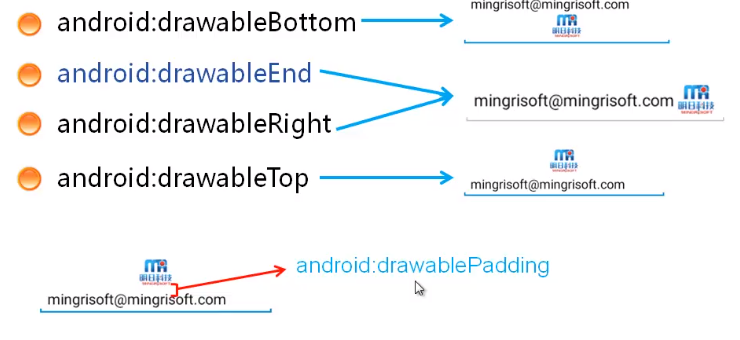 padding应用pd为单位
设置编辑框的文本行数android:lines这样的话当内容较多时。
android:gravity设置提示文字的的对其方式:
android:layout_marginBottom来设置外边距;
android:inputType="textMultiLine"这样来设置编辑框可以显示多行
制作出的添加小事件的程雪截图如图所示:

相应的主要是代码如下:
activity_main.xml
<LinearLayout xmlns:android="http://schemas.android.com/apk/res/android"

    xmlns:tools="http://schemas.android.com/tools"

    android:id="@+id/activity_main"

    android:layout_width="match_parent"

    android:layout_height="match_parent"

    android:orientation="vertical"

    android:padding="10dp"

    android:background="@color/qianhui"

    tools:context=".MainActivity">

    <TextView

        android:id="@+id/texnum1"

        android:layout_width="match_parent"

        android:layout_height="wrap_content"

        android:text="添加新的小事件"

        android:textSize="30dp"

        android:gravity="center_horizontal"

        android:padding="5dp"

        android:background="@color/baise"

        android:layout_marginBottom="10dp"

    />

    <EditText

        android:layout_width="match_parent"

        android:layout_height="wrap_content"

        android:hint="请输入新事件的标题"

        android:lines="2"

        android:padding="8dp"

        android:background="@color/baise"

        android:layout_marginBottom="10dp"

        />

    <EditText

        android:layout_width="match_parent"

        android:layout_height="wrap_content"

        android:hint="请输入新事件的相关内容"

        android:lines="15"

        android:padding="8dp"

        android:background="@color/baise"

        android:layout_marginBottom="10dp"

        android:gravity="top"

        />

    <LinearLayout

        android:id="@+id/ll_date"

        android:layout_width="match_parent"

        android:layout_height="wrap_content"

        android:orientation="horizontal">

        <TextView

            android:layout_width="wrap_content"

            android:layout_height="wrap_content"

            android:text="选择日期:"

            android:padding="8dp"

            android:background="@color/baise"

            android:textSize="18sp" />

        <TextView

            android:id="@+id/tv_date"

            android:layout_width="match_parent"

            android:layout_height="wrap_content"

            android:padding="8dp"

            android:background="@color/qianhuang"

            android:textSize="18sp" />

    </LinearLayout>

    <LinearLayout

        android:id="@+id/ll_time"

        android:layout_width="match_parent"

        android:layout_height="wrap_content"

        android:layout_marginTop="10dp"

        android:orientation="horizontal">

        <TextView

            android:layout_width="wrap_content"

            android:layout_height="wrap_content"

            android:text="选择时间:"

            android:padding="8dp"

            android:background="@color/baise"

            android:textSize="18sp" />

        <TextView

            android:id="@+id/tv_time"

            android:layout_width="match_parent"

            android:layout_height="wrap_content"

            android:background="@color/qianhuang"

            android:padding="8dp"

            android:textSize="18sp" />

    </LinearLayout>

</LinearLayout>
家庭版记账本app进度之编辑框组件的更多相关文章
- 家庭记账本app进度之下拉框和数字转轮的相关应用
这次主要是悬系的下拉框Spinner和数字转轮NumberPicker的使用.先分析相关的用到的知识点. 在Android中,用string-array是一种简单的提取XML资源文件数据的方法. 例子 ...
- 家庭版记账本app进度之关于listview显示账单,并为其添加点击事件
这个主要学习是关于listview的学习. 怎样去自定义adapter,以及使用.自己创建文件,还有就是为listview的每一个子控件添加点击事件. 在整个过程中收获到的知识点如下: 一.对于数据库 ...
- 家庭版记账本app进度之关于android界面布局的相关学习
1.线性布局(linearlayout)是一种让视图水平或垂直线性排列的布局线性布局使用<LinearLayout>标签进行配置对应代码中的类是android.widget.LinearL ...
- 家庭版记账本app进度之对于按钮的点击事件以及线性布局以及(alertdialog)等相关内容的应用测试
通过线性布局,制作出连个按钮还有文本输入框以及嘴上放的标题文本进行信息的相关显示,完后最后的信息的输入,之后在屏幕的的下方进行显示 当点击第一个按钮的时候,在下方就会简单的出现你自己刚刚输入的相关信息 ...
- 家庭版记账本app开发完成
经过这几天关于android的相关学习,对于家庭版记账本app以及开发结束. 实现的功能为:用户的注册.登录.添加支出账单.添加收入账单.显示所有的该用户的账单情况(收入和支出).生产图表(直观的显示 ...
- 家庭记账本app进度之android中AlertDialog的相关应用以及对日期时间的相关操作(应用alertdialog使用的谈话框)
对于AlertDialog的相关知识: 1.创建构造器AlertDialog.Builder的对象: 2.通过构造器对象调用setTitle.setMessage.setIcon等方法构造对话框 ...
- 家庭记账本app进度之复选框以及相应滚动条的应用
这次主要是对于android中复选框的相应的操作.以及其中可能应用到的滚动条的相关应用.每一个复选框按钮都要有一个checkBox与之相对应. 推荐使用XML配置,基本语法如下:<CheckBo ...
- 家庭版记账本app开发进度相关界面的规划
总的app界面包括四个页面,页面可以来回滑动.设计的时候就和微信的四个页面类似. 由于没有找到合适的图标进行替换,在此仍应用微信对应的四个图标. 总的四个页面是: 1.增加收入或者支出的小账单.当点击 ...
- 家庭版记账本app开发进度。开发到现在整个app只剩下关于图表的设计了,具体功能如下
首先说一下自己的功能: 实现了用户的登录和注册.添加收入记账和添加支出记账.粗略显示每条账单基本情况.通过点击每条账单来显示具体的情况, 之后就是退出当前用户的操作. 具体的页面情况如下: 这就是整个 ...
随机推荐
- 爬虫过程中获取不到列表页的url
例1: 采集某网站的时候根据网页页面显示的url链接提取的, 最后始终没有数据返回. 主要原因是页面源码中标签的 href 属性值和页面上的不一样. 页面上显示是‘http://www.xxx.org ...
- python 异步请求
这是循环请求10次页面.总时间大概是10秒左右,如果是普通的循环请求10次页面而不添加异步的话,时间大概在30秒以上,当然这个数据可能有误,因为有网速的问题存在,但大体的效果应该是不变的. impor ...
- mongo复制数据库和表
1.使用工具Studio 3T for MongoDB 选择一个数据库中的Collections集合,然后按住 Ctrl+C 复制快捷键会弹出如下帮助框. 点击 Ctrl+V 粘贴快捷键,重命名一下复 ...
- (转)协议森林14 逆袭 (CIDR与NAT)
协议森林14 逆袭 (CIDR与NAT) 作者:Vamei 出处:http://www.cnblogs.com/vamei 欢迎转载,也请保留这段声明.谢谢! IPv4由于最初的设计原因,长度只有32 ...
- Dubbo之服务暴露
前言 本文 Dubbo 使用版本2.7.5 Dubbo 通过使用dubbo:service配置或@service在解析完配置后进行服务暴露,供服务消费者消费. Dubbo 的服务暴露有两种: 远程暴露 ...
- java猜数游戏(新手记录每天的作业)
//导入包 import java.util.Scanner;import java.util.Random; //定义一个类 public class Zcs{ //公共静态的主方法 public ...
- Spring集成axis2
1.新建一个项目,结构如下 2.引入项目所需jar包 axis相关jar文件说明请查阅该博文 3.配置web.xml,注册axis2信息 <?xml version="1.0" ...
- ubuntu 16.04服务器安装apache2 + php + mysql
具体操作 第一步:安装mysql apt-get install mysql-server mysql-client 第二步:安装apache2 apt-get install apache2 第三步 ...
- c# winform 访问WebServices 服务(通过WEB引用的方式进行访问)
第一步.Winform项目引用WEB服务 第二步.代码声明实例化 Web引用 YzServ.TestServ yzserv = new WebYzServ.TestServ(); yzserv.AAA ...
- go第三方常用包
配置 go-ini/ini 用于读取 ini 格式配置文件. 地址:https://github.com/Go-ini/ini tomal 用于读取 conf 格式配置文件. 地址:https://g ...