
家庭记账本app进度之复选框以及相应滚动条的应用
这次主要是对于android中复选框的相应的操作。以及其中可能应用到的滚动条的相关应用。每一个复选框按钮都要有一个checkBox与之相对应。
推荐使用XML配置,基本语法如下:
<CheckBox
android:text="显示文本"
android:id="@+id/ID号"
android:layout_width="wrap_content"
android:layout_height="wrap_content">
</CheckBox>
最后添加点击事件实现相应的操作。具体的代码实现如下:
MainActivity.java
package com.example.myapplicationhome;

import androidx.appcompat.app.AppCompatActivity;

import android.os.Bundle;

import android.view.View;

import android.widget.Button;

import android.widget.CheckBox;

import android.widget.TextView;

import org.w3c.dom.Text;

public class MainActivity extends AppCompatActivity {

    private CheckBox mChkBoxMusic,mChkBoxSing,mChkBoxDance,mChkBoxTravel,mChkBoxReading,mChkBoxWriting,mChkBoxFitness,mChkBoxClimbing,mChkBoxSwim,mChkBoxExercise,mChkBoxPhoto,mChkBoxEating,mChkBoxPainting;

    private CheckBox mChkBoxwen1,mChkBoxwen2,mChkBoxwen3,mChkBoxwen4,mChkBoxwen5,mChkBoxwen6;

    private Button mBtnOk;

    private TextView mTxtHobby;

    @Override

    protected void onCreate(Bundle savedInstanceState) {

        super.onCreate(savedInstanceState);

        setContentView(R.layout.activity_main);

        mChkBoxwen1=(CheckBox)findViewById(R.id.chkBoxwen1);

        mChkBoxwen2=(CheckBox)findViewById(R.id.chkBoxwen2);

        mChkBoxwen3=(CheckBox)findViewById(R.id.chkBoxwen3);

        mChkBoxwen4=(CheckBox)findViewById(R.id.chkBoxwen4);

        mChkBoxwen5=(CheckBox)findViewById(R.id.chkBoxwen6);

        mChkBoxwen6=(CheckBox)findViewById(R.id.chkBoxwen5);

        mChkBoxMusic=(CheckBox)findViewById(R.id.chkBoxMusic);

        mChkBoxSing=(CheckBox)findViewById(R.id.chkBoxSing);

        mChkBoxDance=(CheckBox)findViewById(R.id.chkBoxDancing);

        mChkBoxTravel=(CheckBox)findViewById(R.id.chkBoxTravel);

        mChkBoxReading=(CheckBox)findViewById(R.id.chkBoxReading);

        mChkBoxWriting=(CheckBox)findViewById(R.id.chkBoxWriting);

        mChkBoxClimbing=(CheckBox)findViewById(R.id.chkBoxClimbing);

        mChkBoxSwim=(CheckBox)findViewById(R.id.chkBoxSwim);

        mChkBoxExercise=(CheckBox)findViewById(R.id.chkBoxExercise);

        mChkBoxFitness=(CheckBox)findViewById(R.id.chkBoxFitness);

        mChkBoxPhoto=(CheckBox)findViewById(R.id.chkBoxPhoto);

        mChkBoxEating=(CheckBox)findViewById(R.id.chkBoxEating);

        mChkBoxPainting=(CheckBox)findViewById(R.id.chkBoxPainting);

        mBtnOk=(Button)findViewById(R.id.btnOk);

        mTxtHobby=(TextView)findViewById(R.id.txtHobby);

        mBtnOk.setOnClickListener(btnOkOnClick);

    }

    private View.OnClickListener btnOkOnClick=new View.OnClickListener() {

        @Override

        public void onClick(View v) {

            String s=getString(R.string.your_hobby);

            if(mChkBoxMusic.isChecked())

                s+=mChkBoxMusic.getText().toString();

            if(mChkBoxSing.isChecked())

                s+=mChkBoxSing.getText().toString();

            if(mChkBoxDance.isChecked())

                s+=mChkBoxDance.getText().toString();

            if(mChkBoxTravel.isChecked())

                s+=mChkBoxTravel.getText().toString();

            if(mChkBoxReading.isChecked())

                s+=mChkBoxReading.getText().toString();

            if(mChkBoxWriting.isChecked())

                s+=mChkBoxWriting.getText().toString();

            if(mChkBoxClimbing.isChecked())

                s+=mChkBoxClimbing.getText().toString();

            if(mChkBoxSwim.isChecked())

                s+=mChkBoxSwim.getText().toString();

            if(mChkBoxExercise.isChecked())

                s+=mChkBoxExercise.getText().toString();

            if(mChkBoxFitness.isChecked())

                s+=mChkBoxFitness.getText().toString();

            if(mChkBoxPhoto.isChecked())

                s+=mChkBoxPhoto.getText().toString();

            if(mChkBoxEating.isChecked())

                s+=mChkBoxEating.getText().toString();

            if(mChkBoxPainting.isChecked())

                s+=mChkBoxPainting.getText().toString();

            if(mChkBoxwen1.isChecked())

                s+=mChkBoxwen1.getText().toString();

            if(mChkBoxwen2.isChecked())

                s+=mChkBoxwen2.getText().toString();

            if(mChkBoxwen3.isChecked())

                s+=mChkBoxwen3.getText().toString();

            if(mChkBoxwen4.isChecked())

                s+=mChkBoxwen4.getText().toString();

            if(mChkBoxwen5.isChecked())

                s+=mChkBoxwen5.getText().toString();

            if(mChkBoxwen6.isChecked())

                s+=mChkBoxwen6.getText().toString();

            mTxtHobby.setText(s);

        }

    };

}
strings.xml
<resources>

    <string name="app_name">兴趣选择程序</string>

    <string name="wen1">w温11</string>

    <string name="wen2">w温12</string>

    <string name="wen3">w温33</string>

    <string name="wen4">w温44</string>

    <string name="wen5">w温55</string>

    <string name="wen6">w温67</string>

    <string name="music">音乐</string>

    <string name="sing">唱歌</string>

    <string name="dance">跳舞</string>

    <string name="travel">旅行</string>

    <string name="reading">阅读</string>

    <string name="writing">写作</string>

    <string name="climbing">爬山</string>

    <string name="swim">游泳</string>

    <string name="exercise">运动</string>

    <string name="fitness">健身</string>

    <string name="photo">摄影</string>

    <string name="eating">美食</string>

    <string name="painting">绘画</string>

    <string name="your_hobby">您的兴趣:</string>

    <string name="btn_ok">确定</string>

</resources>
activity_main.xml
<?xml version="1.0" encoding="utf-8"?>

<ScrollView xmlns:android="http://schemas.android.com/apk/res/android"

    xmlns:app="http://schemas.android.com/apk/res-auto"

    xmlns:tools="http://schemas.android.com/tools"

    android:layout_width="match_parent"

    android:layout_height="wrap_content">

    <LinearLayout

        android:id="@+id/LinearLayout1"

        android:layout_width="wrap_content"

        android:layout_height="wrap_content"

        android:orientation="vertical"

        tools:context=".MainActivity">

        <CheckBox

            android:id="@+id/chkBoxwen6"

            android:layout_width="wrap_content"

            android:layout_height="wrap_content"

            android:textSize="30sp"

            android:text="@string/wen6" />

        <CheckBox

            android:id="@+id/chkBoxwen5"

            android:layout_width="wrap_content"

            android:layout_height="wrap_content"

            android:textSize="30sp"

            android:text="@string/wen5" />

        <CheckBox

            android:id="@+id/chkBoxwen4"

            android:layout_width="wrap_content"

            android:layout_height="wrap_content"

            android:textSize="30sp"

            android:text="@string/wen4" />

        <CheckBox

            android:id="@+id/chkBoxwen3"

            android:layout_width="wrap_content"

            android:layout_height="wrap_content"

            android:textSize="30sp"

            android:text="@string/wen3" />

        <CheckBox

            android:id="@+id/chkBoxwen2"

            android:layout_width="wrap_content"

            android:layout_height="wrap_content"

            android:textSize="30sp"

            android:text="@string/wen2" />

        <CheckBox

            android:id="@+id/chkBoxwen1"

            android:layout_width="wrap_content"

            android:layout_height="wrap_content"

            android:textSize="30sp"

            android:text="@string/wen1" />

        <CheckBox

            android:id="@+id/chkBoxMusic"

            android:layout_width="wrap_content"

            android:layout_height="wrap_content"

            android:textSize="30sp"

            android:text="@string/music" />

        <CheckBox

            android:id="@+id/chkBoxSing"

            android:layout_width="wrap_content"

            android:layout_height="wrap_content"

            android:textSize="30sp"

            android:text="@string/sing" />

        <CheckBox

            android:id="@+id/chkBoxDancing"

            android:layout_width="wrap_content"

            android:layout_height="wrap_content"

            android:textSize="30sp"

            android:text="@string/dance" />

        <CheckBox

            android:id="@+id/chkBoxTravel"

            android:layout_width="wrap_content"

            android:layout_height="wrap_content"

            android:textSize="30sp"

            android:text="@string/travel" />

        <CheckBox

            android:id="@+id/chkBoxReading"

            android:layout_width="wrap_content"

            android:layout_height="wrap_content"

            android:textSize="30sp"

            android:text="@string/reading" />

        <CheckBox

            android:id="@+id/chkBoxWriting"

            android:layout_width="wrap_content"

            android:layout_height="wrap_content"

            android:textSize="30sp"

            android:text="@string/writing" />

        <CheckBox

            android:id="@+id/chkBoxClimbing"

            android:layout_width="wrap_content"

            android:layout_height="wrap_content"

            android:textSize="30sp"

            android:text="@string/climbing" />

        <CheckBox

            android:id="@+id/chkBoxSwim"

            android:layout_width="wrap_content"

            android:layout_height="wrap_content"

            android:textSize="30sp"

            android:text="@string/swim" />

        <CheckBox

            android:id="@+id/chkBoxExercise"

            android:layout_width="match_parent"

            android:layout_height="wrap_content"

            android:text="@string/exercise"

            android:textSize="30sp" />

        <CheckBox

            android:id="@+id/chkBoxFitness"

            android:layout_width="wrap_content"

            android:layout_height="wrap_content"

            android:textSize="30sp"

            android:text="@string/fitness" />

        <CheckBox

            android:id="@+id/chkBoxPhoto"

            android:layout_width="wrap_content"

            android:layout_height="wrap_content"

            android:textSize="30sp"

            android:text="@string/photo" />

        <CheckBox

            android:id="@+id/chkBoxEating"

            android:layout_width="wrap_content"

            android:layout_height="wrap_content"

            android:textSize="30sp"

            android:text="@string/eating" />

        <CheckBox

            android:id="@+id/chkBoxPainting"

            android:layout_width="wrap_content"

            android:layout_height="wrap_content"

            android:textSize="30sp"

            android:text="@string/painting" />

        <Button

            android:id="@+id/btnOk"

            android:layout_width="wrap_content"

            android:layout_height="wrap_content"

            android:text="@string/btn_ok" />

        <TextView

            android:id="@+id/txtHobby"

            android:layout_width="420dp"

            android:layout_height="47dp" />

    </LinearLayout>

</ScrollView>
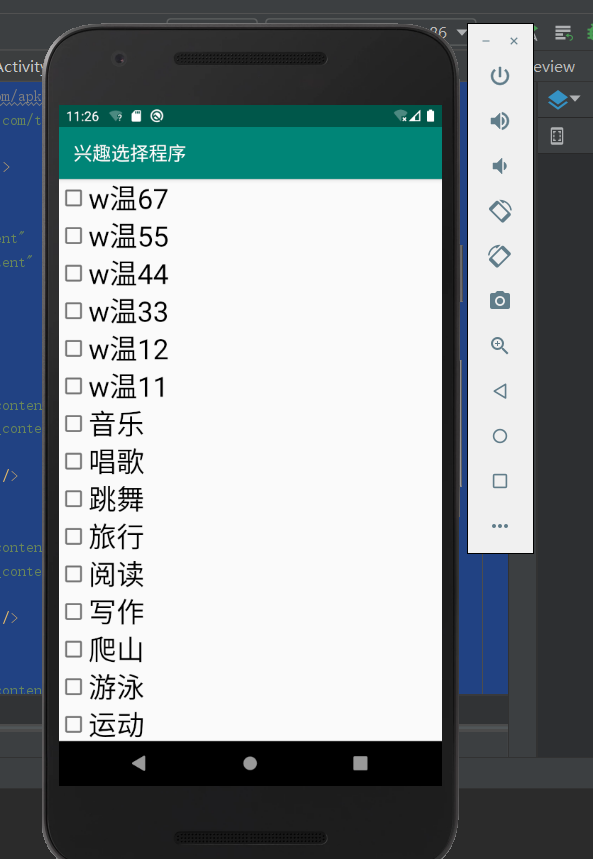
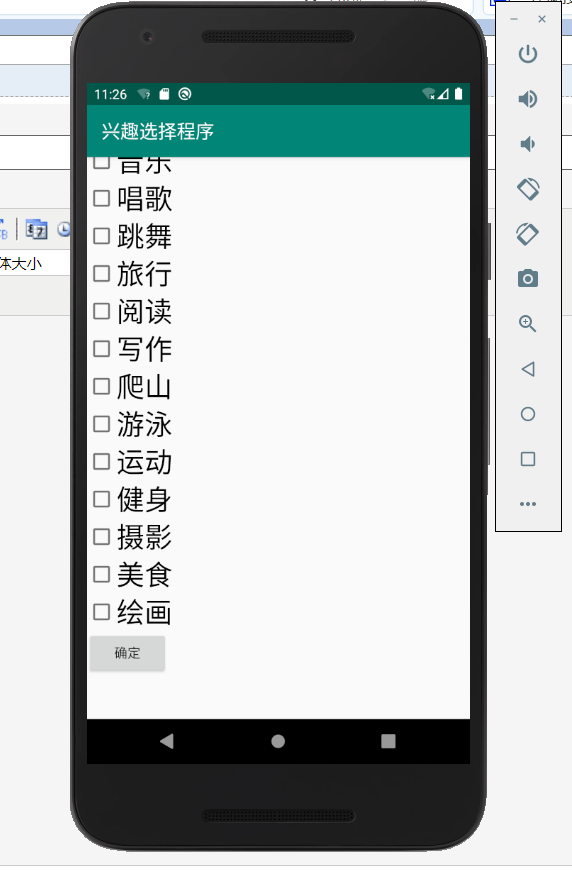
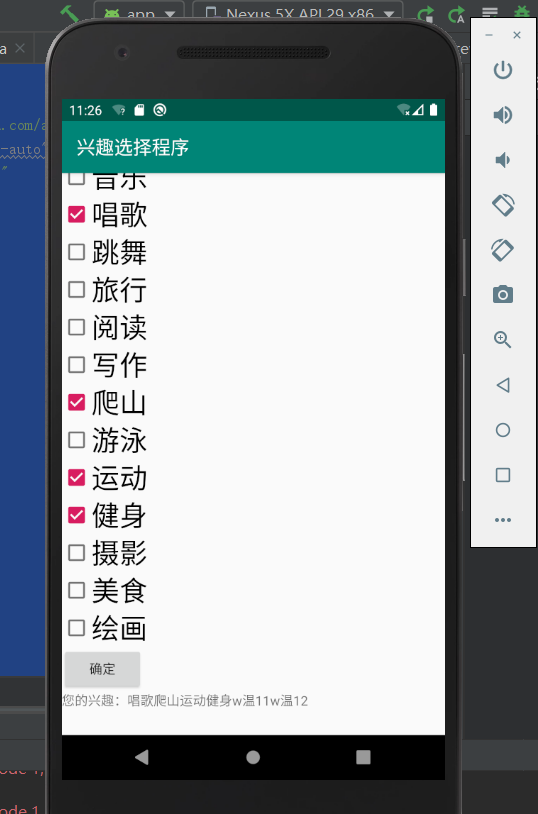
选出几个兴趣之后。点击确定按钮的显示结果:
家庭记账本app进度之复选框以及相应滚动条的应用的更多相关文章
- 家庭记账本app进度之android中AlertDialog的相关应用以及对日期时间的相关操作(应用alertdialog使用的谈话框)
对于AlertDialog的相关知识: 1.创建构造器AlertDialog.Builder的对象: 2.通过构造器对象调用setTitle.setMessage.setIcon等方法构造对话框 ...
- 家庭记账本app进度之对于登录和注册两个界面点击按钮的相互跳转
这次主要完成了两个两个android页面之间的跳转.从登录页面点击注册就会跳转到注册页面.在注册页面点击返回登录,这样就可以返回到登录界面.主要是这样的操作.其中遇到了一个困难主要是当点击按钮的时候, ...
- 家庭记账本app进度之下拉框和数字转轮的相关应用
这次主要是悬系的下拉框Spinner和数字转轮NumberPicker的使用.先分析相关的用到的知识点. 在Android中,用string-array是一种简单的提取XML资源文件数据的方法. 例子 ...
- 家庭记账本app进度之关于单选按钮的相关操作(添加点击按钮事件以及点击单选更改事件)
这次主要是通过代码实现了android中的相关单选按钮的相关操作,之后再最下面有一个按钮,当点击这个按钮的时候,会获取当上面的相关信息,之后再下方会进行相应的文字显示,获取的信息不同显示的信息也不会一 ...
- 家庭记账本app进度之关于tap的相关操作1
今天还主要学习关于怎样制作微信的先关的tap. 今天的主要成果是已经了解了相关的技术,以及相关的思路.代码经过一个下午的编写,基本接近尾声. 更详细的实验代码,以及相关的知识点将在明天完善后进行发表. ...
- 家庭记账本app进度之ui相关概念控制ui界面与布局管理
ui就是用户界面设计的意思. 首先是view,view相当于窗户上的玻璃. 1.android:id属性.android:id="@+id/user".他的id是user前面的@+ ...
- 进度1_家庭记账本App
今天完成了昨天的初步构想,详细介绍见上一篇博客,具体项目结构和案例如下: MainActivity.java: package com.example.familybooks; import andr ...
- 家庭记账本APP开发准备(三)
单选框(RadioButton) 通过设置单选框,可以将非此即彼的问题进行解决,成功学会并应用了手机端单项选择框; 复选框(CheckBox) 学习复选框是为了给使用软件的人更多的选择,在其他选择框后 ...
- 进度4_家庭记账本App
在上一个博客中,我学习了用Fragment进行数据的传值,但是出现了好多问题,我通过百度查阅资料发现fregment在进行数值传输的时候有的语法不能使用,并且不方便的进行数据库的使用,所以我在原来的家 ...
随机推荐
- MATLAB神经网络(1) BP神经网络的数据分类——语音特征信号分类
1.1 案例背景 1.1.1 BP神经网络概述 BP神经网络是一种多层前馈神经网络,该网络的主要特点是信号前向传递,误差反向传播.在前向传递中,输入信号从输入层经隐含层逐层处理,直至输出层.每一层的神 ...
- Simulink仿真入门到精通(十六) Simulink基于模型设计的工业应用概述
16.1 Simulink用途概述 在基于模型设计广泛应用于汽车电子嵌入式开发的今天,MBD(Model Besed Design)技术也逐步推广到各种嵌入式控制方面.与传统的嵌入式开发相比,BMD以 ...
- textareaCenter 未完结 其实就是iview的textarea的从写一遍 需求是光标上下居中
重点1: 一但赋值内容,光标会失去,导致光标到第一位 解决方法 设置一个状态位isChange,编辑的时候不进行watch更新,因为emit会自动改变外层的值,触发watch 解决方法2 找回上一次的 ...
- 多线程的CAS
CAS Compare And Swap (Compare And Exchange) / 自旋 / 自旋锁 / 无锁 独占锁:独占锁是一种悲观锁,synchronized就是一种独占锁,会导致其它所 ...
- FormData/Go分片/分块文件上传
FormData 接口提供了一种表示表单数据的键值对的构造方式,经过它的数据可以使用 XMLHttpRequest.send() 方法送出,本接口和此方法都相当简单直接.如果送出时的编码类型被设为 & ...
- Python编写“去除字符串中所有空格”
#利用迭代操作,实现一个trim()函数,去除字符串中所有空格 def trim(str): newstr = '' for ch in str: #遍历每一个字符串 if ch!=' ': news ...
- 由最多N个给定数字集组成的数字 Numbers At Most N Given Digit Set
2019-10-14 22:21:29 问题描述: 问题求解: 暴力求解必然会超时,那么就需要考虑数学的方法来降低时间复杂度了. public int atMostNGivenDigitSet(Str ...
- FTP服务器与客户端的安装与配置
FTP服务器安装与配置 1. 切换到root用户: su root 2. 查看系统中是否安装了vsftpd,可以通过执行命令 : rpm -qa | grep vsftpd 3. 如果没有安装 v ...
- Manjaro更新后 搜狗拼音输入法突然无法正常使用
之前Manjaro已经用了很久了,很多该配置的都已经配置好了,但是搜狗拼音在系统更新后突然无法使用 1检查 如下依赖 2.检查配置文件 3.发现一切配置没问题,此时输入 sogou-qimpanel ...
- Hive面试准备
Hive与HBase的区别Hive架构原理Hive的数据模型及各模块的应用场景Hive支持的文件格式和压缩格式及各自特点Hive内外表的区分方法及内外部差异Hive视图如何创建.特点及应用场景Hive ...