
iOS开发之如何在用户删除应用后保持一些数据
在开发过程中我们有时候在用户删除时候保存一些信息在用户下次安装应用时候使用,这个时候我们可以使用剪切版UIPasteboard的FindUIPasteboard和钥匙串keychain的使用
剪切版
剪切版主要分为以下两种
UIPasteboardNameGeneral和UIPasteboardNameFind
两种都是系统级的可以在应用删除后仍然保留数据
开发中我们常常使用UIPasteboard的Find UIPasteboard来保存一些用户删除应用后需要保留的数据如UUID,用户名,密码等
下面是一个保存uuid到UIPasteboard的代码
创建UDID
+ (NSString*) _uuidCreateNewUDID {
NSString* _openUDID = nil;
CFUUIDRef uuid = CFUUIDCreate(kCFAllocatorDefault);
CFStringRef cfstring = CFUUIDCreateString(kCFAllocatorDefault, uuid);
const char *cStr = CFStringGetCStringPtr(cfstring, CFStringGetFastestEncoding(cfstring));
unsigned char result[16];
CC_MD5(cStr, (unsigned int)strlen(cStr), result);
CFRelease(uuid);
_openUDID = [NSString stringWithFormat:
@"%02x%02x%02x%02x%02x%02x%02x%02x%02x%02x%02x%02x%02x%02x%02x%02x%08x",
result[0], result[1], result[2], result[3],
result[4], result[5], result[6], result[7],
result[8], result[9], result[10], result[11],
result[12], result[13], result[14], result[15],
(unsigned int)(arc4random() % NSUIntegerMax)];
CFRelease(cfstring);
return _openUDID;
}
保存UDID到剪切板
NSString *openudid = [self _uuidCreateNewUDID];
NSString *checkOpenUDID = [openudid stringByAppendingFormat:kOpenUDIDAdd, nil];
//先把UDID存入字典
NSMutableDictionary *localDict = [NSMutableDictionary dictionaryWithCapacity:2];
[localDict setObject:openudid forKey:kOpenUDIDKey];
[localDict setObject:[checkOpenUDID md5] forKey:kCheckOpenUDIDKey];
// 同步数据到剪切板
UIPasteboard *slotPB = [UIPasteboard pasteboardWithName:kOpenUDIDPB create:YES];
// 设置为永久保存
[slotPB setPersistent:YES];
//把字典存入剪切版
[slotPB setData:[NSKeyedArchiver archivedDataWithRootObject:localDict] forPasteboardType:kOpenUDIDDict];
注意:在用户使用产品过程中我们发现,当用户在隐私里面关闭限制广告跟踪,然后用户删除应用的同时,剪切版的数据会被清空(也有可能因为硬盘容量紧张也回清除)
钥匙串keychain
iOS的keychain服务提供了一种安全的保存私密信息(密码,序列号,证书等)的方式。每个ios程序都有一个独立的keychain存储。从ios 3.0开始,跨程序分享keychain变得可行。
下面就使用keychain来实现存取用户名和密码。
苹果已经有现成的类封装好了keychain,KeychainItemWrapper.h和KeychainItemWrapper.m文件,可以在GenericKeychain实例里找到。
但是这里我只需要存取用户名和密码,就不用苹果提供的类了,自己写个简单的类来实现就好。
KeychainManager.h
#import <Foundation/Foundation.h>
@interface KeychainManager : NSObject
+(KeychainManager*)default;
//根据字典存储对象到钥匙串
- (void)save:(NSString *)service data:(id)data;
//根据字典读取钥匙串里的对象
- (id)load:(NSString *)service;
//删除钥匙串里的数据
- (void)delete:(NSString *)service;
@end
KeychainManager.m
#import "KeychainManager.h"
@implementation KeychainManager
+(KeychainManager*)default
{
static KeychainManager *keychainManager = nil;
if(keychainManager == nil)
{
keychainManager = [[KeychainManager alloc] init];
}
return keychainManager;
}
- (NSMutableDictionary *)getKeychainQuery:(NSString *)service {
return [NSMutableDictionary dictionaryWithObjectsAndKeys:
(id)kSecClassGenericPassword,(id)kSecClass,
service, (id)kSecAttrService,
service, (id)kSecAttrAccount,
(id)kSecAttrAccessibleAfterFirstUnlock,(id)kSecAttrAccessible,
nil];
}
- (void)save:(NSString *)service data:(id)data {
//Get search dictionary
NSMutableDictionary *keychainQuery = [self getKeychainQuery:service];
//Delete old item before add new item
SecItemDelete((CFDictionaryRef)keychainQuery);
//Add new object to search dictionary(Attention:the data format)
[keychainQuery setObject:[NSKeyedArchiver archivedDataWithRootObject:data] forKey:(id)kSecValueData];
//Add item to keychain with the search dictionary
SecItemAdd((CFDictionaryRef)keychainQuery, NULL);
}
- (id)load:(NSString *)service {
id ret = nil;
NSMutableDictionary *keychainQuery = [self getKeychainQuery:service];
//Configure the search setting
//Since in our simple case we are expecting only a single attribute to be returned (the password) we can set the attribute kSecReturnData to kCFBooleanTrue
[keychainQuery setObject:(id)kCFBooleanTrue forKey:(id)kSecReturnData];
[keychainQuery setObject:(id)kSecMatchLimitOne forKey:(id)kSecMatchLimit];
CFDataRef keyData = NULL;
if (SecItemCopyMatching((CFDictionaryRef)keychainQuery, (CFTypeRef *)&keyData) == noErr) {
@try {
ret = [NSKeyedUnarchiver unarchiveObjectWithData:(__bridge NSData *)keyData];
} @catch (NSException *e) {
NSLog(@"Unarchive of %@ failed: %@", service, e);
} @finally {
}
}
if (keyData)
CFRelease(keyData);
return ret;
}
- (void)delete:(NSString *)service {
NSMutableDictionary *keychainQuery = [self getKeychainQuery:service];
SecItemDelete((CFDictionaryRef)keychainQuery);
}
@end
在app delegate的使用
- (BOOL)application:(UIApplication *)application didFinishLaunchingWithOptions:(NSDictionary *)launchOptions {
KeychainManager *manager = [KeychainManager default];
NSString *data = [manager load:@"myName"];
if (data == nil) {
NSLog(@"Save");
NSString *dataString = @"我是谁";
[manager save:@"myName" data:dataString];
}
NSLog(@"data = %@",data);
return YES;
}
运行app你会发现Save只有在你第一次运行app时候打印,如果你把app删除后在运行,也不会清除数据
---------------------
版权声明:本文为CSDN博主「chris-gardner」的原创文章,遵循CC 4.0 by-sa版权协议,转载请附上原文出处链接及本声明。
原文链接:https://blog.csdn.net/u014410695/article/details/50623591
OS App 升级时文件的保留情况
有这样一个问题,用户用iOS设备下载了大量的数据,保存在设备本地,如果用户升级了应用本身,这些文件是否仍然存在。
找了一些官方解释和Stackflow上的说明
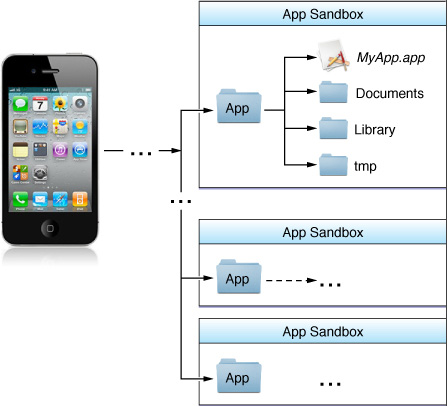
Where You Should Put Your App’s Files
To prevent the syncing and backup processes on iOS devices from taking a long time, be selective about where you place files inside your app’s home directory. Apps that store large files can slow down the process of backing up to iTunes or iCloud. These apps can also consume a large amount of a user's available storage, which may encourage the user to delete the app or disable backup of that app's data to iCloud. With this in mind, you should store app data according to the following guidelines:
Put user data in the <Application_Home>/Documents/. User data is any data that cannot be recreated by your app, such as user documents and other user-generated content.
Handle support files—files your application downloads or generates and can recreate as needed—in one of two ways:
In iOS 5.0 and earlier, put support files in the <Application_Home>/Library/Caches directory to prevent them from being backed up
In iOS 5.0.1 and later, put support files in the <Application_Home>/Library/Application Support directory and apply thecom.apple.MobileBackup extended attribute to them. This attribute prevents the files from being backed up to iTunes or iCloud. If you have a large number of support files, you may store them in a custom subdirectory and apply the extended attribute to just the directory.
Put data cache files in the <Application_Home>/Library/Caches directory. Examples of files you should put in this directory include (but are not limited to) database cache files and downloadable content, such as that used by magazine, newspaper, and map apps. Your app should be able to gracefully handle situations where cached data is deleted by the system to free up disk space.
Put temporary data in the <Application_Home>/tmp directory. Temporary data comprises any data that you do not need to persist for an extended period of time. Remember to delete those files when you are done with them so that they do not continue to consume space on the user’s device.
也就是说,一般从网上下载的那些内容,包括杂志、报纸、视频什么的,都要放在 <Application_Home> /Library/Caches 目录下面
|
<Application_Home>/Library/ |
This directory is the top-level directory for files that are not user data files. You typically put files in one of several standard subdirectories but you can also create custom subdirectories for files you want backed up but not exposed to the user. You should not use this directory for user data files. The contents of this directory (with the exception of the Caches subdirectory) are backed up by iTunes. For additional information about the Library directory, see “The Library Directory Stores App-Specific Files.” |
Library目录下面的内容,也会被被iTunes备份,但是Caches目录除外,也就是说这些网络下载内容文件放在这里是不会被备份的,
|
Caches |
Use this directory to write any app-specific support files that your app can re-create easily. Your app is generally responsible for managing the contents of this directory and for adding and deleting files as needed. In iOS 2.2 and later, the contents of this directory are not backed up by iTunes. In addition, iTunes removes files in this directory during a full restoration of the device. On iOS 5.0 and later, the system may delete the Caches directory on rare occasions when the system is very low on disk space. This will never occur while an app is running. However, you should be aware that iTunes restore is not necessarily the only condition under which the Caches directory can be erased. |
上面写的的比较清楚,Library/Caches目录下,一般情况下是不会被删除的,我理解,也包括stackoverflow网友的证明,应用升级的时候也不会被删除,实际上,应用升级的具体系统操作是这样的:
Files Saved During Application Updates When a user downloads an application update, iTunes installs the update in a new application directory. It then moves the user’s data files from the old installation over to the new application directory before deleting the old installation. Files in the following directories are guaranteed to be preserved during the update process:
- Application_Home/Documents
- Application_Home/Library
Although files in other user directories may also be moved over, you should not rely on them being present after an update.
系统先新建一个应用目录,然后安装一个新版本应用,然后再把旧版本的应用数据拷贝过来,然后再删除旧版本的应用安装目录。
最后注意一下,Library/Caches目录下的数据虽然在一般情况下不会被删除,但是在系统恢复和其他一些罕见的情况下(比如非常底的磁盘空间条件下有可能)会被清除,所以你的程序每次都要检查一些,这些文件都还在不在了,不在的话只能重新下了。
Application_Home/Library/Caches Use this directory to write any application-specific support files that you want to persist between launches of the application or during application updates. Your application is generally responsible for adding and removing these files. It should also be able to re-create these files as needed because iTunes removes them during a full restoration of the device. In iOS 2.2 and later, the contents of this directory are not backed up by iTunes.
参考连接:http://stackoverflow.com/questions/7155964/will-application-home-library-caches-be-clear-on-app-update/7277797#7277797
File System Programming Guide
https://developer.apple.com/library/ios/documentation/FileManagement/Conceptual/FileSystemProgrammingGuide/FileSystemOverview/FileSystemOverview.html#//apple_ref/doc/uid/TP40010672-CH2-SW1
转:https://blog.csdn.net/messyhari/article/details/50481356
iOS开发之如何在用户删除应用后保持一些数据的更多相关文章
- iOS开发--应用设置及用户默认设置——转载
[链接]iOS开发--应用设置及用户默认设置[1.bundlehttp://www.jianshu.com/p/6f2913f6b218 在iphone里面,应用都会在“设置”里面有个专属的应用设置, ...
- iOS开发--应用设置及用户默认设置【2、读取应用中的设置】
在上一节中,我们通过探讨应用的系统设置的基本功能,了解运用bundle捆绑包以及plist文件的基本开发.用户能够使用设置应用来声明他们的偏好设置,那么我们怎样去调用用户所设置的参数呢 ...
- KindEditor的简单使用,以及上传图片预览图片,用户删除图片后的数据处理(重点),以及 BeautifulSoup,shutil两模块了解
KindEditor的简单了解 http://www.cnblogs.com/wupeiqi/articles/6307554.html 简单使用: <div class="comm& ...
- iOS开发--应用设置及用户默认设置【1、bundle的运用】
在iphone里面,应用都会在“设置”里面有个专属的应用设置,选择该菜单界面,用户便可以在其中输入和更改各种选项,协助用户更便捷设置个人喜好与习惯. 在这一节中,希望能通过对捆绑包(bu ...
- iOS开发 首次启动显示用户引导,第二次启动直接进入App,UIScrollView,UIPageControl,NSUserDefaults
首先创建一个引导图的控制器类 UserGuideViewController.h和UserGuideViewController.m #import <UIKit/UIKit.h> #im ...
- iOS开发小技巧--适当的清空模型中的某个数据,达到自己的需求,记得最后将数据还原(百思项目评论页面处理最热评论)
一.项目需求,显示所有贴的时候,需要显示最热评论,但是点击进入相应帖子后,最热评论的label不要显示,如图: 解决方案 -- 该暂时保存的暂时保存,该清空的清空 ...
- django:删除表后怎么重新数据迁移生成表
1.将对应app下的migrations文件夹下面的除了__init__.py文件外全部删除 2.delete from django_migrations where app='app_name' ...
- iOS开发中的4种数据持久化方式【一、属性列表与归档解档】
iOS中的永久存储,也就是在关机重新启动设备,或者关闭应用时,不会丢失数据.在实际开发应用时,往往需要持久存储数据的,这样用户才能在对应用进行操作后,再次启动能看到自己更改的结果与痕迹.ios开发中, ...
- 文顶顶iOS开发博客链接整理及部分项目源代码下载
文顶顶iOS开发博客链接整理及部分项目源代码下载 网上的iOS开发的教程很多,但是像cnblogs博主文顶顶的博客这样内容图文并茂,代码齐全,示例经典,原理也有阐述,覆盖面宽广,自成系统的系列教程 ...
随机推荐
- springboot整合tkmybatis
tkmybatis是什么? tkmybatis是为了简化mybatis单表的增删改查而诞生的,极其方便的使用MyBatis单表的增删改查,在使用mybatis单表增删改查时,可以直接调用tkmybat ...
- 解决问题 inner element must either be a resource reference or empty.
-Q: 错误<item>内部元素必须是资源引用或空 升级Andriod Studio之后编译发现如下错误 Android resource compilation failed ***\a ...
- 【MySql】Explain笔记
Explain -- 使用 Explain + SQL 分析执行计划: id:表示此表的执行优先级 id相同,表的执行顺序依次从上往下: id不同,并且递增,id值越大执 ...
- Android笔记(四十八) Android中的资源访问——SDCard
访问存储在SD卡中的文件 使用 Environment.getExternalStorageState(); 判断是否存在内存卡 使用 Environment.getExternalStorageDi ...
- Java重试机制
重试作用: 对于重试是有场景限制的,不是什么场景都适合重试,比如参数校验不合法.写操作等(要考虑写是否幂等)都不适合重试. 远程调用超时.网络突然中断可以重试.在微服务治理框架中,通常都有自己的重试与 ...
- [极客-Linux] 05 系统调用
分配内存的系统调用 1)brk 小内存 2)mmap 大内存 sigaction 注册信号处理函数 进程间通信: 1)消息队列,在内核中,msgget 创建 2)共享内存,shmget 内核源代码 ...
- 交互式计算引擎MOLAP篇
交互式计算引擎MOLAP篇 摘自:<大数据技术体系详解:原理.架构与实践> MOLAP是一种通过预计算cube方式加速查询的OLAP引擎,它的核心思想是“空间换时间”,典型代表包括Drui ...
- python爬有道翻译
在有道翻译页面中打开开发者工具,在Headers板块找到Request URL以及相应的data. import urllib.request import urllib.parse import j ...
- python网络-静态Web服务器案例(29)
一.静态Web服务器案例代码static_web_server.py # coding:utf-8 # 导入socket模块 import socket # 导入正则表达式模块 import re # ...
- 一道简单的广搜题:Knight Moves
这本来是要用双向宽度搜索的,但是我用简单的广搜也成功了,L<=300,也不会超时?? 另外一个问题就是,我本来想用原来的代码交,结果80分??将边界条件从小于L改成小于等于L,就对了.我可能不会 ...