
python 爬虫之beautifulsoup(bs4)环境准备
环境准备:

bs4安装方法:https://blog.csdn.net/Bibabu135766/article/details/81662981

 requests安装方法:https://blog.csdn.net/douguangyao/article/details/77922973

https://pypi.org/project/requests/#files

卸载pip:python -m pip uninstall pip

安装pip:https://pypi.python.org/pypi/pip#downloads
bs4用法介绍:Beautiful Soup和 lxml 一样, 也是一个HTML/XML的解析器,主要的功能也是如何解析和提取 HTML/XML 数据。
https://www.cnblogs.com/amou/p/9184614.html
https://beautifulsoup.readthedocs.io/zh_CN/latest/
#!/usr/bin/env python

# -*- coding:utf- -*-

from bs4 import BeautifulSoup

html = '''

<html><head><title>The Dormouse's story</title></head>

<body>

<p class="title" name="dromouse"><b>The Dormouse's story</b></p>

<p class="story">Once upon a time there were three little sisters; and their names were

<a href="http://example.com/elsie" class="sister" id="link1"><!-- Elsie --></a>,

<a href="http://example.com/lacie" class="sister" id="link2">Lacie</a> and

<a href="http://example.com/tillie" class="sister" id="link3">Tillie</a>;

and they lived at the bottom of a well.</p>

<p class="story">...</p>

'''

#创建Beautiful Soup 对象

soup = BeautifulSoup(html,'lxml')

print soup,"--------------------------------"

# #格式化输出soup对象的内容

# print soup.prettify()

#四大对象种类 Tag、NavigableString、BeautifulSoup、Comment

#一、Tag通俗点讲就是 HTML 中的一个个标签

# print soup.html

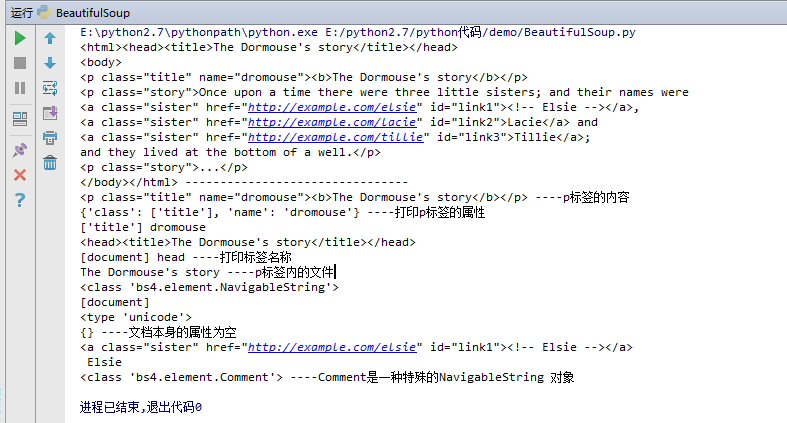
print soup.p,'----p标签的内容'

print soup.p.attrs,'----打印p标签的属性'

print soup.p['class'],soup.p['name']

print soup.head

print soup.name,soup.head.name,'----打印标签名称'

#二、NavigableString 要想获取标签内部的文字怎么办呢?很简单,用 .string 即可

print soup.p.string,'----p标签内的文字'

print type(soup.p.string)

#三、BeautifulSoup 对象表示的是一个文档的内容。大部分时候,可以把它当作 Tag 对象,是一个特殊的 Tag,我们可以分别获取它的类型,名称,以及属性

print soup.name

print type(soup.name)

print soup.attrs,'----文档本身的属性为空'

#四、Comment 对象是一个特殊类型的 NavigableString 对象,其输出的内容不包括注释符号。

print soup.a

print soup.a.string

print type(soup.a.string),'----Comment是一种特殊的NavigableString 对象'
打印结果如下:
BeautifulSoup4查找、正则使用:
#!/usr/bin/env python

# -*- coding:utf- -*-

from bs4 import BeautifulSoup

import resoup = BeautifulSoup(html,'lxml')

#print soup,'------------html文档--------------'

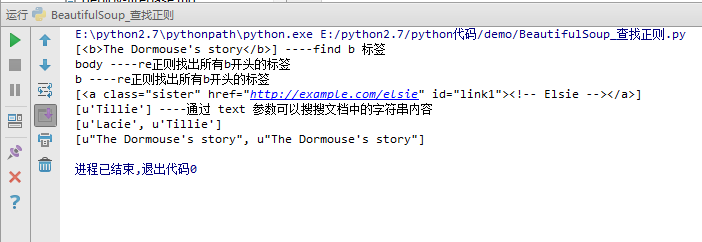
print soup.find_all('b'),'----find b 标签'

for tag in soup.find_all(re.compile('^b')):

  print tag.name,'----re正则找出所有b开头的标签'

print soup.find_all(id='link1')

print soup.find_all(text='Tillie'),'----通过 text 参数可以搜搜文档中的字符串内容'

print soup.find_all(text=["Tillie",'Lacie'])

print soup.find_all(text=re.compile('Dormouse'))
打印结果如下:
-----------------------------------------------------------------------------------------------------------------------------------------------------------------
requests用法介绍:
http://docs.python-requests.org/zh_CN/latest/user/quickstart.html
https://cuiqingcai.com/2556.html
python 爬虫之beautifulsoup(bs4)环境准备的更多相关文章
- 使用Python爬虫库BeautifulSoup遍历文档树并对标签进行操作详解(新手必学)
为大家介绍下Python爬虫库BeautifulSoup遍历文档树并对标签进行操作的详细方法与函数下面就是使用Python爬虫库BeautifulSoup对文档树进行遍历并对标签进行操作的实例,都是最 ...
- Python爬虫——用BeautifulSoup、python-docx爬取廖雪峰大大的教程为word文档
版权声明:本文为博主原创文章,欢迎转载,并请注明出处.联系方式:460356155@qq.com 廖雪峰大大贡献的教程写的不错,写了个爬虫把教程保存为word文件,供大家方便下载学习:http://p ...
- 【Python爬虫】BeautifulSoup网页解析库
BeautifulSoup 网页解析库 阅读目录 初识Beautiful Soup Beautiful Soup库的4种解析器 Beautiful Soup类的基本元素 基本使用 标签选择器 节点操作 ...
- Python爬虫之BeautifulSoup的用法
之前看静觅博客,关于BeautifulSoup的用法不太熟练,所以趁机在网上搜索相关的视频,其中一个讲的还是挺清楚的:python爬虫小白入门之BeautifulSoup库,有空做了一下笔记: 一.爬 ...
- python爬虫入门--beautifulsoup
1,beautifulsoup的中文文档:https://www.crummy.com/software/BeautifulSoup/bs4/doc.zh/ 2, from bs4 import Be ...
- python爬虫之Beautifulsoup学习笔记
相关内容: 什么是beautifulsoup bs4的使用 导入模块 选择使用解析器 使用标签名查找 使用find\find_all查找 使用select查找 首发时间:2018-03-02 00:1 ...
- Python爬虫系列-BeautifulSoup详解
安装 pip3 install beautifulsoup4 解析库 解析器 使用方法 优势 劣势 Python标准库 BeautifulSoup(markup,'html,parser') Pyth ...
- Python爬虫实践~BeautifulSoup+urllib+Flask实现静态网页的爬取
爬取的网站类型: 论坛类网站类型 涉及主要的第三方模块: BeautifulSoup:解析.遍历页面 urllib:处理URL请求 Flask:简易的WEB框架 介绍: 本次主要使用urllib获取网 ...
- Python爬虫之Beautifulsoup模块的使用
一 Beautifulsoup模块介绍 Beautiful Soup 是一个可以从HTML或XML文件中提取数据的Python库.它能够通过你喜欢的转换器实现惯用的文档导航,查找,修改文档的方式.Be ...
随机推荐
- Delphi连接MySql(待测试验证,使用mysql.pas未通过)
要在一个Delphi程序中调用Mysql数据库,查到有个资料如下,待验证,验证后会给出结果.暂时做个标记 已经验证,验证日期:2018.6.18 验证结果:不可行 验证工具:XE7,mysql5.5. ...
- MySQL索引设计需要考虑哪些因素?
索引小知识 篇幅有限,索引的基本知识我们就不赘述了,在此,我们尝试说明其中的一个小点-----B+树与B树的区别到底是什么. InnoDB是使用B+树来实现其索引功能的.在B+树中,内节点(非叶子节点 ...
- selenium-弹窗操作(八)
本次以笔者公告栏的 打赏 弹窗为例 对弹窗中的一些操作进行封装后,在测试中使用 作用:减少对弹窗反复操作时进行定位的麻烦,以后使用中都直接调用即可达到目的 # coding=utf-8 from se ...
- MyBatis批量修改操作
1.需求 后台管理页面,查询频道列表,需要批量修改频道的状态,批量上线和下线 2.MyBatis配置 这是mysql的配置,注意需要加上&allowMultiQueries=true配置 jd ...
- Python ——报错集锦
https://blog.csdn.net/weixin_42660771/article/details/80990665 错误(1):SyntaxError:'return' outside fu ...
- Linux 文件权限管理
1.文件权限的概述 在Linux系统下,使用权限来保护资源的安全将是一种不错的选择.系统中每个文件的权限都有可读(r).可写(w)和可执行(x)这三种权限,它们分别对应权限数值4.2 和1.系统为每个 ...
- U盘中的快捷方式解析
很多人都有使用绿色软件的习惯,在这里我简单称其为Portable App 将这些软甲放到U盘中随身携带,便于我们使用更加符合自身习惯的功能软件. 相信习惯将软件放到U盘启动都会碰到一个问题,就是每次打 ...
- 爬虫之Requests&beautifulsoup
网络爬虫(又被称为网页蜘蛛,网络机器人,在FOAF社区中间,更经常的称为网页追逐者),是一种按照一定的规则,自动地抓取万维网信息的程序或者脚本.另外一些不常使用的名字还有蚂蚁.自动索引.模拟程序或者蠕 ...
- mmap:速度快+整块操作
mmap使得可以将设备内存映射到用户空间,从而使得用户程序获得访问硬件的能力,mmap的动作需要由内核中的驱动来实现.在使用mmap映射后,用户程序对给定范围的内存的读写就变成了对设备内存的读写,也就 ...
- 授权普通非DBA用户可以有权限查看执行计划的方法
drop table PLAN_TABLE; 删除原plan表 执行ORACLE自带的创建脚本 @?/rdbms/admin/utlxplan.sql 创建同义词 create or re ...