
Bert文本分类实践(一):实现一个简单的分类模型
写在前面
文本分类是nlp中一个非常重要的任务,也是非常适合入坑nlp的第一个完整项目。虽然文本分类看似简单,但里面的门道好多好多,作者水平有限,只能将平时用到的方法和trick在此做个记录和分享,希望大家看过都能有所收获,享受编程的乐趣。
第一部分
模型
Bert模型是Google在2018年10月发布的语言表示模型,一经问世在NLP领域横扫了11项任务的最优结果,可谓风头一时无二。有关于Bert中transformer的模型细节,推荐看这篇。在此不做赘述。
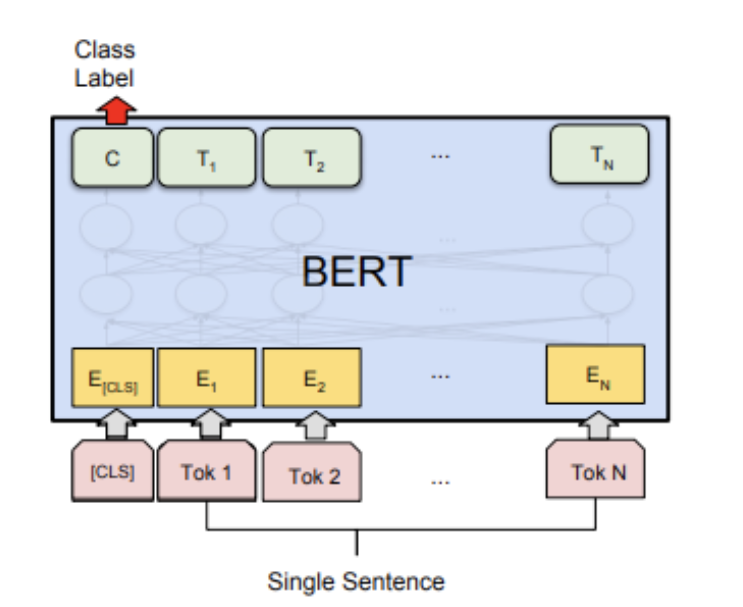
图一:bert分类模型结构
Bert文本分类模型常见做法为将bert最后一层输出的第一个token位置(CLS位置)当作句子的表示,后接全连接层进行分类。模型很简单,我们直接看代码!
第二部分
pytorch代码实现
# -*- coding:utf-8 -*-

# bert文本分类baseline模型

# model: bert

# date: 2021.10.10 10:01

import os

import numpy as np

import pandas as pd

import torch

import torch.nn as nn

import torch.utils.data as Data

import torch.optim as optim

import transformers

from transformers import AutoModel, AutoTokenizer

import matplotlib.pyplot as plt

train_curve = []

device = torch.device('cuda' if torch.cuda.is_available() else 'cpu')

# 定义一些参数,模型选择了最基础的bert中文模型

batch_size = 2

epoches = 100

model = "bert-base-chinese"

hidden_size = 768

n_class = 2

maxlen = 8

# data,构造一些训练数据

sentences = ["我喜欢打篮球", "这个相机很好看", "今天玩的特别开心", "我不喜欢你", "太糟糕了", "真是件令人伤心的事情"]

labels = [1, 1, 1, 0, 0, 0]  # 1积极, 0消极.

# word_list = ' '.join(sentences).split()

# word_list = list(set(word_list))

# word_dict = {w: i for i, w in enumerate(word_list)}

# num_dict = {i: w for w, i in word_dict.items()}

# vocab_size = len(word_list)

# 将数据构造成bert的输入格式

# inputs_ids: token的字典编码

# attention_mask:长度与inputs_ids一致,真实长度的位置填充1,padding位置填充0

# token_type_ids: 第一个句子填充0,第二个句子句子填充1

class MyDataset(Data.Dataset):

  def __init__(self, sentences, labels=None, with_labels=True,):

    self.tokenizer = AutoTokenizer.from_pretrained(model)

    self.with_labels = with_labels

    self.sentences = sentences

    self.labels = labels

  def __len__(self):

    return len(sentences)

  def __getitem__(self, index):

    # Selecting sentence1 and sentence2 at the specified index in the data frame

    sent = self.sentences[index]

    # Tokenize the pair of sentences to get token ids, attention masks and token type ids

    encoded_pair = self.tokenizer(sent,

                    padding='max_length',  # Pad to max_length

                    truncation=True,       # Truncate to max_length

                    max_length=maxlen,

                    return_tensors='pt')  # Return torch.Tensor objects

    token_ids = encoded_pair['input_ids'].squeeze(0)  # tensor of token ids

    attn_masks = encoded_pair['attention_mask'].squeeze(0)  # binary tensor with "0" for padded values and "1" for the other values

    token_type_ids = encoded_pair['token_type_ids'].squeeze(0)  # binary tensor with "0" for the 1st sentence tokens & "1" for the 2nd sentence tokens

    if self.with_labels:  # True if the dataset has labels

      label = self.labels[index]

      return token_ids, attn_masks, token_type_ids, label

    else:

      return token_ids, attn_masks, token_type_ids

train = Data.DataLoader(dataset=MyDataset(sentences, labels), batch_size=batch_size, shuffle=True, num_workers=1)

# model

class BertClassify(nn.Module):

  def __init__(self):

    super(BertClassify, self).__init__()

    self.bert = AutoModel.from_pretrained(model, output_hidden_states=True, return_dict=True)

    self.linear = nn.Linear(hidden_size, n_class) # 直接用cls向量接全连接层分类

    self.dropout = nn.Dropout(0.5)

  def forward(self, X):

    input_ids, attention_mask, token_type_ids = X[0], X[1], X[2]

    outputs = self.bert(input_ids=input_ids, attention_mask=attention_mask, token_type_ids=token_type_ids) # 返回一个output字典

    # 用最后一层cls向量做分类

    # outputs.pooler_output: [bs, hidden_size]

    logits = self.linear(self.dropout(outputs.pooler_output))

    return logits

bc = BertClassify().to(device)

optimizer = optim.Adam(bc.parameters(), lr=1e-3, weight_decay=1e-2)

loss_fn = nn.CrossEntropyLoss()

# train

sum_loss = 0

total_step = len(train)

for epoch in range(epoches):

  for i, batch in enumerate(train):

    optimizer.zero_grad()

    batch = tuple(p.to(device) for p in batch)

    pred = bc([batch[0], batch[1], batch[2]])

    loss = loss_fn(pred, batch[3])

    sum_loss += loss.item()

    loss.backward()

    optimizer.step()

    if epoch % 10 == 0:

      print('[{}|{}] step:{}/{} loss:{:.4f}'.format(epoch+1, epoches, i+1, total_step, loss.item()))

  train_curve.append(sum_loss)

  sum_loss = 0

# test

bc.eval()

with torch.no_grad():

  test_text = ['我不喜欢打篮球']

  test = MyDataset(test_text, labels=None, with_labels=False)

  x = test.__getitem__(0)

  x = tuple(p.unsqueeze(0).to(device) for p in x)

  pred = bc([x[0], x[1], x[2]])

  pred = pred.data.max(dim=1, keepdim=True)[1]

  if pred[0][0] == 0:

    print('消极')

  else:

    print('积极')

pd.DataFrame(train_curve).plot() # loss曲线
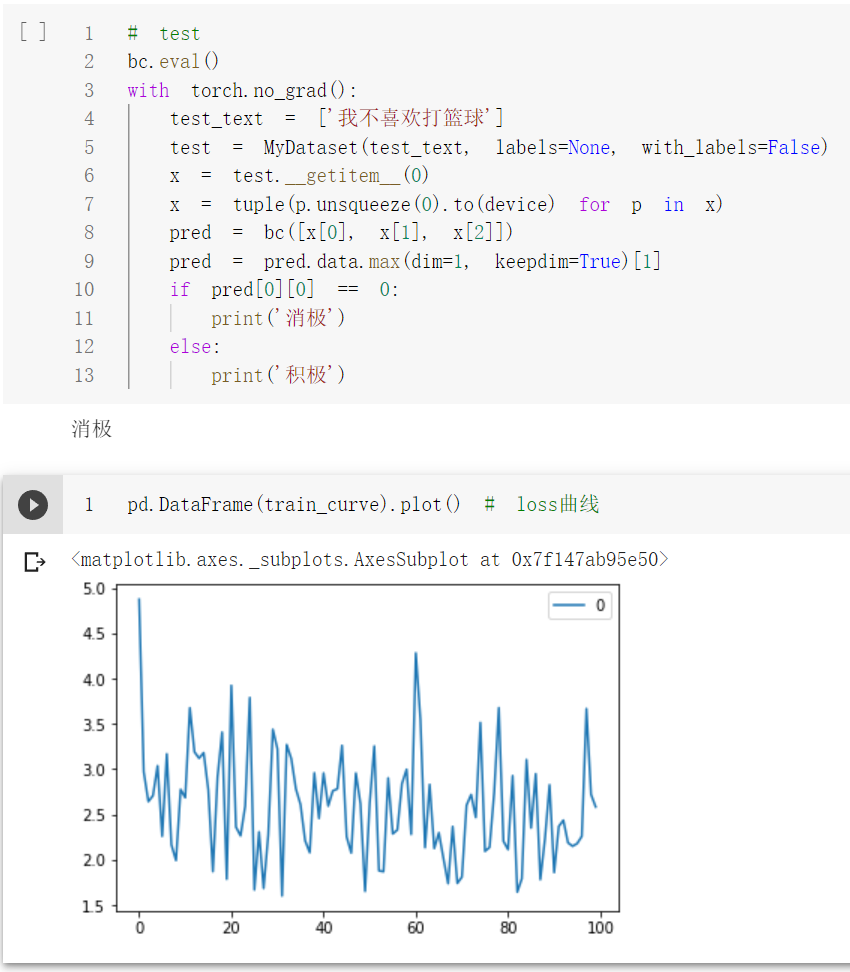
测试单条样本结果:
代码链接:
jupyter版本:https://github.com/PouringRain/blog_code/blob/main/nlp/bert_classify.ipynb
py版本:https://github.com/PouringRain/blog_code/blob/main/nlp/bert_classify.py
喜欢的话,给萌新的github仓库一颗小星星哦……^ _^
Bert文本分类实践(一):实现一个简单的分类模型的更多相关文章
- 2,turicreate入门 - 一个简单的回归模型
turicreate入门系列文章目录 1,turicreate入门 - jupyter & turicreate安装 2,turicreate入门 - 一个简单的回归模型 3,turicrea ...
- 使用 Filter 完成一个简单的权限模型
****对访问进行权限控制: 有权限则可以访问, 否则提示: 没有对应的权限, 请 返回其访问者的权限可以在manager那进行设置:
- 使用JAVA实现的一个简单IOC注入实例
https://blog.csdn.net/echoshinian100/article/details/77977823 欲登高而望远,勿筑台于流沙 RSS订阅 原 使用JAVA实现的一个简单IOC ...
- Bert文本分类实践(二):魔改Bert,融合TextCNN的新思路
写在前面 文本分类是nlp中一个非常重要的任务,也是非常适合入坑nlp的第一个完整项目.虽然文本分类看似简单,但里面的门道好多好多,博主水平有限,只能将平时用到的方法和trick在此做个记录和分享 ...
- Bert文本分类实践(三):处理样本不均衡和提升模型鲁棒性trick
目录 写在前面 缓解样本不均衡 模型层面解决样本不均衡 Focal Loss pytorch代码实现 数据层面解决样本不均衡 提升模型鲁棒性 对抗训练 对抗训练pytorch代码实现 知识蒸馏 防止模 ...
- C++ 容器的综合应用的一个简单实例——文本查询程序
C++ 容器的综合应用的一个简单实例——文本查询程序 [0. 需求] 最近在粗略学习<C++ Primer 4th>的容器内容,关联容器的章节末尾有个很不错的实例.通过实现一个简单的文本查 ...
- 一个简单的代码生成器(T4文本模板运用)
说要写这篇文章有一段时间了,但因为最近各方面的压力导致心情十二分的不好,下班后往往都洗洗睡了.今天痛定思痛,终于把这件拖了很久的事做了.好,不废话了,现在看看"一个简单的代码生成器" ...
- python使用wxPython创建一个简单的文本编辑器。
ubuntu下通过'sudo apt-get install python-wxtools'下载wxPython.load和save函数用于加载和保存文件内容,button通过Bind函数绑定这两个函 ...
- 【小白学PyTorch】15 TF2实现一个简单的服装分类任务
[新闻]:机器学习炼丹术的粉丝的人工智能交流群已经建立,目前有目标检测.医学图像.时间序列等多个目标为技术学习的分群和水群唠嗑的总群,欢迎大家加炼丹兄为好友,加入炼丹协会.微信:cyx64501661 ...
随机推荐
- hive表导出到mysql报错
Exception in thread "main" java.lang.NoClassDefFoundError: org/json/JSONObject hadoop@hado ...
- Servlet、ServletContext与ServletConfig的详解及区别
Servlet.ServletContext与ServletConfig的详解及区别 一.Servlet详解 Servlet是一个interface,全局限定名:javax.servlet.Servl ...
- JAVA简单精确计算工具类
1 public class ArithUtil { 2 3 // 默认除法运算精度 4 private static final int DEF_DIV_SCALE = 10; 5 6 privat ...
- [题解] SPOJ GSS1 - Can you answer these queries I
[题解] SPOJ GSS1 - Can you answer these queries I · 题目大意 要求维护一段长度为 \(n\) 的静态序列的区间最大子段和. 有 \(m\) 次询问,每次 ...
- TFRecord读写简介+Demo 基于Ubuntu18.04+Tensorflow1.12 无WARNING
简介 TFRecord是TensorFlow官方推荐使用的数据格式化存储工具. 它规范了数据的读写方式. 只要生成一次TFRecord,之后的数据读取和加工处理的效率都会得到提高. 将图片转换成TFR ...
- Spring笔记(4)
集成Web环境 1.步骤 导入Spring-web坐标 <!-- spring-web--> <dependency> <groupId>org.springfra ...
- shell 字符串判空
2021-09-01 1. 字符串判空主要用到两个参数 -z 判断字符串为空否 -n 判断字符串不为空 2. 实例 #!/bin/bash PID=`date` if [ -z "$PID& ...
- Linux系统的vsftpd服务配置
概述: FTP ( 文件传输协议 ) 是 INTERNET 上仍常用的最老的网络协议之一 , 它为系统提供了通过网络与远程服务器进行传输的简单方法FTP 服务器包的名称为 VSFTPD , 它代表 V ...
- Java变量命名规范
java命名规范 所有方法.变量.类名:见名知意 类成员变量:首字母小写.驼峰原则: 例如:lastName 第一个单词首字母小写,其余首字母大写 局部变量:首字母小写.驼峰原则 类名: 首字母小写. ...
- 性能测试工具JMeter 基础(九)—— 测试元件: 逻辑控制器之交替控制器
交替控制器:根据被控制器触发执行次数,去依次执行控制器下的子节点(逻辑控制器.采样器),可以由线程组的线程数.循环次数.逻辑控制器触发. 交替控制器(lnterleave Controller) 简单 ...