
Android布局控件
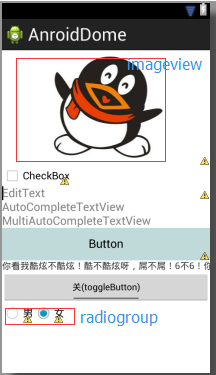
 <LinearLayout xmlns:android="http://schemas.android.com/apk/res/android"

     android:layout_width="match_parent"

     android:layout_height="match_parent"

     android:orientation="vertical"

     android:gravity="center_vertical"

     >

     <ImageView

         android:id="@+id/imageView1"

         android:layout_width="match_parent"

         android:layout_height="wrap_content"

         android:src="@drawable/qq_image" />

     <CheckBox

         android:id="@+id/checkBox1"

         android:layout_width="wrap_content"

         android:layout_height="wrap_content"

         android:text="CheckBox" />

     <EditText

         android:id="@+id/editText1"

         android:layout_width="match_parent"

         android:layout_height="wrap_content"

         android:hint="EditText"

         android:ems="10" >

         <requestFocus />

     </EditText>

     <AutoCompleteTextView

         android:id="@+id/autoCompleteTextView1"

         android:layout_width="match_parent"

         android:layout_height="wrap_content"

         android:completionThreshold="2"

         android:hint="@string/editText1_name" >

     </AutoCompleteTextView>

     <MultiAutoCompleteTextView

         android:id="@+id/multiAutoCompleteTextView1"

         android:layout_width="match_parent"

         android:layout_height="wrap_content"

         android:completionThreshold="2"

         android:hint="@string/editText2_name" >

     </MultiAutoCompleteTextView>

     <Button

         android:id="@+id/button1"

         android:layout_width="match_parent"

         android:layout_height="50dp"

         android:background="#C0D9D9"

         android:text="Button" />

     <com.example.anroiddome.MyTextView

         android:id="@+id/textView1"

         android:layout_width="match_parent"

         android:layout_height="wrap_content"

         android:ellipsize="marquee"

         android:focusable="true"

         android:focusableInTouchMode="true"

         android:singleLine="true"

         android:text="@string/view_name" />

     <ToggleButton

         android:id="@+id/toggleButton"

         android:layout_width="match_parent"

         android:layout_height="wrap_content"

         android:checked="false"

         android:textOff="关(toggleButton)"

         android:textOn="开(toggleButton)" />

     <RadioGroup

         android:id="@+id/radioGroup1"

         android:layout_width="wrap_content"

         android:layout_height="wrap_content"

         android:orientation="horizontal"

         >

         <RadioButton

             android:id="@+id/radio0"

             android:layout_width="match_parent"

             android:layout_height="wrap_content"

             android:text="男" />

         <RadioButton

             android:id="@+id/radio1"

             android:layout_width="match_parent"

             android:layout_height="wrap_content"

             android:checked="true"

             android:text="女" />

     </RadioGroup>

 </LinearLayout>
整理于http://naotu.baidu.com/file/e5880b84b1a906838116f7a45f58de78
Android布局控件的更多相关文章
- Mono for Android布局控件属性小结
1. layout_weight 用于给一个线性布局中的诸多视图的重要度赋值. 所有的视图都有一个layout_weight值,默认为零,意思是需要显示 多大的视图就占据多大的屏幕空 间.若赋一个高于 ...
- Android 布局控件——滚动条视图,日期,时间
今天学长讲了一些控件,比较强的那种控件. 刚开始讲了图片,但是图片我前面写过了就跳过. 滚动条牛牛们应该很熟悉,也常用哈. 这是垂直的滚动条视图哈 一起来用吧! <ScrollView andr ...
- Android:控件布局(相对布局)RelativeLayout
RelativeLayout是相对布局控件:以控件之间相对位置或相对父容器位置进行排列. 相对布局常用属性: 子类控件相对子类控件:值是另外一个控件的id android:layout_above-- ...
- Android:控件布局(线性布局)LinearLayout
LinearLayout是线性布局控件:要么横向排布,要么竖向排布 决定性属性:必须有的! android:orientation:vertical (垂直方向) .horizontal(水平方向) ...
- 【Android】7.1 布局控件常用的公共属性
分类:C#.Android.VS2015: 创建日期:2016-02-10 一.简介 Android应用程序中的布局控件都是容器控件,用于控制子元素的排列和放置方式.Android提供的布局控件有: ...
- Android:控件布局(相对布局)RelativeLayout(转)
相对布局常用属性: 子类控件相对子类控件:值是另外一个控件的id android:layout_above----------位于给定DI控件之上android:layout_below ------ ...
- Android之控件使用
Android系统为我们提供了大量的控件,例如:开关控件.单选按钮.多选按钮.单选菜单等等,那么这些控件如何使用呢?本篇我将带领大家一道学习一下如何使用这些控件.所谓无图无真相,先让大家看一下效果图: ...
- android 基础控件(EditView、SeekBar等)的属性及使用方法
android提供了大量的UI控件,本文将介绍TextView.ImageView.Button.EditView.ProgressBar.SeekBar.ScrollView.WebView ...
- Android基本控件之Menus
在我们的手机中有很多样式的菜单,比如:我们的短信界面,每条短信,我们长按都会出现一个菜单,还有很多的种类.那么现在,我们就来详细的讨论一下安卓中的菜单 Android的控件中就有这么一个,叫做Menu ...
随机推荐
- git add和被ignore的文件
如果有如下的目录结构: workspace tree | --------------------- | | hello.c ...
- 1、Servlet 2、ServletConfig 3、ServletContext 4、HttpUrlConnection
1.Servlet 2.ServletConfig 3.ServletContext 4.HttpUrlConnection 07. 五 / J2EE / 没有评论 一.第一个Servlet的编写 ...
- Orchard开源ASP.NET MVC CMS简介
项目简介: Orchard CMS 是一个免费的开放源代码内容管理系统,让用户可在 Microsoft ASP.NET MVC 平台上快速创建网站.它基于灵活的扩展性框架构建,使开发人员和定制人员可通 ...
- vimdiff: 使用Vim中强大的文件diff功能[转]
学习了一段时间的Vim,直到最近才发现Vim的diff功能是如此方便,对比代码变化再也不用到处去找diff软件或者依靠版本控制的diff了.强大的Vim. 下图是我在macVim中的diff效果. 下 ...
- python笔记之调用系统命令
python笔记之调用系统命令 目前我使用到的python中执行cmd的方式有三种 使用os.system("cmd") 该方法在调用完shell脚本后,返回一个16位的二进制数, ...
- dreamweaver批量去除空格,空行
制作网店的时候,发现有空行,或者空格.如果数量比较少,可以手动清除.如果多的话,可以使用dreamweaver批量去除.方法如下: 第一步,用正则表达式删除所有空白行(其实这一步不一定要做,我只是为了 ...
- javaScript中小数取整,四种方法的比较
1.parseInt:只取整数位例如:parseInt(3.7) 取整结果为:3parseInt(-1.1) 取整结果为:-1 2.Math.floor :向下去整,取大的整数例如:Math.floo ...
- Dropdownlist的onchange事件应用
function selectDpList(dp) { var sIndex = dp.selectedIndex;//返回选中是第几项 0,1.... var sText = dp.options[ ...
- g++ error: expected ‘)’ before ‘*’ token
原本*号前面的类型是我用typedef自定义的类型的,MyType* const p: 发生这样的错误是,编译器根本不知道MyType是什么东西,这是我在C++多重继承中遇到的.MyType是我在基类 ...
- Summary Ranges 解答
Question Given a sorted integer array without duplicates, return the summary of its ranges. For exam ...