
jQuery_完成表单注册检验
在校验表单的时候会很麻烦,但是jq可以用很简单的方法来检验,即使用validate。
原表单:
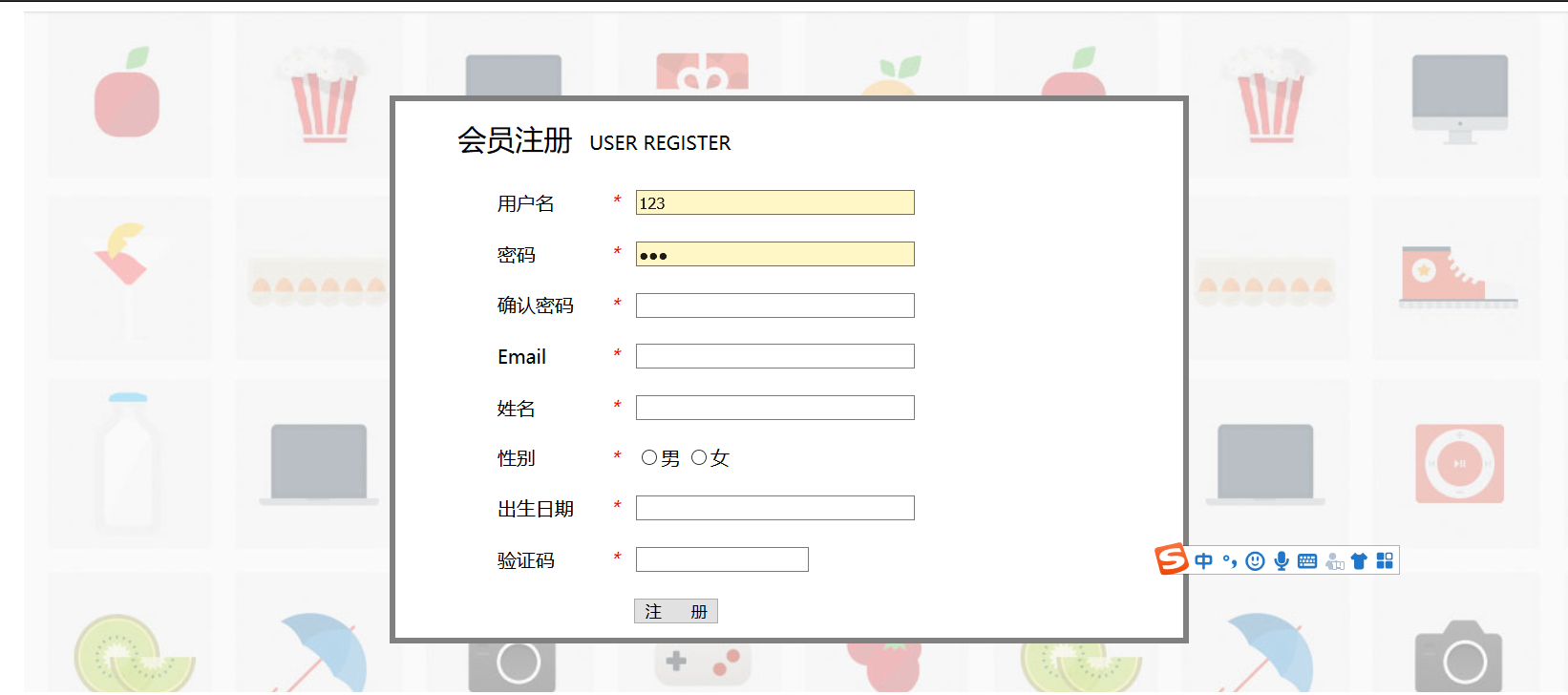
代码
<!DOCTYPE html>
<html>
<head>
<meta charset="UTF-8">
<title>网站注册页面</title>
<style>
#contanier{
border: 0px solid white;
width: 1300px;
margin: auto;
} #top{
border: 0px solid white;
width: 100%;
height: 50px;
}
#menu{
border: 0px solid white;
height: 40px;
background-color: black;
padding-top: 10px;
margin-bottom: 15px;
margin-top: 10px;
}
.top{
border: 0px solid white;
width: 405px;
height: 100%;
float: left;
padding-left: 25px;
}
#top1{
padding-top: 15px;
}
#bottom{
margin-top: 13px;
text-align: center;
} #form{
height: 500px;
padding-top: 70px;
background-image: url(img/regist_bg.jpg);
margin-bottom: 10px;
}
a{
text-decoration: none;
} label.error{
padding-left: 30px;
font-family:georgia;
font-size: 15px;
font-style: normal;
color: red;
} label.success{
background:url(img/checked.gif) no-repeat 10px 3px;
padding-left: 30px;
} #father{
border: 0px solid white;
padding-left: 307px;
} #form2{
border: 5px solid gray;
width: 660px;
height: 450px;
} </style>
<script type="text/javascript" src="js/jquery-1.8.3.js"></script>
<!-- validate.js是建立在jQuery之上的,因此需要先导入jQuery的类库 -->
<script type="text/javascript" src="js/jquery.validate.min.js"></script>
<!-- 导入jQuery的类库 -->
<script type="text/javascript" src="js/messages_zh.js"></script>
<!-- 导入国家化处理类库 -->
<!-- 顺序必须先导入jQuery的类库再导入validate和国际化处理的类库 -->
<script>
$(function(){
$("#registForm").validate({
rules:{
user:{
required:true,
minlength:3
},
password:{
required:true,
digits:true,
minlength:6
},
repassword:{
required:true,
equalTo:"[name='password']"
},
email:{
required:true,
email:true
},
username:{
required:true,
maxlength:5
},
sex:{
required:true
}
},
messages:{
user:{
required:"用户名不为空",
minlength:"最小长度为3"
},
password:{
required:"密码不为空",
minlength:"最小长度为6",
digits:"密码必须为数字"
},
repassword:{
required:"确认密码不能为空",
equalTo:"与之前的密码不相等" },
email:{
required:"邮箱不为空",
email:"邮箱格式不正确"
},
username:{
required:"用户名不为空",
maxlength:"最大长度为5"
},
sex:{
required:"性别不为空"
}
},
errorElement:"label",<!--用来创建错误提示信息标签 validate插件默认的就是label-->
success:function(label){<!-- 验证成功后执行的回调方法-->
//label指向上面错误提示信息的标签label
label.text(" ")//将文本内容清空
.addClass("success");//添加自己定义的success类 } }); });
</script>
</head>
<body>
<div id="contanier">
<div id="form">
<form action="#" method="get" id="registForm">
<div id="father">
<div id="form2">
<table border="0px" width="100%" height="100%" align="center" cellpadding="0px" cellspacing="0px" bgcolor="white">
<tr>
<td colspan="2" >
<font size="5">会员注册</font> USER REGISTER
</td>
</tr>
<tr>
<td width="180px">
<label for="user" >用户名</label>
</td>
<td>
<em style="color: red;">*</em> <input type="text" name="user" size="35px" id="user"/>
</td>
</tr>
<tr>
<td>
密码
</td>
<td>
<em style="color: red;">*</em> <input type="password" name="password" size="35px" id="password" />
</td>
</tr>
<tr>
<td>
确认密码
</td>
<td>
<em style="color: red;">*</em> <input type="password" name="repassword" size="35px"/>
</td>
</tr>
<tr>
<td>
</td>
<td>
<em style="color: red;">*</em> <input type="text" name="email" size="35px" id="email"/>
</td>
</tr>
<tr>
<td>
姓名
</td>
<td>
<em style="color: red;">*</em> <input type="text" name="username" size="35px"/>
</td>
</tr>
<tr>
<td>
性别
</td>
<td>
<span style="margin-right: 155px;">
<em style="color: red;">*</em> <input type="radio" name="sex" value="男"/>男
<input type="radio" name="sex" value="女"/>女<em></em>
<label for="sex" class="error" style="diaplay:none"></label>
</span> </td>
</tr>
<tr>
<td>
出生日期
</td>
<td>
<em style="color: red;">*</em> <input type="text" name="birthday" size="35px"/>
</td>
</tr>
<tr>
<td>
验证码
</td>
<td>
<em style="color: red;">*</em> <input type="text" name="yanzhengma" />
</td>
</tr>
<tr>
<td colspan="2">
<input type="submit" value="注 册" height="50px"/>
</td>
</tr>
</table>
</div>
</div>
</form>
</div>
</div>
</body>
</html>
注意:
第一注意导入类库的顺序,
第二注意格式的问题,虽然写法简单,但是不要写错逗号
效果:
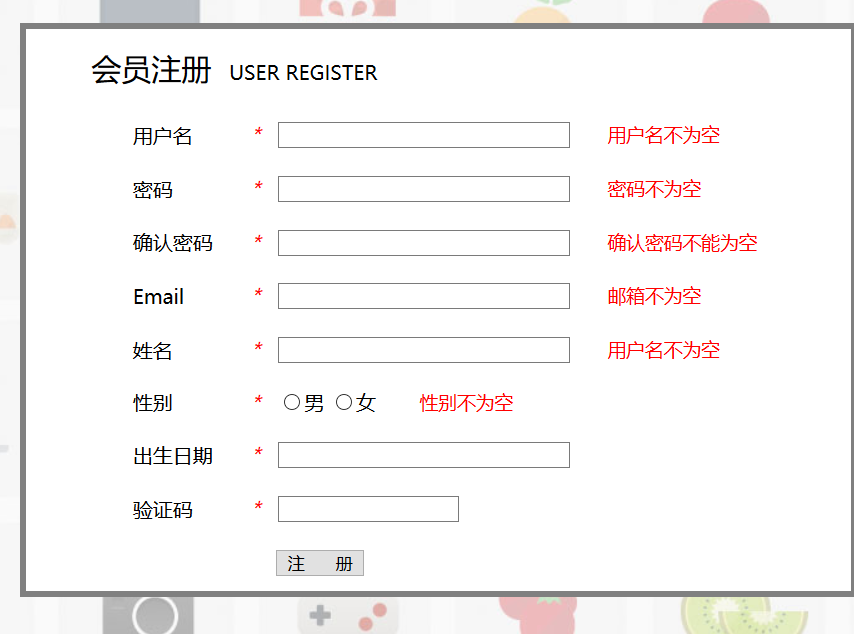



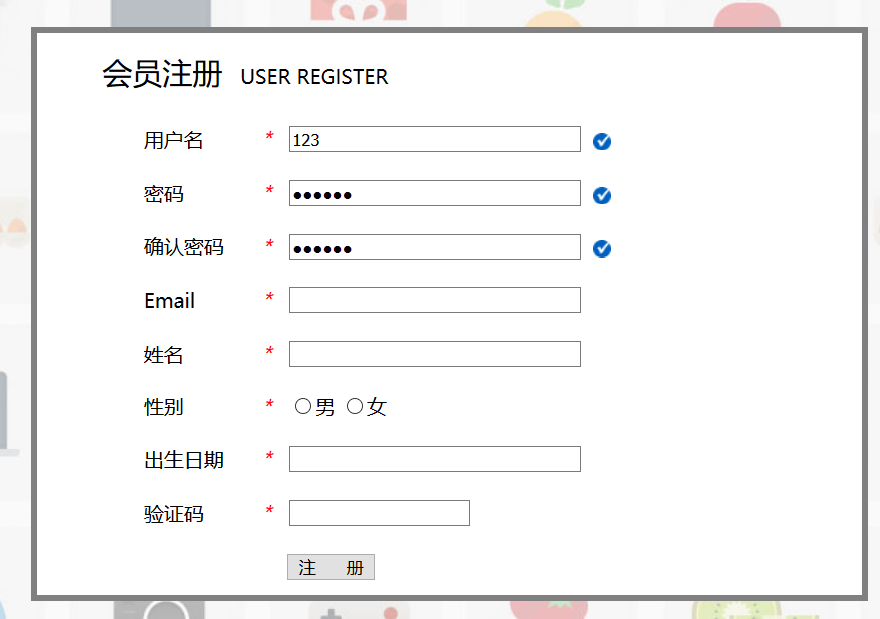

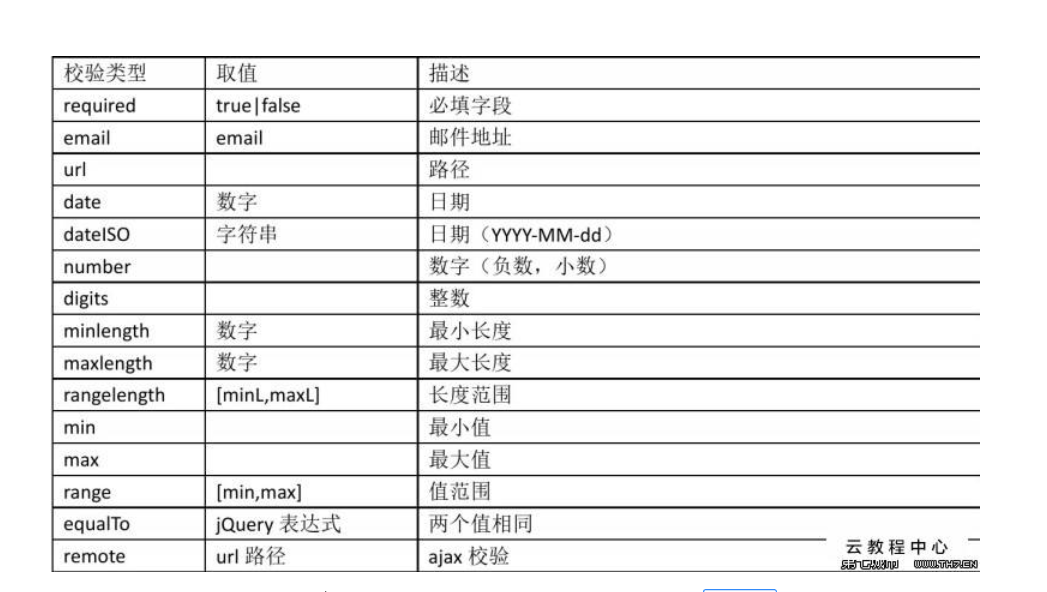
体会:学会了使用jq的validate来检验表单会简单很多,不需要再用正则表达式了,而且还有各种校验式,如下:
jQuery_完成表单注册检验的更多相关文章
- ajax+FormData+javascript 实现无刷新表单注册
<!doctype html> <html> <head> <meta charset="utf-8"> <title> ...
- Android逆向破解表单注册程序
Android逆向破解表单注册程序 Android开发 ADT: android studio(as) 程序界面如下,注册码为6位随机数字,注册成功时弹出通知注册成功,注册失败时弹出通知注册失败. 布 ...
- form表单注册——HTML
<!DOCTYPE html> <html lang="en"> <head> <meta charset="utf-8&quo ...
- 表单注册及自定义validate手机验证码验证实例
<!DOCTYPE html> <html lang="zh-CN"> <head> <meta charset="utf-8& ...
- PHP正则表达式及表单注册案例
正则表达式是一种具有特定模式的用来匹配文本的字符串 preg_match 匹配 $pattern = '/php/'; $subject = "php 是最好的编程语言,php 没有之一!& ...
- 再学ajax--第二天 | 基于php+mysql+ajax的表单注册、登录、注销
写在前面 ajax学习到了第二天,这次是用第一天封装的ajax函数,后端使用了php+mysql实现基本的注册,登录,注销. php是我前几个月get到的技能,我已经学习到了面向对象,知道各修饰符的含 ...
- JS-特效 ~ 05. 缓动框架兼容封装/回掉函数/兼容透明度/层级、旋转轮播图、正则表达式、验证表单注册账号、
缓动函数中opcity 写百分值的值 JS一般不用小数运算,会照成精度丢失 元素的默*认透明度是 层级一次性赋值,不缓动 利用for…in为同一个父元素的子元素绑定属性 缓动框架兼容封装/回掉函数/ ...
- 使用express+mongoDB搭建多人博客 学习(3)connect-flash和mongodb,表单注册
1.根目录下新建settings.js,存放数据库配置 module.exports={ cookieSecret:"myblog", db:"blog", h ...
- angularjs表单注册--两次密码验证
html <div class="container" ng-controller="RegisterCtrl"> <form name=&q ...
随机推荐
- 链表--笔记--数据结构(C++版)王红梅--自我思路整理与梳理
看到这篇文的很多人大概都知道链表是个什么玩意了.简单说就是一个又一个的指针,指针之间用指针连接起来. 本文的阅读 适合有c++基础的人群 以下: 这叫做一个结点. 这就是一个链表.我们主要使用的是 ...
- mysql以及mysql bench安装教程
首先,我们需要去官网下载mysql(这里以下载) 1 2 3 4 5 下载好了自己好了之后,点击安装好的东西出现如下界面: 1.接受使用条款并点击next 2.点击custom,可以根据个人习惯进行安 ...
- 使用Visual Studio 2019--调试汇编32位代码的详细步骤
声明:本文使用32位masm,代码与16位,64位不同 ------------------------------------------------------------------------ ...
- Git上传相关资料
############ssh key及 配置信息############# 设置Git的user name和email: $ git config --global user.name " ...
- redis存储数据
redis存储结构--5种 RedisTemplate访问Redis数据结构(一)--String https://blog.csdn.net/qq_25135655/article/details/ ...
- CentOS 7 防火墙常用操作及常见问题处理
一.常用操作 1.启动防火墙: systemctl start firewalld.service 2.关闭防火墙: systemctl stop firewalld.service 3.添加放行端口 ...
- 导出excel模版
方法一: public void ToExcel(){ //第一步:获取模版物理路径 string file_1 = Server.MapPath("/Content/Excel/downE ...
- markdown图片转换demo
markdown图片转换demo 一直以来都是用Markdown来写博客的,但是它的图片嵌入实在是太让人头秃,逼得我能找网上的图片就不用自己的,实在是麻烦.所以我在发现了一个可以生成markdown样 ...
- 在set中放入自定义类型
这件事情的起因是在学习背包问题时突然想到了一种算法,分析了一下应该是n^2logn复杂度的,当然比dp慢.但是既然想到了就实现了下: #include<bits/stdc++.h> usi ...
- log4j2配置文件xml详细了解
log4j2配置文件xml详细了解 详细参考:https://www.cnblogs.com/new-life/p/9246143.html log4j 2.x版本不再支持像1.x中的.propert ...