一、相关用法:
1、执行shell
获取web组里得eth0接口信息
ansible web -a "ifconfig eth0"
2、执行ifconfig eth0 命令,ansible模块 默认是command,它不会通过shell进行处理,
所以像$ HOME和像“<”,“>”,“|”,“;” 和“&”将不工作(如果您需要这些功能,请使用shell模块)。
以shell解释器执行脚本
ansible web -m shell -a "ifconfig eth0|grep addr"
3、以raw模块执行脚本
ansible web -m raw -a "ifconfig eth0|grep addr
4、将本地脚本传送到远程节点上运行
ansible web -m script -a ip.sh
5、传输文件
拷贝本地的/etc/hosts 文件到web组所有主机的/tmp/hosts(空目录除外)
ansible web -m copy -a "src=/etc/hosts dest=/tmp/hosts"
拷贝本地的ntp文件到目的地址,设置其用户及权限,如果目标地址存在相同的文件,则备份源文件。
ansible web -m copy -a "src=/mine/ntp.conf dest=/etc/ntp.conf owner=root group=root mode=644 backup=yes force=yes"
6、file 模块允许更改文件的用户及权限
ansible web -m file -a "dest=/tmp/a.txt mode=600 owner=user group=user"
7、使用file 模块创建目录,类似mkdir -p
ansible web -m file -a "dest=/tmp/test mode=755 owner=user group=user state=directory"
使用file 模块删除文件或者目录
ansible web -m file -a "dest=/tmp/test state=absent"
创建软连接,并设置所属用户和用户组
ansible web -m file -a "src=/file/to/link/to dest=/path/to/symlink owner=user group=user state=link"
touch 一个文件并添加用户读写权限,用户组去除写执行权限,其他组减去读写执行权限
ansible web -m file -a "path=/etc/foo.conf state=touch mode='u+rw,g-wx,o-rwx'"
管理软件包
apt、yum 模块分表用于管理Ubuntu 系列和RedHat 系列系统软件包
更新仓库缓存,并安装"foo"
ansible web -m apt -a "name=foo update_cache=yes"
删除 "foo"
ansible web -m apt -a "name=foo state=absent"
安装 "foo"
ansible web -m apt -a "name=foo state=present"
安装 1.0版本的 "foo"
ansible web -m apt -a "name=foo=1.00 state=present"
安装最新得"foo"
ansible web -m apt -a "name=foo state=latest"
注释:Ansible 支持很多操作系统的软件包管理,使用时-m 指定相应的软件包管理工具模块,如果没有这样的模块,可以自己定义类似的模块或者使用command 模块来安装软件包
安装 最新的 Apache
ansible web -m yum -a "name=httpd state=latest"
删除apache
ansible web -m yum -a "name=httpd state=absent"
从testing 仓库中安装最后一个版本得apache
ansible web -m yum -a "name=httpd enablerepo=testing state=present"
更新所有的包
ansible web -m yum -a "name=* state=latest"
安装远程的rpm包
安装 'Development tools' 包组
ansible web -m yum -a "name='@Development tools' state=present"
用户和用户组
添加用户 'user'并设置其 uid 和主要的组'admin'
ansible web -m user -a "name=user comment='I am user ' uid=1040 group=admin"
添加用户 'user'并设置其登陆shell,并将其假如admins和developers组
ansible web -m user -a "name=user shell=/bin/bash groups=admins,developers append=yes"
删除用户 'user '
ansible web -m user -a "name=user state=absent remove=yes"
创建 user用户得 2048-bit SSH key,并存放在 ~user/.ssh/id_rsa
ansible web -m user -a "name=user generate_ssh_key=yes ssh_key_bits=2048 ssh_key_file=.ssh/id_rsa"
设置用户过期日期
ansible web -m user -a "name=user shell=/bin/zsh groups=nobdy expires=1422403387"
创建test组,并设置git为1000
ansible web -m group -a "name=test gid=1000 state=present"
删除test组
ansible web -m group -a "name=test state=absent"
源码部署
Ansible 模块能够通知变更,当代码更新时,可以告诉Ansible 做一些特定的任务,比如从git 部署代码然后重启apache 服务等
服务管理
确保web组所有主机的httpd 是启动的
ansible web-m service -a "name=httpd state=started"
重启web组所有主机的httpd 服务
ansible web-m service -a "name=httpd state=restarted"
确保web组所有主机的httpd 是关闭的
ansible web-m service -a "name=httpd state=stopped"
后台运行
长时间运行的操作可以放到后台执行,ansible 会检查任务的状态;在主机上执行的同一个任
务会分配同一个job ID
后台执行命令3600s,-B 表示后台执行的时间
ansible all -B 3600 -a "/usr/bin/long_running_operation --do-stuff"
检查任务的状态
ansible all -m async_status -a "jid=123456789"
后台执行命令最大时间是1800s 即30 分钟,-P 每60s 检查下状态默认15s
ansible all -B 1800 -P 60 -a "/usr/bin/long_running_operation --do-stuff"
定时任务
每天5点,2点得时候执行 ls -alh > /dev/null
ansible test -m cron -a "name='check dirs' minute='0' hour='5,2' job='ls -alh > /dev/null'"
搜集系统信息
搜集主机的所有系统信息
ansible all -m setup
搜集系统信息并以主机名为文件名分别保存在/tmp/facts 目录
ansible all -m setup --tree /tmp/facts
搜集和内存相关的信息
ansible all -m setup -a 'filter=ansible_*_mb'
搜集网卡信息
ansible all -m setup -a 'filter=ansible_eth[0-2]'
================================================================================================
二、详细步骤如下:
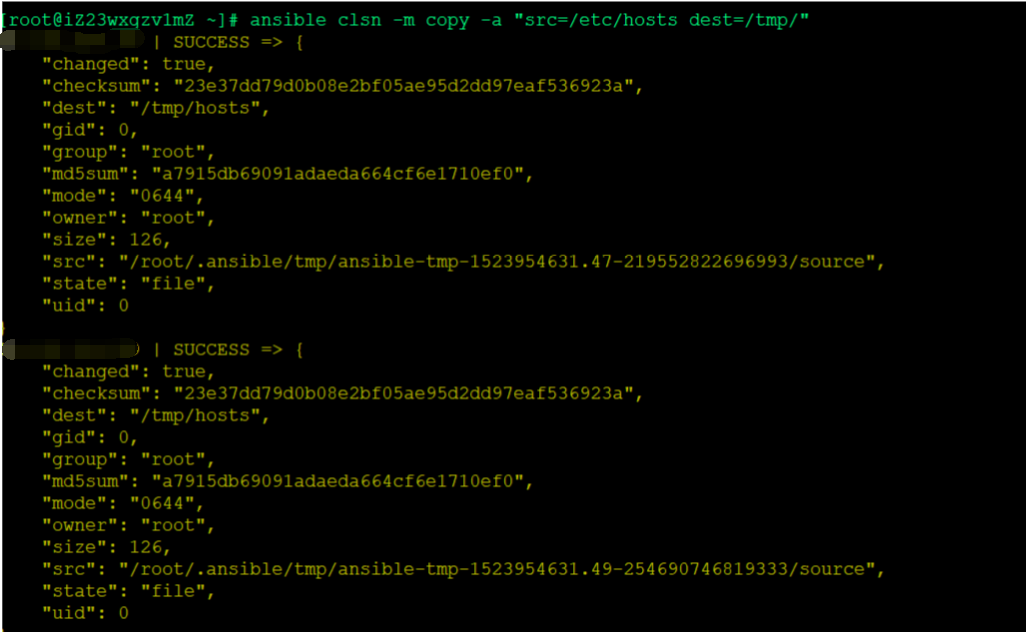
1、复制主机的文件:ansible clsn -m copy -a "src=/etc/hosts dest=/tmp/",查看主机的文件:ansible clsn -m shell -a "ls -l /tmp/hosts"
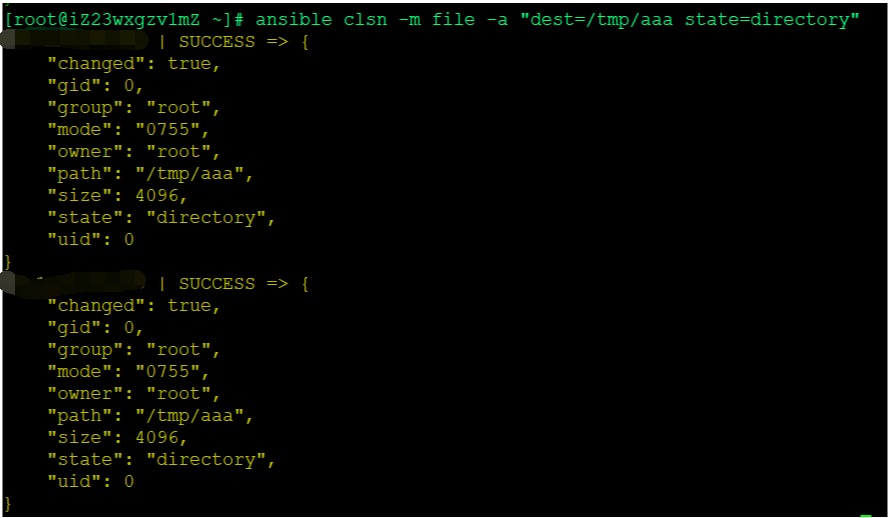
2、创建一个目录:ansible clsn -m file -a "dest=/tmp/aaa state=directory"
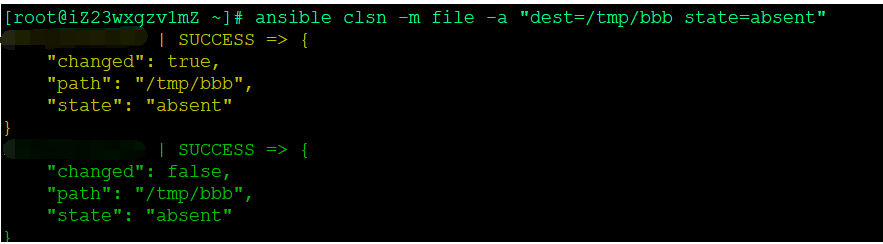
3、删除目录文件信息:ansible clsn -m file -a "dest=/tmp/bbb state=absent"
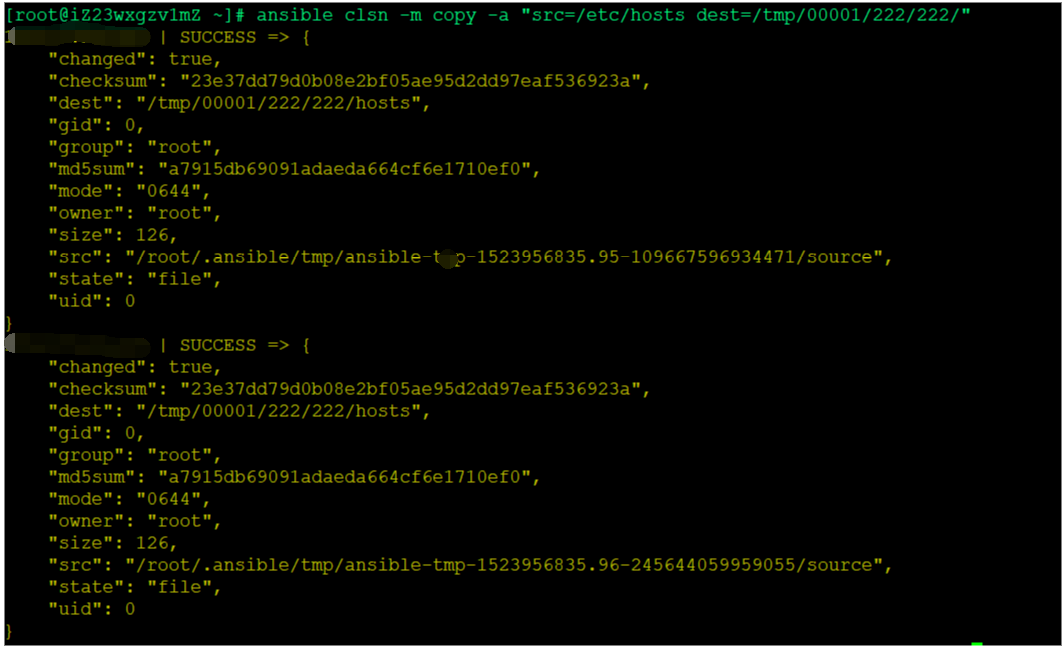
4、创建多级目录:ansible clsn -m copy -a "src=/etc/hosts dest=/tmp/00001/222/222/"
- 【Oracle 集群】ORACLE DATABASE 11G RAC 知识图文详细教程之RAC 特殊问题和实战经验(五)
RAC 特殊问题和实战经验(五) 概述:写下本文档的初衷和动力,来源于上篇的<oracle基本操作手册>.oracle基本操作手册是作者研一假期对oracle基础知识学习的汇总.然后形成体 ...
- (转)国内外三个不同领域巨头分享的Redis实战经验及使用场景
随着应用对高性能需求的增加,NoSQL逐渐在各大名企的系统架构中生根发芽.这里我们将为大家分享社交巨头新浪微博.传媒巨头Viacom及图片分享领域佼佼者Pinterest带来的Redis实践,首先我们 ...
- MySQL数据库的优化-运维架构师必会高薪技能,笔者近六年来一线城市工作实战经验
原文地址:http://liangweilinux.blog.51cto.com/8340258/1728131 首先在此感谢下我的老师年一线实战经验,我当然不能和我的老师平起平坐,得到老师三分之一的 ...
- MySQL索引实战经验总结
MySQL索引对数据检索的性能至关重要,盲目的增加索引不仅不能带来性能的提升,反而会消耗更多的额外资源,本篇总结了一些MySQL索引实战经验. 索引是用于快速查找记录的一种数据结构.索引就像是数据库中 ...
- 第9期Unity User Group Beijing图文报道:《Unity实战经验分享》
时间来到了金秋九月,北京UUG活动也来到了第九期.本次活动的主题为<Unity实战经验分享>,为此我们邀请了3位资深的行业大神.这次我们仍然在北京市海淀区丹棱街5号微软大厦举行活动,在这里 ...
- ASP.NET Core & Docker 实战经验分享
一.前言 最近一直在研究和实践ASP.NET Core.Docker.持续集成.在ASP.NET Core 和 Dcoker结合下遇到了一些坑,在此记录和分享,希望对大家有一些帮助. 二.中间镜像 我 ...
- Jenkins高级用法 - Jenkinsfile 介绍及实战经验
系列目录 1.Jenkins 安装 2.Jenkins 集群 3.Jenkins 持续集成 - ASP.NET Core 持续集成(Docker&自由风格&Jenkinsfile) 4 ...
- HDFS配置参数及优化之实战经验(Linux hdfs)
HDFS优化之实战经验 Linux系统优化 一.禁止文件系统记录时间 Linux文件系统会记录文件创建.修改和访问操作的时间信息,这在读写操作频繁的应用中将带来不小的性能损失.在挂载文件系统时设置no ...
- Visual Studio 2015开发Qt项目实战经验分享(附项目示例源码)
Visual Studio 2015开发Qt项目实战经验分享(附项目示例源码) 转 https://blog.csdn.net/lhl1124281072/article/details/800 ...
随机推荐
- 挖矿病毒DDG的分析与清除
注:以下所有操作均在CentOS 7.2 x86_64位系统下完成. 今天突然收到“阿里云”的告警短信: 尊敬的****:云盾云安全中心检测到您的服务器:*.*.*.*(app)出现了紧急安全事件:挖 ...
- 打开远程桌面时总提示无法打开连接文件default.rdp
删除C:\Users\Administrator\Documents\default.rdp,再启动远程就好了 http://www.chahushequ.com/read-topic-94-2fa9 ...
- MIME 类型,ContentType
MIME (Multipurpose Internet Mail Extensions) 是描述消息内容类型的因特网标准. MIME 消息能包含文本.图像.音频.视频以及其他应用程序专用的数据. 官方 ...
- leetcode-easy-array-1 two sum
mycode 33.91% class Solution: def twoSum(self, nums: List[int], target: int) -> List[int]: for i ...
- 基于球分割的空间二叉树检索算法(sphere-kdtree)
sphere-kdtree算法思路说明 具体思路如下: 第一.球半径分割,即利用不同的球半径,将三维空间点(向量)分割成多块.所以首先要求确定的就是分割多少块,怎么设置半径最合理. 第二.三维空间点平 ...
- idea中git回退本地仓库版本
场景:代码commit到本地仓库,还没有push到远程仓库,这时要回退代码. 介绍下Reset Head中三种Reset Type类型: 1.Mixed(默认):它回退到某个版本,本地会保留源码,回退 ...
- MAC截图工具
截图快捷键 ctrl+shift+A
- JavaScript基础篇详解
全部的数据类型: 基本数据类型: undefined Number Boolean null String 复杂数据类型: object ①Undefined: >>>声明但未初始化 ...
- mac 外接显示屏的坑
概述 工作中使用 Mac 外接显示屏,有时会出现闪屏然后黑屏的现象,之前都没有找到原因,今天终于找到了,记录下来,供以后参考,相信对其他人也有用. 参考资料: Macbook外接显示器设置教程 问题 ...
- Jest 里面需要注意的几个小细节
概述 最近学 jest ,有一些细节记录下来,供以后开发时参考,相信对其他人也有用. import 提升 ES6 的 import 会自动提升到文档前面,所以下面的 import 会提升到前面. le ...