
mybatis默认的数据源连接池(PooledDataSource和UnPooledDataSource)
一般情况下我们操作数据库都是通过connection,但是频繁创建和删除connection会严重影响效率,因此在这种情况下我们一般会用到连接池,因为项目中用到的是mybatis,所以了解一下mybatis的默认的数据库连接池(大多数情况下我们会使用Durid连接池)
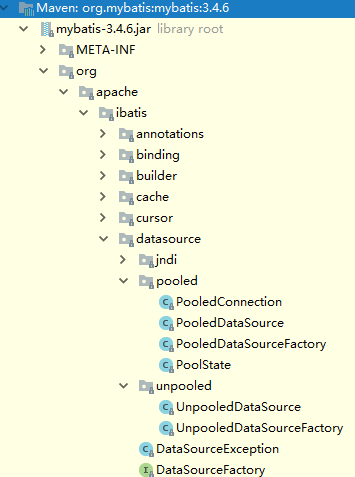
代码路径:
很明显看到datasource目录下有pooled和unpooled两个目录,分别是使用到了连接池和没有用到
1、unpooled目录下的UnpooledDatasource.java
/**

 * @author Clinton Begin

 * @author Eduardo Macarron

 */

public class UnpooledDataSource implements DataSource {

  private ClassLoader driverClassLoader;

  private Properties driverProperties;

  private static Map<String, Driver> registeredDrivers = new ConcurrentHashMap<String, Driver>();

 //常规配置

  private String driver;

  private String url;

  private String username;

  private String password;

 //是否自动commit    事务的隔离级别

  private Boolean autoCommit;

  private Integer defaultTransactionIsolationLevel;


 //注册驱动

  static {

    Enumeration<Driver> drivers = DriverManager.getDrivers();

    while (drivers.hasMoreElements()) {

      Driver driver = drivers.nextElement();

      registeredDrivers.put(driver.getClass().getName(), driver);

    }

  }

  public UnpooledDataSource() {

  }

  public UnpooledDataSource(String driver, String url, String username, String password) {

    this.driver = driver;

    this.url = url;

    this.username = username;

    this.password = password;

  }

 //重点getconnnection  获取数据库连接,调用doGetConnection方法

  @Override

  public Connection getConnection() throws SQLException {

    return doGetConnection(username, password);

  }

  @Override

  public Connection getConnection(String username, String password) throws SQLException {

    return doGetConnection(username, password);

  }

 //用户名  密码   设置配置

  private Connection doGetConnection(String username, String password) throws SQLException {

    Properties props = new Properties();

    if (driverProperties != null) {

      props.putAll(driverProperties);

    }

    if (username != null) {

      props.setProperty("user", username);

    }

    if (password != null) {

      props.setProperty("password", password);

    }

    return doGetConnection(props);

  }

 //真正获取连接的方法,由此可见,每次调用getConnection方法是,都会新建一个Connection对象,可想当并发量高是,数据库的连接就会被占满

  private Connection doGetConnection(Properties properties) throws SQLException {

    initializeDriver();

    Connection connection = DriverManager.getConnection(url, properties);

    configureConnection(connection);

    return connection;

  }

 //初始化  在调用doGetConnection方法中,会先进行一下判断,判断mybatis的configuration中是否已经有数据库驱动,没有的话会通过反射加载驱动

  private synchronized void initializeDriver() throws SQLException {

    if (!registeredDrivers.containsKey(driver)) {

      Class<?> driverType;

      try {

        if (driverClassLoader != null) {

          driverType = Class.forName(driver, true, driverClassLoader);

        } else {

          driverType = Resources.classForName(driver);

        }

        // DriverManager requires the driver to be loaded via the system ClassLoader.

        // http://www.kfu.com/~nsayer/Java/dyn-jdbc.html

        Driver driverInstance = (Driver)driverType.newInstance();

        DriverManager.registerDriver(new DriverProxy(driverInstance));

        registeredDrivers.put(driver, driverInstance);

      } catch (Exception e) {

        throw new SQLException("Error setting driver on UnpooledDataSource. Cause: " + e);

      }

    }

  }

 //设置是否自动提交   事务的隔离级别

  private void configureConnection(Connection conn) throws SQLException {

    if (autoCommit != null && autoCommit != conn.getAutoCommit()) {

      conn.setAutoCommit(autoCommit);

    }

    if (defaultTransactionIsolationLevel != null) {

      conn.setTransactionIsolation(defaultTransactionIsolationLevel);

    }

  }

}
2、PolledDataSource.java类,其内部的datasource其实也是通过unpolledDataSource对象来实现的,只是在获取连接connection的时候进行了处理(重点关注getConnection方法)
public class PooledDataSource implements DataSource {

  private static final Log log = LogFactory.getLog(PooledDataSource.class);

 //PollState 充当锁对象,这个对象中也有例如  空闲连接集合,活跃链接集合,请求的数量,等一些变量

  private final PoolState state = new PoolState(this);

 //PolledDataSource中的数据源也是使用的UnpolledDataSource对象来实现的

  private final UnpooledDataSource dataSource;

  // OPTIONAL CONFIGURATION FIELDS 线程池的最大活跃数量,最大空闲数量,等待时间等等。。。

  protected int poolMaximumActiveConnections = ;

  protected int poolMaximumIdleConnections = ;

  protected int poolMaximumCheckoutTime = ;

  protected int poolTimeToWait = ;

  protected int poolMaximumLocalBadConnectionTolerance = ;

  protected String poolPingQuery = "NO PING QUERY SET";

  protected boolean poolPingEnabled;

  protected int poolPingConnectionsNotUsedFor;

 //url+username+password连接起来的字符串的hashcode值

  private int expectedConnectionTypeCode;

  public PooledDataSource() {

    dataSource = new UnpooledDataSource();

  }

  public PooledDataSource(UnpooledDataSource dataSource) {

    this.dataSource = dataSource;

  }

  public PooledDataSource(String driver, String url, String username, String password) {

    dataSource = new UnpooledDataSource(driver, url, username, password);

    expectedConnectionTypeCode = assembleConnectionTypeCode(dataSource.getUrl(), dataSource.getUsername(), dataSource.getPassword());

  }


 //获取连接connection

  @Override

  public Connection getConnection() throws SQLException {

    return popConnection(dataSource.getUsername(), dataSource.getPassword()).getProxyConnection();

  }

  @Override

  public Connection getConnection(String username, String password) throws SQLException {

    return popConnection(username, password).getProxyConnection();

  }

 //线程安全的获取连接的方法(供PooledConnection中调用)  synchronized

  protected void pushConnection(PooledConnection conn) throws SQLException {

  //所对象为PoolState

    synchronized (state) {

      state.activeConnections.remove(conn);

      if (conn.isValid()) {

        if (state.idleConnections.size() < poolMaximumIdleConnections && conn.getConnectionTypeCode() == expectedConnectionTypeCode) {

          state.accumulatedCheckoutTime += conn.getCheckoutTime();

          if (!conn.getRealConnection().getAutoCommit()) {

            conn.getRealConnection().rollback();

          }

          PooledConnection newConn = new PooledConnection(conn.getRealConnection(), this);

          state.idleConnections.add(newConn);

          newConn.setCreatedTimestamp(conn.getCreatedTimestamp());

          newConn.setLastUsedTimestamp(conn.getLastUsedTimestamp());

          conn.invalidate();

          if (log.isDebugEnabled()) {

            log.debug("Returned connection " + newConn.getRealHashCode() + " to pool.");

          }

          state.notifyAll();

        } else {

          state.accumulatedCheckoutTime += conn.getCheckoutTime();

          if (!conn.getRealConnection().getAutoCommit()) {

            conn.getRealConnection().rollback();

          }

          conn.getRealConnection().close();

          if (log.isDebugEnabled()) {

            log.debug("Closed connection " + conn.getRealHashCode() + ".");

          }

          conn.invalidate();

        }

      } else {

        if (log.isDebugEnabled()) {

          log.debug("A bad connection (" + conn.getRealHashCode() + ") attempted to return to the pool, discarding connection.");

        }

        state.badConnectionCount++;

      }

    }

  }

  private PooledConnection popConnection(String username, String password) throws SQLException {

    boolean countedWait = false;

    PooledConnection conn = null;

    long t = System.currentTimeMillis();

    int localBadConnectionCount = ;

    while (conn == null) {

      synchronized (state) {
     //如果state中空闲的连接不为空时,直接从state中的idelConnections集合中获取

        if (!state.idleConnections.isEmpty()) {

          // Pool has available connection

          conn = state.idleConnections.remove();

          if (log.isDebugEnabled()) {

            log.debug("Checked out connection " + conn.getRealHashCode() + " from pool.");

          }

        } else {
      //state中的idelConnections集合中没有连接connection了,判断活跃的connection是否小于最大活跃线程数,小于的话就新建一个connection

          // Pool does not have available connection

          if (state.activeConnections.size() < poolMaximumActiveConnections) {

            // Can create new connection

            conn = new PooledConnection(dataSource.getConnection(), this);

            if (log.isDebugEnabled()) {

              log.debug("Created connection " + conn.getRealHashCode() + ".");

            }

          } else {
       //当前活跃的connection数大于最大活跃connection数是,表明不能新建connection,这种情况下,会判断是否已经超过设定的时间20s,如果超过,会根据是否自动commit,
       /不是自动提交,会进行rollback操作
            // Cannot create new connection

            PooledConnection oldestActiveConnection = state.activeConnections.get();

            long longestCheckoutTime = oldestActiveConnection.getCheckoutTime();

            if (longestCheckoutTime > poolMaximumCheckoutTime) {//判断是否超时

              // Can claim overdue connection

              state.claimedOverdueConnectionCount++;

              state.accumulatedCheckoutTimeOfOverdueConnections += longestCheckoutTime;

              state.accumulatedCheckoutTime += longestCheckoutTime;

              state.activeConnections.remove(oldestActiveConnection);

              if (!oldestActiveConnection.getRealConnection().getAutoCommit()) {//判断是否设置了自动提交,不是自动提交的话,会进行rollback

                try {

                  oldestActiveConnection.getRealConnection().rollback();

                } catch (SQLException e) {

                  /*

                     Just log a message for debug and continue to execute the following

                     statement like nothing happend.

                     Wrap the bad connection with a new PooledConnection, this will help

                     to not intterupt current executing thread and give current thread a

                     chance to join the next competion for another valid/good database

                     connection. At the end of this loop, bad {@link @conn} will be set as null.

                   */

                  log.debug("Bad connection. Could not roll back");

                }

              }
        //将之前rollback的connection进行处理,重新生成一个connection,并设置创建时间和最后使用时间

              conn = new PooledConnection(oldestActiveConnection.getRealConnection(), this);

              conn.setCreatedTimestamp(oldestActiveConnection.getCreatedTimestamp());

              conn.setLastUsedTimestamp(oldestActiveConnection.getLastUsedTimestamp());

              oldestActiveConnection.invalidate();

              if (log.isDebugEnabled()) {

                log.debug("Claimed overdue connection " + conn.getRealHashCode() + ".");

              }

            } else {
         //当活跃connection的集合中第一个connection不符合超时,则进行等待wait

              // Must wait

              try {

                if (!countedWait) {

                  state.hadToWaitCount++;

                  countedWait = true;

                }
           //pooltimeTowait默认也是20秒

                if (log.isDebugEnabled()) {

                  log.debug("Waiting as long as " + poolTimeToWait + " milliseconds for connection.");

                }

                long wt = System.currentTimeMillis();

                state.wait(poolTimeToWait);

                state.accumulatedWaitTime += System.currentTimeMillis() - wt;

              } catch (InterruptedException e) {

                break;

              }

            }

          }

        }
    //经过以上处理,如果conn仍然没有值,则会循环走一行流程,第二次一定会获取到conn对象(默认的超时时间是20秒,第一次已经等待过20s了)

        if (conn != null) {
      //判断conn是否能用   通过ping能否ping通

          // ping to server and check the connection is valid or not

          if (conn.isValid()) {

            if (!conn.getRealConnection().getAutoCommit()) {

              conn.getRealConnection().rollback();

            }

            conn.setConnectionTypeCode(assembleConnectionTypeCode(dataSource.getUrl(), username, password));

            conn.setCheckoutTimestamp(System.currentTimeMillis());

            conn.setLastUsedTimestamp(System.currentTimeMillis());

            state.activeConnections.add(conn);

            state.requestCount++;

            state.accumulatedRequestTime += System.currentTimeMillis() - t;

          } else {

            if (log.isDebugEnabled()) {

              log.debug("A bad connection (" + conn.getRealHashCode() + ") was returned from the pool, getting another connection.");

            }

            state.badConnectionCount++;

            localBadConnectionCount++;

            conn = null;

            if (localBadConnectionCount > (poolMaximumIdleConnections + poolMaximumLocalBadConnectionTolerance)) {

              if (log.isDebugEnabled()) {

                log.debug("PooledDataSource: Could not get a good connection to the database.");

              }

              throw new SQLException("PooledDataSource: Could not get a good connection to the database.");

            }

          }

        }

      }

    }

    if (conn == null) {

      if (log.isDebugEnabled()) {

        log.debug("PooledDataSource: Unknown severe error condition.  The connection pool returned a null connection.");

      }

      throw new SQLException("PooledDataSource: Unknown severe error condition.  The connection pool returned a null connection.");

    }

    return conn;

  }

}
3、看下创建PooledConnection对象(从上边截出的一部分代码,新建PooledConnection对象)
 // Pool does not have available connection

          if (state.activeConnections.size() < poolMaximumActiveConnections) {

            // Can create new connection

            conn = new PooledConnection(dataSource.getConnection(), this);

            if (log.isDebugEnabled()) {

              log.debug("Created connection " + conn.getRealHashCode() + ".");

            }

          }
PooledConnection构造函数:PooledConnection函数实现了InvocationHandler接口(动态代理)
  public PooledConnection(Connection connection, PooledDataSource dataSource) {

    this.hashCode = connection.hashCode();

    this.realConnection = connection;

    this.dataSource = dataSource;

    this.createdTimestamp = System.currentTimeMillis();

    this.lastUsedTimestamp = System.currentTimeMillis();

    this.valid = true;

    this.proxyConnection = (Connection) Proxy.newProxyInstance(Connection.class.getClassLoader(), IFACES, this);

  }

 @Override

  public Object invoke(Object proxy, Method method, Object[] args) throws Throwable {

    String methodName = method.getName();
  //判断是否close,如果是close的话,会调用PooledDataSource中的pushConnection方法,将该conn从activeConnections删除,同时将此conn添加到idelConnections中

    if (CLOSE.hashCode() == methodName.hashCode() && CLOSE.equals(methodName)) {

      dataSource.pushConnection(this);

      return null;

    } else {

      try {

        if (!Object.class.equals(method.getDeclaringClass())) {

          // issue #579 toString() should never fail

          // throw an SQLException instead of a Runtime

          checkConnection();

        }

        return method.invoke(realConnection, args);

      } catch (Throwable t) {

        throw ExceptionUtil.unwrapThrowable(t);

      }

    }

  }
参考:https://blog.csdn.net/drxRose/article/details/85710850
https://www.jianshu.com/p/21cf094cb97b?open_source=weibo_search
mybatis默认的数据源连接池(PooledDataSource和UnPooledDataSource)的更多相关文章
- springboot添加多数据源连接池并配置Mybatis
springboot添加多数据源连接池并配置Mybatis 转载请注明出处:https://www.cnblogs.com/funnyzpc/p/9190226.html May 12, 2018 ...
- 使用MyBatis集成阿里巴巴druid连接池(不使用spring)
在工作中发现mybatis默认的连接池POOLED,运行时间长了会报莫名其妙的连接失败错误.因此采用阿里巴巴的Druid数据源(码云链接 ,中文文档链接). mybatis更多数据源参考博客链接 . ...
- dbcp数据源连接池
一.数据源连接池 我们之前利用jdbc连接数据库,每次都要创建连接对象,销毁连接对象,如果并发访问量比较大,这样肯定比较辣 浪费数据库的效率,我们可以像之前mybatis中缓存查询到的数据一样,可以把 ...
- DBCP数据源连接池实现原理分析
前些天在调试公司系统的时候发现这样的一个问题:mysql数据库服务停止一段时间后再次重启后吗,tomcat服务无法请求数据库服务,调试了半天对这个问题进行定位解决,期间也搞了很多有关mysql数据库的 ...
- WebSphere中数据源连接池太小导致的连接超时错误记录
WebSphere中数据源连接池太小导致的连接超时错误记录. 应用连接超时错误信息: [// ::: CST] webapp E com.ibm.ws.webcontainer.webapp.WebA ...
- springboot入门系列(四):SpringBoot和Mybatis配置多数据源连接多个数据库
SpringBoot和Mybatis配置多数据源连接多个数据库 目前业界操作数据库的框架一般是 Mybatis,但在很多业务场景下,我们需要在一个工程里配置多个数据源来实现业务逻辑.在SpringBo ...
- JDBC数据源连接池的配置和使用实例
个人学习参考所用,勿喷! 使用JDBC建立数据库连接的两种方式: 1.在代码中使用DriverManager获得数据库连接.这种方式效率低,并且其性能.可靠性和稳定性随着用户访问量得增加逐渐下降. 2 ...
- JavaWeb之数据源连接池(4)---自定义数据源连接池
[续上文<JavaWeb之数据源连接池(3)---Tomcat>] 我们已经 了解了DBCP,C3P0,以及Tomcat内置的数据源连接池,那么,这些数据源连接池是如何实现的呢?为了究其原 ...
- JavaWeb之数据源连接池(3)---Tomcat
此文续 <JavaWeb之数据源连接池(2)---C3P0>. Apache Tomcat作为一款JavaWeb服务器,内置了DBCP数据源连接池.在使用中,只要进行相应配置即可. 首先, ...
随机推荐
- 2.Web中使用iReport 整合----------创建html格式的
转自:https://wenku.baidu.com/view/104156f9770bf78a65295462.html 1.
- ABP框架按条件导出
web层 .js导出事件: //导出为excel文档 $('#btn-export').click(function () { //得到查询的参数 var temp = { //这里的键的名字和控制器 ...
- 微信小程序(8)--头部导航滑动
项目需求:实现头部导航,可左右滑动. <view class="top-news"> <view class="self-box"> & ...
- 【LeetCode】线段树 segment-tree(共9题)+ 树状数组 binary-indexed-tree(共5题)
第一部分---线段树:https://leetcode.com/tag/segment-tree/ [218]The Skyline Problem [307]Range Sum Query - Mu ...
- jffs2镜像制作
自己被自己绊住了,出于对无知的恐惧,总觉得是很难的一件事情. demo board ltp-ddt qspi_mtd_dd_rw error:can't read superblock on /dev ...
- 用pycharm运行pytest
安装pytest 1. 在pycharm中建项目,建文件,文件名字要以test_开头 2.在文件中插入pytest模块 import pytest #引用pytest模块 3.定义test函数,以及断 ...
- sql语句中判断空值的函数
COALESCE()函数 主流数据库系统都支持COALESCE()函数,这个函数主要用来进行空值处理,其参数格式如下: COALESCE ( expression,value1,value2……,v ...
- Linux 多个cpp文件的编译(Makefile)
打包so文件: CC = g++ CFLAGS=-Wall -O2 -fPIC TARGET = libbg.so SRCS := $(wildcard *.cpp) OBJS := $(patsub ...
- mybatis源码分析之03SqlSession的创建
在上一篇中,说到了mybatis是如何构造一个SqlSessionFactory实例的,顾名思意,SqlSessionFactory就是用于创建SqlSession的工厂类. 好,现在我们接着昨天的来 ...
- 在Developerkit开发板上运行blink例程
本文将介绍怎么样在VScode环境下,将AliOS Tings提供的blink例程在Developerkit开发板上运行起来. DeveloperKit开发板 在例程中分别用到两个led和一个按钮 ...