
Prometheus + Grafana
Prometheus
ubuntu安装prometheus非常简单:
apt update

apt install prometheus

systemctl enable prometheus

systemctl enable prometheus-node-exporter
apt安装prometheus和prometheus-node-exporter之后便带有基本配置,无需修改。
确保开启服务开启:
systemctl status prometheus

systemctl status prometheus-node-exporter
顺便使用它监控mongodb,安装prometheus-mongodb-exporter:
apt install prometheus-mongodb-exporter

systemctl enable prometheus-mongodb-exporter
此外由于mongodb开启了密码验证,需要注意mongodb用户的权限:mongodb_exporter github链接
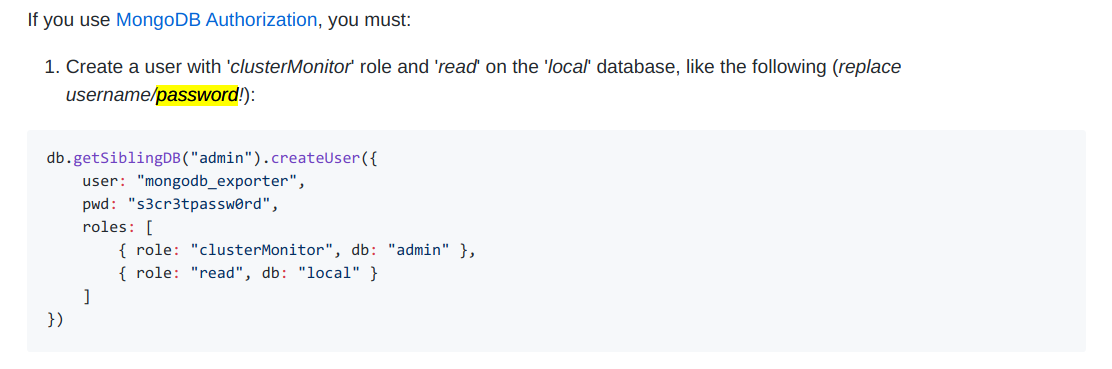
然后需要修改 /etc/default/prometheus-mongodb-exporter 中的 ARGS 如下:
# ARGS='-mongodb.uri="mongodb://localhost:27017"'

ARGS='-mongodb.uri="mongodb://xxx:xxxxx@localhost:27017"'
mongodb URI格式如下:
mongodb://[username:password@]host1[:port1][,...hostN[:portN]][/[database][?options]]
如果 username 或 password 包含 @ : / % 四种符号需要使用 百分号编码.
错误添加需要删除时用db.getSiblingDB("admin").dropUser("mongodb_exporter")
然后重启一下服务
systemctl restart prometheus-mongodb-exporter
Grafana
安装:
sudo add-apt-repository "deb https://packages.grafana.com/oss/deb stable main"

wget -q -O - https://packages.grafana.com/gpg.key | sudo apt-key add -

apt update

apt install grafana
配置:
配置文件为 /etc/grafana/grafana.ini,注意如下内容:
...

[server]

domain = www.xxxx.com

enforce_domain = true

root_url = %(protocol)s://%(domain)s/grafana

...

[security]

admin_password = xxxx
然后访问 www.xxxx.com/grafana 登录,用户名admin,密码为上面设置的admin_password。
然后按照 [这里][https://github.com/percona/grafana-dashboards] 配置数据源使用prometheus,并导入面板。一般导入这些即可:
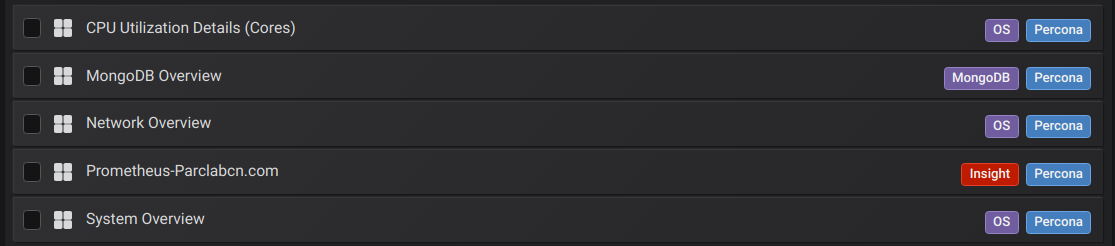
(注意:json中的pmm-singlestat-panel可能需要替换为singlestat)
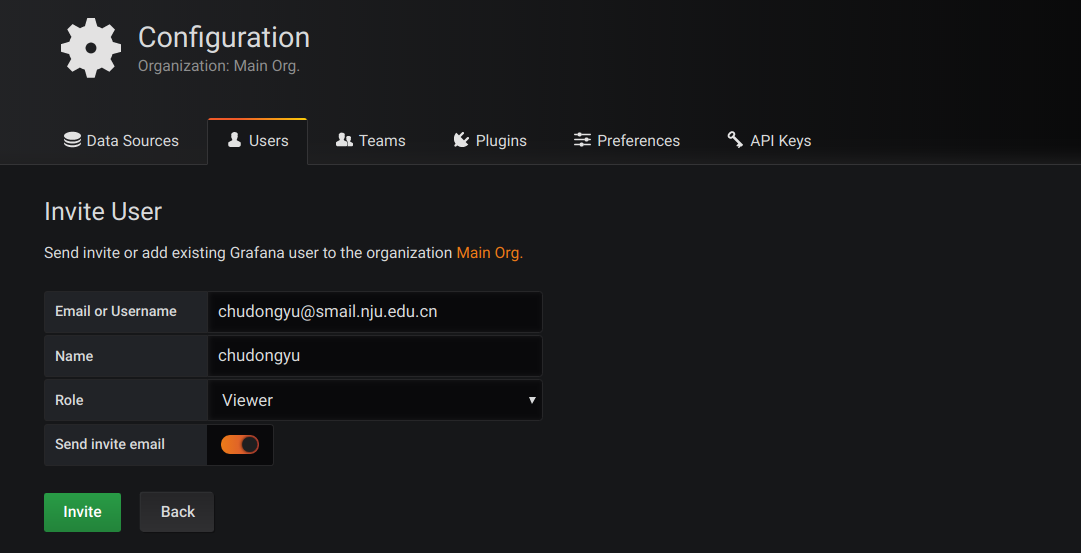
使用Viewer角色用户登录查看
上述Dashboard配置好之后,不应继续使用admin登录系统。
在设置中“邀请”用户,填写自己的邮箱然后通过邮箱链接设置密码,即可以自己的邮箱登录grafana。

注:
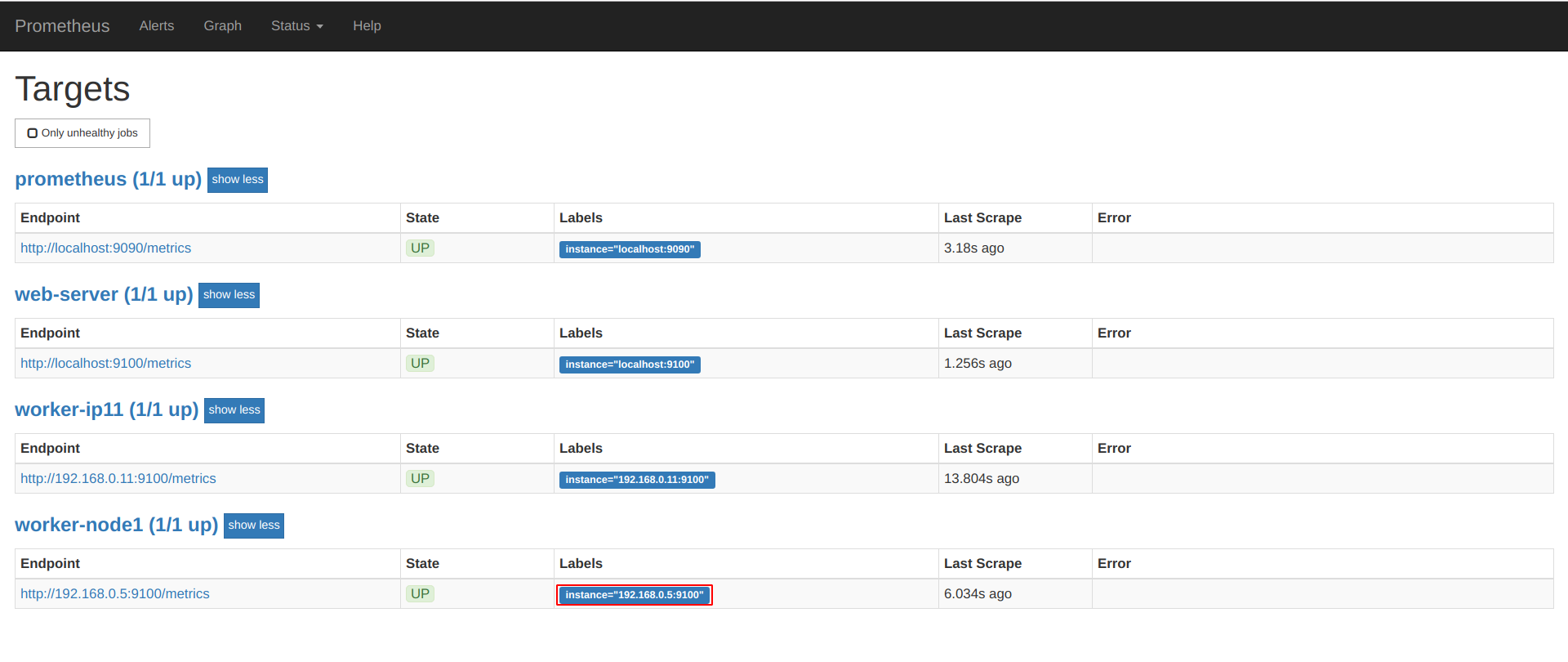
使用prometheus监控两台服务器,配置文件 /etc/prometheus/prometheus.yml 内容如下:
# Sample config for Prometheus.

global:

  scrape_interval:     15s # By default, scrape targets every 15 seconds.

  evaluation_interval: 15s # By default, scrape targets every 15 seconds.

  # scrape_timeout is set to the global default (10s).

  # Attach these labels to any time series or alerts when communicating with

  # external systems (federation, remote storage, Alertmanager).

  external_labels:

      monitor: 'example'

# Load and evaluate rules in this file every 'evaluation_interval' seconds.

rule_files:

  # - "first.rules"

  # - "second.rules"

# A scrape configuration containing exactly one endpoint to scrape:

# Here it's Prometheus itself.

scrape_configs:

  # The job name is added as a label `job=<job_name>` to any timeseries scraped from this config.

  - job_name: 'prometheus'

    # Override the global default and scrape targets from this job every 5 seconds.

    scrape_interval: 5s

    scrape_timeout: 5s

    # metrics_path defaults to '/metrics'

    # scheme defaults to 'http'.

    static_configs:

        - targets: ['localhost:9090']

  - job_name: "web-server"

    # If prometheus-node-exporter is installed, grab stats about the local

    # machine by default.

    static_configs:

      - targets: ['localhost:9100']

  - job_name: "worker-node1"

    static_configs:

      - targets: ['192.168.0.5:9100']
这个配置是没问题的,在另一台机器 (192.168.0.5) 上安装并启用 prometheus-node-exporter 即可。
但如果你仅仅修改了某个job_name(而没有修改ip),比如把web-server改为node,那么grafana界面中的singlestat panel将不能正确显示,显示“Only queries that return single...”,
这是因为singlestat只能显示一个结果,而查询语句查到了两个结果。解决方式是删除之前的数据系列:
首先停止prometheus服务,传入
--web.enable-admin-api参数手动运行然后这样删除:
curl -X POST -g 'http://localhost:9090/api/v1/admin/tsdb/delete_series?match[]={instance="localhost:9100"}'
参考链接:Prometheus: Delete Time Series Metrcs
注2:上述情况的查询语句可能是这样的(可以在grafana中看到):

(可以用instance="xxxxx"或job="xxxxx")
清理数据参考链接:
https://prometheus.io/docs/prometheus/2.3/querying/api/#delete-series
https://www.alibabacloud.com/help/zh/doc-detail/56246.htm
prometheus 默认是9090端口:
Prometheus + Grafana的更多相关文章
- 使用 Prometheus + Grafana 对 Kubernetes 进行性能监控的实践
1 什么是 Kubernetes? Kubernetes 是 Google 开源的容器集群管理系统,其管理操作包括部署,调度和节点集群间扩展等. 如下图所示为目前 Kubernetes 的架构图,由 ...
- cAdvisor+Prometheus+Grafana监控docker
cAdvisor+Prometheus+Grafana监控docker 一.cAdvisor(需要监控的主机都要安装) 官方地址:https://github.com/google/cadvisor ...
- 基于Docker+Prometheus+Grafana监控SpringBoot健康信息
在微服务体系当中,监控是必不可少的.当系统环境超过指定的阀值以后,需要提醒指定的运维人员或开发人员进行有效的防范,从而降低系统宕机的风险.在CNCF云计算平台中,Prometheus+Grafana是 ...
- prometheus + grafana部署RabbitMQ监控
prometheus + grafana部署RabbitMQ监控 1.grafana导入dashboards https://grafana.com/dashboards/2121 2.expor ...
- Kubernetes+Prometheus+Grafana部署笔记
一.基础概念 1.1 基础概念 Kubernetes(通常写成“k8s”)Kubernetes是Google开源的容器集群管理系统.其设计目标是在主机集群之间提供一个能够自动化部署.可拓展.应用容器可 ...
- [转帖]Prometheus+Grafana监控Kubernetes
原博客的位置: https://blog.csdn.net/shenhonglei1234/article/details/80503353 感谢原作者 这里记录一下自己试验过程中遇到的问题: . 自 ...
- Prometheus+Grafana监控部署实践
参考文档: Prometheus github:https://github.com/prometheus grafana github:https://github.com/grafana/graf ...
- Prometheus+Grafana搭建监控系统
之前在业务中遇到服务器负载过高问题,由于没有监控,一直没发现,直到业务方反馈网站打开速度慢,才发现问题.这样显得开发很被动.所以是时候搭建一套监控系统了. 由于是业余时间自己捯饬,所以神马业务层面的监 ...
- Spring Boot 2.x监控数据可视化(Actuator + Prometheus + Grafana手把手)
TIPS 本文基于Spring Boot 2.1.4,理论支持Spring Boot 2.x所有版本 众所周知,Spring Boot有个子项目Spring Boot Actuator,它为应用提供了 ...
- Prometheus Grafana可视化展示Linux资源使用率
Prometheus Grafana可视化展示Linux资源使用率 Grfana官方仪表盘下载:https://grafana.com/dashboards 数据源推荐:https://grafan ...
随机推荐
- pspice建立仿真模型元件库
摘自:http://royroyyy.blog.163.com/blog/static/1376506172011026102216175/ PSpice9.2电子元器件模型--由网页下载的model ...
- CentOS下安装Chrome浏览器
1. 下载安装脚本, 在下载目录中,执行以下命令,将安装脚本下载到本地 wget https://intoli.com/install-google-chrome.sh 2.然后授予可执行权限 chm ...
- 求能粘贴Word 内容(含图片)的在线编辑器
word图片转存,是指UEditor为了解决用户从word中复制了一篇图文混排的文章粘贴到编辑器之后,word文章中的图片数据无法显示在编辑器中,也无法提交到服务器上的问题而开发的一个操作简便的图片转 ...
- hibernate插入中文字段时,无法插入数据库
体现: hibernate插入数据时,一直报错: Caused by: java.sql.SQLException: Incorrect string value: '\xE5\xBC\xA0\xE4 ...
- python判断list中是否包含某个元素
python判断list中是否包含某个元素 theList = ['a','b','c'] if 'a' in theList: print 'a in the list' if 'd' not in ...
- loj#501 「LibreOJ β Round」ZQC 的树列
分析 代码(我的代码是瞎jb水过去的) #include<bits/stdc++.h> using namespace std; #define li long long li a[]; ...
- day20—CSS中伪类:before与:after的应用:
转行学开发,代码100天——2018-04-05 CSS中的两个伪类:before和:after适合应用与在元素的开始或者结尾处添加修饰性文字或外观,实现内容添加的同时并没有破坏HTML代码 语义.如 ...
- Vue作用域插槽:基本用法
一 项目结构 二 App组件 <template> <div id="app"> <!-- 子组件 --> <user v-slot:de ...
- 把Notepad++的tab设置为四个空格
在7.1版本以及以后 设置->首选项->Language 勾选Repalce by space 在7.1版本以前 设置->首选项->制表符设置 右侧,转为空格,勾选上 参考: ...
- c# 调用 webService
开局几张 照着做就完事 说明下 这个wsdl 文件是根据别人提供的webService 接口 打开后改变后缀来的 这样就引用完成了 接下来就是重点了 怎么调用 localhost.WsSyncDu ...