
Mini projects #5 ---- Memory
课程全名:An Introduction to Interactive Programming in Python,来自 Rice University
授课教授:Joe Warren, Scott Rixner, John Greiner, Stephen Wong
工具:http://www.codeskulptor.org/, simplegui 模块
第5周讲述
1. simplegui模块中鼠标的控制方式
2. list的各种操作, append, pop, extend, index, remove, reverse, sort
3. Iteration,迭代器,遍历对象方式 for x in lst:… 或者列表生成式 [exp for x in lst]
[exp for x in lst] # 迭代器,遍历x中的所有元素x执行exp的操作,返回一个计算完整的列表
(exp for x in lst) # 生成器,也是一种迭代器,返回一个迭代对象,不计算所有结果,只提供当前需要访问的next元素,所以生成器只能迭代一次。好处是节省内存
4. dictionaries, python中的字典dict, {},键值对
字典中只有immutable对象可以做key,value可以是任意的
例如:d = {(1,2):[1,2,3], True:{1:2}, "123":(1,2), 4:5}
immutable 对象: string, int, float, tuple, bool,(值类型)
mutable 对象: list, dictionary, set,(自定义类型,引用类型)
其他的就是浅拷贝和深拷贝的问题:
当进行a=b赋值操作,如果是immutable对象,a作为b的一个拷贝创建,a和b独立。如果是mutable对象,a作为b的一个引用创建,a和b共享。
浅拷贝---构造一个新的复合对象,使用原来对象元素的引用,(对于immutable类型相当于拷贝)填充新对象。
深拷贝---构造一个新的复合对象,同时递归拷贝对象所包含的所有元素。
copy模块中
copy.copy(x) # return a shallow copy of x
copy.deepcopy(x) # return a deep copy of x
5. simplegui模块中图像的载入,load_image
本周的游戏:
完成一个数字记忆相关游戏,界面如下
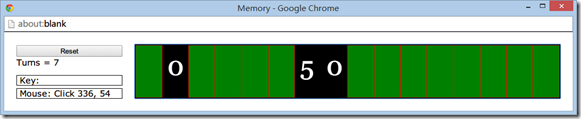
游戏的规则:
1. 共有16个数字,他们是成对的0-7共8组,随机分布在16个格子里。
2. 初始都是cover状态,通过鼠标点击卡牌可以uncover查看对应的数字。
3. 如果连续两次点击为相同数字,那么数字会保留uncover状态。
4. 如果连续两次的点击为不相同数字,当点击第三个数字,原先卡牌uncover状态将恢复成cover
5. Turns记录每轮点击次数,并且重复点击已经点开的卡牌没有效果,reset重置游戏。
游戏框架:
def new_game() # 游戏初始化
1. 思考关于游戏逻辑,需要记录那些属性,至少有个list用来记录16个数字,命名为memory_list好了。还要有个list记录哪些牌需要翻开哪些牌是不翻开的,命名为exposed。需要初始化turns,turns为一个数值记录当前次数。需要一个list命名prev_card_id用来记录先前翻开的牌。还需要state变量,记录当前处于游戏的哪个状态,0表示处于初始状态,1表示已经翻开一张牌
2. 初始化memory_list,直接生成0-16然后对8取模,在进行shuffle
memory_list = [i%8 for i in range(16)]

random.shuffle(memory_list)
def mouseclick(pos) # 鼠标交互事件
1. 鼠标点击,得到了什么?鼠标点击的坐标位置,那需要什么?点了哪张牌。so,for循环枚举每张牌的左右两条竖线(x方向信息),判断点击牌序号存在card_id
2. 如果当前牌是uncover,或者点击极限位置没找到牌(可能么?)的那么就不管他,否则,进入游戏规则2、3、4的逻辑判断。
需要注意就是,在状态0时候,要先把prev_card_id里面的卡牌状态翻转成未翻开
if state == 0:

    for i in prev_card_id:

        exposed[i] = False

    prev_card_id = [card_id]

    exposed[card_id] = True

    turns += 1

    state = 1

    label.set_text("Turns = " + str(turns))

else:

    exposed[card_id] = True

    state = 0

    if memory_list[prev_card_id[0]] == memory_list[card_id]:

        exposed[card_id] = True

        prev_card_id = []

    else:

        prev_card_id.append(card_id)
def draw(canvas) # 界面绘制事件
界面就负责绘制,800的宽度分成16份
第i个的宽度分别是i*50, (i+1)*50
1.如果exposed[i]是True,翻开就绘制Text
2.否则,未翻开就绘制polygon
for i in range(len(exposed)):

    if exposed[i]:

        canvas.draw_text(str(memory_list[i]), (i*50+10, 100/1.75), 50, 'White')

    else:

        canvas.draw_polygon([(i*50, 0), ((i+1)*50, 0), ((i+1)*50, 100), ((i*50), 100)], 1, 'Red', 'Green')
完整代码如下:
# implementation of card game - Memory

import simplegui

import random

# helper function to initialize globals

def new_game():

    global exposed, prev_card_id, turns, memory_list, state

    # init variables

    exposed = [False]*16

    turns = state = 0

    label.set_text("Turns = " + str(turns))

    prev_card_id = []

    memory_list = [i%8 for i in range(16)]

    random.shuffle(memory_list)

# define event handlers

def mouseclick(pos):

    global state, prev_card_id, exposed, turns

    # find the clicked card's id

    card_id = -1

    for i in range(len(exposed)):

        if pos[0] >= i*50 and pos[0] < (i+1)*50:

            card_id = i

    if (card_id != -1) and (exposed[card_id] is False):

        # state logic processed

        if state == 0:

            for i in prev_card_id:

                exposed[i] = False

            prev_card_id = [card_id]

            exposed[card_id] = True

            turns += 1

            state = 1

            label.set_text("Turns = " + str(turns))

        else:

            exposed[card_id] = True

            state = 0

            if memory_list[prev_card_id[0]] == memory_list[card_id]:

                exposed[card_id] = True

                prev_card_id = []

            else:

                prev_card_id.append(card_id)

# cards are logically 50x100 pixels in size

def draw(canvas):

    for i in range(len(exposed)):

        if exposed[i]:

            canvas.draw_text(str(memory_list[i]), (i*50+10, 100/1.75), 50, 'White')

        else:

            canvas.draw_polygon([(i*50, 0), ((i+1)*50, 0), ((i+1)*50, 100), ((i*50), 100)], 1, 'Red', 'Green')

# create frame and add a button and labels

frame = simplegui.create_frame("Memory", 800, 100)

frame.add_button("Reset", new_game, 200)

label = frame.add_label("Turns = 0")

# register event handlers

frame.set_mouseclick_handler(mouseclick)

frame.set_draw_handler(draw)

# get things rolling

new_game()

frame.start()

# Always remember to review the grading rubric
Mini projects #5 ---- Memory的更多相关文章
- Mini projects #8–RiceRocks
课程全名:An Introduction to Interactive Programming in Python,来自 Rice University 授课教授:Joe Warren, Scott ...
- Mini projects #7 ---- Spaceship
课程全名:An Introduction to Interactive Programming in Python,来自 Rice University 授课教授:Joe Warren, Scott ...
- Mini projects #6 ---- Blackjack
课程全名:An Introduction to Interactive Programming in Python,来自 Rice University 授课教授:Joe Warren, Scott ...
- Mini projects #3 ---- Stopwatch: The Game
课程全名:An Introduction to Interactive Programming in Python,来自 Rice University 授课教授:Joe Warren, Scott ...
- Mini projects #4 ---- Pong
课程全名:An Introduction to Interactive Programming in Python,来自 Rice University 授课教授:Joe Warren, Scott ...
- Thinking Clearly about Performance
http://queue.acm.org/detail.cfm?id=1854041 The July/August issue of acmqueue is out now acmqueue is ...
- 【NX二次开发】NX内部函数,libugui.dll文件中的内部函数
本文分为两部分:"带参数的函数"和 "带修饰的函数". 浏览这篇博客前请先阅读: [NX二次开发]NX内部函数,查找内部函数的方法 带参数的函数: bool A ...
- memory prefix mini mono multi out _m 5
1● mini 小 迷你 2● mono 单一 ,单 3● multi 多
- All the Apache Streaming Projects: An Exploratory Guide
The speed at which data is generated, consumed, processed, and analyzed is increasing at an unbeliev ...
随机推荐
- cookie以及cookie的作用
ios中对cookie操作的两个类分别是:1. NSHTTPCookie 2. NSHTTPCookieStorage,具体的使用在这里就不多说了. 1.什么是Cookie("小甜饼&qu ...
- machine learning----->Amazon Machine Learning机器学习平台
参考资料: 1.如何使用Amazon Machine Learning平台构建你的机器学习预测模型 2.
- 通过XmlHttpRequest实现带进度条异步下载文件
本博文源自技术群的讨论,因为网上找不到实现这样效果的的代码,而我说没问题,可以实现,因此有人质疑我是否能做到,呵呵,现将我实现代码贴出如下,希望有兴趣的同学可以继续完善: 本代码仅做技术展现,请勿探讨 ...
- Xcode - 知道.001
1.在xcode7以后,一定要有根视图,否则会报错,程序崩溃,
- oracle计算时间秒数差
--计算plsql处理时间差 --qzq declare time1 timestamp; --开始时间 time2 timestamp; --结束时间 sum1 ); --时间差(s) begin ...
- 【转】mysql存储引擎
http://www.cnblogs.com/kevingrace/p/5685355.html Mysql有两种存储引擎:InnoDB与Myisam,下表是两种引擎的简单对比 MyISAM In ...
- form表单里如果只存在一个文本框,enter键提交
在这里说一说浏览器里form表单的默认行为 我们都知道浏览器是存在很多默认行为的,可能是出于常用行为考虑又或者是历史原因.但有时候我们不需要这些默认行为.以下: 1).当form表单里只存在一个inp ...
- 在Windows下编译扩展OpenCV 3.1.0 + opencv_contrib
为什么要CMake,这里我陈述自己的想法,作为一个刚使用opencv库的小白来说,有以下大概三点内容 1.由于在学习图像处理滤波器中,需要用到各种边缘保护滤波器(EPS)算法,但是这些算法在OpenC ...
- 记录Qt的一个诡异Bug
公司的一款项目,在迭代开发阶段,突然发现运行速度越来越慢,界面切换卡顿时间在2秒以上.经过和某个不卡版本的对比,惊奇的发现程序二进制都一模一样,就几个图片资源和脚本不一样.经过差不多一天的排查,发现是 ...
- Windows安装mxnet
code { white-space: pre } div.sourceCode { } table.sourceCode,tr.sourceCode,td.lineNumbers,td.source ...